
Bigme B6
Bigme B6 Color Ebook Reader User Manual
Model: B6 | Brand: Bigme
1. Киришүү
This manual provides detailed instructions for the safe and efficient operation of your Bigme B6 Color Ebook Reader. Please read this manual thoroughly before using the device and retain it for future reference.
Пакеттин мазмуну
- Bigme B6 Ebook Reader
- Коргоочу кап
- Колдонуучунун Колдонмосу (бул документ)
- Заряддоо кабели

Image 1.1: Bigme B6 Color Ebook Reader and included protective case.
2. Продукт бүтүп калдыview
Familiarize yourself with the components and features of your Bigme B6 device.
Негизги өзгөчөлүктөрү
- Дисплей: 6-inch Color E-paper display, 300 PPI resolution.
- Процессор: Octa-core CPU for responsive performance.
- Эстутум жана сактоо: 4GB RAM and 64GB internal storage, expandable via Micro-SD card (up to 1TB).
- Операция системасы: Android 14, providing access to various applications.
- Байланыш: Bluetooth and Wi-Fi for wireless communication.
- Аудио: Integrated Hi-Fi Speakers.
- Дизайн: Ультра жука проfile at 6.98mm.
- Көздүн жайлуулугу: Features Zero Blue Light and Flicker-Free technology, TUV Rheinland certified for reduced eye strain.

Сүрөт 2.1: Бүттүview of the Bigme B6 Ebook Reader's main features.
3. Орнотуу
3.1 Алгачкы заряддоо
Before first use, fully charge your Bigme B6. Connect the device to a power source using the provided charging cable. The charging indicator will show the charging status.
3.2 Күйгүзүү/өчүрүү
- Күйгүзүү үчүн: Экран жарыктанганга чейин кубат баскычын басып, кармап туруңуз.
- To power off: Press and hold the power button, then select "Power Off" from the options.
- To sleep/wake: Briefly press the power button.
3.3 Тармакка туташуу (Wi-Fi)
- Башкы экрандан төмөнкүгө өтүңүз: Орнотуулар.
- Тандоо Тармак жана Интернет.
- Которуу Wi-Fi ON.
- Тизмеден каалаган Wi-Fi тармагын тандаңыз.
- Эгер суралса, сырсөздү киргизип, таптаңыз Туташуу.
3.4 Баштапкы системанын конфигурациясы
Upon first power-on or after a factory reset, follow the on-screen prompts to select your language, connect to Wi-Fi, and set up your Google account (optional, for app store access).
4. Иштөө нускамалары
4.1 Негизги навигация
- Сенсордук экран: Tap to select items, swipe to scroll, pinch to zoom.
- Башкы экран: Displays installed applications and widgets.
- Эскертме панели: Ыкчам жөндөөлөргө жана эскертмелерге жетүү үчүн экрандын өйдө жагынан ылдый сүрүңүз.
- Башкаруу борбору: Access system settings like Wi-Fi, Bluetooth, brightness, and refresh modes.
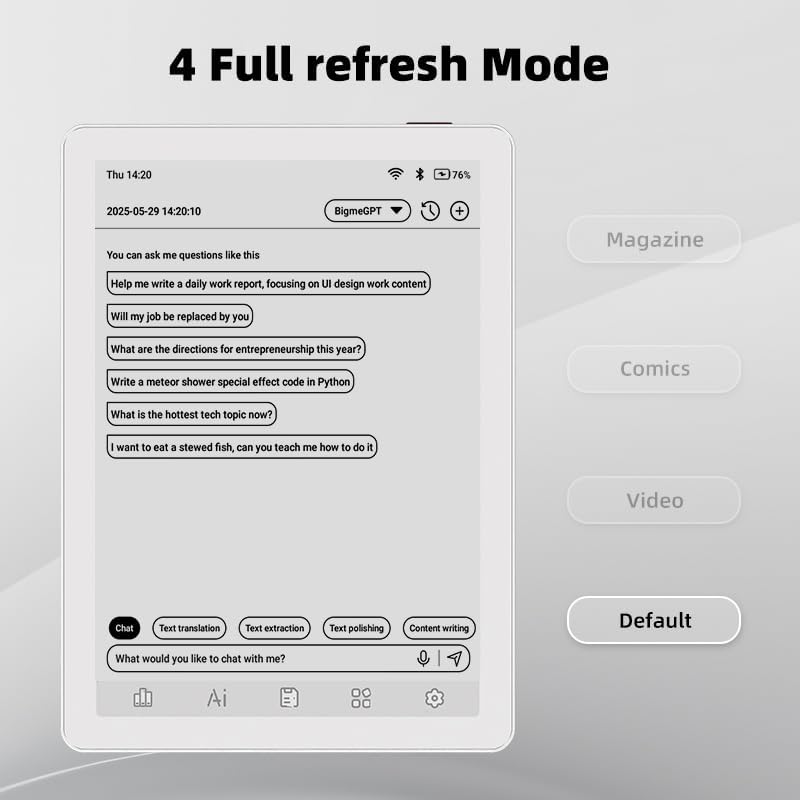
Image 4.1: The Bigme B6 home screen displaying various application icons.

Image 4.2: Accessing the Control Center for quick adjustments to device settings.
4.2 Reading eBooks
The Bigme B6 supports over 19 eBook formats, including PDF, TXT, EPUB, MOBI, and more. You can load books via USB or download them directly through reading applications.
- Open a reading application (e.g., the default reader or a downloaded app like Kindle or Libby).
- Select the book you wish to read from your library.
- Tap the left or right side of the screen to turn pages.
- Tap the center of the screen to access reading options (font size, line spacing, contrast, etc.).
- To highlight text: Press and hold on a word, then drag the selection handles to cover the desired text. Options for highlighting or notes will appear.

Image 4.3: Reading an eBook and highlighting text with color on the Bigme B6.
4.3 Колдонмо башкаруу
As an Android 14 device, you can install applications from the Google Play Store or other compatible sources.
- Колдонмолорду орнотуу: ачыңыз App Store icon (Google Play Store) on your home screen, search for the desired app, and follow the installation prompts.
- Колдонмолорду орнотуудан чыгаруу: барыңыз Орнотуулар > Колдонмолор, колдонмону тандап, таптаңыз Чыгаруу.
4.4 Audiobooks and Media Playback
The device supports audiobook playback through its built-in Hi-Fi speakers or connected Bluetooth headphones.
- Playing Audiobooks: Use a compatible audiobook application.
- Connecting Bluetooth Headphones: барыңыз Орнотуулар > Туташкан түзмөктөр > Bluetooth, enable Bluetooth, and pair with your headphones.

Image 4.4: The Bigme B6 supports audiobooks, allowing for hands-free listening.
4.5 Display Refresh Modes
The Bigme B6 offers multiple refresh modes to optimize display performance for different content types.
- Access refresh modes from the Control Center or Display Settings.
- Жалпы режимдер төмөнкүлөрдү камтыйт:
- Демейки: Standard reading mode.
- Журнал: Optimized for images and text in magazines.
- Comics: Enhanced for comic book viewing.
- Видео: Provides a smoother refresh rate for video content (note: e-paper displays have limitations for video).

Image 4.5: Selecting from various refresh modes to suit different content types.
5. Техникалык тейлөө
5.1 Аппаратты тазалоо
- Түзмөктүн экранын жана корпусун акырын сүртүү үчүн жумшак, мамыксыз чүпүрөктү колдонуңуз.
- өжөр тактар үчүн, бир аз гampчүпүрөккө суу же электроника үчүн атайын иштелип чыккан экран тазалагыч.
- Катуу химиялык заттарды, абразивдүү материалдарды же ашыкча нымдуулукту колдонуудан алыс болуңуз.
5.2 Батареяга кам көрүү
- Аппаратты үзгүлтүксүз заряддаңыз, бирок аны узак убакытка толук зарядсыз калтырбаңыз.
- Do not expose the device to extreme temperatures, as this can affect battery life.
- Use only the provided or a certified charging cable and adapter.
5.3 Сактоо
When not in use for extended periods, store the device in a cool, dry place, away from direct sunlight and extreme temperatures. It is recommended to charge the device to about 50% before long-term storage.
6. Кыйынчылыктарды
| Көйгөй | Мүмкүн себеп | Чечим |
|---|---|---|
| Түзмөк күйбөйт. | Батареянын аздыгы; аппарат катып калган. | Түзмөктү кеминде 30 мүнөт кубаттаңыз. Кубат баскычын 10-15 секунд басып туруп, мажбурлап өчүрүп-күйгүзүңүз. |
| Экран жооп бербей жатат же жай иштеп жатат. | Убактылуу программалык камсыздоонун мүчүлүштүгү; өтө көп колдонмолор иштеп жатат. | Restart the device. Close unnecessary background applications. Check for system updates. |
| Wi-Fi'га туташпай жатат. | Туура эмес сырсөз; роутер маселеси; Wi-Fi өчүрүлгөн. | Ensure Wi-Fi is enabled and the password is correct. Restart your Wi-Fi router. Try connecting to a different network. |
| Батарея бат эле түгөнөт. | High screen brightness; many background apps; frequent Wi-Fi/Bluetooth use. | Reduce screen brightness. Close unused applications. Disable Wi-Fi and Bluetooth when not needed. Adjust refresh mode settings. |
| Applications crash or freeze. | App incompatibility; insufficient memory. | Update the application. Clear the app's cache (Settings > Apps > [App Name] > Storage & cache). If issues persist, uninstall and reinstall the app. |
7. Техникалык шарттар
| Модель аты | US-B6 |
| Дисплей | 6-inch Color E-paper, Electronic Ink, 300 PPI |
| Операция системасы | Android 14 |
| RAM | 4 ГБ |
| Ички сактагыч | 64 ГБ |
| Кеңейтүүчү сактагыч | Micro-SD card (up to 1TB support) |
| Байланыш | Bluetooth, WiFi |
| Батарея | 1 стандарттуу эмес батарея (кошулган) |
| Өлчөмдөрү (L x W x Th) | 5.88" x 4.25" x 0.28" (14.94 см x 10.8 см x 0.71 см) |
| Элемент Салмагы | 6.2 унция (175.77 грамм) |
| Колдоого алынган электрондук китеп форматтары | PDF, TXT, EPUB, EPUB3, HTML, HTM, AZW3, FB2, DOC, DOCX, MOBI, OEB, CBR, RPC, RTF, DJVU, ZIP |
8. Кепилдик жана колдоо
8.1 Кепилдик маалыматы
Please refer to the warranty card included with your product for specific warranty terms and conditions. The warranty typically covers manufacturing defects for a specified period from the date of purchase.
8.2 Кардарларды колдоо
For technical assistance, troubleshooting not covered in this manual, or warranty claims, please contact Bigme customer support. Contact details can usually be found on the Bigme official webсайтында же продуктунун таңгагында.
Сиз да зыярат кылсаңыз болот Bigme Store on Amazon кошумча продукт маалымат жана колдоо ресурстар үчүн.
Ask a question about this manual
Ask about setup, troubleshooting, compatibility, parts, safety, or missing instructions. Manuals+ will review the question and use this page’s manual context to help answer it.