
Introduction
This manual provides comprehensive instructions for the safe and efficient operation of your Crosley CR3505A-LN Cruiser Portable CD Player. Please read this manual thoroughly before using the device and retain it for future reference. This portable audio player combines classic design with modern functionality, offering CD playback, Bluetooth connectivity, FM radio, and auxiliary input.
Кутуда эмне бар
Таңгактан чыгарганда бардык буюмдар бар экенин текшериңиз:
- Crosley CR3505A-LN Portable CD Player
- USB-C Cable
Продукт өзгөчөлүктөрү
- Portable Music Player: Equipped with a rechargeable lithium battery, providing up to 4 hours of playback at 50% volume after a 3.5-hour charge.
- Versatile Audio Options: Features built-in stereo speakers and a headphone jack. Supports CD playback, Bluetooth streaming to wireless headphones/speakers, and auxiliary input for other devices.
- Retro Style, Modern Function: Blends nostalgic aesthetics with contemporary features, including a tonearm-inspired power switch and a built-in FM radio.
- Designed for Portability: Lightweight construction with a magnetic lid closure for easy transport.
Компоненттин идентификациясы
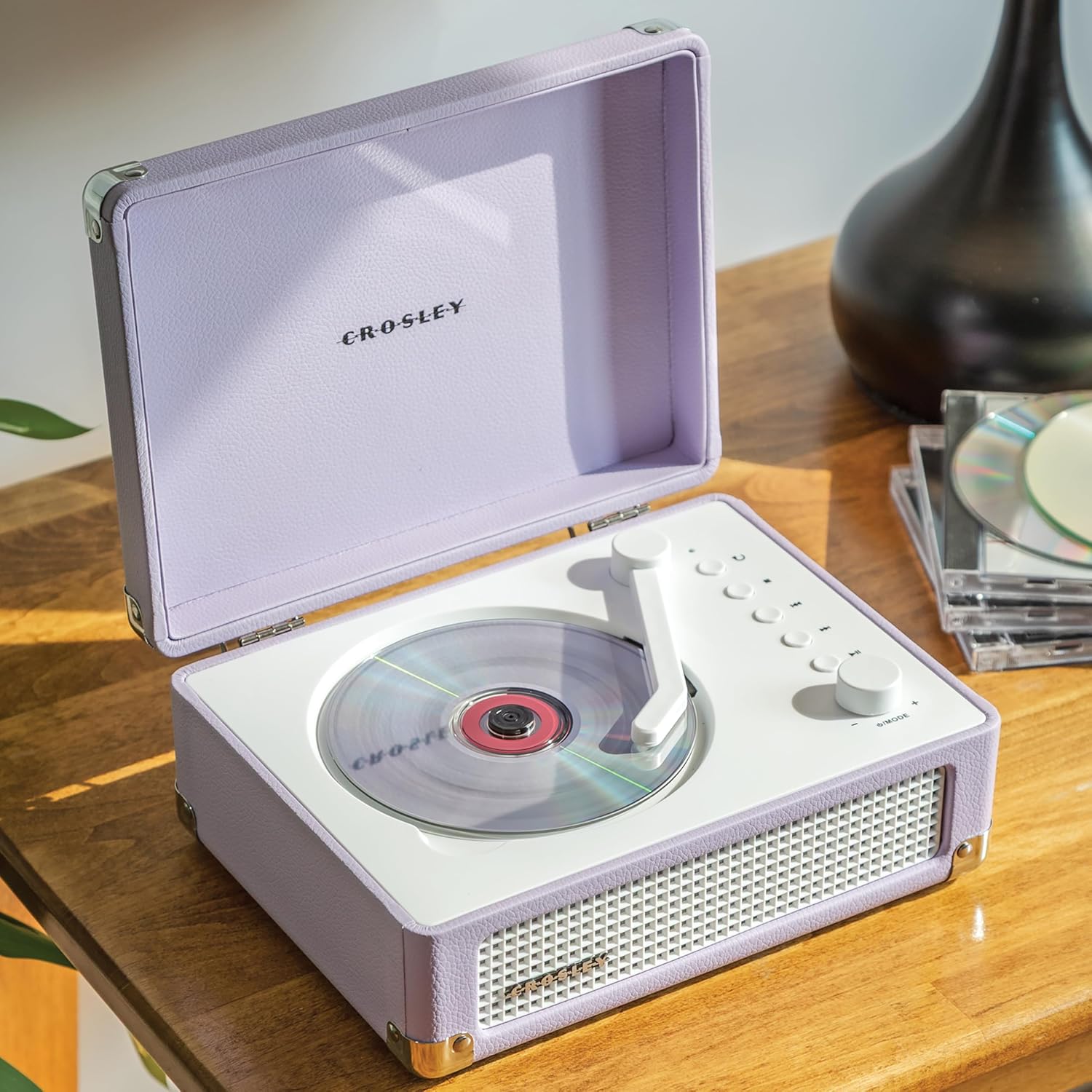
1-сүрөт: Жогорку view of the Crosley CR3505A-LN with lid open, highlighting the CD compartment and control panel.

2-сүрөт: Арткы view of the unit, displaying the headphone jack, AUX In port, and USB-C charging port.
Башкаруу панелиview
- Tonearm-inspired Power Switch: Activates/deactivates the unit and initiates CD playback.
- Mode/Power Dial: Rotates to adjust volume. Press to cycle through modes (CD, Bluetooth, FM, AUX).
- Кайталоо баскычы: Repeats current track or album.
- Токтотуу баскычы: CD ойнотууну токтотот.
- Previous Track/Rewind Button: Skips to the previous track or rewinds during playback.
- Next Track/Fast Forward Button: Skips to the next track or fast forwards during playback.
- Ойнотуу/тындыруу баскычы: Controls playback for CD and Bluetooth.
- Bluetooth/FM Indicator Light: Indicates current mode and pairing status.
Жайгашуу
Батареяны заряддоо
- Connect the supplied USB-C cable to the DC 5V port on the rear of the unit (Figure 2).
- USB-C кабелинин экинчи учун туура келген USB кубат адаптерине туташтырыңыз (кошумча эмес).
- Индикатор жарыгы заряддоо абалын көрсөтөт. Толук кубаттоо болжол менен 3.5 саатты талап кылат.
Күйгүзүү/өчүрүү
To power on the unit, move the tonearm-inspired switch over the CD spindle. To power off, move the switch back to its resting position.
Иштөө нускамалары
CD ойнотуу
- Open the lid of the CD player.
- Carefully place a CD onto the spindle in the CD compartment, label side up.
- Капкакты жабыңыз.
- Move the tonearm-inspired switch over the CD spindle to power on and initiate playback.
- Use the Play/Pause, Stop, Previous Track/Rewind, and Next Track/Fast Forward buttons to control playback.
- Press the Repeat button to cycle through repeat modes (repeat one track, repeat all tracks, random play).
Bluetooth Жупташтыруу
- Аппаратты күйгүзүңүз.
- Press the Mode/Power dial repeatedly until the Bluetooth indicator light flashes blue, indicating pairing mode.
- On your Bluetooth-enabled device (e.g., smartphone, tablet), search for "Crosley CR3505A-LN" in the Bluetooth settings.
- Select the device to pair. Once connected, the Bluetooth indicator light will turn solid blue.
- You can now stream audio from your device to the CD player.
FM радиосу
- Аппаратты күйгүзүңүз.
- Press the Mode/Power dial repeatedly until the FM indicator light illuminates.
- Use the Previous Track/Rewind and Next Track/Fast Forward buttons to tune to desired FM stations.
Көмөкчү киргизүү
- Аппаратты күйгүзүңүз.
- Press the Mode/Power dial repeatedly until the AUX indicator light illuminates.
- Connect an external audio device (e.g., MP3 player) to the AUX In port on the rear of the unit (Figure 2) using a 3.5mm audio cable (not included).
- Audio from the external device will now play through the CD player's speakers.
Үндү көзөмөлдөө
Rotate the Mode/Power dial clockwise to increase volume and counter-clockwise to decrease volume.
Техникалык тейлөө
Тазалоо
- Тазалоодон мурун аны дайыма электр булагынан сууруп алыңыз.
- Сырткы беттерди сүртүү үчүн жумшак, кургак чүпүрөктү колдонуңуз. Абразивдүү тазалоочу каражаттарды, момдорду же эриткичтерди колдонбоңуз.
- For the CD lens, use a specialized CD lens cleaner. Avoid touching the lens directly.
Батареяга кам көрүү
- Батареянын иштөө мөөнөтүн узартуу үчүн, бат-баттан батарейканы толук зарядсыздандырбаңыз.
- If storing the unit for an extended period, charge the battery to approximately 50% every few months.
Проблемаларды чечүү
| Көйгөй | Мүмкүн себеп | Чечим |
|---|---|---|
| Күч жок | Battery is discharged; Unit is not powered on. | Charge the battery using the USB-C cable; Ensure the tonearm-inspired switch is moved to the ON position. |
| CD ойнобой жатат | CD inserted incorrectly; CD is dirty or scratched; Unit is not in CD mode. | Reinsert CD label side up; Clean or replace CD; Press Mode/Power dial to select CD mode. |
| Bluetooth туташпай жатат | Unit not in pairing mode; Device too far; Previously paired device connected. | Press Mode/Power dial until Bluetooth light flashes; Move device closer; Disconnect from other Bluetooth devices. |
| FM радиосун кабыл алуу начар | Алсыз сигнал; Интерференция. | Adjust the unit's position; Try tuning to a stronger station. |
| Үн жок | Үнү өтө төмөн; Туура эмес режим тандалды; Кулакчындар туташтырылган. | Increase volume; Ensure correct mode (CD, BT, FM, AUX) is selected; Disconnect headphones if using speakers. |
Техникалык шарттар
- Продукциянын өлчөмдөрү: 6.75 x 8.75 x 3.75 дюйм
- Элемент Салмагы: 2.54 фунт
- Модель номери: CR3505A-LN
- Бренд: Crosley
- Түсү: Лаванда
- Байланыш технологиясы: Bluetooth
- Дисктердин саны: 1
Коопсуздук маалыматы
- Түзмөктү өтө жогорку температурага, нымдуулукка же түз күн нуруна дуушар кылбаңыз.
- Аппаратты жылуулук булактарынын жанына же вентиляциясы начар жерлерге коюудан алыс болуңуз.
- Агрегатты өз алдынча бөлбөңүз же оңдоого аракет кылбаңыз. Бардык тейлөөлөрдү квалификациялуу кызматкерлерге тапшырыңыз.
- Агрегатты суудан же башка суюктуктардан алыс кармаңыз.
- Көрсөтүлгөн кубаттоочу кабелди гана колдонуңуз.
Кепилдик жана колдоо
Crosley products are designed in the USA and come with USA-based customer support. For warranty information or technical assistance, please refer to the official Crosley webсайтка же түздөн-түз кардарларды тейлөөгө кайрылыңыз. Сатып алуу квитанциясын кепилдик дооматтары үчүн сатып алуунун далили катары сактаңыз.