
Introduction
The Fender Mustang LTX50 is a versatile 50-watt modeling combo amplifier designed for guitarists seeking a wide range of authentic Fender tones and modern features. Equipped with a 12-inch Celestion G12P-80 speaker, it delivers dynamic sound suitable for practice, rehearsal, and performance. This amplifier offers 25 amp models and 25 effects, covering various musical styles from clean to high-gain. Its intuitive color display, onboard tuner, and 100 user preset slots provide easy customization and quick access to your preferred sounds. The Mustang LTX50 also features Bluetooth audio streaming for playing along with tracks and USB-C connectivity for direct recording and monitoring.
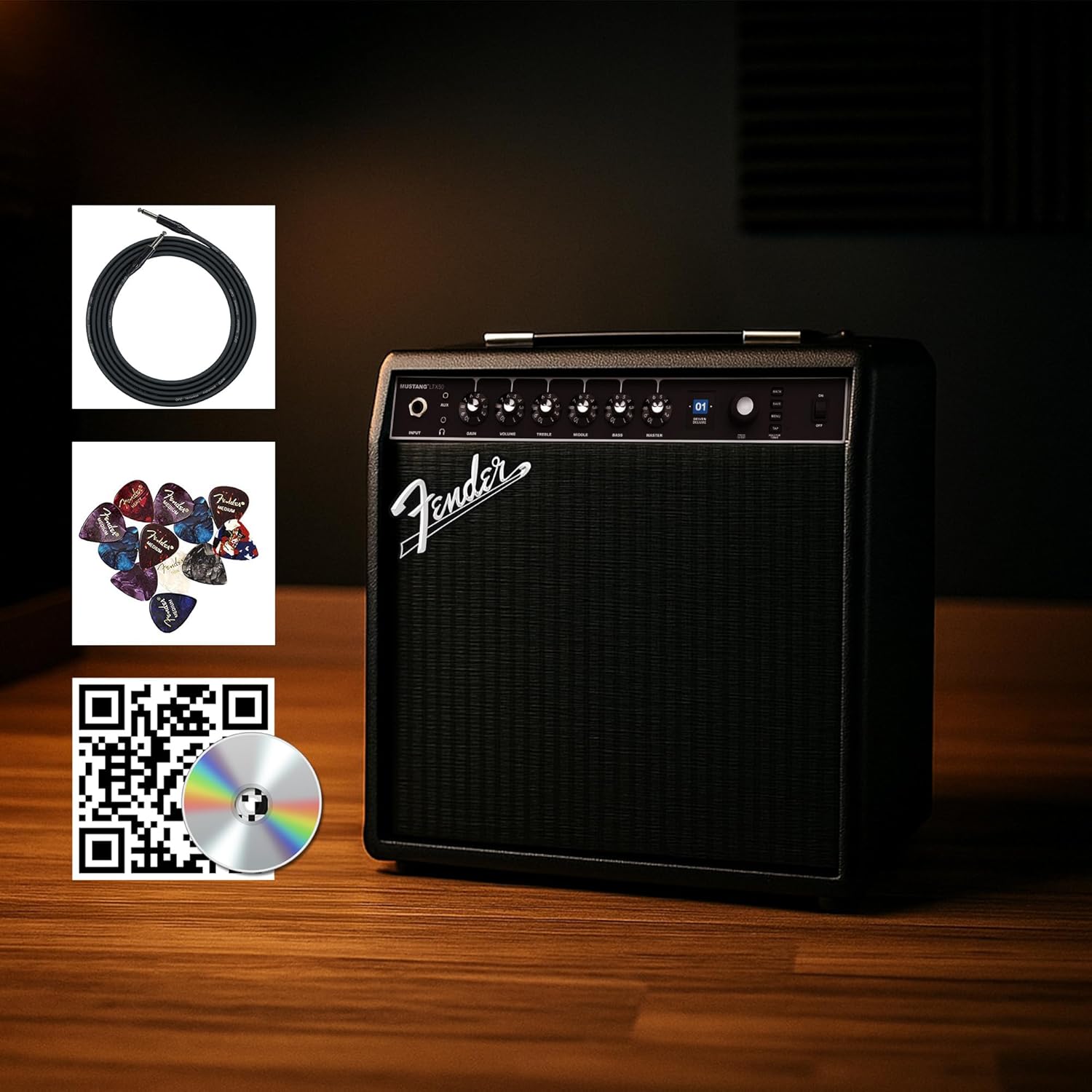
Figure 1: Fender Mustang LTX50 Guitar Combo Amplifier with included accessories.
Жайгашуу
1. Кутудан чыгаруу жана алгачкы текшерүү
- Кылдаттык менен алып салуу ampкөтөргүч жана таңгактагы бардык аксессуарлар.
- текшерүү amplifier for any signs of damage that may have occurred during shipping.
- Confirm all included items are present: Mustang LTX50 amplifier, power cord, instrument cable, 12-pack guitar picks, and instructional DVD.
2. Кубатты туташтыруу
- камсыз кылуу ampкөтөргүчтүн кубат которгучу OFF абалында.
- Connect the included power cord to the AC input on the rear panel of the ampөмүрлүү.
- Электр шнурунун экинчи учун жерге туташтырылган электр розеткасына сайыңыз.
3. Гитараңызды туташтыруу
- Use the included instrument cable to connect your guitar to the INPUT алдыңкы панелиндеги домкрат ampөмүрлүү.
4. Негизги башкаруу элементтериview
Familiarize yourself with the front panel controls before powering on the ampөмүрлүү.
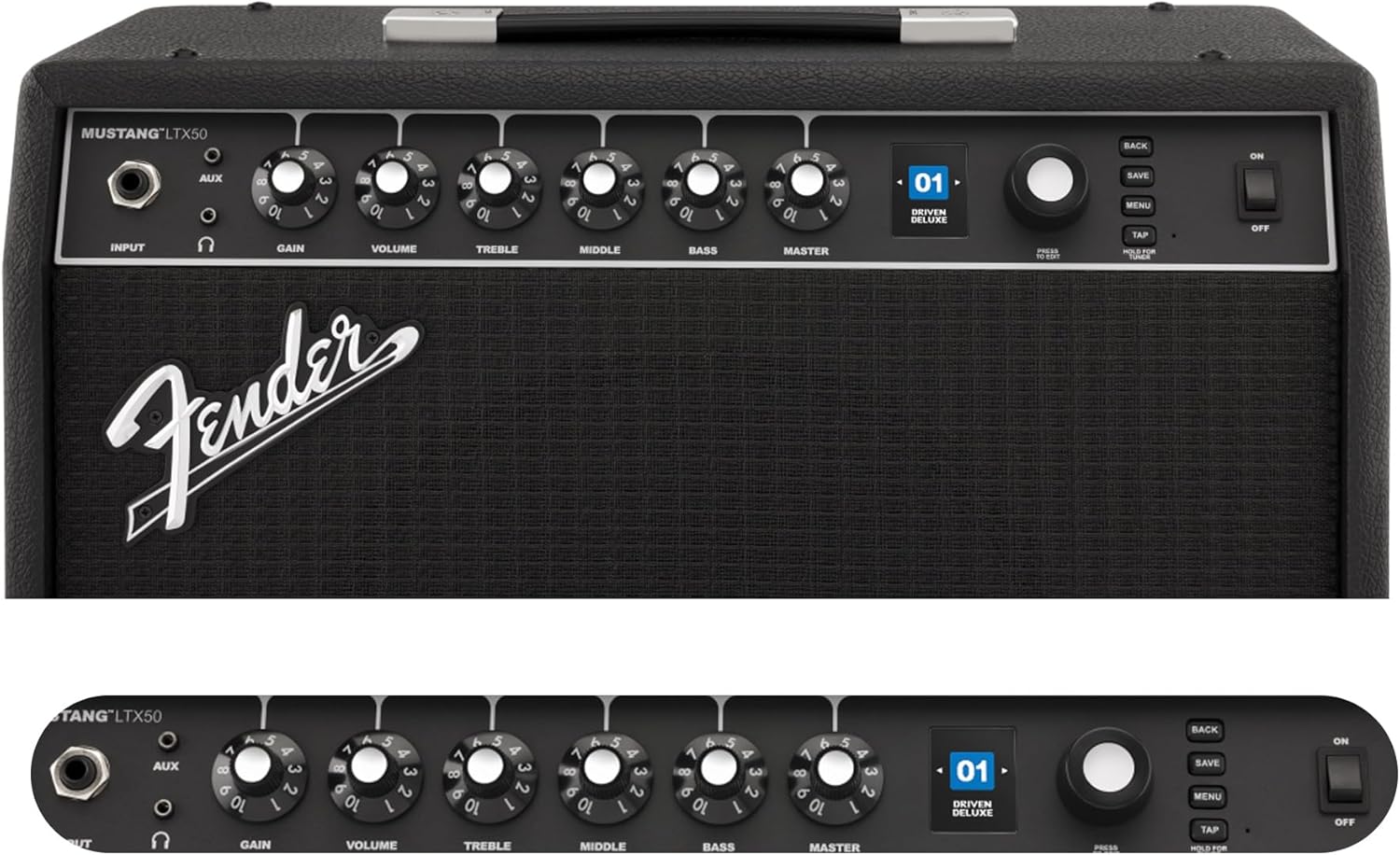
Figure 2: Front Panel Controls of the Mustang LTX50.
Иштөө нускамалары
1. Күйгүзүү / Өчүрүү
- To power on, ensure all volume controls are set to minimum, then flip the КҮЧ күйгүзүү.
- To power off, flip the КҮЧ OFF абалына которуштуруу.
2. Алдын ала орнотууларды багыттоо
- колдонуу КОДЕР knob (large rotary knob) to scroll through the 100 available presets (70 factory, 30 user).
- басыңыз КОДЕР knob to select a preset.
- The color LCD displays the current preset number and name.
3. Жөнгө салуу Amp Моделдер жана эффекттер
- басыңыз МЕНЮ кирүү үчүн баскыч ampкөтөргүчтүн жөндөөлөрү.
- Navigate through options like AMP, STOMP, MOD, DELAY, REVERB using the КОДЕР.
- Select an option and use the КОДЕР to choose different amp моделдер же эффекттер.
- Adjust parameters for each effect using the smaller control knobs (GAIN, VOLUME, TREBLE, MIDDLE, BASS, MASTER) or by selecting parameters on the display.
- Басыңыз САКТОО to store your customized preset.
4. Using the Built-in Tuner
- басып, кармап туруңуз TAP button to activate the chromatic tuner.
- Play a single note on your guitar; the display will show the note and indicate if it is sharp, flat, or in tune.
- Press any button or play for a few seconds to exit tuner mode.
5. Fender Tone 3.0 App Control
- Download the Fender Tone 3.0 app from your device's app store (iOS/Android).
- Мобилдик түзмөгүңүздө Bluetooth'ду иштетиңиз.
- боюнча ampкөтөргүч, басыңыз МЕНЮ button, navigate to "Bluetooth," and select "Pair."
- Select "Mustang LTX50" from your device's Bluetooth settings to connect.
- Use the app to wirelessly create, edit, save, and share presets, and to manage your ampкөтөргүч орнотуулары.
6. Playing Along with Audio (Bluetooth)
- Once paired via Bluetooth, you can stream audio from your mobile device directly to the ampөмүрлүү.
- Adjust the volume of the streamed audio from your mobile device.
- Alternatively, connect an external audio source to the AUX IN jack on the front panel using a 3.5mm stereo cable.
7. Recording via USB-C
- Connect a USB-C cable from the amplifier's USB-C port to your computer (Mac or PC).
- The amplifier functions as a bidirectional audio interface, allowing direct recording and monitoring.
- Refer to your Digital Audio Workstation (DAW) software's manual for specific setup instructions.
Техникалык тейлөө
1. Тазалоо
- ажыратыңыз amplifier from power before cleaning.
- Сырткы беттерин сүртүү үчүн жумшак, кургак чүпүрөктү колдонуңуз.
- өжөр кир үчүн, бир аз гamp жумшак самын менен кездеме, андан кийин кургак чүпүрөк колдонсо болот.
- Абразивдүү тазалоочу каражаттарды, эриткичтерди же момдорду колдонуудан алыс болуңуз, анткени алар жасалгасына зыян келтириши мүмкүн.
2. Сактоо
- сактаңыз ampтүз күндүн нурунан жана экстремалдык температурадан алыс салкын, кургак жерде liifier.
- Нымдуулугу жогору жерлерде сактоодон алыс болуңуз.
- If storing for extended periods, cover the ampчаңдан коргоо үчүн көтөргүч.
3. Safety Warnings (Proposition 65)
Бул продукт Калифорния штатына рак, тубаса кемтиктер же башка репродуктивдик зыян келтирери белгилүү болгон химиялык заттарды камтышы мүмкүн. Көбүрөөк маалымат алуу үчүн, төмөнкү дарекке кириңиз: www.P65Warnings.ca.gov.
Проблемаларды чечүү
Үн жок
- камсыз кылуу amplifier is powered on and the power cord is securely connected.
- Check that your guitar is properly connected to the INPUT джек.
- экендигин текшериңиз МАСТЕР volume and individual preset volume controls are not set to zero.
- Test with a different instrument cable and guitar to rule out faulty equipment.
- If using headphones, ensure they are fully plugged into the headphone jack and that the main speaker is not muted.
Бурмаланган же каалабаган ызы-чуу
- Check your guitar's volume and tone controls.
- азайтыңыз АЛУУ күйгүзүү ampөмүрлүү.
- Ensure your instrument cable is not damaged or poorly shielded.
- Try a different power outlet to rule out electrical interference.
- If using high-gain amp models, some distortion is inherent. Adjust settings accordingly.
Bluetooth туташуу маселелери
- Ensure Bluetooth is enabled on both your mobile device and the ampөмүрлүү.
- текшериңиз amplifier is in pairing mode (refer to "Fender Tone 3.0 App Control" section).
- Мобилдик түзмөгүңүздү жакыныраак жылдырыңыз ampөмүрлүү.
- Түзмөктөрдү ажыратып, кайра жупташтырып көрүңүз.
- Экөөнү тең кайра иштетиңиз ampкөтөргүч жана мобилдик аспабыңыз.
Amplifier Not Responding
- Күч айлампасы amplifier by turning it off, waiting 10 seconds, and turning it back on.
- If the issue persists, a factory reset may be necessary. Consult the Fender support website for instructions on performing a factory reset for the Mustang LTX50.
Техникалык шарттар
| Модель аты | MUSTANG LTX50 |
| Модель номери | 2311700000 |
| Бренд | Fender |
| Ampжашоочу түрү | Санарип моделдөө |
| Power Output | 50 Ватт |
| Баяндамачы | 1 x 12" Celestion G12P-80 |
| Amp Моделдер | 25 |
| Эффекттер | 25 (distortion, overdrive, compression, modulation, reverb, delay, octave, etc.) |
| Алдын ала орнотуулар | 70 factory + 100 user slots |
| Дисплей | Color LCD with onboard chromatic tuner |
| Байланыш | Bluetooth audio, USB-C bidirectional audio |
| Чыгуулар | XLR line out, Headphone out |
| Колдонмо колдоо | Fender Tone 3.0 app (iOS/Android) |
| Коргоочу материал | Металл |
| Элементтин өлчөмдөрү (D x W x Y) | 22.3"D x 19.9"W x 12.3"H |
| Элемент Салмагы | 26.4 фунт |
| UPC | 840262259088 |

Figure 3: Rear Panel Connections of the Mustang LTX50.
Кепилдик маалымат
The Fender Mustang LTX50 Guitar Combo Ampкөтөргүч а менен жабылат 2 жылдык Чектелген Кепилдик. This warranty covers defects in materials and workmanship under normal use. For full terms and conditions, please refer to the warranty documentation included with your product or visit the official Fender webсайт.
Колдоо
For further assistance, technical support, or service inquiries regarding your Fender Mustang LTX50 amplifier, please visit the official Fender support webсайт:
You may also find additional resources, FAQs, and software updates on the Fender webсайт.