
Introduction
This manual provides essential information for setting up, operating, and maintaining your Roku 32-Inch Select Series 1080p Full HD Smart TV. Designed for a delightful streaming experience, this TV offers excellent picture quality, clear sound, and automatic updates. Please read this manual thoroughly before using your television.
Кутуда эмне бар
Таңгакта бардык компоненттер бар экенин текшериңиз:
- Roku 32-Inch Select Series 1080p Full HD Smart TV
- Алыстан башкаруу
- Стенд (2 даана)
- Stand Screws (4 pieces)
- Электр кабели
- Колдонуучунун Колдонмосу (бул документ)

Image: Contents of the Roku TV box, showing the television, remote control, two stand pieces, and four screws.
Орнотуу нускамалары
1. Телевизордун отургучун бекитүү
- Carefully place your TV face-down on a soft, clean surface to prevent damage to the screen.
- Тургуч бөлүктөрүн телевизордун астындагы бурамалар тешиктери менен тууралаңыз.
- Secure each stand piece with two screws using a Phillips head screwdriver. Do not overtighten.
2. Кубат жана түзмөктөрдү туташтыруу
- Кубат кабелин телевизордун кубат киресине, андан кийин розеткага туташтырыңыз.
- Connect your external devices (e.g., cable box, gaming console, Blu-ray player) to the available HDMI ports on the back of the TV. This model features 3 HDMI ports.
- For older devices, use the AV input ports (yellow, white, red).
- An optical audio output is available for connecting to soundbars or home theater systems.
- A USB port is provided for media playback.

Сүрөт: Арткы view of the Roku TV displaying HDMI, AV, Antenna, USB, Optical, and Headphone ports.
3. Баштапкы күйгүзүү жана тармакка туташуу
- Пульттун же сыналгыдагы кубат баскычын басыңыз.
- Follow the on-screen instructions to select your language and connect to your Wi-Fi network.
- Activate your Roku account or create a new one. This is required to access streaming channels and features.
Иштөө нускамалары
1. Roku OS Interface
The Roku OS provides a simple and intuitive home screen for accessing all your entertainment. Easily navigate between streaming apps, live TV, and connected devices.

Image: The Roku TV home screen with a menu on the left and app icons on the right, including Netflix, Disney+, Apple TV, and Roku Channel.
2. Voice Remote
Your Roku TV comes with a voice remote for convenient control. Use your voice to search for content, launch apps, and control playback.
- Үн менен издөө: Press the voice button and speak your command (e.g., "Find comedies," "Open Netflix").
- Колдонмонун кыска жолдору: Атайын баскычтар популярдуу агым кызматтарына тез жетүүнү камсыз кылат.
- Үндү көзөмөлдөө: Adjust volume using the side buttons.
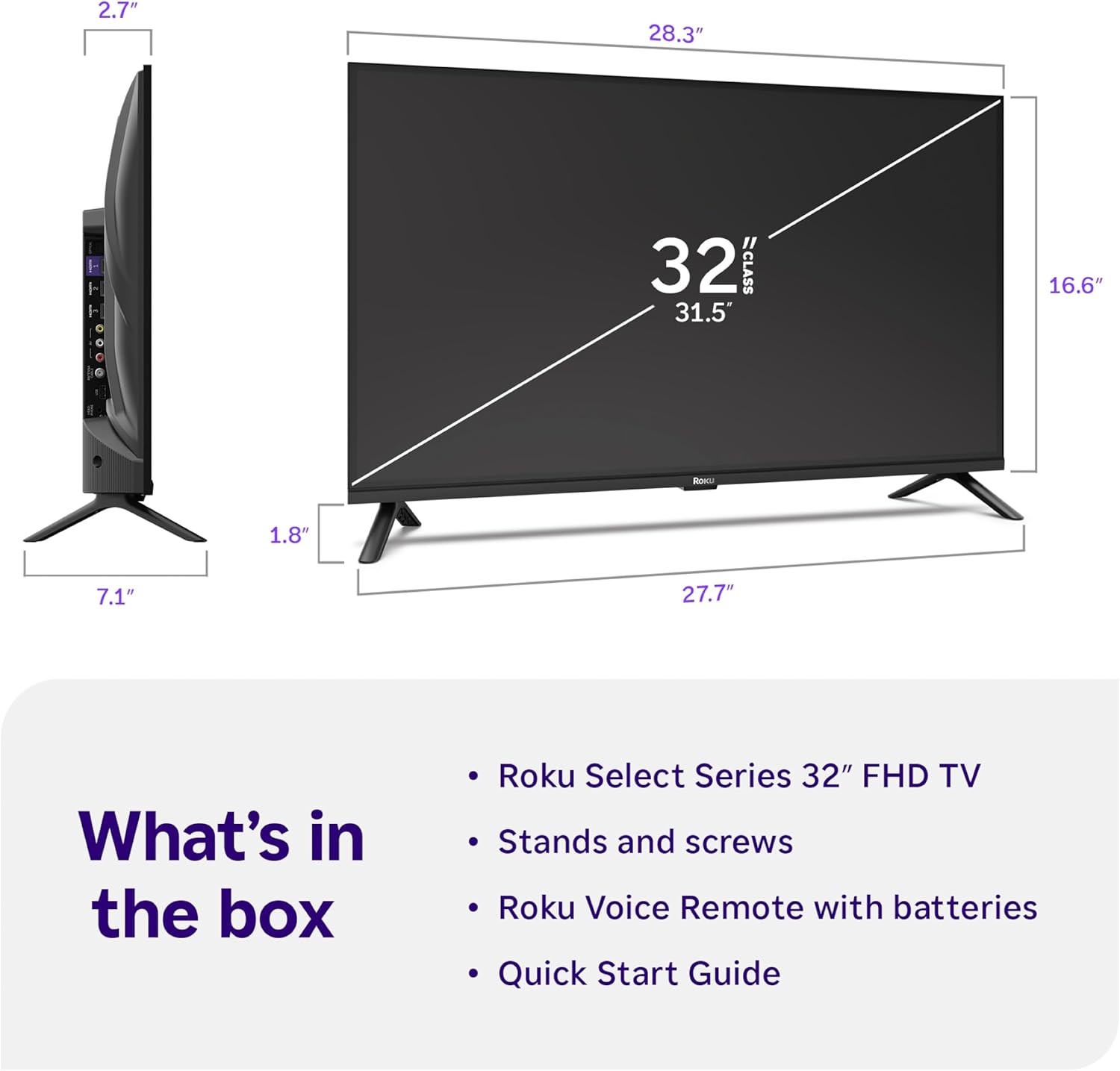
Image: Close-up of the Roku Voice Remote, highlighting buttons for TV power, volume, mute, voice search, instant replay, options, and dedicated app shortcuts.
3. Streaming Apps and Live TV
Access thousands of streaming channels, including Netflix, Disney+, Hulu, Prime Video, and Apple TV+. The Roku Channel also offers free live TV and on-demand content.

Image: A vibrant Roku TV home screen displaying a selection of popular streaming applications and recommended shows.
4. Сүрөт орнотуулары
Сиздин оптималдаштыруу viewар кандай сүрөт жөндөөлөрү менен тажрыйба алуу:
- Roku Smart Picture: Automatically adjusts picture mode for optimal viewing.
- Сүрөт режимдери: Choose from presets like Movie, Sports, Vivid, Standard, or Low Power.
- Ыңгайлаштыруу: Adjust brightness, contrast, sharpness, color, and tint for a personalized picture.
5. Үн орнотуулары
Аудио тажрыйбаңызды жакшыртыңыз:
- Dolby Audio: Enjoy clear speech and louder sound.
- Үн режимдери: Select from Standard, Dialogue, Movie, Music, or Night mode.
- Bluetooth кулакчын режими: Connect your wireless headphones to listen without disturbing others.

Image: A child wearing wireless headphones while watching the Roku TV, demonstrating the Bluetooth Headphone Mode.
6. Smart Home интеграциясы
Your Roku TV is compatible with various smart home ecosystems:
- Үн менен башкаруу: Use Roku Voice, Siri, Alexa, or Google Assistant for hands-free control.
- Apple AirPlay: Effortlessly share videos, photos, and music from your Apple devices.
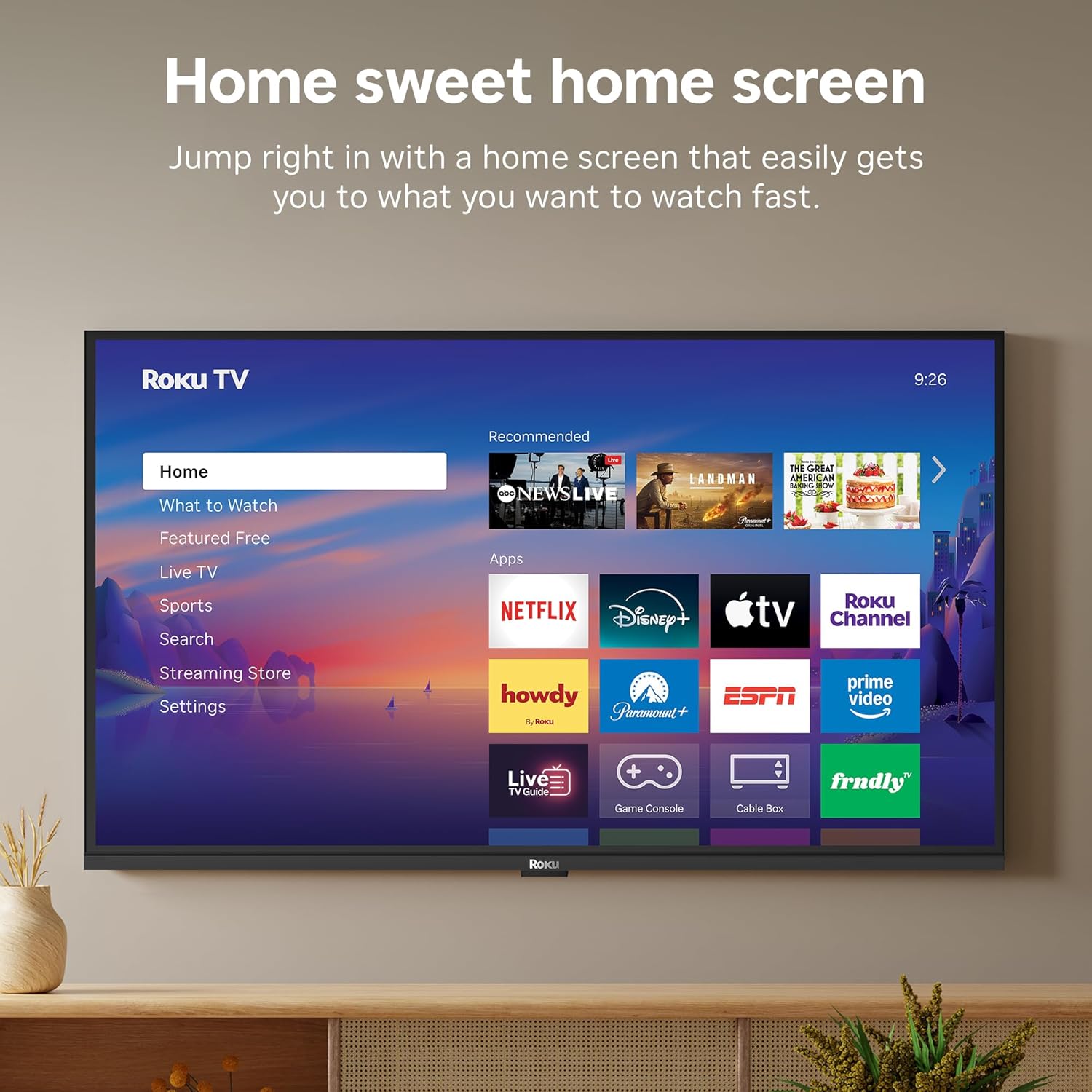
Image: The Roku TV screen displaying smart home compatibility logos for Roku Smart Home, Apple AirPlay, Apple Home, Alexa, and Google Home, with a smart speaker nearby.
7. Ата-энелик көзөмөл
Manage content access with built-in parental controls, including V-Chip technology, to ensure a safe viewбалдар үчүн чөйрө.
Расмий продукт Video
Видео: Бүттүview of the Roku TV OS, demonstrating its user-friendly interface, app selection, and smart features. This video is provided by Roku, Inc.
Техникалык шарттар
- Экрандын өлчөмү:
- 32 дюйм
- Чечим:
- 1080p толук HD
- Дисплей технологиясы:
- LED
- Жаңыртуу ылдамдыгы:
- 60 Гц
- Өзгөчөлүктөр:
- Bluetooth Headphone Mode, Dolby Audio, Voice Remote, Roku Smart Picture
- Байланыш технологиясы:
- Bluetooth, WiFi
- Аппараттык интерфейс:
- 3 HDMI Ports, 1 USB Port, S/PDIF (Optical Audio Out)
- Операция системасы:
- Roku OS
- Продукциянын өлчөмдөрү (D x W x Y):
- 7.1"D x 28.3"W x 18.4"H
- Элемент Салмагы:
- 7.7 фунт (стенд менен)
- VESA тоо стандарты:
- 200 x 200 мм
- Модель номери:
- 32R3E5
- UPC:
- 829610009469
Проблемаларды чечүү
If you encounter issues with your Roku TV, please refer to the following common solutions:
- Кубат жок: Кубат кабелинин телевизорго да, иштеп жаткан электр розеткасына да бекем туташтырылганын текшериңиз. Башка розетканы колдонуп көрүңүз.
- Сүрөт/үн жок: Verify that the correct input source is selected on your TV. Check all cable connections (HDMI, AV, etc.) for looseness.
- Алыстан жооп бербейт: Replace the batteries in your remote control. Ensure there are no obstructions between the remote and the TV.
- Тармакка туташуу маселелери: Restart your Wi-Fi router and modem. Go to the TV's Settings > Network > Check connection to diagnose and reconnect.
- Колдонмо жүктөлбөй жатат: Restart the app. If the issue persists, try removing and reinstalling the app from the Roku Channel Store.
For more detailed troubleshooting, visit the official Roku support webсайт.
Техникалык тейлөө
To ensure the longevity and optimal performance of your Roku TV, follow these maintenance guidelines:
- Экранды тазалоо: Экранды жумшак, кургак микрофибер чүпүрөк менен акырын сүртүңүз. өжөр тактар үчүн, жеңил гampчүпүрөккө суу же электроника үчүн атайын иштелип чыккан экранды тазалоо эритмеси. Суюктукту экранга түз чачпаңыз.
- Телевизордун корпусун тазалоо: Use a soft, dry cloth to wipe the exterior of the TV. Avoid abrasive cleaners or solvents.
- Вентиляция: Ашыкча ысып кетүүнүн алдын алуу үчүн телевизордун желдетүү тешиктери жабылбагандыгын текшериңиз. Телевизордун айланасында абанын айлануусу үчүн жетиштүү мейкиндикти сактаңыз.
- Программалык камсыздоо жаңыртуулары: Your Roku TV automatically receives software updates. Ensure your TV is connected to the internet to receive the latest features and performance improvements.
- Энергияны башкаруу: Чагылганда же ал узак убакыт бою кароосуз калганда телевизорду розеткадан сууруп алыңыз.
Кепилдик жана колдоо
Кепилдик маалымат
Roku warrants the hardware of this device against defects in materials and workmanship under normal use for a period of one (1) year from the date of purchase ("Warranty Period"). If Roku determines that the device’s hardware is defective during the Warranty Period, Roku’s sole obligation, and your exclusive remedy, will be to either repair or replace the unit with either a new or rebuilt device, at its option. This warranty applies if the device is used in accordance with the provided documentation.
Important information about warranty returns and replacements is available on the Roku support site. You may also return a device for any reason, subject to the terms of the applicable return policy: 1) Within thirty (30) days from the date of purchase from Roku; or 2) within the applicable return period if purchased from an authorized reseller or distributor. Additional details regarding product returns can be found on the Roku support site.
Кардарларды колдоо
For further assistance, technical support, or to access the full range of support resources, please visit the official Roku support webсайт. Кардарларды тейлөө кызматы үчүн көп берилүүчү суроолорду, көйгөйлөрдү чечүү боюнча көрсөтмөлөрдү жана байланыш маалыматын ал жерден таба аласыз.