
1. Киришүү
This manual provides comprehensive instructions for the TALIX AuraHalo G1 Open-Ear Headphones. Please read this manual carefully before use to ensure proper operation and to maximize the product's performance and lifespan. Keep this manual for future reference.
2. Продукт бүтүп калдыview
The TALIX AuraHalo G1 headphones feature an innovative open-ear design, allowing you to enjoy audio while remaining aware of your surroundings. They are ultra-lightweight, weighing only 5.2 grams per earbud, and offer a comfortable, secure fit. Equipped with Bluetooth 5.3, these headphones provide stable connectivity and clear sound, suitable for both iOS and Android devices. An IPX4 waterproof rating ensures durability against sweat and light rain.

Image: TALIX AuraHalo G1 Open-Ear Headphones in their charging case.
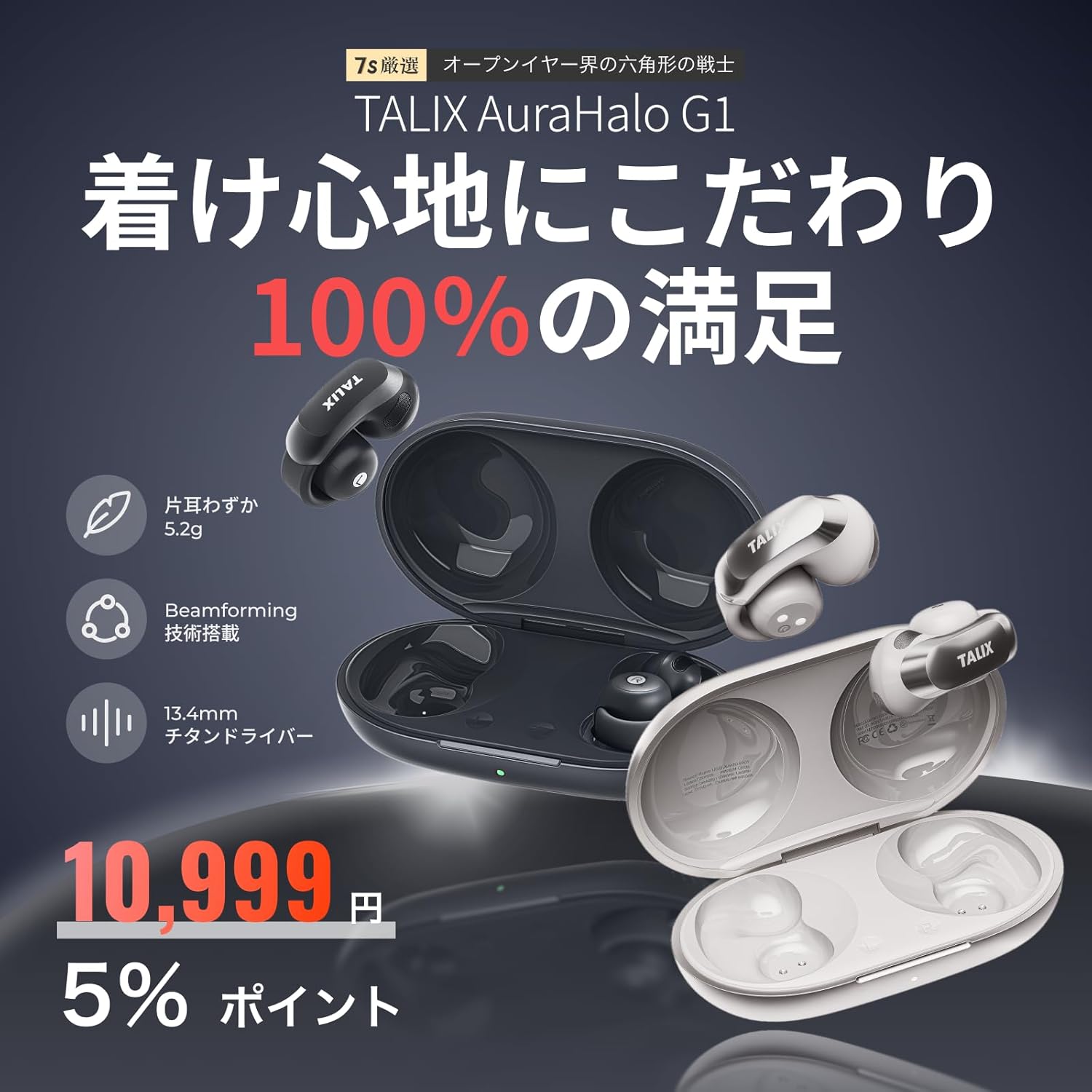
Сүрөт: бүттүview of TALIX AuraHalo G1 highlighting key features: 5.2g ultra-lightweight, Beamforming technology, and 13.4mm Titanium Driver.
3. Пакеттин мазмуну
Пакетте бардык буюмдар бар экенин текшериңиз:
- TALIX AuraHalo G1 Earbuds (Left and Right) x 1
- Заряддоо кутусу x 1
- USB-C заряддоо кабели x 1
- Колдонуучунун колдонмосу x 1

Image: Contents of the TALIX AuraHalo G1 package, including earbuds, charging case, USB-C cable, and manual.
4. Орнотуу
4.1 Заряддоо
Биринчи колдонуудан мурун, кулакчындарды жана заряддоо кутучасын толук заряддаңыз.
- Кулакчындарды заряддоо кутусуна салыңыз.
- USB-C заряддоо кабелин корпустагы кубаттоо портуна жана кубат булагына туташтырыңыз.
- Корпустагы индикатор жарыктары кубаттоо абалын көрсөтөт. Толук кубаттоо болжол менен 1.5 саатты талап кылат.
4.2 Жупташуу
- Кубаттоочу кутучаны ачыңыз. Кулакчындар автоматтык түрдө жупташтыруу режимине өтөт, бул күйүп-өчкөн LED жарыгы менен көрсөтүлөт.
- Түзмөгүңүздө (смартфон, планшет ж.б.) Bluetooth иштетиңиз.
- Издөө "TALIX AuraHalo G1" in the list of available Bluetooth devices and select it to connect.
- Туташкандан кийин кулакчындардагы LED индикатору өчүп токтойт.
4.3 Кулакчындарды тагынуу
For optimal sound and comfort, ensure the earbuds are worn correctly.
- Gently stretch the ear hook and place it over your ear.
- Adjust the earbud so the speaker part is directed towards your ear canal.
- Ensure the L (left) and R (right) markings match your ears. Do not excessively bend or stretch the ear hook.

Image: Visual guide demonstrating the correct way to wear the TALIX AuraHalo G1 earbuds, showing proper ear hook placement and speaker alignment, alongside examples of incorrect wearing.
5. Иштөө нускамалары
5.1 Сенсордук башкаруу
The TALIX AuraHalo G1 earbuds feature intuitive touch controls on each earbud. The functions may vary slightly between the left and right earbuds.

Image: Diagram illustrating the touch control functions for the TALIX AuraHalo G1 earbuds.
| Акция | Сол кулакчын | Оң кулак |
|---|---|---|
| Эки жолу таптаңыз | Чалууга жооп берүү/аяктоо, музыканы ойнотуу/тындыруу | Чалууга жооп берүү/аяктоо, музыканы ойнотуу/тындыруу |
| Үч жолу таптаңыз | Reject Incoming Call, Previous Track | Reject Incoming Call, Next Track |
| Узак басуу | Үн жардамчысын жандырыңыз | Үн жардамчысын жандырыңыз |
5.2 Чакыруу функциялары
- Чалууларга жооп берүү / аяктоо: Кулакчындын бирин эки жолу басыңыз.
- Чалууларды четке кагуу: Кулакчындын бирин үч жолу таптаңыз.
- The built-in microphone with Beamforming technology enhances call clarity by reducing ambient noise.
5.3 Музыканы ойнотуу
- Ойнотуу/тындыруу: Кулакчындын бирин эки жолу басыңыз.
- Кийинки трек: Оң кулакчынды үч жолу таптаңыз.
- Мурунку трек: Сол кулакчынды үч жолу таптаңыз.
5.4 Үн жардамчысы
- Иштетүү: Long press either earbud to activate your device's voice assistant (e.g., Siri, Google Assistant).
6. Техникалык тейлөө
6.1 Тазалоо
- Кулакчындарды жана заряддоо кутусун жумшак, кургак, түксүз чүпүрөк менен дайыма тазалап туруңуз.
- Абразивдүү тазалагычтарды, эриткичтерди же аэрозолдук спрейлерди колдонбоңуз.
- Заряддоо портуна же динамиктердин торлоруна ным кирбесин текшериңиз.
6.2 Сактоо
- Колдонулбаганда, кулакчындарды коргоо жана кубаттоо үчүн кубаттоочу кутучага сактаңыз.
- Күн нурунан жана экстремалдык температурадан алыс салкын, кургак жерде сактаңыз.
6.3 Сууга туруктуулук (IPX4)
The TALIX AuraHalo G1 earbuds are rated IPX4, meaning they are resistant to splashing water from any direction. This makes them suitable for use during workouts or in light rain. However, they are not designed for swimming or submersion in water. Do not expose them to pressurized water or high-velocity water.

Image: Visual representation of TALIX AuraHalo G1 earbuds with IPX4 water resistance, showing protection against splashes.
7. Кыйынчылыктарды
If you encounter any issues with your TALIX AuraHalo G1 headphones, please refer to the following common solutions:
- Үн жок/Төмөн үнү:
- Ensure the earbuds are properly charged.
- Түзмөгүңүздөгү жана кулакчындардын үнүнүн деңгээлин текшериңиз.
- Ensure the earbuds are correctly paired and connected to your device.
- Try cleaning any debris from the speaker grilles.
- Жупташуу мүмкүн эмес:
- Түзмөгүңүздө Bluetooth иштетилгенин текшериңиз.
- Ensure the earbuds are in pairing mode (flashing LED).
- Түзмөгүңүздүн Bluetooth'ун өчүрүп, күйгүзүңүз.
- Bluetooth тизмеңизден түзмөктү унутуп, кайра жупташтырып көрүңүз.
- Ensure the earbuds are not connected to another device.
- Үзгүлтүксүз туташуу:
- Ensure your device is within the Bluetooth range (typically 10 meters/33 feet) without significant obstacles.
- Күчтүү электромагниттик тоскоолдуктардан качыңыз.
- Кулакчындарды түзмөгүңүз менен кайра жупташтырыңыз.
- Кулакчындар кубатталбай жатат:
- Заряддоо кабели корпуска да, кубат булагына да бекем туташтырылганын текшериңиз.
- Заряддоо кутусунун өзүндө кубат бар-жогун текшериңиз.
- Кулакчындардагы жана корпустагы заряддоо контакттарын тазалаңыз.
- Башка USB-C кабелин же кубат адаптерин колдонуп көрүңүз.
- Тийүү башкаруулары жооп бербейт:
- Сенсордук башкаруу элементтерин колдонууда манжаларыңыз таза жана кургак экенин текшериңиз.
- Кулакчындарды кутуга салып, кайра чыгаруу менен кайра иштетиңиз.
Эгер көйгөй чечилбесе, кардарларды колдоо менен байланышыңыз.
8. Техникалык шарттар
| Өзгөчөлүк | Спецификация |
|---|---|
| Модель аты | OW5405 |
| Бренд | TALIX |
| Байланыш технологиясы | Bluetooth |
| Зымсыз байланыш технологиясы | Bluetooth 5.3 |
| Кулак жайгаштыруу | Ачык кулак |
| Наушник стили | Ear Cuff |
| Башкаруу түрү | Touch Control |
| Noise Control | Call Noise Cancellation (Beamforming) |
| Product Weight (per earbud) | 5.2 грамм |
| Сууга туруктуулук деңгээли | IPX4 (Суу өткөрбөйт) |
| Заряддоо убактысы | 1.5 саат |
| Жалпы ойноо убактысы (заряддоо кутусу менен) | 28 саатка чейин |
| Playtime (earbuds only) | 7 саатка чейин (50% үн менен) |
| Шайкеш түзмөктөр | Android, iOS |
| Материал | Силикон, Пластик |
| Сезимталдуулук | 126 дБ |
| Frequency Response | 20 Hz (Note: Full range typically 20Hz-20kHz, only lower bound provided) |
9. Кепилдик жана колдоо
9.1 30-Day Return Guarantee
Returns are accepted within 30 days of purchase if the product is unopened and in a resalable condition. Please note that opened or used items, as well as included accessories or promotional gifts, are not eligible for return or exchange due to customer reasons.
9.2 Product Warranty (12 Months)
If a product defect occurs within 12 months from the order date, an exchange will be provided upon confirmation by our store. This warranty does not cover defects resulting from normal wear and tear, customer negligence, or improper use. Examples of improper use include, but are not limited to, earbuds soaked in sodium chloride from sweat and left in the charging case, leading to electrochemical reactions or oxidative corrosion. Please be aware of these exclusions.

Image: Information regarding the 30-day return guarantee and 12-month product warranty for TALIX AuraHalo G1.
9.3 Кардарларды колдоо
For further assistance or inquiries, please contact TALIX customer support through the retailer where you purchased the product.