
Introduction
This manual provides essential information for the safe and effective operation of your Radioddity FS-T8 FRS Two-Way Radio. Please read this manual thoroughly before using the device and retain it for future reference. The Radioddity FS-T8 is a Family Radio Service (FRS) device designed for clear, long-range communication, suitable for various outdoor activities and family use.
Пакеттин мазмуну
Upon unpacking, please ensure all items listed below are present and in good condition. If any items are missing or damaged, please contact Radioddity customer support.
- 4 x Radioddity FS-T8 Two-Way Radios
- 4 x Rechargeable Batteries (2000mAh)
- 4 x USB-C заряддоо кабелдери
- 4 x Белдик клиптер
- 4 x Lanyards
- 4 x Compasses
- 4 x Badges
- Sticker Sheets
- User Manual
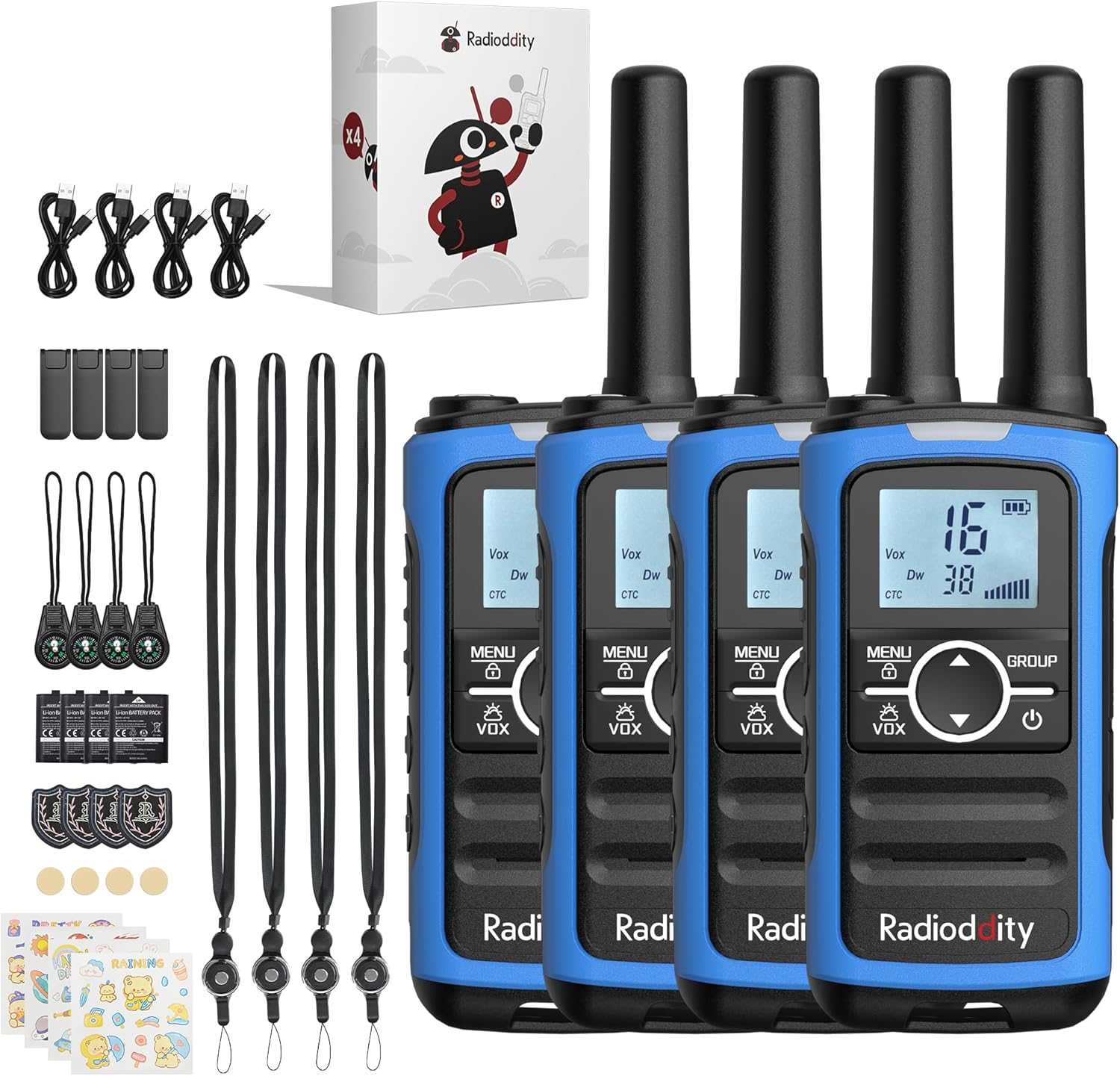
Image: A complete set of Radioddity FS-T8 walkie talkies and their accessories, laid out on a surface.
Продукт бүттүview
The Radioddity FS-T8 features a compact design with an easy-to-read backlit digital display. It includes essential functions for reliable communication and safety.

Image: A close-up of the Radioddity FS-T8 walkie talkie, highlighting its digital display and main control buttons.
Жайгашуу
Батареяны орнотуу жана кубаттоо
The FS-T8 radios come with 2000mAh rechargeable batteries. They are also compatible with 3xAA batteries (not included) for backup power.
- To install the rechargeable battery, remove the battery compartment cover on the back of the radio.
- Insert the 2000mAh rechargeable battery pack, ensuring correct polarity.
- Батарея бөлүгүнүн капкагын ордуна коюңуз.
- To charge, connect the USB-C charging cable to the radio's USB-C port and a compatible 5V USB power adapter (not included). A full charge takes approximately 2 hours and provides up to 48 hours of continuous talk time.
- For AA battery use, open the compartment and insert 3xAA batteries, observing polarity.

Image: An illustration showing the USB-C charging port on the Radioddity FS-T8 and the option for both rechargeable and AA batteries.
Аксессуарларды тиркөө
Each radio includes a belt clip and a lanyard for convenient carrying. The lanyard can be attached to either the top or bottom loop on the radio.
- Кур клип: Slide the belt clip into the slot on the back of the radio until it clicks into place.
- Лянард: Thread the lanyard loop through the desired attachment point (top or bottom) on the radio and secure it.
- Компас: The included compass can be attached to the lanyard. Avoid attaching the compass directly to the radio's magnetic areas, as this may affect its accuracy.
Иштөө нускамалары
Күйгүзүү/өчүрүү
To power on or off the radio, press and hold the Күч button (usually marked with a power symbol) until the display lights up or turns off.
Канал тандоо
The FS-T8 features 22 FRS channels. To select a channel:
- басыңыз МЕНЮ баскычын бир жолу. Канал номери жарк этет.
- колдонуу Up or Төмөн Каалаган каналыңызды тандоо үчүн жебе баскычтарын басыңыз.
- басыңыз МЕНЮ button again to confirm your selection, or wait a few seconds for it to auto-confirm.
Топтук чалуу функциясы
The One-Key Group Call feature allows instant communication with all other FS-T8 radios within range, regardless of their current channel setting. This is ideal for ensuring everyone hears important messages.
- To initiate a group call, press and hold the ГРУППА баскычы.
- Микрофонго так сүйлө.
- бошотуңуз ГРУППА угуу үчүн баскыч.

Image: A visual representation of the group call feature, demonstrating its ease of use in an outdoor family setting.
VOX (Үн менен башкаруу)
The VOX function allows for hands-free communication. When activated, the radio will transmit automatically when it detects your voice.
- To activate/deactivate VOX, press the МЕНЮ button multiple times until the VOX icon flashes.
- колдонуу Up or Төмөн arrow buttons to select a VOX sensitivity level (1-3, with 3 being most sensitive) or 'OFF'.
- Басыңыз МЕНЮ ырастоо үчүн.
Баскыч кулпу
Жөндөөлөрдүн кокусунан өзгөрүп кетишинин алдын алуу үчүн, баскычтопту кулпулап койсоңуз болот.
- Баскычтопту кулпулоо үчүн басып, кармап туруңуз МЕНЮ баскычын дисплейде кулпу сөлөкөтү пайда болгонго чейин басыңыз.
- Кулпуну ачуу үчүн басып, кармап туруңуз МЕНЮ кулпу сөлөкөтү жок болмоюнча кайра баскычын басыңыз.
NOAA аба ырайы каналдары
Stay informed about hazardous weather conditions with the integrated NOAA weather channels.
- To access NOAA weather channels, press the МЕНЮ button until the NOAA icon appears.
- колдонуу Up or Төмөн arrow buttons to scan through the 11 available NOAA channels. The radio will automatically select the strongest signal.
- Басыңыз МЕНЮ to exit NOAA mode.

Image: The Radioddity FS-T8 showing its NOAA weather channel feature, providing critical weather alerts.
Flashlight and SOS Alert
The FS-T8 includes a built-in flashlight and an SOS alert function for emergencies.
- To turn on/off the flashlight, press the dedicated Кол чырак button on the side of the radio.
- To activate the SOS alert, press and hold the SOS button (often combined with the flashlight button or a separate dedicated button). The flashlight will flash in an SOS pattern, and an audible alert may sound.
Диапазон Performance
The effective communication range varies based on terrain and obstructions:
- Up to 3 miles in open areas with minimal obstructions.
- Approximately 1 mile in semi-obstructed zones (e.g., light foliage, scattered buildings).
- Up to 547 yards in heavily obstructed urban environments.

Image: A graphic illustrating the varying communication ranges of the FS-T8 in different types of terrain.
Техникалык тейлөө
Тазалоо
To maintain your radio's performance and appearance:
- Радиону жумшак менен сүртүңүз, гamp кездеме.
- Катуу химиялык заттарды же абразивдүү тазалоочу каражаттарды колдонбоңуз.
- Заряддоодон мурун бардык порттор кургак экенин текшериңиз.
Батареяга кам көрүү
- Биринчи колдонуудан мурун батарейкаларды толук заряддаңыз.
- Avoid overcharging or completely draining the rechargeable batteries.
- If using AA batteries, remove them if the radio will not be used for an extended period to prevent leakage.
Проблемаларды чечүү
| Көйгөй | Мүмкүн себеп | Чечим |
|---|---|---|
| Күч жок | Батареянын кубаты аз же туура эмес орнотулган. | Charge the rechargeable battery or replace AA batteries. Ensure batteries are installed with correct polarity. |
| Башка радиолор менен байланышууга болбойт | Different channels or privacy codes. Out of range. | Ensure all radios are on the same channel and privacy code. Use the Group Call function. Move closer to other radios. |
| Аудио сапаты начар | Weak signal. Obstructions. | Move to an area with fewer obstructions. Check battery level. |
| Баскычтоп жооп бербейт | Баскычтоп кулпуланган. | Unlock the keypad by pressing and holding the MENU button. |
Техникалык шарттар
| Өзгөчөлүк | Деталь |
|---|---|
| Бренд | Radioioddity |
| Модель номери | FS-T8 (QYWRFTB01) |
| Жыштык диапазону | FRS |
| Каналдардын саны | 22 |
| Сүйлөшүү диапазону максималдуу | 3 Miles (unobstructed) |
| Батарея түрү | 2000mAh Rechargeable (included), 3xAA (not included) |
| Батареянын орточо иштөө мөөнөтү | 48 саатка чейин |
| Заряддоо | USB-C (5V only) |
| Өзгөчөлүктөр | Integrated Flashlight, NOAA Weather Channels, One-Key Group Call, SOS Alarm, VOX (Voice Operated Transmission), Keypad Lock, 131 Privacy Codes |
| Сууга туруктуулук деңгээли | Сууга чыдамдуу эмес |
| Продукциянын өлчөмдөрү | 1.18"D x 1.9"W x 5.9"H |
| Элемент Салмагы | 0.3 фунт |
| FCC ID | 2AN62-T8 |
Кепилдик
The Radioddity FS-T8 FRS Two-Way Radio comes with a 19-month warranty from the date of purchase. This warranty covers manufacturing defects and malfunctions under normal use. Please retain your proof of purchase for warranty claims. For detailed warranty terms and conditions, please visit the official Radioddity webсайтка же кардарларды колдоо менен байланышыңыз.
Колдоо
For further assistance, technical support, or to inquire about replacement parts, please contact Radioddity customer service through the following channels:
- Онлайн: Visit the official Radioddity webКөп берилүүчү суроолор, колдоо макалалары жана байланыш формалары үчүн сайт.
- Электрондук почта: Продуктуңуздун таңгагына же расмий өкүлгө кайрылыңыз webкардарларды колдоо электрондук почта дареги үчүн сайт.
Please have your model number (FS-T8) and purchase information ready when contacting support.