
AOPUTTRIVER AP-9000F
AOPUTTRIVER AP-9000F Hot Wire Anemometer User Manual
Model: AP-9000F
1. Introduction and Overview
The AOPUTTRIVER AP-9000F is a professional handheld hot wire anemometer designed for precise measurement of air velocity, airflow volume (CFM/CMM), and air temperature. This device is equipped with a retractable sensor probe, making it suitable for various applications, including HVAC system diagnostics, environmental monitoring, and industrial air flow analysis. This manual provides essential information for the safe and effective operation of your AP-9000F anemometer.
2. Кутуда эмне бар
Таңгактан чыгаргандан кийин, төмөндө көрсөтүлгөн нерселердин бардыгы бар экенин жана жакшы абалда экендигин текшериңиз:
- AP-9000F Hot Wire Anemometer Unit
- User Manual
- Type-C маалымат кабели

3. Продукциянын өзгөчөлүктөрү
The AP-9000F anemometer offers a range of features designed for precision and convenience:
- 3-бирде өлчөө: Accurately measures wind speed (m/s, km/h, ft/min, knots, mph), airflow (CFM/CMM), and wind temperature (°C/°F).
- Retractable Sensor Probe: Features a flexible, extendable probe tip for convenient measurements in confined or hard-to-reach spaces, such as air conditioning vents. Probe dimensions: 298.5 × 40.84 × 23.7 mm.
- LCD дисплей: A clear, backlit LCD presents wind speed (Max, Min, Real-time), airflow, temperature, and humidity data. Includes anti-interference buttons and a low battery indicator.
- Type-C интерфейси: Equipped with a Type-C charging port and powered by a 1000mAh lithium-ion battery. Supports an optional auto-shutdown function.
- Кеңири колдонуу: Suitable for environmental measurements, air transportation, and air conditioning monitoring systems.


4. Орнотуу
4.1 Батареяны заряддоо
The AP-9000F is powered by a built-in 1000mAh lithium-ion battery. Before first use, or when the low battery indicator appears on the LCD, charge the device using the provided Type-C data cable.
- Connect the Type-C cable to the charging port on the anemometer and the other end to a standard USB power adapter (not included).
- Толук кубаттоо адатта 2-3 саатка созулат.
- Эскертүү: The device cannot be turned on or operated while it is charging.
4.2 Extending the Sensor Probe
The hot wire sensor is located at the tip of the retractable probe. Carefully extend the probe to the desired length for measurement. The probe can be rotated 360 degrees for optimal positioning.
- Gently pull the probe from the main unit to extend it.
- Adjust the angle of the probe tip as needed.
- After use, retract the probe back into the unit for protection.
5. Иштөө нускамалары
5.1 Аппараттын макети жана баскычтары

- Кубат баскычы (кызыл тегерек): Түзмөктү ON же ӨЧҮРҮҮ үчүн басыңыз.
- MODE баскычы: Switches between different measurement modes (e.g., wind speed, airflow).
- UNIT баскычы: Changes the unit of measurement for wind speed (m/s, km/h, ft/min, knots, mph) or airflow (CFM, CMM).
- SET баскычы: Used to set the air volume area for accurate CFM/CMM calculations.
- MAX/MIN баскычы: Toggles between maximum, minimum, and real-time values on the display.
- HOLD баскычы: Дисплейдеги учурдагы окууну токтотот. Чыгаруу үчүн кайра басыңыз.
- °C/°F баскычы: Switches the temperature unit between Celsius and Fahrenheit.
5.2 Өлчөөнүн негизги процедурасы
- Күйгүзүү: басыңыз Кубат баскычы to turn on the anemometer. The LCD will illuminate.
- Extend Probe: Carefully extend the sensor probe and position it in the airflow you wish to measure. Ensure the sensor tip is fully exposed to the air stream.
- Режимди тандоо: басыңыз MODE баскычы to select between wind speed, airflow, or temperature measurement.
- Бирдикти тандоо: басыңыз UNIT баскычы to choose your preferred unit (e.g., m/s, CFM, °C).
- Set Area (for Airflow): If measuring airflow (CFM/CMM), press the SET баскычы to input the cross-sectional area of the duct or vent. Refer to the specifications for area input range.
- Өлчөөнү окуу: The current readings will be displayed on the LCD.
- Дайындарды кармоо: басыңыз HOLD баскычы to freeze the current reading. Press again to resume live measurement.
- Max/Min/Avg: колдонуу MAX/MIN баскычы чейин view the maximum, minimum, or average readings recorded during the measurement session.
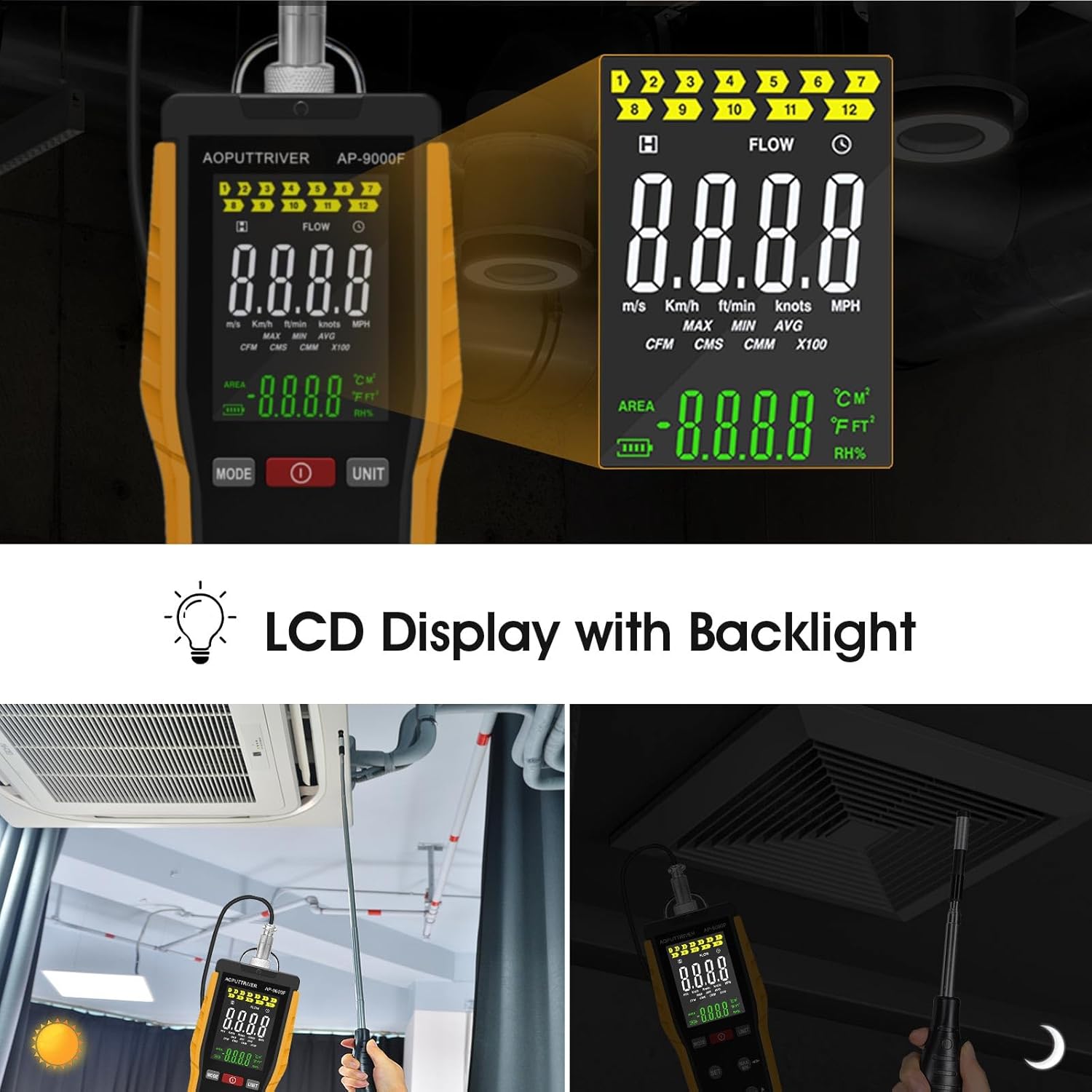


6. Техникалык тейлөө
6.1 Аппаратты тазалоо
- Wipe the main unit with a soft, dry cloth. Do not use abrasive cleaners or solvents.
- For the sensor probe, gently clean any dust or debris. Avoid touching the delicate hot wire sensor directly.
6.2 Батареяга кам көрүү жана сактоо
- Батареянын иштөө мөөнөтүн сактоо үчүн, түзмөк көп колдонулбаса дагы, аны үзгүлтүксүз кубаттап туруңуз.
- Анемометрди салкын, кургак жерде, күн нуру түз тийбеген жана өтө жогорку температурадан алыс сактаңыз.
- Ensure the sensor probe is fully retracted and protected during storage.
7. Кыйынчылыктарды
If you encounter issues with your AP-9000F, please refer to the following common problems and solutions:
| Көйгөй | Мүмкүн себеп | Чечим |
|---|---|---|
| Түзмөк күйбөйт | Low battery; Device is charging | Charge the battery fully; Disconnect from charger before powering on. |
| Так эмес окуулар | Sensor obstructed or dirty; Incorrect unit/mode selected; Probe not properly positioned | Clean the sensor gently; Verify selected mode and unit; Ensure sensor is fully in the airflow. |
| Дисплей бош же тоңуп калган | Battery low; HOLD function active; Device malfunction | Recharge battery; Press HOLD button to release; If problem persists, contact support. |
| Cannot change units/modes | Buttons unresponsive; Device in a locked state | Ensure buttons are pressed firmly; Power cycle the device (turn off and on). |
8. Техникалык шарттар
Detailed technical specifications for the AOPUTTRIVER AP-9000F Hot Wire Anemometer:
| Параметр | Нарк |
|---|---|
| Шамалдын ылдамдыгын өлчөө диапазону | 0.1 – 30 м/с |
| Air Temperature Measurement Range | 0 – 45°C (32 – 113°F) |
| Airflow Measurement Range (CFM) | 0 – 999,900 ft³/min |
| Airflow Measurement Range (CMM) | 0 – 999,900 м³/мин |
| Зонддун өлчөмдөрү | 298.5 × 40.84 × 23.7 мм |
| Батарея түрү | 1000mAh литий-иону |
| Заряддоо порту | Type-C |
| Дисплей | Арткы жарык менен LCD |
| Салмагы | 0.12 фунт (болжол менен 54 г) |

9. Кепилдик жана колдоо
9.1 Кепилдик маалыматы
AOPUTTRIVER products are manufactured to high-quality standards. This product is covered by a limited warranty against defects in materials and workmanship. Please refer to the warranty card included with your product for specific terms and conditions, or visit the official AOPUTTRIVER webкөбүрөөк маалымат алуу үчүн сайт.
9.2 Кардарларды колдоо
For technical assistance, troubleshooting, or inquiries regarding your AP-9000F Hot Wire Anemometer, please contact AOPUTTRIVER customer support. Contact information can typically be found on the product packaging, the official AOPUTTRIVER webсайты же сатып алуу платформасы аркылуу.
When contacting support, please have your product model (AP-9000F) and a detailed description of the issue ready.
Ask a question about this manual
Ask about setup, troubleshooting, compatibility, parts, safety, or missing instructions. Manuals+ will review the question and use this page’s manual context to help answer it.