
1. Киришүү
The Nivian NVS-Bracelet is a wireless SOS emergency button designed to provide immediate personal safety. Upon activation, it sends an instant panic alert to your Nivian alarm panel and mobile application. This device is ideal for homes, businesses, or for individuals requiring quick assistance, such as the elderly.
It features stable 433 MHz RF wireless communication with a range of up to 80 meters, allowing freedom of movement. A built-in LED confirms signal transmission, and the alarm panel provides an audible verification. The bracelet is comfortable, portable, and operates on a long-lasting CR2032 battery.
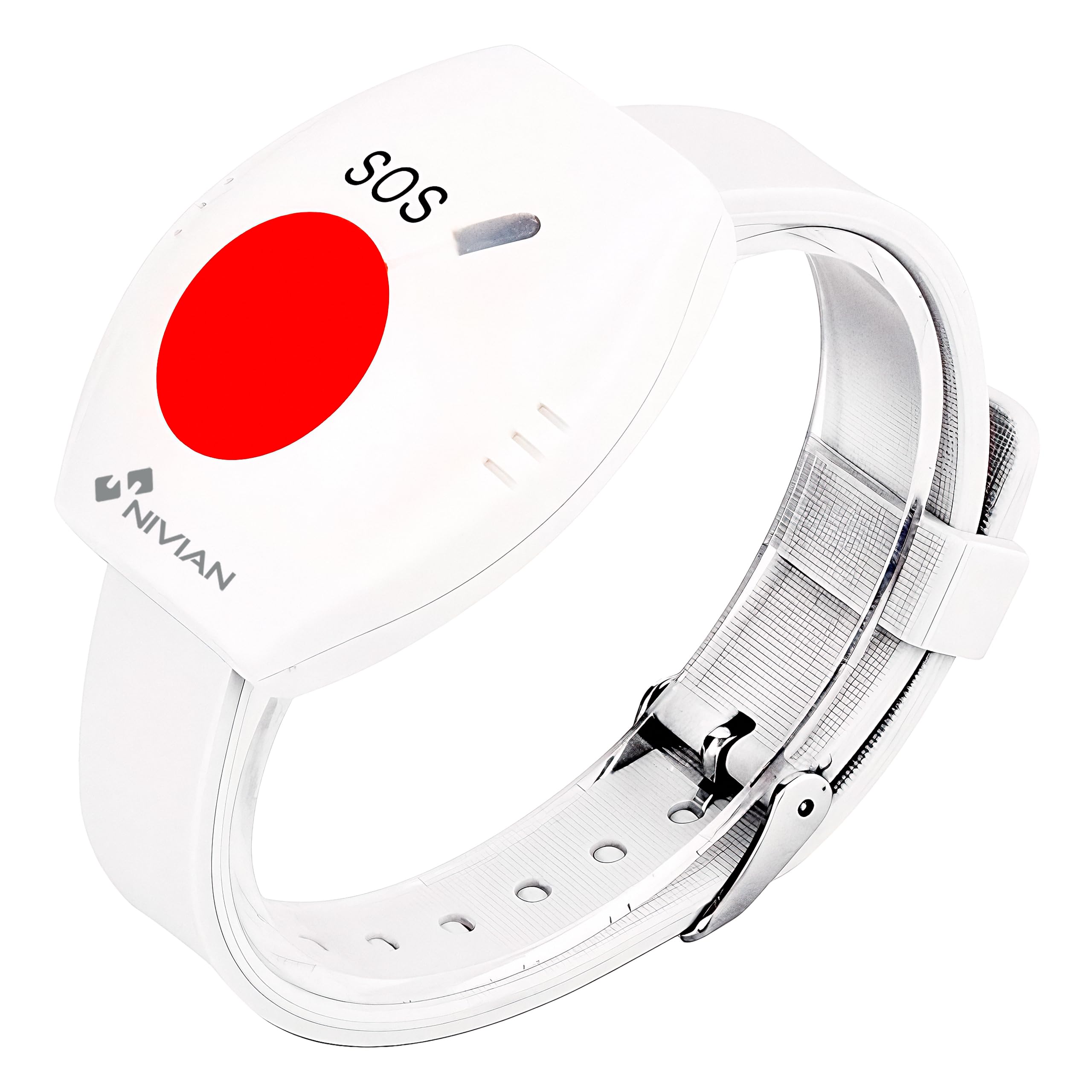
Figure 1: Nivian NVS-Bracelet Wireless SOS Emergency Button.
2. Коопсуздук маалыматы
Please refer to the official safety information document for detailed guidelines on safe usage and handling of the Nivian NVS-Bracelet.
You can download the safety information PDF бул жерде.
3. Продукт бүтүп калдыview
The NVS-Bracelet consists of a main unit with an SOS button and an adjustable silicone strap. The main unit houses the wireless transmitter and an LED indicator.

Сүрөт 2: Алдыңкы view of the Nivian NVS-Bracelet, highlighting the SOS button and brand logo.

3-сүрөт: Каптал view of the Nivian NVS-Bracelet.

4-сүрөт: Артка view of the Nivian NVS-Bracelet.
4. Техникалык шарттар
| Модель номери | NVS-BRACELET |
| Бренд | NIVIAN |
| Зымсыз жыштык | 433 МГц |
| Максималдуу диапазон | 80 метр (ачык аянт) |
| Power Source | Батарея CR2032 |
| Шайкеш түзмөктөр | Nivian Alarm Panel, Mobile App |
| Dimensions (Bracelet Unit) | 245 мм (узундугу) x 43 мм (туурасы) x 16 мм (калыңдыгы) |
| Башкаруу ыкмасы | Button, Application |
Figure 5: The NVS-Bracelet is battery-powered for long-lasting use.

Figure 6: Dimensions of the Nivian NVS-Bracelet.
5. Орнотуу
5.1. Батареяны орнотуу
The NVS-Bracelet comes with a pre-installed CR2032 battery. If the battery needs replacement, carefully open the back cover of the main unit and insert a new CR2032 battery, ensuring correct polarity.
5.2. Pairing with Nivian Alarm System
To integrate the NVS-Bracelet with your Nivian alarm system, follow these steps:
- Ensure your Nivian alarm panel is powered on and in pairing mode (refer to your alarm panel's manual for specific instructions).
- Press and hold the SOS button on the NVS-Bracelet for approximately 3-5 seconds until the LED indicator flashes.
- The alarm panel should detect the new device. Confirm the pairing on the alarm panel.
- Once paired, the LED on the bracelet will stop flashing, and the alarm panel will provide a confirmation.

Figure 7: The NVS-Bracelet is compatible with Nivian alarm systems.
5.3. Connecting to the Mobile App
After pairing with the alarm panel, ensure your Nivian mobile application is configured to receive alerts from the panel. The app will display notifications when the SOS button is pressed.
Video 1: This video demonstrates the functionality of an SOS emergency bracelet, including how it can be used to send alerts. (Source: Abubu SL)

Figure 8: Stay informed and in control with mobile app notifications.
6. Иштөө нускамалары
6.1. Activating an SOS Alert
To send an emergency alert, simply press the large red SOS button on the NVS-Bracelet. Hold the button for a moment to ensure activation.

Figure 9: Easy to use: simply press the SOS button for immediate assistance.
6.2. LED көрсөткүч
Upon successful transmission of the SOS signal, the integrated LED on the bracelet will illuminate or flash, providing visual confirmation that the alert has been sent. Your Nivian alarm panel will also emit an audible beep to confirm receipt of the alert.

Figure 10: The NVS-Bracelet helps care for those who matter most.
Video 2: This video demonstrates the usage of an emergency button, showing how it can be activated in various scenarios. (Source: KMINA)
Video 3: This video illustrates how an emergency button can be shared among multiple family members for enhanced safety. (Source: Aleenfoon-EU)
Video 4: This video highlights the quick response and ease of use of an emergency button for elderly individuals. (Source: OrtoPrime)
7. Техникалык тейлөө
7.1. Батареяны алмаштыруу
The NVS-Bracelet uses a CR2032 coin cell battery. When the battery is low, the LED indicator may behave erratically or fail to light up upon button press. To replace the battery:
- Carefully open the battery compartment on the back of the main unit using a small screwdriver or coin.
- Эски CR2032 батареясын алып салыңыз.
- Жаңы CR2032 батареясын оң (+) тарабын өйдө каратып салыңыз.
- Батарея отсегин бекем жабыңыз.
- Test the button to ensure it functions correctly and the LED illuminates.
7.2. Тазалоо
Wipe the NVS-Bracelet with a soft, dry cloth. Do not use abrasive cleaners or immerse the device in water.
8. Кыйынчылыктарды
- Көйгөй: The SOS button does not activate an alert.
Чечим: Check the battery. Replace the CR2032 battery if it is low or depleted. Ensure the button is pressed firmly for a few seconds. - Көйгөй: The alarm panel or mobile app does not receive the alert.
Чечим:- Ensure the NVS-Bracelet is within the 80-meter range of the Nivian alarm panel. Walls and other obstructions can reduce the effective range.
- Re-pair the NVS-Bracelet with your Nivian alarm system (refer to Section 5.2).
- Verify that your Nivian alarm panel is powered on and functioning correctly.
- Check your mobile app settings to ensure notifications are enabled and the app is connected to your alarm panel.
- Көйгөй: The LED indicator on the bracelet does not light up.
Чечим: This usually indicates a low or dead battery. Replace the CR2032 battery.
9. Кепилдик
Nivian products come with a standard manufacturer's warranty. For specific details regarding your NVS-Bracelet warranty coverage, please refer to the documentation included with your purchase or visit the official Nivian webсайт.
10. Колдоо
For additional information, technical support, or warranty inquiries, please visit the NivianHome website or contact customer service through the following channels:
- NivianHome Web: For information, technical support, and warranty details.
- InstagRAM: Follow Nivian for updates and tips: @nivianhome_es
- YouTube: Watch tutorials and tips: Nivian YouTube Channel

Figure 11: Nivian support channels for information, technical assistance, and tutorials.