
1. Киришүү
This manual provides instructions for the Adesso WKB-7010 Bluetooth Keyboard Case, designed for use with iPad Pro 11-inch and iPad Air 10.9-inch models. This product combines a protective case with a detachable wireless keyboard and integrated touchpad, transforming your tablet into a portable workstation.

Image 1.1: The Adesso WKB-7010 Bluetooth Keyboard Case with an iPad in use.
2. Пакеттин мазмуну
Пакетиңизде бардык буюмдар бар экенин текшериңиз:
- Adesso WKB-7010 Bluetooth Keyboard Case
- USB-C заряддоо кабели
- Колдонуучунун Колдонмосу (бул документ)
3. Шайкештик
The Adesso WKB-7010 Bluetooth Keyboard Case is compatible with the following Apple iPad models:
- iPad Pro 11-inch: 1st generation (2018), 2nd generation (2020), 3rd generation (2021), 4th generation (2022)
- iPad Air 10.9-inch: 4th generation (2020), 5th generation (2022), 6th generation (2024 M2 models)
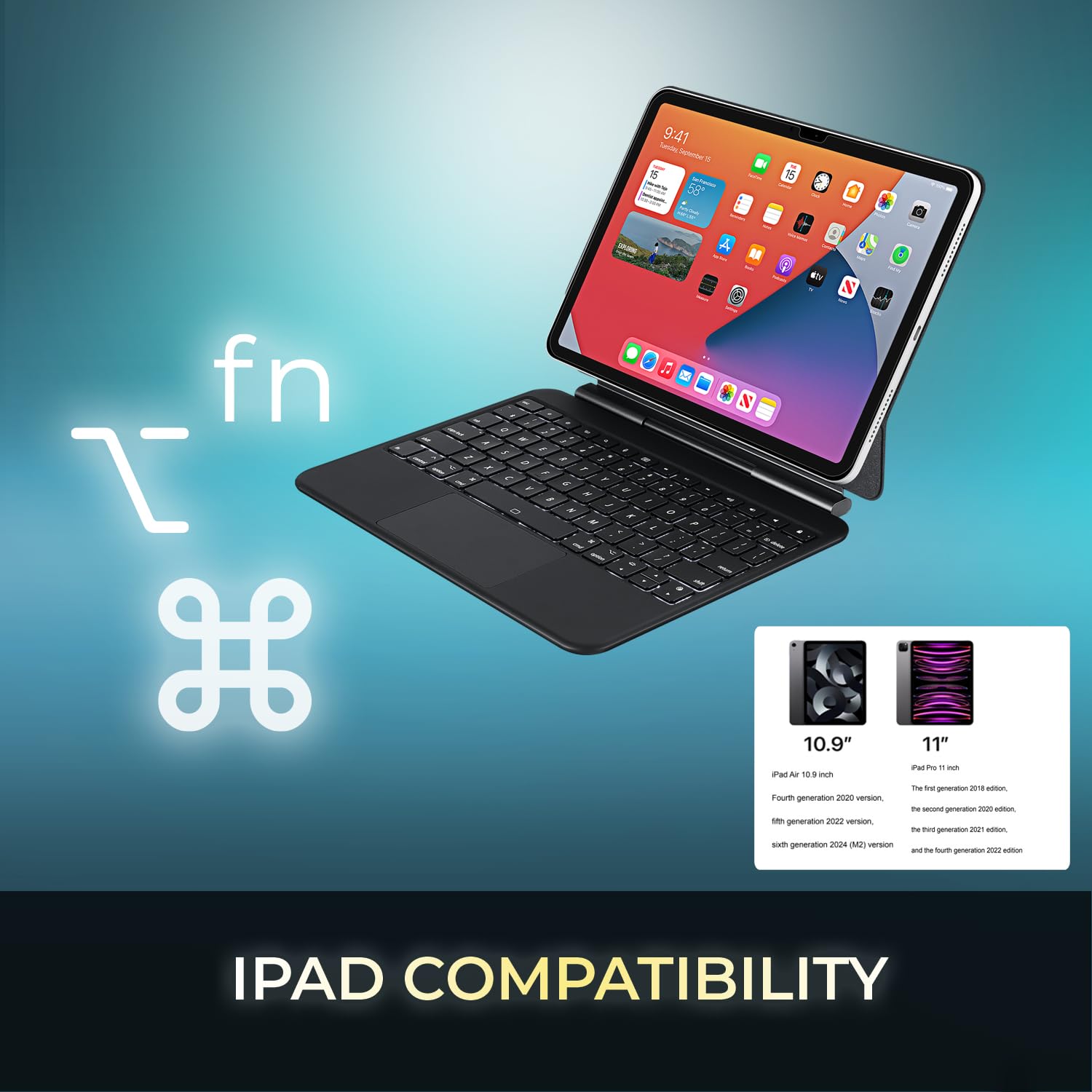
Image 3.1: Visual representation of compatible iPad models (10.9" and 11").
4. Өзгөчөлүктөрү
- Бөлүнүүчү дизайн: The keyboard can be separated from the case for flexible use.
- Жөнгө салынуучу стенд: The case converts into a stand with multiple viewбурчтар.
- Интегралдык сенсордук такта: Provides precise navigation and multi-touch gesture support.
- Bluetooth 5.1 туташуусу: Offers stable wireless connection up to 30 feet with low power consumption.
- Кайра заряддалуучу батарея: Built-in 450 mAh lithium polymer battery for extended use.
- Scissor-Switch баскычтары: Төмөн профессионалfile keys designed for comfortable and responsive typing.
- Туруктуу курулуш: Ultra-slim aluminum design for portability and protection.

Image 4.1: The case allows for various adjustable viewiPad үчүн бурчтарды өзгөртүү.

Image 4.2: The keyboard case features an ultra-slim and compact design, as shown with a ruler for scale.
5. Орнотуу
5.1. Баскычтопту заряддоо
Before initial use, fully charge the keyboard. Connect the included USB-C cable to the keyboard's charging port and the other end to a USB power source (e.g., computer, wall adapter). The charging indicator light will illuminate during charging and turn off when fully charged.

Image 5.1: The keyboard features a built-in rechargeable battery and charges via USB-C.
5.2. Inserting Your iPad
Carefully place your iPad into the protective case, ensuring it is securely seated. The magnetic closure will help secure the tablet and keyboard when closed.
5.3. Bluetooth Жупташтыруу
- Баскычтоп күйгүзүлгөнүн жана толук кубатталганын текшериңиз.
- Кубат баскычын "ON" абалына жылдырып, клавиатураны күйгүзүңүз.
- басыңыз Fn + C keys simultaneously to activate Bluetooth pairing mode. The Bluetooth indicator light will flash.
- iPad'иңизден төмөнкүгө өтүңүз Орнотуулар > Bluetooth.
- Bluetooth күйгүзүү.
- Locate "Adesso WKB-7010" (or similar) in the list of available devices and tap to connect.
- Туташкандан кийин клавиатурадагы Bluetooth индикатор жарыгы өчүп токтойт.

Image 5.2: The keyboard utilizes Bluetooth 5.1 wireless technology for connection.
6. Иштөө нускамалары
6.1. Баскычтоптун функциялары
The keyboard features standard QWERTY layout keys and dedicated function keys for iPad control. Use the Fn key in combination with other keys for special functions (e.g., media control, volume, screen brightness).
6.2. Сенсордук панелди колдонуу
The integrated touchpad supports various gestures for navigation and interaction with your iPad. Ensure that "AssistiveTouch" or "Trackpad & Mouse" settings are configured on your iPad for optimal performance.
- Бир манжа менен таптоо: Сол чыкылдатуу.
- Эки манжа менен таптоо: Чычкандын оң баскычын чыкылдатыңыз (контексттик меню).
- Эки манжа менен жылдыруу: Өйдө/төмөн же солго/оңго сыдырыңыз.
- Чоңойтуу үчүн чымчыңыз: Чоңойтуу же кичирейтүү үчүн эки манжаңызды колдонуңуз.
- Үч манжа менен өйдө сүрүү: Башкы экранга өтүңүз.
- Үч манжа менен солго/оңго сүрүү: Ачык колдонмолордун ортосунда которулуңуз.
7. Баскычтопту заряддоо
The keyboard is equipped with a 450 mAh rechargeable lithium polymer battery. A full charge takes approximately 3 hours using the provided USB-C cable.
- Continuous Use (backlight off): 150 саатка чейин
- Continuous Use (backlight on): 2.5 саатка чейин
- Күтүү убактысы: 90 күнгө чейин
When the battery is low, the power indicator light may flash or turn red. Connect the keyboard to a power source to recharge.
8. Техникалык тейлөө
- Keep the keyboard and case clean by wiping with a soft, dry cloth.
- Аппаратты экстремалдык температурага, нымдуулукка же тике күн нуруна тийгизүүдөн сактаңыз.
- Катуу химиялык заттарды же абразивдүү тазалоочу каражаттарды колдонбоңуз.
- Аппаратты узак убакыт бою колдонбогондо салкын, кургак жерде сактаңыз.
9. Кыйынчылыктарды
9.1. Клавиатура туташпай жатат
- Баскычтоп күйгүзүлгөнүн жана толук кубатталганын текшериңиз.
- iPad'иңизде Bluetooth иштетилгенин текшериңиз.
- Put the keyboard into pairing mode (Fn + C).
- Forget the device on your iPad's Bluetooth settings and attempt to re-pair.
- iPad жана клавиатураны өчүрүп күйгүзүңүз.
9.2. Touchpad Not Responding
- Баскычтоптун Bluetooth аркылуу туташканын текшериңиз.
- Check iPad settings for "Trackpad & Mouse" or "AssistiveTouch" to ensure external input devices are enabled.
- Баскычтопту жана iPad'ти кайра иштетиңиз.
9.3. Keys Not Working
- Баскычтоп толук кубатталганын текшериңиз.
- Verify a stable Bluetooth connection.
- Калдыктарды кетирүү үчүн жабыркаган ачкычтардын айланасын тазалаңыз.
10. Техникалык шарттар
| Модель номери | WKB-7010 |
| Байланыш технологиясы | Bluetooth 5.1 |
| Шайкеш түзмөктөр | iPad Pro 11-inch, iPad Air 10.9-inch |
| Батарея түрү | Кайра заряддалуучу литий полимери |
| Батарея сыйымдуулугу | 450 мАч |
| Заряддоо порту | USB-C |
| Операциялык аралык | 30 фут (10 метр) чейин |
| Ачкычтын которуштуруу түрү | Scissor-Switch |
| Материал | Aluminum, Leather (case exterior) |
| Өлчөмдөрү (L x W x Y) | 10 x 7.8 x 0.55 дюйм |
| Салмагы | 1.2 фунт |
11. Кепилдик жана колдоо
This Adesso product comes with a 1 жылдык Чектелген Өндүрүүчүнүн Кепилдиги. For warranty claims or technical support, please contact Adesso customer service. You can find contact information on the official Adesso webсайт: www.adesso.com
Кепилдик тейлөө үчүн сатып алуу далилиңизди сактап коюңуз.