
1. Киришүү
The Audizio Desio is a versatile digital radio that combines classic aesthetics with modern audio technology. It features DAB, DAB+, and FM tuning for clear radio reception, along with Bluetooth 5.0 for wireless streaming, a USB port for media playback, and a 3.5mm AUX input for wired connections. The radio is equipped with a 2.4-inch color LCD display and integrated stereo speakers, making it suitable for various environments such as living rooms, kitchens, or bedrooms.
This manual provides detailed instructions for setting up, operating, and maintaining your Audizio Desio radio. Please read it thoroughly before use to ensure proper functionality and to maximize your listening experience.
2. Коопсуздук маалыматы
- Кубат адаптерин камсыз кылыңызtage matches your local power supply before connecting.
- Аппаратты жамгырга, нымдуулукка же экстремалдык температурага дуушар кылбаңыз.
- Аппаратты жылуулук булактарынын жанына же тике күн нуруна коюудан алыс болуңуз.
- в ачпагылаasing; бардык тейлөөлөрдү квалификациялуу кызматкерлерге тапшырыңыз.
- Агрегатты күчтүү магнит талаасынан алыс кармаңыз.
- Агрегатты жумшак, кургак чүпүрөк менен гана тазалаңыз.
3. Пакеттин мазмуну
Таңгактан чыгарганда бардык буюмдардын бар экенин текшериңиз:
- Audizio Desio DAB/DAB+/FM Radio
- Кубат адаптери (DC 5V)
- Алыстан башкаруу
- User Manual
4. Башкаруу элементтери жана байланыштар
Алдыңкы панелдин башкаруу элементтери
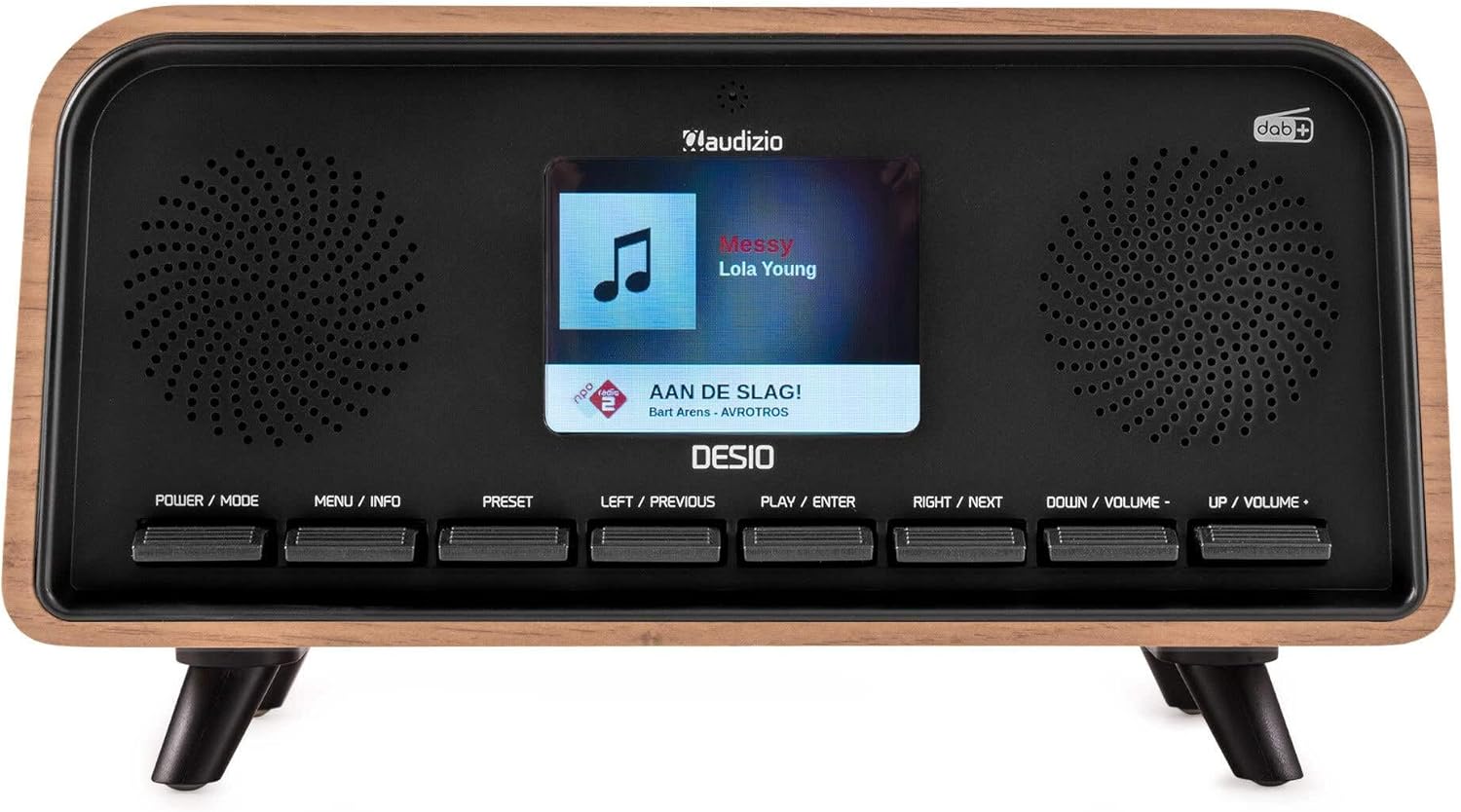
Фронт view of the Audizio Desio radio, showing the display playing music with artist and track information. The control buttons are visible below the screen.
- POWER / MODE: Press to turn on/off. Press and hold to switch between DAB, FM, Bluetooth, USB, and AUX modes.
- MENU / INFO: Press to access menu options. In playback mode, press to cycle through information display.
- ОРНОТУУ: Press to recall saved stations. Press and hold to save current station.
- LEFT / PREVIOUS: Navigate left in menus, or skip to previous track/station.
- PLAY / ENTER: Confirm selection in menus, or play/pause media.
- RIGHT / NEXT: Navigate right in menus, or skip to next track/station.
- DOWN / VOLUME -: Decrease volume, or navigate down in menus.
- UP / VOLUME +: Increase volume, or navigate up in menus.
Арткы панелдик байланыштар
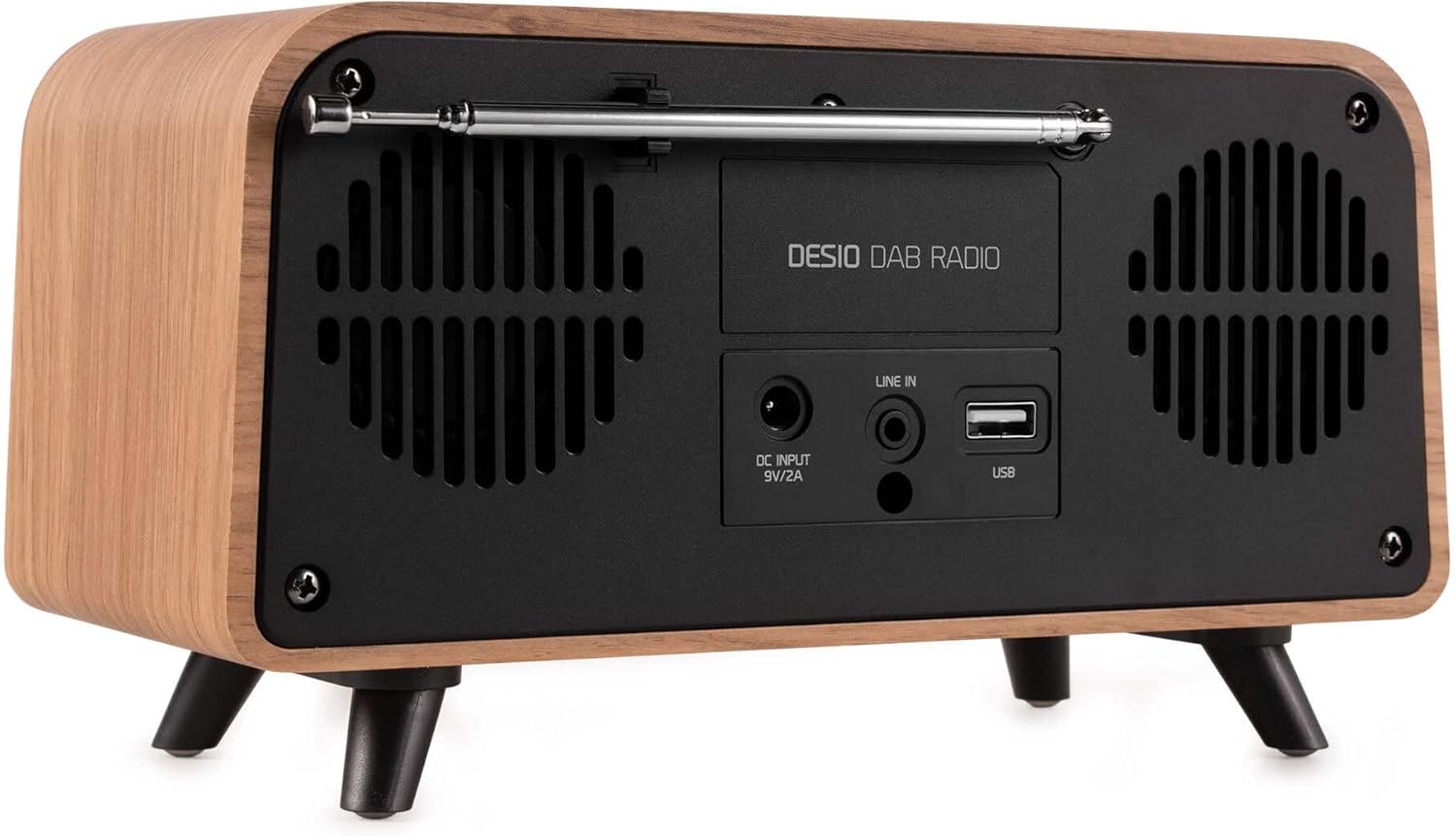
Арткы view of the Audizio Desio radio, highlighting the DC INPUT 9V/2A, LINE IN (3.5mm AUX), and USB ports. The telescopic antenna is extended.
- DC INPUT 9V/2A: Берилген кубат адаптерин бул жерге туташтырыңыз.
- LINE IN (3.5mm AUX): 3.5 мм аудио кабелин колдонуу менен тышкы аудио түзмөктөрдү туташтырыңыз.
- USB: MP3 ойнотуу үчүн USB флеш-дискти салыңыз.
- Телескопиялык антенна: Extend fully for optimal DAB/DAB+ and FM reception.
5. Баштапкы орнотуу
- Туташуу кубаты: Plug the provided DC 5V power adapter into the DC INPUT port on the rear of the radio, then plug the adapter into a wall outlet.
- Антеннаны узартуу: Fully extend the telescopic antenna located on the rear of the unit for best reception.
- Күйгүзүү: басыңыз POWER / РЕЖИМ радиону күйгүзүү үчүн баскыч.
- First-time DAB Scan: Upon first power-on, the radio will automatically perform a full scan for DAB/DAB+ stations. This may take a few minutes. The display will show the scanning progress.
- Убакыт/күн коюу: The time and date will usually be set automatically via DAB signal. If not, you can manually set them via the menu.
6. Иштөө нускамалары
6.1 DAB/DAB+ радиосунун иштеши

Фронт view of the Audizio Desio radio, displaying a DAB radio station ('NPO Klassiek') and current time.
- Select DAB Mode: басыңыз POWER / РЕЖИМ button repeatedly until 'DAB' is displayed.
- Станцияларды издөө: If no stations are found or you wish to rescan, press МЕНЮ / INFO, андан кийин колдонуңуз LEFT / PREVIOUS or ОҢГО / КИЙИНКИ to select 'Full Scan' and press PLAY / ENTER.
- Станцияны тандоо: колдонуу LEFT / PREVIOUS or ОҢГО / КИЙИНКИ Жеткиликтүү станцияларды карап чыгуу үчүн баскычтарды басыңыз. PLAY / ENTER бекет тандоо.
- Алдын ала сактоону сактоо: Станцияны сактоо үчүн, баскычын басып кармап туруңуз АЛДЫН АЛА баскычы. Колдонуу LEFT / PREVIOUS or ОҢГО / КИЙИНКИ to choose a preset number (1-50), then press PLAY / ENTER ырастоо үчүн.
- Алдын ала орнотуу: Сакталган станцияны чакырып алуу үчүн, баскычын басыңыз АЛДЫН АЛА button (do not hold). Use LEFT / PREVIOUS or ОҢГО / КИЙИНКИ to select the desired preset, then press PLAY / ENTER.

Фронт view of the Audizio Desio radio, showing the 'Preset Recall' menu on the display, indicating empty preset slots.
6.2 FM радиосунун иштеши
- FM режимин тандоо: басыңыз POWER / РЕЖИМ 'FM' көрсөтүлгөнгө чейин баскычын кайра-кайра басыңыз.
- Авто сканерлөө: Басып кармап туруңуз PLAY / ENTER to automatically scan for and save available FM stations.
- Кол менен жөндөө: Колдонуу LEFT / PREVIOUS or ОҢГО / КИЙИНКИ жыштыкты так жөндөө үчүн.
- Save/Recall Presets: Follow the same procedure as for DAB radio (Section 6.1).
6.3 Bluetooth (BT) иштөөсү

Фронт view of the Audizio Desio radio, with the display showing 'BT' (Bluetooth) mode and 'Connected' status.
- Select BT Mode: басыңыз POWER / РЕЖИМ button repeatedly until 'BT' is displayed. The radio will enter pairing mode, indicated by a flashing Bluetooth icon.
- Түзмөктү жупташтыруу: On your smartphone, tablet, or laptop, enable Bluetooth and search for available devices. Select 'Audizio Desio' from the list.
- Туташуу: Once paired, the display will show 'Connected'. You can now stream audio from your device to the radio.
- Ойнотуу башкаруусу: Use your connected device or the radio's PLAY / ENTER, LEFT / PREVIOUS, жана ОҢГО / КИЙИНКИ ойнотууну башкаруу үчүн баскычтар.
6.4 USB ойнотуу

Фронт view of the Audizio Desio radio, with the display showing 'USB' mode, current time, and details of an MP3 file ойнолуп жатат.
- USB дискти салыңыз: MP3 камтылган USB флеш-дискти (FAT32 форматында форматталган) салыңыз fileрадионун арткы жагындагы USB портуна сайыңыз.
- USB режимин тандаңыз: басыңыз POWER / РЕЖИМ button repeatedly until 'USB' is displayed. The radio will automatically start playing the first compatible audio file.
- Чабыттоо Files: Колдонуу LEFT / PREVIOUS or ОҢГО / КИЙИНКИ to skip tracks. Press PLAY / ENTER ойнотууну тындыруу/ улантуу.
6.5 AUX киргизүү
- Түзмөктү туташтыруу: Connect an external audio device (e.g., MP3 player, smartphone) to the 'LINE IN' (3.5mm AUX) port on the rear of the radio using a 3.5mm audio cable (not included).
- AUX режимин тандаңыз: басыңыз POWER / РЕЖИМ button repeatedly until 'AUX' is displayed.
- Ойноону көзөмөлдөө: Playback is controlled directly from your connected external device. Adjust volume using the radio's volume controls.
6.6 Alarm and Timer Functions
- Ойготкучтарды орнотуу: Ойготкуч жөндөөлөрүнө төмөнкү аркылуу кириңиз МЕНЮ / INFO button. You can set multiple alarms with customizable sources (DAB, FM, Buzzer), volume, and recurrence (daily, weekdays, weekends).
- Уйку таймери: The sleep timer allows the radio to turn off automatically after a set period. Access this function via the МЕНЮ / INFO button and select the desired duration.
- Чырым Function: When an alarm sounds, press any button (except Power) to activate the snooze function for a short period.
7. Техникалык тейлөө
- Тазалоо: Use a soft, dry, lint-free cloth to clean the radio's surface. Do not use abrasive cleaners, waxes, or solvents.
- Антеннага кам көрүү: Телескопиялык антеннаны ийилип же сындырып албаш үчүн этияттык менен кармаңыз.
- Сактагыч: Эгерде радиону узак убакытка сактап жатсаңыз, аны электр тармагынан сууруп, салкын, кургак жерде сактаңыз.
8. Кыйынчылыктарды
| Көйгөй | Мүмкүн себеп | Чечим |
|---|---|---|
| Күч жок | Кубат адаптери туташкан эмес же туура эмес розетка. | Check power adapter connection and try a different outlet. |
| DAB/FM кабыл алуу начар | Antenna not fully extended or poor signal area. | Fully extend the antenna. Try repositioning the radio. Perform a full scan. |
| Bluetooth туташпай жатат | Radio not in BT mode, device not in pairing mode, or too far away. | Ensure radio is in BT mode. Put your device in pairing mode. Move device closer to the radio (within 10m). |
| USB ойнотуу иштебей жатат | USB drive not inserted correctly, unsupported file format, or drive not FAT32. | USB дискти кайра салыңыз. Ишениңиз files are MP3. Check USB drive format (FAT32). |
| AUXтен үн чыкпайт | Radio not in AUX mode, cable faulty, or external device volume low. | Select AUX mode. Check 3.5mm cable. Increase volume on both radio and external device. |
9. Техникалык шарттар
- Бренд: Аудизио
- Модел: Desio
- Тюнер технологиясы: FM, DAB+
- Bluetooth: Version 5.0 (Range: 10m)
- Ойнотуу параметрлери: Bluetooth, USB, 3.5mm AUX input
- Алдын ала коюлган станциялар: 50
- Дисплей: 2.4 дюймдук Түстүү LCD
- Функциялары: Alarm, Sleep Timer, Snooze, Dimming, Week/Weekend Alarm
- Max Speaker Power: 30 Ватт
- Электр камсыздоо: DC 5V (Power Adapter)
- Продукциянын өлчөмдөрү (H x W x D): 32 x 16 x 18 см
- Салмагы: 1.66 кг
10. Кепилдик жана колдоо
Бул продукт стандарттуу өндүрүүчүнүн кепилдиги менен келет. Кепилдиктин толук шарттары жана эрежелери үчүн, сатып алуу учурунда берилген документтерди караңыз же сатуучуга кайрылыңыз.
For technical support, troubleshooting assistance, or service inquiries, please contact the Audizio customer support team or your local dealer. Please have your product model number (Desio) and purchase information ready when contacting support.