
1. Киришүү
Thank you for choosing the Angrox Backlit Universal Remote Control for LG Smart TVs. This remote is designed to provide a seamless and enhanced television viewing experience, especially in low-light conditions. It serves as a direct replacement for your original LG TV remote, offering broad compatibility and ease of use without requiring complex setup procedures. This manual provides detailed instructions for setting up, operating, maintaining, and troubleshooting your new remote control.
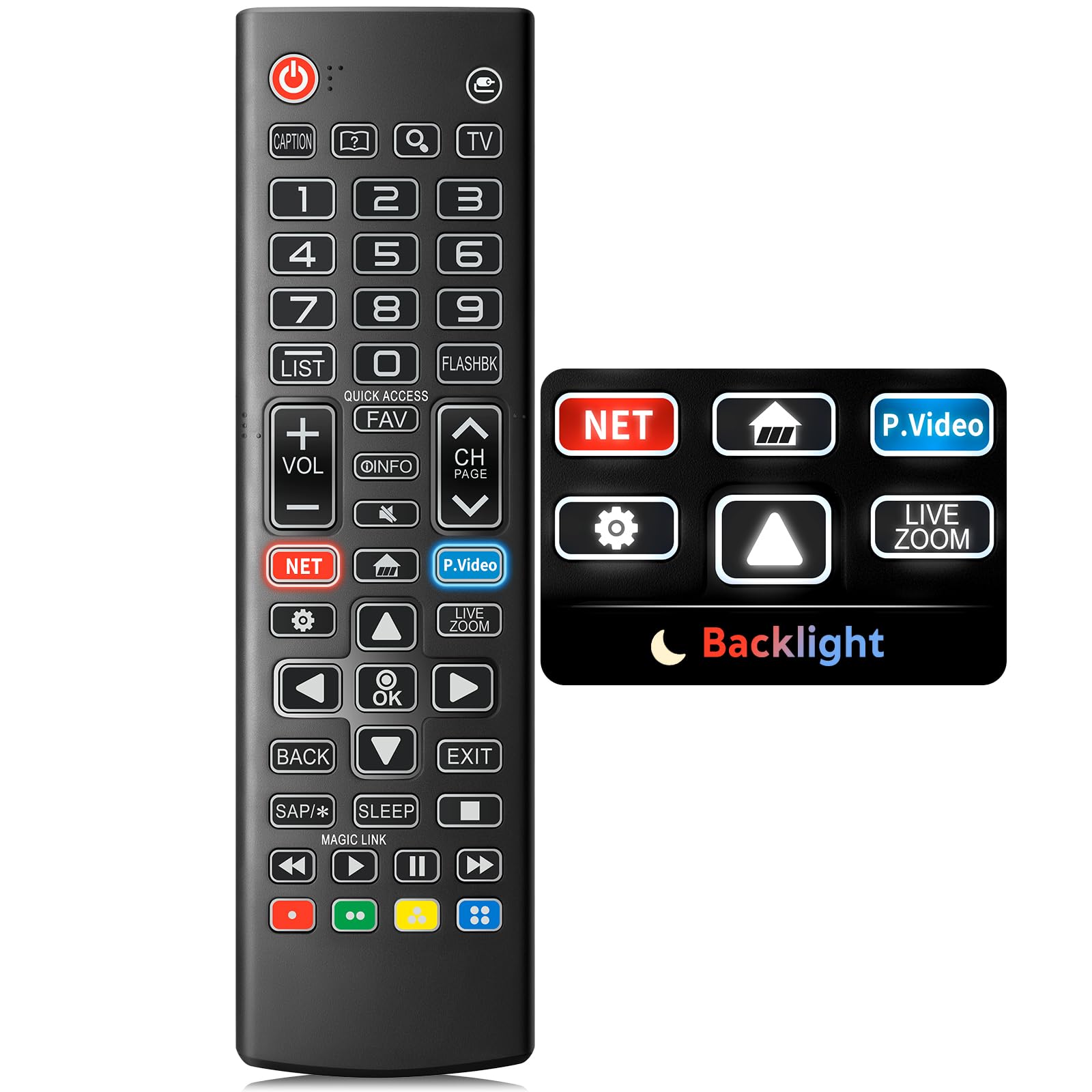
Image: The Angrox Backlit Universal Remote Control, a sleek black remote with clearly labeled buttons.
2. Негизги өзгөчөлүктөрү
- Easy Nighttime Operation: Features soft glow buttons that illuminate, allowing for clear visibility and use in dark environments without causing glare. The backlight activates with any button press and automatically turns off after 10 seconds of inactivity.
- Жалпы шайкештик: Designed as a direct replacement for LG TV remotes, compatible with all LG TV models. No programming or complex pairing is required; it works immediately out of the box.
- Жогорку сапаттагы аткаруу: Equipped with sensitive buttons and stable signal transmission for smooth and responsive operation.
- Эргономикалык дизайн: Shaped to fit comfortably in the hand, reducing fatigue during extended use. The button layout is intuitive for users of all ages.
- Туруктуу жана ишенимдүү: Constructed from high-quality, sturdy materials to withstand daily use and accidental drops, ensuring a long lifespan.

Image: A comparison showing the remote control with its backlight off and then with its buttons illuminated, highlighting the easy nighttime operation feature.

Image: The remote control displayed alongside various LG TV models (OLED, UHD, QNED, NanoCell), illustrating its broad compatibility.
3. Орнотуу нускамалары
3.1 Батареяны орнотуу
- Пульттун артындагы батарея бөлүкчөсүнүн капкагын табыңыз.
- Бөлүмдү ачуу үчүн капкакты ылдый жылдырыңыз же илгичти басыңыз.
- Эки (2) AAA батарейкасын салып, оң (+) жана терс (-) терминалдары бөлүмдүн ичиндеги индикаторлорго туура дал келгенин текшериңиз.
- Батарея бөлүкчөсүнүн капкагын бекем чыккыча ордуна жылдырыңыз.
Эскертүү: Batteries are not included with the remote control. Please use new AAA alkaline batteries for optimal performance.

Image: A visual guide demonstrating the correct insertion of two AAA batteries into the remote control's battery compartment.
3.2 Initial Use (No Pairing Required)
The Angrox Backlit Universal Remote Control is designed for immediate use with LG Smart TVs. No pairing or programming steps are necessary. Once batteries are installed, the remote is ready to control your LG television.
4. Иштөө нускамалары
This section details the functions of the buttons on your Angrox remote control.

Image: A comprehensive layout of the remote control, with labels pointing to each button and describing its primary function.
4.1 Негизги функциялар
- Күч (
 ): Телевизорду күйгүзөт же өчүрөт.
 - Киргизүү (): Changes the input source (e.g., HDMI 1, HDMI 2).
- Үнүн жогорулатуу/төмөндөтүү (VOL +/-): Үн деңгээлин тууралайт.
- Канал өйдө/төмөн (CH Page): Телеканалды өзгөртөт.
- Үнсүз (): Телевизордун үнүн өчүрөт же үнүн чыгарат.
- Сан баскычтары (0-9): Канал номерлерин же башка сандык киргизүүлөрдү түз киргизет.
- Чабыттоо баскычтары (өйдө/төмөн/сол/оң): Менюларды жана параметрлерди жылдыруу үчүн колдонулат.
- OK баскычы: Selects menu items or confirms your input.
4.2 Special Function Buttons
- Netflix баскычы: Launches the Netflix application directly.
- Amazon Prime Video Button: Launches the Amazon Prime Video application directly.
- Ыкчам жетүү: A feature that allows you to enter a specified app or Live TV directly by pressing and holding the number buttons.
- Тизме: Сакталган программалар тизмесине жетет.
- Flashback: Мурункуга кайтат viewed channel or input.
- Маалымат: Displays information on the current program.
- Сүйүктүү: Сүйүктүү каналдар тизмесине кириңиз.
- Орнотуулар (): Accesses the Quick Settings menu.
- Артка: Экрандагы дисплейлерди тазалап, сыналгыга кайтат viewing.
- Чыгуу: Учурдагы менюдан чыгат.
- Уйку: Accesses the sleep timer.
- Медианы башкаруу баскычтары (ойнотуу, тындыруу, токтотуу, алдыга тездетүү, артка түрүү): Controls media content playback.
4.3 Арткы жарык функциясы
The remote control features a soft backlight for easy use in the dark. Simply press any button, and the backlight will turn on. It will automatically turn off after 10 seconds of inactivity to conserve battery life.
Video: A demonstration of the Angrox Backlit Remote for LG Smart TV, showcasing its easy nighttime use and responsive buttons. This video highlights the convenience of the backlit feature in dark environments.
5. Техникалык шарттар
| Бренд | Angrox |
| Модель аты | AKB75095307 |
| Модель номери | AKB75095307 |
| Өзгөчөлүктөр | Backlit, Ergonomic, Lightweight, No Programming Required, Universal |
| Шайкеш түзмөктөр | Television (All LG TV models) |
| Колдоого алынган түзмөктөрдүн максималдуу саны | 1 |
| Байланыш технологиясы | Инфракызыл |
| Button Quantity | 30 |
| Controller Type | Control Button |
| Максималдуу диапазон | 10 метр (болжол менен 33 фут) |
| Керектүү батарейкалардын саны | 2 AAA батарейка |
| Батарея түрү | щелочтуу |
| Элементтин өлчөмдөрү (L x W x Y) | 9.25"L x 1.89"W x 0.73"H |
6. Кыйынчылыктарды
Эгерде сиз алыстан башкаруу пультуңуз менен көйгөйлөргө туш болсоңуз, төмөнкү кеңири таралган чечимдерди караңыз:
- Пульт жооп бербей жатат:
- Батареялар туура полярдуулук менен (+/-) туура салынганын текшериңиз.
- Эски батарейкаларды жаңы AAA щелочтуу батарейкаларына алмаштырыңыз.
- Алыстан башкаруу пульту менен сыналгынын инфракызыл кабылдагычынын ортосунда кандайдыр бир тоскоолдук бар-жогун текшериңиз.
- Ensure you are within the maximum operating range (10 meters) of the TV.
- Арткы жарык иштебейт:
- Verify battery power. Low batteries may affect backlight functionality.
- The backlight is designed to turn off after 10 seconds of inactivity. Press any button to reactivate it.
- Specific buttons not working (e.g., Netflix, Amazon Prime):
- Ensure your LG Smart TV is connected to the internet and the respective applications are installed and updated.
- Some smart TV features or app shortcuts may vary slightly depending on your TV's model and region.
- Пульт жай иштеп же жооп бербей жаткандай сезилет:
- Батареяларды жаңысына алмаштырыңыз.
- Clean the remote's infrared emitter (at the top) and the TV's IR receiver with a soft, dry cloth to ensure a clear signal path.
7. Техникалык тейлөө
Angrox пультуңуздун узак мөөнөттүү иштешин жана оптималдуу иштешин камсыз кылуу үчүн, төмөнкү техникалык тейлөө көрсөтмөлөрүн аткарыңыз:
- Тазалоо: Use a soft, dry cloth to clean the remote's surface. Avoid using liquid cleaners, aerosols, or harsh chemicals, as they may damage the remote.
- Батареяны алмаштыруу: Replace batteries promptly when the remote's performance declines or if the backlight becomes dim. Remove batteries if the remote will not be used for an extended period to prevent leakage.
- Сактагыч: Пультту салкын, кургак жерде, күндүн түз тийген нурунан, өтө жогорку температурадан жана жогорку нымдуулуктан алыс сактаңыз.
- Тамчылардан качуу: Бышык болгону менен, кайра-кайра түшүп кетүү ички компоненттерге зыян келтириши мүмкүн. Пультту этияттык менен колдонуңуз.
8. Кепилдик жана колдоо
8.1 Кепилдик маалыматы
The Angrox Backlit Universal Remote Control (Model AKB75095307) is covered by a 90 күндүк кепилдик from the date of purchase. This warranty covers manufacturing defects and ensures the product functions as described under normal use. It does not cover damage caused by misuse, accidents, unauthorized modifications, or normal wear and tear.
8.2 Кардарларды колдоо
For any questions, technical assistance, or warranty claims, please contact Angrox customer support through the retailer where you purchased the product or visit the official Angrox store online. Please have your purchase receipt and product model number available when contacting support.