
1. Киришүү
The ZTE U60 Pro MU5250 is a portable 5G Wi-Fi 7 router designed to provide high-speed internet connectivity on the go. It features an ultra-high-speed 5G-A network, the flagship Snapdragon X75 chip platform, and advanced Wi-Fi 7 technology. This device is equipped with a 10,000 mAh high-capacity battery, offering extended usage and the ability to function as a power bank for other electronic devices. Its 3.5-inch HD touchscreen allows for easy network management and traffic monitoring. The U60 Pro supports up to 64 simultaneous device connections and offers convenient NFC one-touch connectivity, intelligent AI scenes, and AI voice management for a fast, stable, and efficient internet experience.

Сүрөт 1.1: Алдыңкы view of the ZTE U60 Pro MU5250, showing its 3.5-inch display with network information.
2. Орнотуу
2.1 Пакеттин мазмуну
Баштоодон мурун, бардык компоненттер бар экенин текшериңиз:
- ZTE U60 Pro MU5250 5G Pocket Wi-Fi 7 Router
- AC адаптер
- Колдонуучунун Колдонмосу (бул документ)
2.2 SIM картаны орнотуу
To enable 5G connectivity, a compatible SIM card must be installed.
- SIM карта уячасын түзмөктүн капталынан табыңыз.
- Using the provided SIM ejector tool (if applicable) or a small pin, gently press into the small hole next to the SIM tray to eject it.
- Place your 5G-enabled Nano-SIM card into the tray, ensuring proper orientation.
- SIM лотокту кылдаттык менен кайра орнотуңуз.
2.3 Күйгүзүү/өчүрүү
To power on the device, press and hold the power button located on the side until the screen illuminates. To power off, press and hold the power button until the power-off options appear on the screen, then select 'Power Off'.
2.4 Initial Wi-Fi Connection
After powering on, the device will automatically search for a 5G network. You can connect to the Wi-Fi network using one of the following methods:
- Кол менен туташуу: On your device (phone, laptop, etc.), search for available Wi-Fi networks. Select the network name (SSID) displayed on the U60 Pro's screen and enter the password (also displayed on the screen).
- NFC бир тийүү менен туташуу: For Android phones with NFC enabled, tap your phone against the NFC area on the U60 Pro. Your phone will automatically connect to the Wi-Fi network without requiring a password.

Image 2.1: Illustrates the NFC one-touch connection process for quick Wi-Fi access.
3. Иштөө нускамалары
3.1 Сенсордук экран интерфейси
The 3.5-inch HD touchscreen provides a minimalist user interface for managing the device. You can view network status, data usage, signal strength, battery level, and adjust basic settings directly from the screen. Swipe and tap gestures are used for navigation.
3.2 Бир нече түзмөктөрдү туташтыруу
The ZTE U60 Pro supports simultaneous connections for up to 64 devices, allowing multiple users to share the 5G network. Connect devices using the standard Wi-Fi connection method as described in Section 2.4.
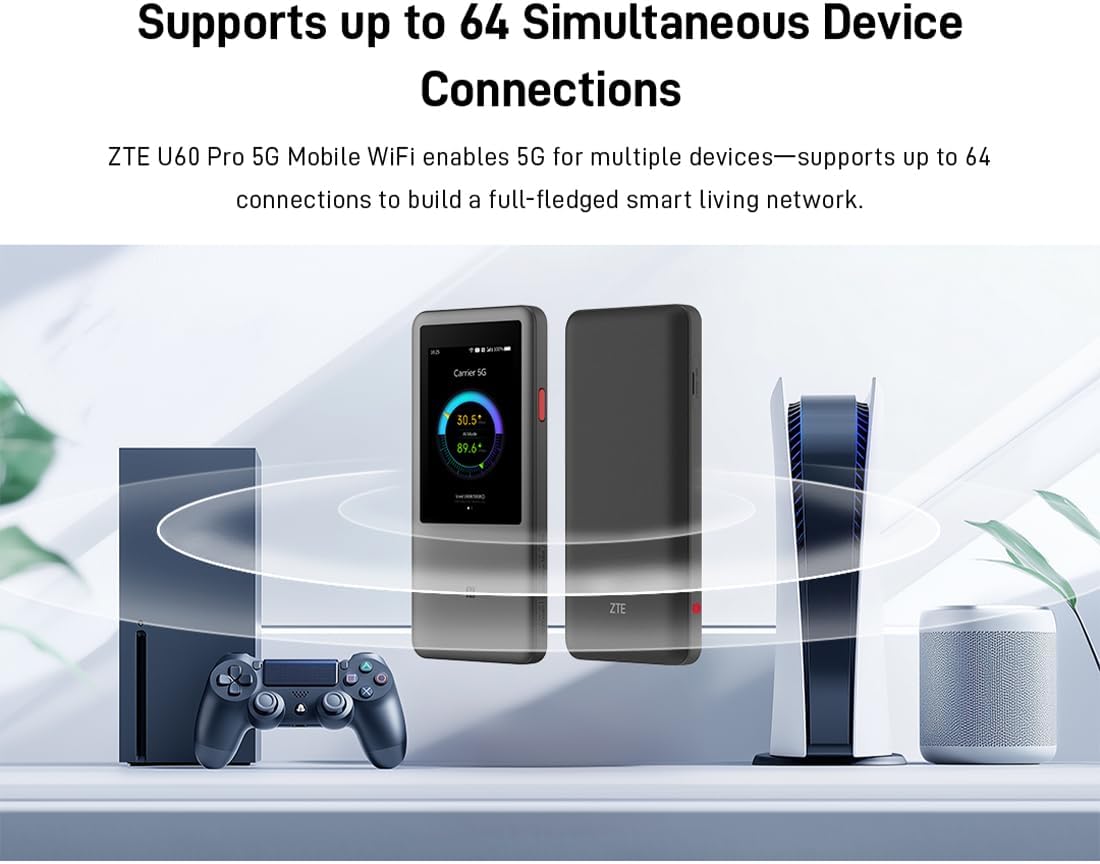
Image 3.1: The ZTE U60 Pro providing 5G Wi-Fi connectivity to various electronic devices.
3.3 AI Smart Scene Modes
The device features intelligent AI Scene technology with dynamic bandwidth allocation. It adjusts bandwidth and priority for applications based on user usage patterns to ensure smooth operation. Available modes include:
- Anchor Mode: Optimized for live streaming.
- Конференция режими: Prioritizes video conferencing applications.
- Видео режими: Enhances video playback and streaming.
- Ылдамдык режими: Maximizes overall network speed.
- Оюн режими: Reduces latency for online gaming.
3.4 AI Voice Management (via ZTE Smart Life APP)
The ZTE Smart Life APP enables effortless device management, including AI voice control. This feature allows for intelligent management of the router through voice commands. Download the ZTE Smart Life APP from your device's app store.

Image 3.2: The ZTE Smart Life APP interface demonstrating AI voice management capabilities.
3.5 Power Bank функциясы
The U60 Pro can also serve as a power bank. With its 10,000 mAh battery and 18W reverse fast charging, you can charge other electronic devices by connecting them to the router's appropriate port (e.g., USB-C).
4. Техникалык тейлөө
4.1 Батареяга кам көрүү
The device is equipped with a 10,000 mAh battery. To maximize battery life:
- Ашыкча температурадан сактаныңыз.
- Оптималдуу кубаттоо үчүн берилген 27 Вт тез кубаттагычты колдонуңуз.
- Узак мөөнөткө сактоо үчүн, батареяны болжол менен 50% га чейин заряддап, салкын, кургак жерде сактаңыз.
4.2 Жалпы түзмөккө кам көрүү
To ensure the longevity and optimal performance of your ZTE U60 Pro:
- Аппаратты таза жана чаңдан алыс кармаңыз. Тазалоо үчүн жумшак, кургак чүпүрөктү колдонуңуз.
- Аппаратты сууга же ашыкча нымдуулукка дуушар кылуудан алыс болуңуз.
- Аппаратты кулатпаңыз же катуу таасирлерге дуушар кылбаңыз.
- Ашыкча ысып кетүүнүн алдын алуу үчүн колдонууда жакшы желдетүүнү камсыз кылыңыз.
5. Кыйынчылыктарды
If you encounter issues with your ZTE U60 Pro, refer to the following common solutions:
5.1 Тармакка туташуу жок
- SIM картаны текшерүү: Ensure the SIM card is correctly inserted and activated with a 5G data plan.
- Сигнал күчү: Verify the signal strength indicator on the device's screen. Move to an area with better 5G coverage if the signal is weak.
- Түзмөктү кайра иштетүү: Power off and then power on the U60 Pro.
- Тармак орнотуулары: Check network settings via the touchscreen or ZTE Smart Life APP to ensure APN settings are correct (usually automatic).
5.2 Wi-Fi туташуу маселелери
- Туура эмес сырсөз: Double-check the Wi-Fi password displayed on the U60 Pro's screen.
- Түзмөктүн чеги: Ensure you have not exceeded the maximum of 64 connected devices.
- Restart Connected Device: Restart the device attempting to connect to the Wi-Fi.
- Маршрутизаторду кайра иштетүү: Restart the ZTE U60 Pro.
5.3 Интернеттин жай ылдамдыгы
- Сигнал күчү: A weak 5G signal will result in slower speeds.
- Data Cap: Check if your data plan has a fair usage policy or if you have exceeded a data cap, which might throttle speeds.
- AI Scene Mode: Ensure the appropriate AI Scene mode (e.g., Speed Mode) is selected for your activity.
- Интерференция: Түзмөктү тоскоолдук жаратышы мүмкүн болгон башка электрондук түзүлүштөрдөн алыс жылдырыңыз.
6. Техникалык шарттар
The following table details the technical specifications of the ZTE U60 Pro MU5250:

Image 6.1: The Snapdragon X75 Flagship Chip-set Platform, central to the router's performance.
| Өзгөчөлүк | Деталь |
|---|---|
| Бренд | ZTE |
| Модель аты | MU5250 |
| Элемент моделинин номери | MU5250 |
| Өндүрүүчү | ZTE |
| Өзгөчө өзгөчөлүк | 5G Connection, Wi-Fi 7, AI Scenes, Voice Control, Power Bank |
| Байланыш технологиясы | 5G, Wi-Fi |
| Wi-Fi Generation | Wi-Fi 7 |
| Зымсыз байланыш стандарты | 802.11a, 802.11ac, 802.11b, 802.11g, 802.11n |
| Жыштык тилкесинин классы | Dual Band |
| Жыштык | 5 ГГц |
| Маалыматтарды өткөрүү ылдамдыгы | 4.29 Gigabits per second (Download) |
| Maximum Upstream Data Transfer Rate | 3600 Megabits per second (Wi-Fi 7 Peak Throughput) |
| Антенналардын саны | 9 (Omnidirectional 5G Array) |
| Камтуу | Wide and complete (360° full-band coverage) |
| Башкаруу ыкмасы | тийүү |
| Операция системасы | ZyNOS |
| Коопсуздук протоколу | WPA3 |
| Router Firewall Security Level | Негизги |
| Батарея(лар) | 1 AAA - included (Note: Product description mentions 10,000 mAh, likely internal) |
| Элемент Салмагы | 435 грамм |
| Камтылган компоненттер | AC адаптер |
| Шайкеш түзмөктөр | Game Console, various Wi-Fi enabled devices |
| Продукт үчүн сунушталган колдонуу | Streaming, Gaming, Outdoor/Travel, Small Office |
| Интернет байланышы | Ооба |
| Modem Compatible | No (Functions as a standalone 5G router) |
| Smart Home шайкештиги | Not Smart Home Compatible |
| Запастык бөлүктөрдүн болушу | Маалымат жеткиликсиз |
| Программалык камсыздоонун жаңыртууларына кепилдик берилет | Маалымат жеткиликтүү эмес |

Image 6.2: Highlighting the 5G ultra-high-speed network of the ZTE U60 Pro MU5250.

Image 6.3: Illustration of the 9 omnidirectional 5G antennas providing 360° full-band coverage.
7. Колдоо жана кепилдик
7.1 Кардарларды колдоо
For further assistance, technical support, or inquiries not covered in this manual, please refer to the official ZTE support channels or contact your retailer.
7.2 Кепилдик маалыматы
Warranty terms and conditions may vary by region and retailer. Please refer to the warranty card included with your product or consult your point of purchase for detailed warranty information.