
1. Киришүү
This manual provides detailed instructions for the setup, operation, maintenance, and troubleshooting of your ASHATA Business IP Phone. Designed for small to medium-sized businesses, this 2-line VoIP phone offers advanced features such as a 2.4-inch color display, dual 1000M Ethernet ports, Bluetooth 5.0 connectivity, noise cancellation, and integrated Power over Ethernet (PoE) for a streamlined communication experience.
2. Продукт бүтүп калдыview
2.1 Негизги өзгөчөлүктөрү
- Dual Service Lines: Supports two service lines, ideal for managing multiple calls efficiently.
- 2.4 дюймдук түстүү дисплей: A clear, backlit graphical LCD for easy call management and information display.
- Интегралдык PoE: Power over Ethernet support simplifies installation by delivering power and data through a single cable.
- Bluetooth 5.0: Enables wireless connectivity for compatible headsets, offering greater mobility.
- Ызы -чууну жокко чыгаруу: Minimizes background noise to ensure clear and uninterrupted conversations.
- Ар тараптуу байланыш: Includes USB A, RJ9, and EHS ports for various headset options.
- Эргономикалык дизайн: Features an adjustable stand for optimal viewing angles and user comfort.
2.2 Пакеттин мазмуну
Пакетиңизде бардык буюмдар бар экенин текшериңиз:
- ASHATA Business IP Phone Unit
- Телефон
- Телефон шнур
- Ethernet кабели
- Үстөл столу
- Ыкчам баштоо колдонмосу (эгер бар болсо)
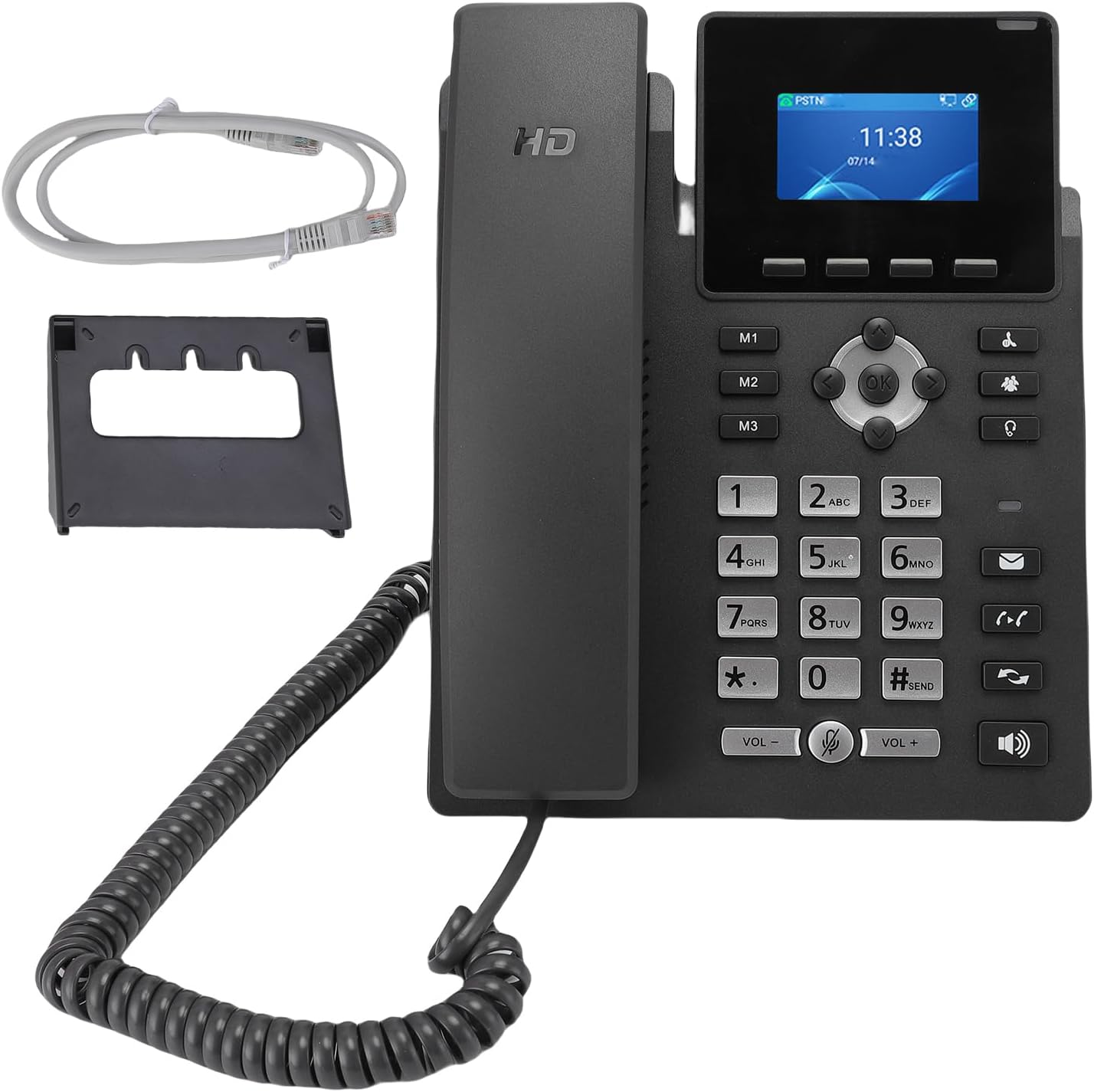
Image: The ASHATA Business IP Phone, showing the main unit, handset, coiled cord, desk stand, and an Ethernet cable, indicating the complete package contents.
3. Орнотуу
3.1 Физикалык байланыштар
- Телефонду туташтыруу: Оролгон трубканын шнурунун бир учун трубкага, экинчи учун телефон түзмөгүндөгү трубка портуна сайыңыз.
- Тармакка туташуу (PoE): Эгер Ethernet аркылуу кубаттоону колдонсоңуз, Ethernet кабелинин бир учун телефондун арткы жагындагы LAN портуна, ал эми экинчи учун PoE иштетилген тармактык коммутаторго же роутерге туташтырыңыз. Телефон автоматтык түрдө күйөт.
- Connect to Network (Non-PoE): If PoE is not available, connect one end of the Ethernet cable to the LAN port on the back of the phone and the other end to your network. Then, connect a compatible 5V DC power adapter (not included) to the DC 5V power port on the phone.
- Компьютерди туташтыруу (кошумча): If you wish to connect a computer through the phone, use another Ethernet cable to connect the PC port on the phone to your computer's Ethernet port.
- Attach Desk Stand: Securely attach the included desk stand to the bottom of the phone unit. The stand allows for adjustable viewбурчтар.

Сүрөт: Арткы view of the ASHATA Business IP Phone, highlighting the LAN, PC, headset, and DC 5V power input ports for various connections.

Сүрөт: каптал view of the ASHATA Business IP Phone, demonstrating the adjustable desk stand that allows for different viewбурчтар.
3.2 Баштапкы конфигурация
Upon first power-up, the phone will initiate its boot sequence. The 2.4-inch color display will show the boot progress. Once fully booted, the phone will attempt to obtain network settings via DHCP. If your network requires static IP configuration or specific VoIP server settings, these can be configured via the phone's menu system or a web interface (refer to your network administrator for details).
4. Иштөө нускамалары
4.1 Чалууларды кабыл алуу жана кабыл алуу
- Чалуу үчүн: Pick up the handset or press the Speaker button. Dial the desired number using the keypad. Press the 'Send' or 'Dial' button (if available) or wait for the call to connect automatically.
- Чакырууну кабыл алуу үчүн: When the phone rings, pick up the handset or press the Speaker button. The display will show caller ID information if available.
- Дисплейди колдонуу: The 2.4-inch color display provides information such as caller ID, call duration, and menu options. Use the navigation buttons (up, down, left, right, OK) to navigate through menus.
- Үн почтасын өткөрүү: During an active call, you can transfer the call to voicemail by following the on-screen prompts or using a dedicated 'Voicemail' or 'Transfer' button, then selecting the voicemail option.
4.2 Bluetooth 5.0 Байланыш
The ASHATA Business IP Phone supports Bluetooth 5.0 for connecting wireless headsets.
- Bluetooth иштетүү: Navigate to the phone's menu, find the Bluetooth settings, and enable it.
- Гарнитураны жупташтыруу: Put your Bluetooth headset into pairing mode. On the phone, select 'Scan for Devices' and choose your headset from the list. Follow any on-screen prompts to complete pairing.
- Use Headset: Once paired, you can typically answer/end calls using the headset's controls or by selecting the headset option on the phone.
4.3 Headset Compatibility
In addition to Bluetooth, the phone supports wired headsets via USB A, RJ9, and EHS ports. Connect your compatible headset to the appropriate port for hands-free communication.
4.4 ызы-чууну жокко чыгаруу
The integrated noise cancellation technology actively reduces background noise during calls, ensuring that your voice is transmitted clearly and that you can hear the other party without distraction. This feature is always active to provide optimal audio quality.

Сүрөт: жогорудан төмөнгө view of the ASHATA Business IP Phone, showing the 2.4-inch color display, numerical keypad, and various function buttons for call management.
5. Техникалык тейлөө
5.1 Тазалоо
- Телефондун бетин жана дисплейин тазалоо үчүн жумшак, кургак, түксүз чүпүрөктү колдонуңуз.
- өжөр белгилери үчүн, бир аз гampчүпүрөктү суу же жумшак, абразивдүү тазалагыч менен жууп салыңыз.
- Телефонго түздөн-түз катуу химиялык заттарды, абразивдүү тазалоочу каражаттарды же аэрозоль чачыраткычтарын колдонуудан алыс болуңуз.
- Тазалоодон мурун телефонду өчүрүп, розеткадан сууруп коюңуз.
5.2 Жалпы кам көрүү
- Телефонду түз күн нурунан, жылуулук булактарынан жана ашыкча нымдуулуктан алыс кармаңыз.
- Телефонду түшүрүп алуудан же катуу соккуга кабылтуудан алыс болуңуз.
- Do not attempt to disassemble the phone; this will void the warranty.
6. Кыйынчылыктарды
If you encounter issues with your ASHATA Business IP Phone, refer to the following common problems and solutions:
| Көйгөй | Мүмкүн себеп | Чечим |
|---|---|---|
| Терүү үнү жок | Network cable loose or disconnected; Phone not powered; VoIP registration failed. | Check Ethernet cable connection. Ensure power adapter (if not PoE) is connected. Verify network connectivity and VoIP account registration status on the display. |
| Чалууларды жасоо/кабыл алуу мүмкүн эмес | VoIP account not registered; Incorrect network settings; Firewall blocking VoIP traffic. | Check VoIP account status on the display. Verify network settings (IP address, gateway, DNS). Consult your network administrator regarding firewall settings. |
| Үн сапаты начар (жаңылык, статикалык) | Network congestion; Faulty handset/headset; Environmental noise. | Check network bandwidth. Try a different handset or headset. Ensure noise cancellation is active (it is by default). |
| Bluetooth headset not connecting | Headset not in pairing mode; Bluetooth disabled on phone; Interference. | Ensure headset is in pairing mode. Verify Bluetooth is enabled on the phone. Move closer to the phone and away from other wireless devices. |
7. Техникалык шарттар
| Өзгөчөлүк | Деталь |
|---|---|
| Бренд | АШАТА |
| Модел | Бизнес IP телефон |
| Түс | Кара |
| Телефон түрү | жоон |
| Дисплей | 2.4-inch Color Graphical LCD (Backlit) |
| VoIP линиялары | 2 Service Lines |
| Ethernet порттору | Dual 1000M (Gigabit) Ethernet Ports (LAN, PC) |
| Күч | Power over Ethernet (PoE) or DC 5V Power Adapter (not included) |
| Bluetooth | Bluetooth 5.0 |
| Гарнитура порттору | USB A, RJ9, EHS |
| Noise Cancellation | Интеграцияланган |
| Конференциянын функциясы | Негизги |
| Чалуучунун ID | No (as per specifications, though display shows it if provided by service) |
| Multiple Simultaneous Calls | Multi-line operation |
| Келип чыккан өлкө | Кытай |
| ASIN | B0FX1R3R15 |
8. Кепилдик жана колдоо
For warranty information and technical support, please refer to the documentation provided with your purchase or contact your vendor. Keep your purchase receipt as proof of purchase for any warranty claims.