
ROCAM CR1030DAB
ROCAM CR1030DAB Solar DAB+/FM Emergency Radio User Manual
Модель: CR1030DAB
Introduction
Сатып алганыңыз үчүн рахматasing the ROCAM CR1030DAB Solar DAB+/FM Emergency Radio. This portable radio is designed for reliable communication and power in various situations, from daily use to outdoor adventures and emergencies. It features DAB+/FM radio reception, Bluetooth connectivity, multiple charging options including solar and hand crank, a powerful 12000 mAh battery, and integrated lighting functions. Please read this manual thoroughly before use to ensure proper operation and to maximize the product's lifespan.
Коопсуздук нускамалары
- Түзмөктү өтө жогорку температурага, узак убакыт бою (кубаттоодон тышкары) түз күн нуруна же жогорку нымдуулукка дуушар кылбаңыз.
- Радиону түшүрүп алуудан же катуу соккуга кабылтуудан алыс болуңуз.
- Агрегатты өз алдынча бөлбөңүз же оңдоого аракет кылбаңыз. Бардык тейлөөлөрдү квалификациялуу кызматкерлерге тапшырыңыз.
- Keep the device away from water and other liquids, except for its IPX6 water resistance which protects against strong jets of water. Do not submerge.
- Ensure the USB-C port cover is securely closed when not in use, especially in wet conditions.
- Кол менен айлануучу механизмди колдонгондо, аны орточо, бир калыпта буруңуз. Ашыкча күч же ылдамдык механизмге зыян келтириши мүмкүн.
- The SOS alarm is very loud. Avoid activating it unnecessarily or near sensitive ears.
- Батареяларды жергиликтүү эрежелерге ылайык жок кылыңыз.
Пакеттин мазмуну
Пакетте бардык буюмдар бар экенин текшериңиз:
- 1 × ROCAM CR1030DAB Radio
- 1 × USB-C заряддоо кабели
- 1 × Portable Strap
- 1 × Колдонуучунун колдонмосу
Продукт бүттүview
Радионун компоненттери жана башкаруу элементтери менен таанышып алыңыз.

Сүрөт: Фронт view of the ROCAM CR1030DAB radio, highlighting its display, control buttons, and extended antenna. The radio is shown in an outdoor setting, emphasizing its portable and robust design.
Негизги компоненттер:
- 2.4 дюймдук түстүү дисплей: Shows station information, battery level, time, and menu options.
- Башкаруу баскычтары: Power, Mode, Menu, Scan, Volume, Navigation (Up/Down/Left/Right/OK), SOS.
- Телескопиялык антенна: For optimal DAB+/FM signal reception.
- Күн панели: Located on top for solar charging.
- Кол бурчу: On the side for manual power generation.
- Кол чырак: Integrated LED light on one end.
- Окуу Лamp: Foldable panel with 12 LEDs.
- USB-C киргизүү/чыгаруу порту: For charging the radio and charging external devices.
- Наушник уячасы (3.5 мм): Жеке угуу үчүн.
- Батарея бөлүмү: AAA резервдик батарейкалар үчүн.

Сүрөт: А деталдуу view of the radio's 2.4-inch color display, illustrating its clarity and the information presented, such as station name and signal strength.
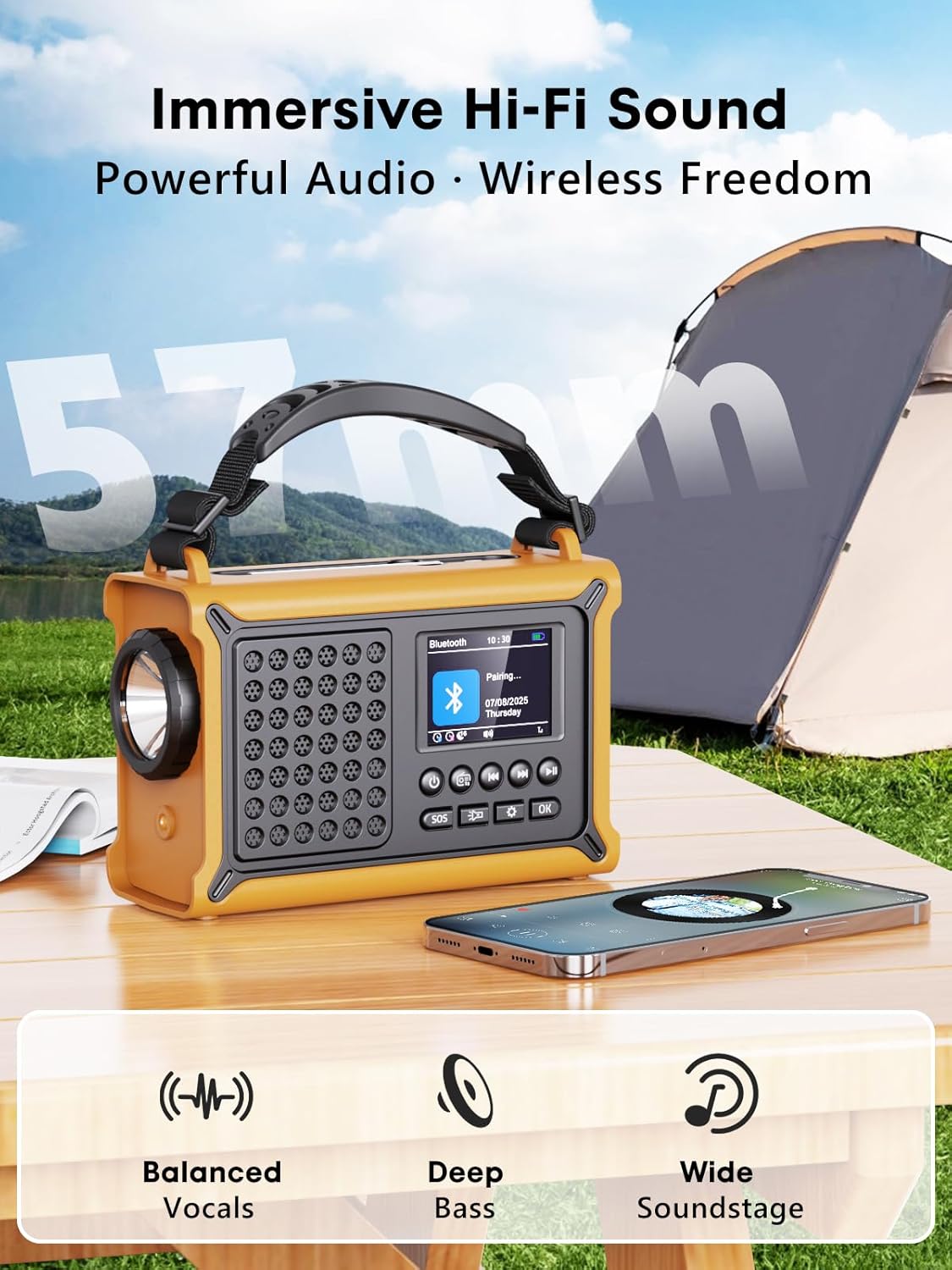
Сүрөт: The radio highlighting its audio capabilities, featuring 57mm speakers designed for clear, powerful sound with balanced vocals and deep bass.

Сүрөт: The radio held in hand, illustrating its ultra-portable design and compact dimensions (17.3 cm length, 12.1 cm height, 7.4 cm width), along with its IPX6 water resistance.
Жайгашуу
1. Баштапкы заряддоо
Before first use, it is recommended to fully charge the radio's internal 12000 mAh battery using the supplied USB-C cable. Connect the USB-C cable to the radio's USB-C input port and the other end to a standard USB power adapter (not included) or a computer USB port. The charging indicator on the display will show the charging status. A full charge ensures maximum battery life and optimal performance.
2. Inserting AAA Batteries (Optional Backup)
For an additional power backup, you can insert 3 AAA batteries (not included) into the battery compartment. This provides an alternative power source if the internal rechargeable battery is depleted and other charging methods are unavailable.
3. Power On and Language Selection
басып, кармап туруңуз Күч button to turn on the radio. Upon first power-on, you may be prompted to select your preferred language from the 12 available options. Use the navigation buttons to select and the OK ырастоо үчүн баскыч.
Иштөө нускамалары
Күйгүзүү/өчүрүү
- Күйгүзүү үчүн: басып, кармап туруңуз Күч баскычы.
- Өчүрүү үчүн: басып, кармап туруңуз Күч кайра баскычын.
DAB+/FM Radio Operation
- Режимди тандоо: басыңыз Mode DAB+ жана FM радио режимдери ортосунда которулуу үчүн баскыч.
- Антеннаны узартуу: Fully extend the telescopic antenna for best reception.
- Авто сканерлөө: DAB+ же FM режиминде баскычын басыңыз Скандоо button to automatically search for available stations. The radio will store up to 40 DAB+ and 40 FM stations.
- Кол менен жөндөө/станцияны тандоо: колдонуу Өйдө/Төмөн navigation buttons to browse through scanned stations or manually tune frequencies.
- Үндү көзөмөлдөө: колдонуу Көлөм +/- үн деңгээлин тууралоо үчүн баскычтар.
- Алдын ала орнотуулар: Станцияны сактоо үчүн, каалаган станцияга күүлөп, андан кийин басып, кармап туруңуз OK button. Use navigation buttons to select a preset number and press OK to save. To recall a preset, briefly press the OK button, then use navigation to select the preset.
Bluetooth байланышы
- Bluetooth режимине кириңиз: басыңыз Mode button until "Bluetooth" appears on the display. The radio will enter pairing mode, indicated by a blinking Bluetooth icon.
- Жупташтыруу: On your smartphone or other Bluetooth device, enable Bluetooth and search for available devices. Select "ROCAM CR1030DAB" from the list.
- Туташкан: Once paired, the radio will emit a confirmation sound, and the Bluetooth icon will stop blinking. You can now play audio from your device through the radio.
Радиону заряддоо
The radio offers multiple charging methods for its internal 12000 mAh battery:

Сүрөт: The radio demonstrating its versatile charging capabilities, including the solar panel, USB-C input, hand crank, and the option for AAA batteries.
- USB-C заряддоо: Connect the supplied USB-C cable to a 5V/2A (or higher) USB power source. This is the fastest charging method.
- Күн кубаты: Place the radio with the solar panel facing direct sunlight. The solar charging indicator will illuminate. This method is ideal for maintaining charge or slow charging in emergencies. The 8500 mm² panel provides 350 mA.
- Кол менен заряддоо: Rotate the hand crank clockwise or counter-clockwise at a steady pace (approx. 120-150 RPM). Cranking for 1 minute can provide several minutes of radio playback. The hand crank generates 650 mA.
- AAA батареялары: If the internal battery is depleted, the radio can operate using 3 AAA batteries (not included) inserted into the battery compartment.
External Device Charging (Power Bank Function)
The radio can act as a power bank to charge external devices like smartphones. Connect your device's charging cable to the radio's USB-C output port. The radio's 12000 mAh battery provides a 5V/1A output.
Жарыктандыруу функциялары

Сүрөт: A composite image illustrating the radio's versatile lighting options: a powerful 5W flashlight, the SOS red flashing light, and a soft 12-LED reading lamp.
- Кол чырак: басыңыз Кол чырак button once to turn on the 5W LED flashlight. Press again to cycle through brightness levels (if available) or turn off.
- Окуу Лamp: Lift the reading lamp panel. Press the Окуу Лamp button (often combined with flashlight button or a separate one) to activate the 12-LED reading lamp. Press again to cycle through brightness levels or turn off.
SOS Сигнализация Функциясы
Шашылыш учурда, баскычын басып, кармап туруңуз SOS button. The radio will emit a loud 120 dB siren and flash a red light to attract attention. Press the SOS button again to deactivate the alarm.
Техникалык тейлөө
- Тазалоо: Радиону жумшак менен сүртүңүз, гamp кездеме. Абразивдүү тазалагычтарды же эриткичтерди колдонбоңуз.
- Сактагыч: When not in use for extended periods, store the radio in a cool, dry place. It is recommended to fully charge the internal battery every 3-6 months to maintain its health.
- Батареяга кам көрүү: Avoid completely draining the internal battery frequently. Recharge it as soon as possible when the low battery indicator appears.
Проблемаларды чечүү
| Көйгөй | Мүмкүн себеп | Чечим |
|---|---|---|
| Радио күйбөйт. | Батарея түгөнүп калды. | Charge the radio via USB-C, solar, or hand crank. Ensure AAA batteries are inserted correctly if using them. |
| Радио кабыл алуу начар. | Антенна узартылган эмес, сигнал аймагы алсыз, тоскоолдук бар. | Fully extend the telescopic antenna. Reposition the radio to a location with better signal. Perform an auto scan again. |
| Bluetooth түзмөгү туташа албайт. | Radio not in pairing mode, device too far, already connected to another device. | Ensure the radio is in Bluetooth pairing mode. Move the device closer to the radio. Disconnect from other Bluetooth devices. |
| Тышкы түзмөк заряддалбай жатат. | Радионун батареясы өтө аз, кабель туура эмес, түзмөк шайкеш келбейт. | Ensure the radio has sufficient charge. Use a compatible USB-C cable. Some devices may draw too much power. |
| Колдун рычагы катуу же кубатталбай жатат. | Mechanism obstruction, incorrect cranking speed. | Check for any obstructions. Rotate the crank at a steady, moderate pace. Do not force it. |
Техникалык шарттар
| Модел | CR1030DAB |
| Radio Bands | DAB+, FM |
| Bluetooth версиясы | 5.0 |
| Батарея сыйымдуулугу | 12000 мАч (литий) |
| Заряддоо ыкмалары | USB-C, Solar, Hand Crank, 3x AAA Batteries (backup) |
| Күн панелинин өлчөмү | 8500 mm² (350 mA output) |
| Кол кранынын чыгышы | 650 мА |
| USB чыгышы | 5V/1A |
| Дисплей | 2.4 дюймдук түстүү LCD |
| Алдын ала орнотуулар | 80 (40 DAB+, 40 FM) |
| Суу каршылык | IPX6 |
| SOS сигнализациясы | 120 дБ |
| Кол чырак | 5W LED |
| Окуу Лamp | 12-LED |
| Өлчөмдөр | 12L x 17.2W x 7.3H cm (approx.) |
| Салмагы | 820 грамм (болжол менен) |

Сүрөт: A comparison chart detailing the specifications of the ROCAM CR1030DAB against generic alternatives, emphasizing its advanced features like a larger color display, higher battery capacity, and more efficient charging.
Кепилдик жана колдоо
ROCAM products are designed for reliability and performance. This product comes with a standard manufacturer's warranty. For specific warranty details, please refer to the documentation provided with your purchase or contact ROCAM customer support.
If you encounter any issues or have questions regarding the operation or maintenance of your ROCAM CR1030DAB radio, please contact our customer support team.
- Кардарларды колдоо: Refer to your product packaging or the ROCAM official webбайланыш маалыматы үчүн сайт.
- Онлайн ресурстар: Visit the ROCAM webКөп берилүүчү суроолор, өнүмдөрдү каттоо жана кошумча колдоо материалдары үчүн сайт.
Ask a question about this manual
Ask about setup, troubleshooting, compatibility, parts, safety, or missing instructions. Manuals+ will review the question and use this page’s manual context to help answer it.