
1. Киришүү
This manual provides essential information for the safe and efficient use of your suevery Prebuilt Gaming PC. Please read these instructions carefully before operating the device and retain them for future reference. This gaming PC is designed for high-performance computing, suitable for gaming, business, and everyday use.

Сүрөт 1.1: Бүттүview of the suevery Prebuilt Gaming PC with internal RGB lighting.
2. Орнотуу колдонмосу
Follow these steps to set up your new suevery Prebuilt Gaming PC:
- Пакеттен чыгаруу: Carefully remove the PC from its packaging. Inspect for any visible damage.
- Жайгашкан жери: Компьютерди вентиляциясы бар туруктуу, жалпак бетке коюңуз. Желдетүүчү тешиктердин тоскоол болбогонун текшериңиз.
- Перифериялык түзүлүштөрдү туташтыруу:
- Connect your monitor(s) to the graphics card's HDMI or DisplayPort outputs.
- Баскычтоп менен чычканыңызды жеткиликтүү USB портторуна туташтырыңыз.
- Connect speakers or headphones to the audio output ports.
- For wired internet, connect an Ethernet cable to the LAN port. For Wi-Fi, ensure antennas are attached if external.
- Кубат туташуу: Connect the power cable to the PC's power supply unit and then to a grounded electrical outlet.
- Биринчи жүктөө: Press the power button on the front of the PC. The system will initiate the boot process. Follow any on-screen instructions for initial operating system setup.
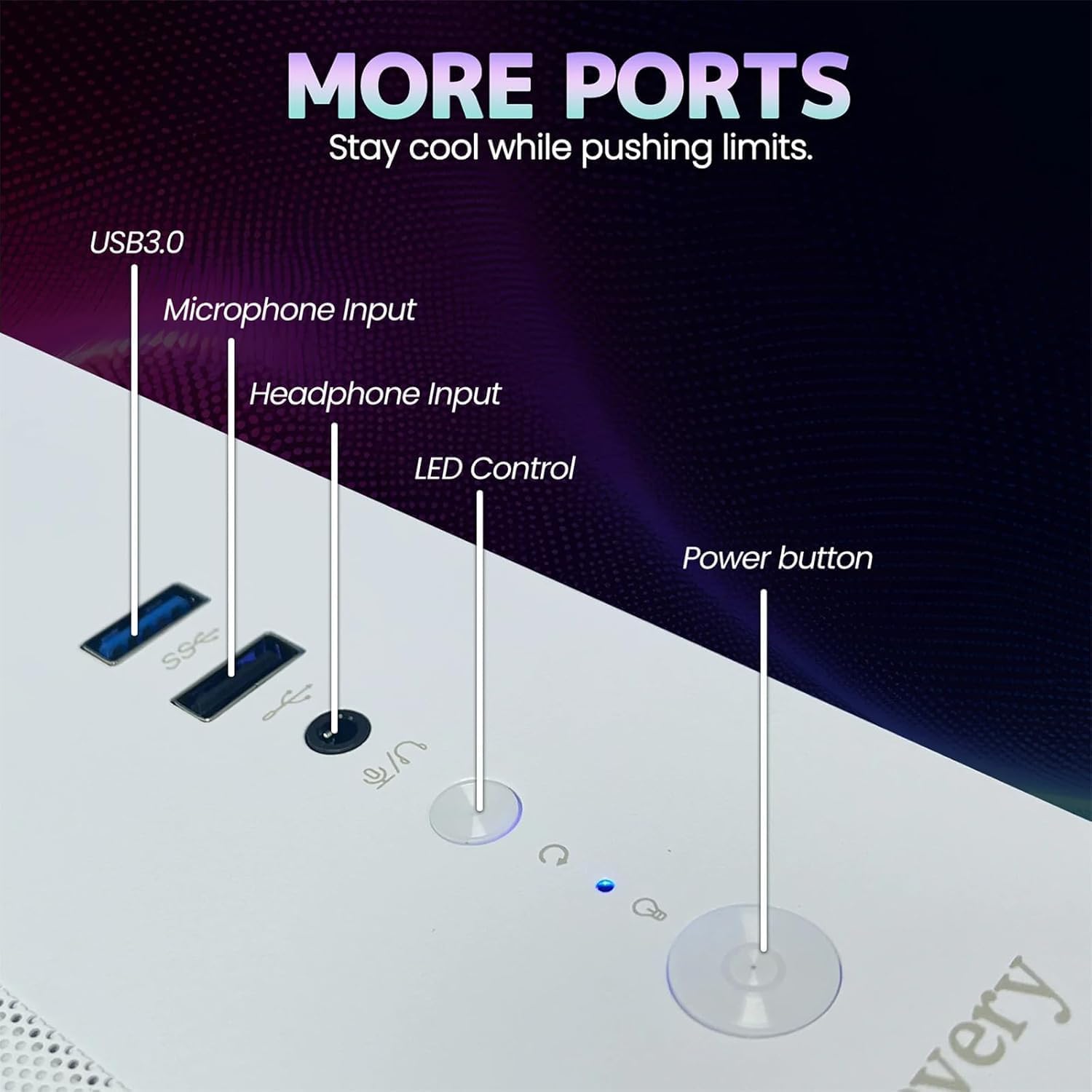
Image 2.1: Rear panel of the PC illustrating various connectivity ports including USB, HDMI, and audio jacks.
3. Иштөө нускамалары
Your suevery Prebuilt Gaming PC comes with a pre-installed operating system (DOS, requiring user installation of a full OS). Once your preferred operating system is installed and configured, you can begin using your PC.
- Күйгүзүү/өчүрүү: Press the power button to turn the PC on. To turn off, use the operating system's shutdown function. Avoid direct power-off unless necessary to prevent data loss.
- RGB жарыкты башкаруу: The PC features customizable RGB lighting. Refer to the specific software or physical button (if available, as indicated in Image 2.1) for adjusting lighting modes and colors.
- Программалык камсыздоону орнотуу: Install necessary drivers for your graphics card and other components from the manufacturer's websites for optimal performance. Install your desired games and applications.
- Байланыш: Utilize the Wi-Fi 6 for high-speed wireless internet or the Ethernet port for a stable wired connection. The multiple USB ports allow for connecting various peripherals.
Video 3.1: An official video demonstrating the suevery Prebuilt Gaming PC Desktop Computer, showcasing анын дизайны жана өзгөчөлүктөрү.
4. Техникалык тейлөө
Компьютериңиздин үзгүлтүксүз техникалык тейлөөсү анын узак мөөнөттүү иштешин жана оптималдуу иштешин камсыз кылат.
- Чаңды тазалоо: Periodically clean dust from the internal components, especially fans and heatsinks, using compressed air. Ensure the PC is powered off and unplugged before cleaning.
- Программалык камсыздоо жаңыртуулары: Keep your operating system, drivers, and antivirus software updated to ensure security and performance.
- Кабелдик башкаруу: Ensure internal and external cables are neatly organized to improve airflow and prevent accidental disconnections.
- Вентиляция: Always ensure the PC has clear space around its vents for proper airflow.

Сүрөт 4.1: Ички view of the PC highlighting the cooling fans and component layout, emphasizing the importance of dust removal.
5. Кыйынчылыктарды
Бул бөлүм сиз кабылышы мүмкүн болгон жалпы көйгөйлөрдү карайт.
| Көйгөй | Мүмкүн чечим |
|---|---|
| PC күйбөйт. | Check power cable connections to the PC and wall outlet. Ensure the power supply switch on the back of the PC is in the 'On' position. Test the outlet with another device. |
| Монитордо дисплей жок. | Ensure the monitor is powered on and connected to the graphics card (not the motherboard's video output). Try a different cable or monitor. |
| Система жай иштеп жатат же тоңуп калууда. | Check for background applications consuming resources. Update drivers. Scan for malware. Ensure adequate ventilation to prevent overheating. |
| Wi-Fi туташуу маселелери. | Ensure Wi-Fi antennas are securely attached. Restart your router and PC. Update Wi-Fi drivers. |
| RGB жарыктандыруу иштебейт. | Check connections to the RGB controller. Use the dedicated RGB control button or software to adjust settings. |
6. Техникалык шарттар
Detailed technical specifications for your suevery Prebuilt Gaming PC.
| Өзгөчөлүк | Деталь |
|---|---|
| Бренд | сувери |
| Модель аты | SU-V9W2-V9W4 |
| CPU модели | AMD Ryzen 5 (6 Cores, 3.6 GHz up to 4.1 GHz) |
| RAM эс тутуму | 16 GB DDR4 3200 MHz (Max 32 GB) |
| Сактагыч | 512 GB M.2 PCIe NVMe SSD |
| Графикалык сопроцессор | RX 560 4G GDDR5 (Dedicated) |
| Операция системасы | DOS (User-installed OS required) |
| Байланыш | Wi-Fi 6 (802.11ax), USB (2x USB 3.0, 4x USB 2.0), HDMI |
| Энергияны керектөө | 400 Ватт |
| Өлчөмдөрү (L x W x Y) | 13.35 x 10.87 x 12.99 дюйм |
| Түс | Ак |

Image 6.1: Dimensional diagram of the suevery Prebuilt Gaming PC, indicating its compact size.
7. Кепилдик жана колдоо
Your suevery Prebuilt Gaming PC comes with a 1 жылдык кепилдик сатып алынган күндөн тартып өндүрүш кемчиликтерин жабуу.
For technical support, warranty claims, or further assistance, please contact suevery customer service through the retailer's platform or visit the official suevery webбайланыш маалыматы үчүн сайт.
Please have your product model number (Ryzen5-16G-512G-RX560 4G) and proof of purchase ready when contacting support.