
Introduction
Welcome to the HP OmniDesk M03 AI Desktop PC. This manual provides essential information for setting up, operating, maintaining, and troubleshooting your new computer. The HP OmniDesk M03 is designed for performance and efficiency, featuring an Intel Core Ultra 7 265 processor with dedicated AI cores, 16GB DDR5 RAM, and a 2TB NVMe SSD, running on Windows 11 Home.
Кутуда эмне бар
Таңгакта бардык компоненттер бар экенин текшериңиз:
- HP OmniDesk столу
- Зымсыз клавиатура
- Чычкан
- Ыкчам орнотуу көрсөтмөлөрү
- Электр кабели

Image: The HP OmniDesk M03 desktop PC, wireless keyboard, mouse, and power cable, illustrating the contents of the product box.
Жайгашуу
1. Перифериялык түзүлүштөрдү туташтыруу
Before powering on your PC, connect your monitor, keyboard, and mouse.
- Монитор: Connect your monitor to the PC using an HDMI or DisplayPort cable. The ports are located on the rear of the PC.
- Баскычтоп жана чычкан: The included keyboard and mouse are wireless. Insert batteries (if not pre-installed) and connect their USB receiver to an available USB port on the PC.
- Күч: Connect the power cable to the PC's power input on the rear and then to a wall outlet.
- Тармак (милдеттүү эмес): For a wired internet connection, connect an Ethernet cable from your router to the RJ45 port on the rear of the PC.

Image: Rear panel of the HP OmniDesk M03, highlighting the DisplayPort, HDMI, USB, and Ethernet ports for connecting external devices.

Сүрөт: каптал view of the HP OmniDesk M03 AI Desktop PC, showing its compact tower design.
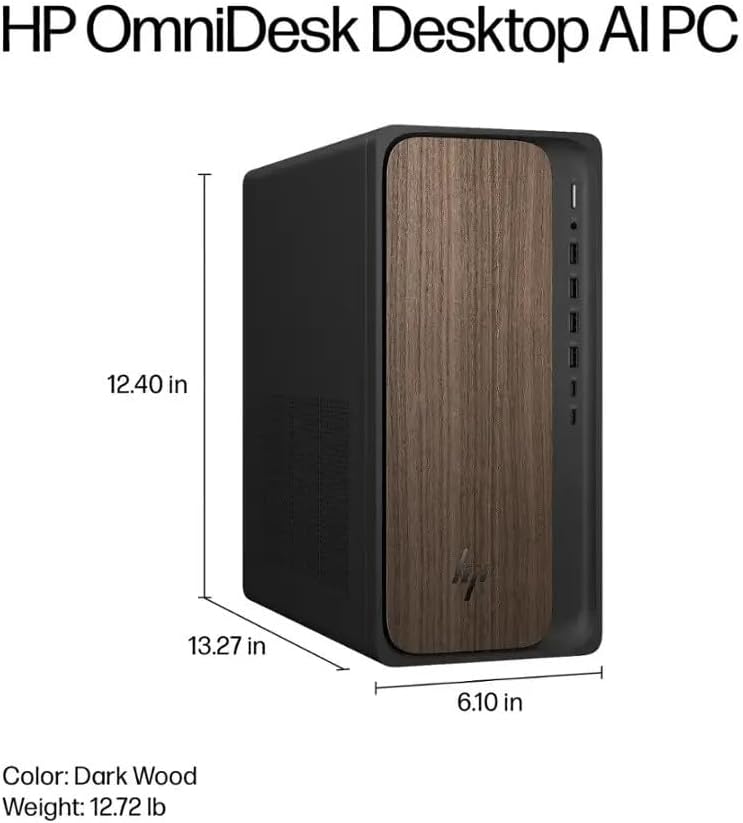
Image: Diagram illustrating the location and type of front and rear ports on the HP OmniDesk M03, including USB-A, USB-C, HDMI, DisplayPort, and audio jacks.
2. Күйгүзүү жана баштапкы орнотуу
Once all peripherals are connected:
- Press the power button located on the front of the PC.
- Follow the on-screen instructions to complete the Windows 11 Home initial setup, including language selection, network connection (if not wired), account creation, and privacy settings.

Сүрөт: алдыңкы view of the HP OmniDesk M03, showing the power button at the top right and various USB ports below it.
Компьютериңизди иштетүү
Windows 11 Home
Your HP OmniDesk M03 comes pre-installed with Windows 11 Home. Familiarize yourself with the operating system's interface, Start menu, and settings. Microsoft provides extensive online resources for Windows 11 usage.
AI өзгөчөлүктөрү
The Intel Core Ultra 7 265 processor includes dedicated AI cores and Intel AI Boost, enhancing performance for AI-driven applications and features within Windows 11, such as AI Copilot. These features can assist with tasks, content creation, and system optimization.
Байланыш
- Wi-Fi 6 (802.11ax): Connect to wireless networks for internet access. Manage Wi-Fi settings through the Windows 11 network settings.
- Bluetooth 5.4: Pair wireless devices such as headphones, speakers, or additional input devices. Access Bluetooth settings via the Windows 11 settings menu.
- Ethernet: For a stable, high-speed wired connection, ensure an Ethernet cable is connected to the RJ45 port.
Техникалык тейлөө
Cleaning Your PC
- Сырткы: Бир аз жумшак, түксүз кездемени колдонуңуз dampened with water or a mild cleaning solution to wipe down the exterior. Avoid harsh chemicals.
- Тешиктер: Periodically clean dust from the ventilation grilles using compressed air to ensure proper airflow and prevent overheating.
- Порттор: Порттарды чаңдан жана таштандылардан тазалаңыз.
Программалык камсыздоо жаңыртуулары
Regularly update Windows 11 and device drivers to ensure optimal performance, security, and compatibility. Access Windows Update through the Settings menu.
Маалыматтын камдык көчүрмөсү
Маалыматтардын жоголушун алдын алуу үчүн маанилүү маалыматтарыңыздын камдык көчүрмөсүн тышкы дискке же булут сактагычына үзгүлтүксүз сактап туруу сунушталат.
Проблемаларды чечүү
Бул бөлүм сиз кабылышы мүмкүн болгон жалпы көйгөйлөрдү карайт.
- Кубат жок:
- Кубат кабели компьютерге да, розеткага да бекем туташып турганын текшериңиз.
- Башка аспапка туташтыруу менен розетка иштеп жатканын текшериңиз.
- Дисплей жок:
- Check that the monitor is powered on and correctly connected to the PC via HDMI or DisplayPort.
- Мониторуңузда туура киргизүү булагы тандалганын текшериңиз.
- Интернет байланышы жок:
- For Wi-Fi, check if the Wi-Fi adapter is enabled and if you are connected to the correct network with the right password.
- For wired connection, ensure the Ethernet cable is properly connected and your router is working.
- Баскычтоп/чычкан жооп бербейт:
- Check battery levels for wireless devices.
- Ensure the USB receiver is plugged into a functional USB port.
- Try restarting the PC.
Татаал маселелер үчүн HP колдоо бөлүмүнө кайрылыңыз webсайтка же кардарларды тейлөөгө кайрылыңыз.
Техникалык шарттар
Detailed technical specifications for the HP OmniDesk M03 AI Desktop PC:
| Компонент | Спецификация |
| Процессор | Intel Core Ultra 7 265 (20-Core, up to 5.3 GHz, Intel AI Boost) |
| Операция системасы | Windows 11 Home (64-бит) |
| Эстутум (RAM) | 16 ГБ DDR5 5600 МГц |
| Сактагыч | 2TB PCIe NVMe M.2 SSD |
| Графика | Интеграцияланган Intel Graphics |
| Video Output | 1x HDMI 2.1, 1x DisplayPort 1.4a |
| USB порттору (алдыңкы) | 2x USB-A 5Gbps, 2x USB-A 10Gbps, 1x USB-C 5Gbps, 1x USB-C 10Gbps |
| USB порттору (арткы) | 4x USB 2.0 Type-A |
| Аудио порттор | 1x Headphone/Microphone Combo, 1x Line Input, 1x Line Output |
| Network | Wi-Fi 6 (802.11ax), Bluetooth 5.4, Gigabit Ethernet (RJ45) |
| Өлчөмдөрү (H x W x D) | 13.3" x 6.1" x 12.4" (33.8 см x 15.5 см x 31.5 см) |
| Салмагы | 11.77 фунт (5.34 кг) |

Image: Diagram showing the height (13.27 inches), width (6.10 inches), and depth (12.40 inches) of the HP OmniDesk M03 desktop PC.
Кепилдик жана колдоо
Кепилдик маалымат
Your HP OmniDesk M03 AI Desktop PC comes with a 90 күндүк чектелген кепилдик. This warranty covers defects in materials and workmanship under normal use. For detailed terms and conditions, please refer to the warranty documentation included with your product or visit the official HP support webсайт.
Кардарларды колдоо
For technical assistance, troubleshooting, or warranty claims, please contact HP Customer Support:
- Онлайн колдоо: расмий сапар HP колдоо Webсайт for drivers, manuals, and troubleshooting guides.
- Телефондук колдоо: Refer to the Quick Setup Guide or HP's webаймактык байланыш номерлери үчүн сайт.
Колдоо кызматына кайрылганда, өнүмүңүздүн моделин (M03) жана сериялык номерин даярдап коюңуз.