
1. Киришүү
This manual provides essential information for setting up, operating, and maintaining your ASUS NUC 15 Pro Mini Desktop Computer. This compact and powerful AI Mini PC features an Intel Series 2 Core Ultra 7 255H processor, Intel Arc 140T GPU, 32GB DDR5 RAM, and a 1TB PCIe SSD, running on Windows 11 Pro. It is designed for demanding tasks such as AI computing, video editing, 3D rendering, and gaming, offering 8K/Quad 4K HDR display support and advanced connectivity options like Thunderbolt 4 and WiFi 7.
2. Пакеттин мазмуну
Пакетиңизде бардык буюмдар бар экенин текшериңиз:
- ASUS NUC 15 Pro Mini PC
- AC адаптери жана кубат шнуры
- VESA тоосу
- Зымсыз клавиатура
- Зымсыз чычкан
- Колдонуучунун Колдонмосу (бул документ)
3. Продукт бүтүп калдыview
3.1 Негизги өзгөчөлүктөрү
- Процессор: Intel Series 2 Core Ultra 7 255H (16 cores, 16 threads, up to 5.1 GHz, 24 MB Intel Smart Cache)
- Графика: Integrated Intel Arc 140T GPU
- Эстутум: 32GB DDR5 RAM (upgradeable to 128GB)
- Сактагыч: 1TB PCIe 4.0 SSD (upgradeable to 48TB)
- Операция системасы: Windows 11 Pro
- Дисплейди колдоо: Up to 8K or Quad 4K HDR via HDMI 2.1 and Thunderbolt 4
- Байланыш: Wi-Fi 7, Bluetooth 5.4, 2.5G Gigabit Ethernet
- Порттор: 1x USB 3.2 Gen2 x 2 Type-C, 3x USB 3.2 Gen2 Type-A, 1x USB 2.0 Gen2 Type-A, 2x HDMI 2.1, 2x Thunderbolt 4, 1x 2.5G Gigabit Ethernet
3.2 Processor and AI Capabilities
The Intel Series 2 Core Ultra 7 255H processor, with its 16 cores and 16 threads, provides robust performance for demanding applications. The integrated Intel Arc 140T GPU and built-in AI Acceleration Engine enhance AI computing, video editing, and 3D rendering tasks.

3.2.1-сүрөт: Бүттүview of the Intel Core Ultra 7 255H processor specifications, highlighting 16 cores, 16 threads, 24 MB cache, 96 TOPS, and 5.1 GHz max turbo frequency.

3.2.2-сүрөт: Illustration of the Neural Processing Unit (NPU) for on-device AI acceleration, supporting applications like Midjourney, DeepSeek, Photoshop, and Premiere Pro.
3.3 Порттар жана туташуу
The ASUS NUC 15 Pro offers a comprehensive array of ports for connecting various peripherals and displays.

3.3.1-сүрөт: Diagram illustrating the various ports on the ASUS NUC 15 Pro, including USB 3.2 Gen2 x 2 Type-C, USB 3.2 Gen2 Type-A, USB 2.0 Type-A, HDMI 2.1, Thunderbolt 4, and 2.5G Ethernet.
4. Орнотуу колдонмосу
4.1 Баштапкы туташуу
- Дисплейди туташтыруу: Connect your monitor(s) to the HDMI 2.1 or Thunderbolt 4 ports. The system supports up to four 4K HDR displays or one 8K display.
- Перифериялык түзүлүштөрдү туташтыруу: Plug in the wireless keyboard and mouse receiver into an available USB port. Connect any other USB devices as needed.
- Туташуу кубаты: Connect the AC adapter to the DC-In port on the mini PC, then plug the power cord into an electrical outlet.
- Тармак туташуусу: For wired internet, connect an Ethernet cable to the 2.5G Gigabit Ethernet port. For wireless internet, ensure your Wi-Fi network is available.
- Күйгүзүү: Аппараттын алдыңкы жагында жайгашкан кубат баскычын басыңыз.

4.1.1-сүрөт: Visual representation of the ASUS NUC 15 Pro connected to multiple displays, demonstrating its support for quad 4K or 8K display configurations via HDMI and Thunderbolt ports.
4.2 Операциялык системаны орнотуу
Upon first boot, the Windows 11 Pro operating system will guide you through the initial setup process, including language selection, network configuration, and user account creation. Follow the on-screen instructions to complete the setup.
5. Иштөө нускамалары
5.1 Жалпы колдонуу
Your ASUS NUC 15 Pro is ready for a wide range of applications, from everyday computing to intensive tasks.
- Көп тапшырма: Leverage the powerful Intel Core Ultra 7 processor for seamless multitasking across various applications.
- AI Computing: Utilize the integrated AI capabilities for enhanced performance in AI-driven software.
- Жогорку чечилиштеги дисплейлер: Connect multiple high-resolution monitors for an expansive workspace or immersive entertainment.
5.2 Байланыш
The mini PC offers advanced connectivity options for fast and reliable data transfer and network access.
- Wi-Fi 7: Жогорку ылдамдыктагы зымсыз интернетке кирүү үчүн.
- Bluetooth 5.4: For connecting wireless peripherals such as headphones, speakers, and game controllers.
- Thunderbolt 4: Provides high-bandwidth connections for external GPUs, high-speed storage, and display output.
- 2.5G Ethernet: For ultra-fast wired network connections.

5.2.1-сүрөт: Diagram highlighting the advanced connectivity features of the ASUS NUC 15 Pro, including Wi-Fi 7, Bluetooth 5.4, and 2.5G LAN for uninterrupted network performance.
5.3 Колдонуу сценарийлери
The ASUS NUC 15 Pro is versatile and suitable for various applications:
- Graphic Design / Video Processing: Utilize the powerful CPU and GPU for demanding creative tasks.
- Оюн: Enjoy a smooth gaming experience with the Intel Arc 140T GPU.
- NAS (Тармакка туташкан сактагыч): Its compact size and connectivity make it suitable for home server applications.
- Үй кинотеатры: Connect to your TV for 8K or 4K HDR media playback.

5.3.1-сүрөт: Examples of how the ASUS NUC 15 Pro can be used, including graphic design, video processing, gaming, network attached storage (NAS), and as a home theater PC.
6. Техникалык тейлөө жана жаңылоо
6.1 Эстутумду жана сактагычты жаңыртуу
The ASUS NUC 15 Pro features a tool-free design for easy upgrades of RAM and SSD.
- RAM: Supports 16GB–64GB DDR5 RAM, upgradeable to 128GB.
- SSD: Supports 512GB–2TB PCIe 4.0 SSDs, upgradeable to 48TB.
- Процедура: Refer to the detailed instructions in the physical user manual for safe access and installation of components.
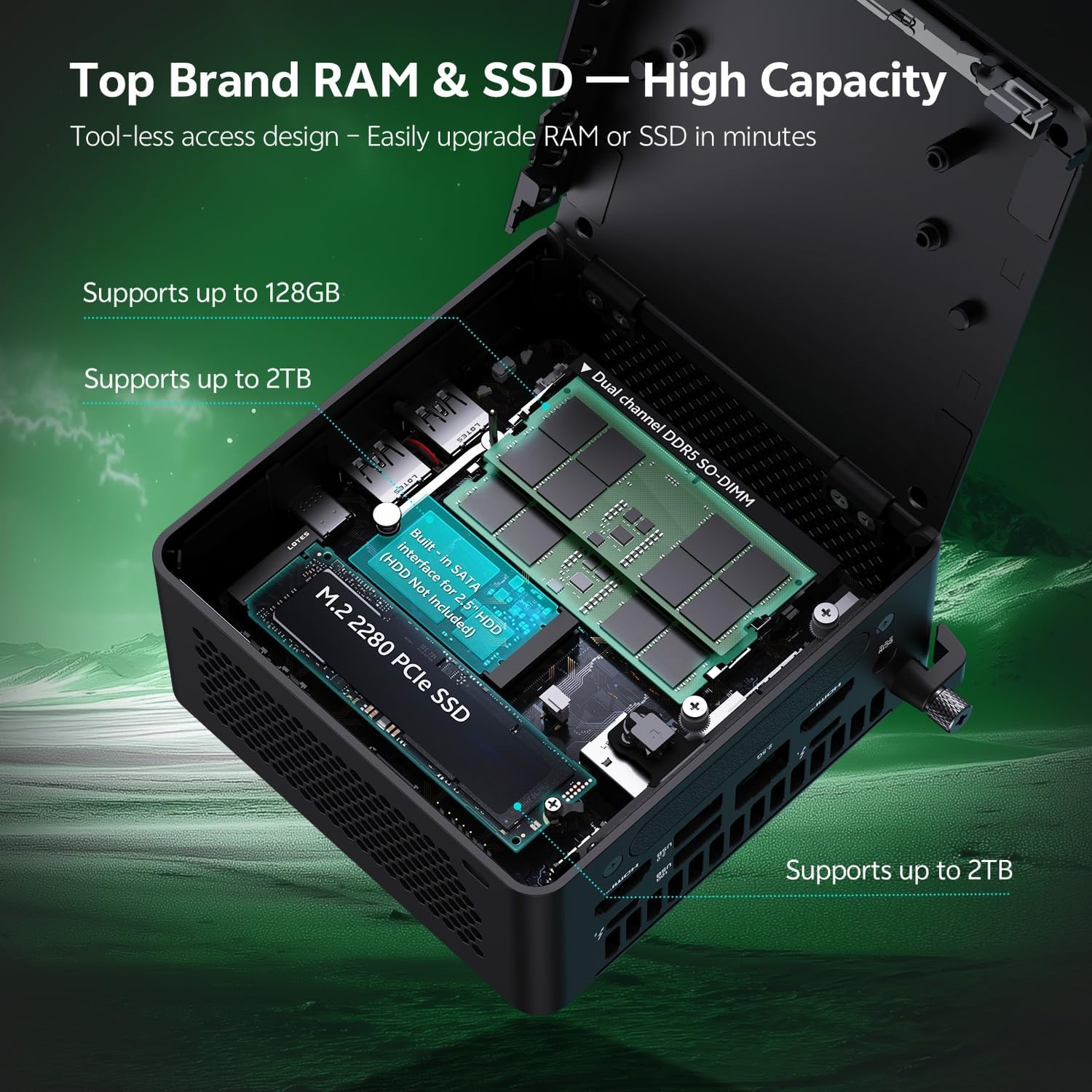
6.1.1-сүрөт: Internal layout of the ASUS NUC 15 Pro, illustrating the dual-channel DDR5 SO-DIMM slots for RAM and the M.2 2280 PCIe SSD slot, both designed for tool-less access and upgrades.
6.2 Муздатуу системасы
The device incorporates a Smart Silent Cooling System with dual heat pipes and a large fan to ensure efficient heat dissipation and stable performance.
- Ашыкча ысып кетүүнүн алдын алуу үчүн кичи компьютердин айланасында туура желдетүүнү камсыз кылыңыз.
- Periodically clean dust from the vents using compressed air to maintain optimal cooling efficiency.

6.2.1-сүрөт: жарылды view diagram of the ASUS NUC 15 Pro's Smart Silent Cooling System, showing dual heat pipes and a large fan designed for efficient thermal management and multi-ventilation.
7. Кыйынчылыктарды
If you encounter issues with your ASUS NUC 15 Pro, refer to the following common troubleshooting steps:
- Кубат жок:
- Ensure the AC adapter is securely connected to both the mini PC and a working power outlet.
- Verify the power cord is not damaged.
- Дисплей жок:
- Check that the display cable (HDMI or Thunderbolt) is firmly connected to both the mini PC and the monitor.
- Монитордун күйгүзүлгөнүн жана туура киргизүү булагына коюлганын текшериңиз.
- Башка дисплей кабелин же бар болсо мониторду колдонуп көрүңүз.
- Интернет байланышы жок:
- Зымдуу туташуулар үчүн Ethernet кабелинин жана роутердин абалын текшериңиз.
- For Wi-Fi, ensure Wi-Fi is enabled in Windows settings and you are connected to the correct network.
- Роутериңизди/модемиңизди жана мини компьютериңизди өчүрүп күйгүзүңүз.
- Перифериялык түзүлүштөр жооп бербейт:
- Ensure wireless keyboard/mouse receivers are properly inserted into a USB port.
- Check battery levels for wireless peripherals.
- Try connecting peripherals to different USB ports.
8. Техникалык шарттар
| Өзгөчөлүк | Деталь |
|---|---|
| Бренд | ASUS |
| Модель аты | RNUC15HU7 |
| Операция системасы | Windows 11 Pro |
| CPU модели | Intel Core Ultra 7 255H |
| CPU ылдамдыгы | 5.1 ГГц чейин |
| Графикалык сопроцессор | Intel Arc 140T GPU |
| RAM эстутум орнотулган өлчөмү | 32 GB DDR5 (Upgradeable to 128 GB) |
| Эстутум сактоо сыйымдуулугу | 1 TB PCIe SSD (Upgradeable to 48 TB) |
| Аппараттык интерфейс | HDMI, Thunderbolt 4, USB 2.0 Type A, USB 3.2 Gen 2 |
| Байланыш технологиясы | Bluetooth 5.4, Wi-Fi 7, Ethernet (2.5G) |
| Видео чыгаруу интерфейси | HDMI 2.1, Thunderbolt 4 |
| Элементтин өлчөмдөрү (L x W x Y) | 4.6 x 4.4 x 2.1 дюйм |
| Салмагы | 1.36 фунт |
| Түс | Кара |
| UPC | 197105156340 |
9. Кепилдик жана колдоо
9.1 Кепилдик маалыматы
Your ASUS NUC 15 Pro Mini Desktop Computer comes with a 12-month warranty. This warranty covers manufacturing defects and issues arising from normal use. Please retain your proof of purchase for warranty claims.
Note: The manufacturer box is opened by professional engineers for customizing and testing. Factory defects and blemishes are significantly reduced by this in-depth inspection and testing process.
9.2 Техникалык колдоо
For technical assistance, troubleshooting beyond this manual, or warranty inquiries, please contact ASUS customer support.
- Расмий ASUS колдоо бөлүмүнө баш багыңыз webайдоочулар, көп берилүүчү суроолор жана байланыш маалыматы үчүн сайт.
- Have your product model (RNUC15HU7) and serial number ready when contacting support.