
1. Киришүү
This manual provides essential instructions for setting up, operating, and maintaining your Canon i-SENSYS MF664Cdw multifunction color laser printer. The MF664Cdw is designed for efficient office environments, offering fast, high-quality color printing, copying, and scanning capabilities. It features automatic duplex printing, a 250-sheet paper cassette, a 50-sheet Automatic Document Feeder (ADF), and various connectivity options including USB and Wi-Fi.
Негизги өзгөчөлүктөр төмөнкүлөрдү камтыйт:
- Булут байланышы: Print or scan directly from Google Drive, Dropbox, and OneDrive.
- Мобилдик басып чыгаруу: Supports Canon PRINT Business App, AirPrint (Apple), and Mopria (Android) for printing from smartphones.
- Жумуш агымын автоматташтыруу: Customize tasks like printing stored forms, scanning to email, or copying documents using the Library application.
- Коопсуздук өзгөчөлүктөрү: Includes secure PIN printing and system control at startup to protect against unauthorized access.
- Натыйжалуулугу: Fast printing speeds of up to 25 pages per minute (color and monochrome), time-saving single-pass duplex scanning, and a large color touchscreen for intuitive operation.
2. Коопсуздук маалыматы
Please read all safety instructions before using the printer to prevent injury or damage.
- Электр коопсуздугу: Connect the printer to a grounded power outlet. Do not use damaged power cords. Avoid placing the printer in areas with high humidity or near water.
- Вентиляция: Ensure adequate space around the printer for proper ventilation to prevent overheating.
- Тонер картридждери: Handle toner cartridges carefully. If toner spills, wipe it with a damp cloth. Do not inhale toner dust. Keep cartridges out of reach of children.
- Жайгашкан жери: Place the printer on a stable, level surface. Do not block ventilation openings.
- Принтерди жылдыруу: When moving the printer, ensure all cables are disconnected and secure any movable parts. The printer weighs approximately 22.6 kg (49.8 lbs), so use proper lifting techniques or assistance.
3. Пакеттин мазмуну
Баардык буюмдар пакетте камтылганын текшериңиз:
- Canon i-SENSYS MF664Cdw Printer Unit
- Starter Toner Cartridges (Black, Cyan, Magenta, Yellow)
- Электр кабели
- USB Cable (may not be included in all regions)
- Орнотуу колдонмосу / Колдонуучунун колдонмосу (бул документ)
- Driver CD-ROM (drivers also available online)
4. Орнотуу
4.1 Пакеттен чыгаруу жана жайгаштыруу
Carefully remove the printer from its packaging. Remove all protective tapes and packing materials from the exterior and interior of the printer. Place the printer on a sturdy, level surface with adequate space for ventilation and access to paper trays.
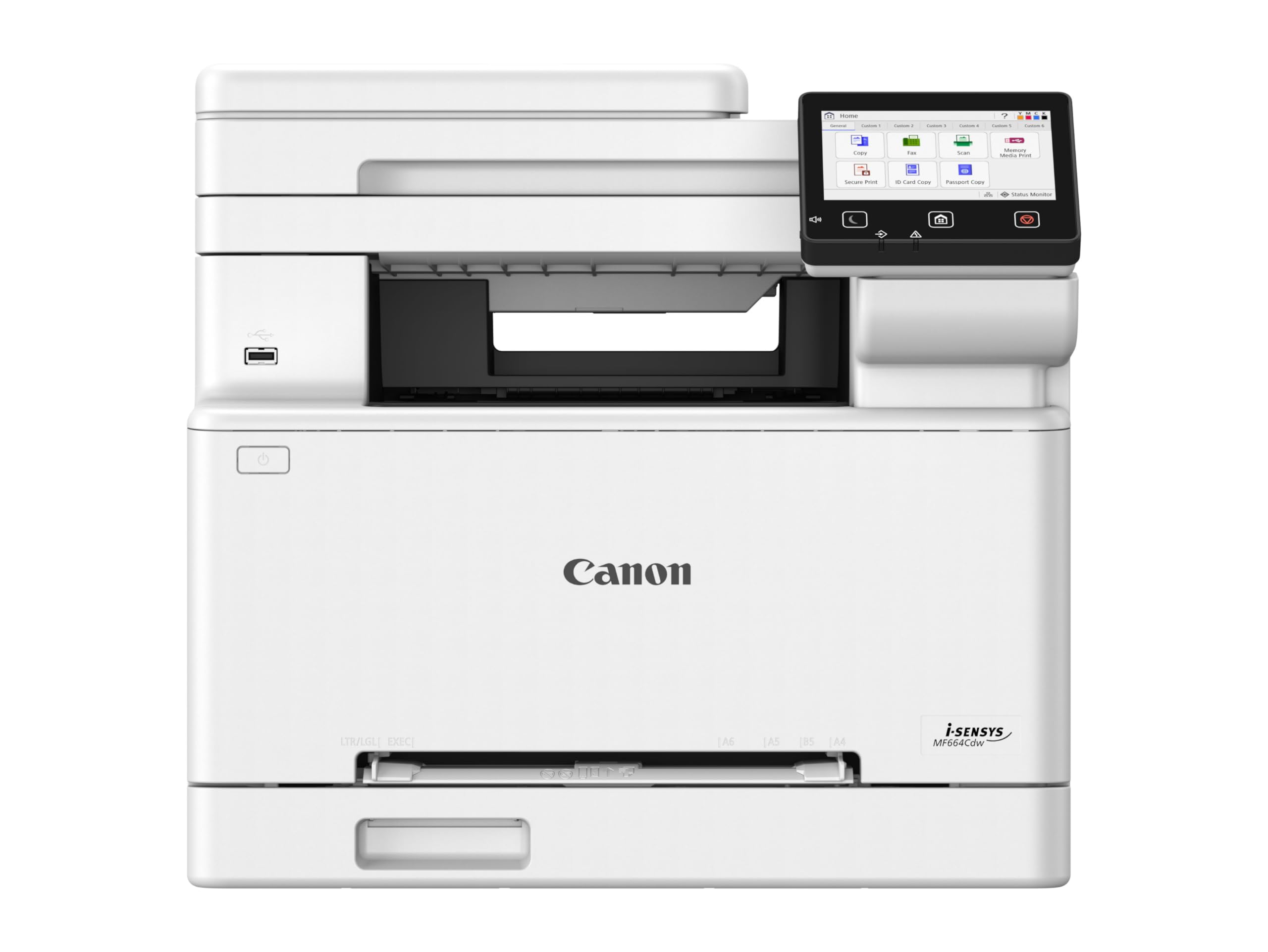
Image: Canon i-SENSYS MF664Cdw printer unit. This image shows the front view of the printer with its control panel and paper tray visible.
4.2 Кубатты туташтыруу
Connect the power cord to the printer's power input and then to a grounded electrical outlet. Turn on the printer using the power button, usually located on the front or side panel.
4.3 Тонер картридждерин орнотуу
Open the front cover of the printer. Remove each toner cartridge from its packaging, gently shake it horizontally a few times, and then insert it into its corresponding slot until it clicks into place. Ensure all four cartridges (Black, Cyan, Magenta, Yellow) are correctly installed.
4.4 Кагазды жүктөө
Open the paper cassette (Tray 1) and adjust the paper guides to the size of the paper you are loading (e.g., A4). Load up to 250 sheets of plain paper. For the multi-purpose tray, open it and load single sheets of special media like envelopes or labels. The printer supports paper sizes up to A3, though the standard cassette is A4.
4.5 Network Connection and Driver Installation
The MF664Cdw supports USB, Wi-Fi, and Ethernet (LAN) connectivity.
- Wi-Fi туташуусу: On the printer's touchscreen, navigate to the network settings and select Wi-Fi Setup. Follow the on-screen instructions to connect to your wireless network.
- USB туташуу: Connect a USB 2.0 cable from the printer to your computer.
- Ethernet (LAN) туташуусу: Принтердин LAN портунан Ethernet кабелин тармак роутериңизге же коммутаторуңузга туташтырыңыз.
After connecting, install the printer drivers on your computer. You can use the provided CD-ROM or download the latest drivers from the official Canon support website. For mobile devices, download the Canon PRINT Business App from your device's app store.
5. Иштөө нускамалары
5.1 Негизги басып чыгаруу
From your computer, open the document you wish to print. Select "Print" from the application's menu. Choose the Canon i-SENSYS MF664Cdw from the list of available printers. Adjust print settings such as paper size, orientation, and number of copies. For duplex printing, select the "Two-sided printing" or "Duplex" option in the print driver settings.
5.2 Документтерди көчүрүү
Place your document face-up in the Automatic Document Feeder (ADF) or face-down on the scanner glass. On the printer's touchscreen, select the "Copy" function. Adjust settings such as number of copies, color/mono, and enlargement/reduction. Press the Start button to begin copying. The maximum copy speed is 25 ppm for black and white, with a resolution of 600 x 600 dpi.
5.3 Документтерди сканерлөө
Place your document in the ADF or on the scanner glass. On the touchscreen, select the "Scan" function. You can choose to scan to a computer, email, or cloud services like Google Drive, Dropbox, or OneDrive. Follow the on-screen prompts to configure scan settings and destination.
5.4 Mobile Printing and Cloud Connectivity
Use the Canon PRINT Business App on your smartphone or tablet to print documents and photos directly. The printer also supports AirPrint for Apple devices and Mopria for Android devices. For cloud printing, access the cloud services directly from the printer's touchscreen interface after configuring your accounts.
6. Техникалык тейлөө
6.1 Тонер картридждерин алмаштыруу
When a toner cartridge is low or empty, a message will appear on the touchscreen. Open the front cover, remove the old cartridge by pulling it out, and insert a new Canon Cartridge 067 series cartridge (Black, Cyan, Magenta, or Yellow) until it clicks into place. Close the front cover.
6.2 Принтерди тазалоо
Принтердин сыртын дайыма жумшак, гamp, lint-free cloth. For internal cleaning, refer to the printer's touchscreen menu for options like drum cleaning or fuser cleaning, if available. Clean the scanner glass with a soft cloth and glass cleaner.
6.3 Микропрограмма жаңыртуулары
Periodically check the Canon support website for firmware updates. Firmware updates can improve performance, add new features, or fix bugs. Follow the instructions provided by Canon for safe firmware installation.
7. Кыйынчылыктарды
Бул бөлүм сиз кабылышы мүмкүн болгон жалпы көйгөйлөрдү карайт.
- Принтер жооп бербей жатат:
- Электр тармагына туташууну текшерип, принтердин күйүк экенин текшериңиз.
- Verify network connection (Wi-Fi or Ethernet) or USB cable connection.
- Принтерди жана компьютериңизди/түзмөктү өчүрүп күйгүзүңүз.
- Принтер драйверлери туура орнотулганын жана жаңыртылганын текшериңиз.
- Print Quality Issues (Streaks, Fading, Incorrect Colors):
- Тонердин деңгээлин текшерип, азыраак картридждерди алмаштырыңыз.
- Perform a print head cleaning or calibration from the printer's maintenance menu.
- Ensure you are using genuine Canon toner cartridges.
- Кагаз тыгылыштары:
- Follow the on-screen instructions on the printer's display to locate and clear the jammed paper.
- Кагаздын туура жүктөлгөндүгүн жана лотокторго ашыкча толтурулбагандыгын текшериңиз.
- Use appropriate paper types and avoid wrinkled or damaged paper.
- Тармактык байланыш көйгөйлөрү:
- Verify your Wi-Fi password or Ethernet cable connection.
- Роутериңизди жана принтериңизди өчүрүп-күйгүзүңүз.
- Принтер Wi-Fi роутериңиздин чегинде экенин текшериңиз.
- Check firewall settings on your computer that might be blocking communication.
8. Техникалык шарттар
| Өзгөчөлүк | Спецификация |
|---|---|
| Модель аты | i-SENSYS MF664Cdw |
| Басма технологиясы | Түстүү лазер |
| Функциялар | Басып чыгаруу, көчүрүү, сканерлөө |
| Байланыш | USB 2.0, Wi-Fi, Ethernet (LAN) |
| Максималдуу басып чыгаруу ылдамдыгы (түстүү/моно) | 25 промилле |
| Print Resolution | 1200 x 1200 dpi чейин |
| Дуплекстүү басып чыгаруу | Автоматтык |
| Сканер түрү | ADF, Flatbed |
| Макс. көчүрүү ылдамдыгы (кара-ак) | 25 промилле |
| Көчүрүүнүн максималдуу чечилиши | 600 x 600 dpi |
| Кагаз киргизүү сыйымдуулугу | 250 sheets (Standard Cassette), 50 sheets (ADF) |
| Максималдуу медиа өлчөмү | A3 (via multi-purpose tray), A4 (Standard Cassette) |
| Шайкеш картридждер | Canon Cartridge 067 series (Black, Cyan, Magenta, Yellow) |
| Элемент Салмагы | 22.6 килограмм (болжол менен 49.8 фунт) |
| Өлчөмдөр (D x W x H) | 18.11"D x 17.76"W x 16.26"H |
| Энергияны керектөө | 370 Watts (Operating), 50 Watts (Standby) |
| Өзгөчөлүктөр | Auto-Duplex, Scan To Email, Touch Screen, Energy Star |
9. Кепилдик жана колдоо
Your Canon i-SENSYS MF664Cdw printer comes with a standard manufacturer's warranty. For detailed warranty information, please refer to the warranty card included in your product packaging or visit the official Canon support webсайт.
For technical support, driver downloads, and additional resources, please visit the Canon support webсайтына кириңиз же Canon кардарларды тейлөө кызматына кайрылыңыз.
- Canon колдоо Webсайт: www.canon.com/support
- Продукт моделинин номери: 6928C008AA