
1. Бүттүview
The FNIRSI LC1020E is a handheld LCR meter designed for precise measurement of inductance, capacitance, and resistance. It features a dual-parameter display, allowing simultaneous viewing of main and secondary parameters such as X, D, Q, θ, and ESR. With multiple test frequencies and voltage levels, it provides accurate readings for various electronic components. The device also includes a smart sorting function for efficient component screening.
2. Коопсуздук маалыматы
Түзмөктү иштетүүдөн мурун бардык коопсуздук көрсөтмөлөрүн окуп чыгып, түшүнүп алыңыз. Бул көрсөтмөлөрдү аткарбоо электр тогуна урунууга, өрткө же түзмөктүн бузулушуна алып келиши мүмкүн.
- Do not attempt to measure live circuits or components with stored energy (e.g., charged capacitors) without first discharging them.
- Өлчөөлөрдү жүргүзүүдөн мурун, сыноо зымдары жакшы абалда жана туура туташтырылганын текшериңиз.
- Түзмөктү нымдуу чөйрөдө же нымдуу колдор менен иштетпеңиз.
- Avoid exposing the device to extreme temperatures, direct sunlight, or strong vibrations.
- Only use the specified power adapter or batteries if applicable.
- Бардык тейлөөлөрдү квалификациялуу кызматкерлерге тапшырыңыз.
3. Орнотуу
3.1 Аппаратты кубаттоо
The LC1020E is typically powered by an internal rechargeable battery or an external power source. Ensure the device is sufficiently charged before use. Connect the appropriate power adapter if external power is required.
3.2 Сыноо өткөргүчтөрүн туташтыруу
Connect the provided test leads to the input terminals on the LCR meter. Ensure a secure connection to prevent inaccurate readings or damage.

Image: The FNIRSI LC1020E LCR Meter with test leads connected to a large capacitor, demonstrating the primary and secondary parameter display.
4. Иштөө нускамалары
4.1 Күйгүзүү/өчүрүү
басып, кармап туруңуз Күч аппаратты күйгүзүү же өчүрүү үчүн баскыч.
4.2 Негизги навигация
The LC1020E features several buttons for navigation and setting adjustments:
- AUTO/R/L/C/Z: Switches between automatic component recognition and manual selection of Resistance, Inductance, Capacitance, or Impedance measurement modes.
- X/D/Q/θ/ESR: Toggles the secondary parameter displayed (Reactance, Dissipation Factor, Quality Factor, Phase Angle, Equivalent Series Resistance).
- OK: Confirms selections or enters sub-menus.
- БЕРҮҮ: Freezes the current measurement on the display.
- ЫЛДАМ: Adjusts the measurement speed (Fast, Medium, Slow).
- RANGE: Manually selects the measurement range.
- FREQ: Selects the test frequency.
- LEVEL: Adjusts the test voltage деңгээл.
- OFFSET: Used for calibration or bias settings.
5. Measurement Modes and Parameters
5.1 Auto Measurement
In АВТО mode, the LC1020E automatically identifies the component type (Resistor, Inductor, or Capacitor) and switches to the appropriate measurement mode, simplifying testing.

Image: The FNIRSI LC1020E LCR Meter in 'AUTO' mode, displaying capacitance and dissipation factor for a component, with illustrations of an inductor, resistor, and capacitor.
5.2 Dual Parameter Display
The device simultaneously displays a primary parameter (L, C, R) and a secondary parameter (X, D, Q, θ, ESR), providing a comprehensive analysis of the component under test.
5.3 Test Frequencies and Voltage Levels
The LC1020E offers multiple test frequencies and RMS voltage levels for versatile measurements:
- Жыштыктар: 100Hz, 120Hz, 1kHz, 10kHz, 100kHz
- RMS Voltage Levels: 0.1V, 0.3V, 0.6V
- Ички тентектик: 0.0V, 0.5V

Image: The FNIRSI LC1020E LCR Meter display illustrating the selectable test frequencies (100Hz, 120Hz, 1kHz, 10kHz, 100kHz) and RMS voltage levels (0.1V, 0.3V, 0.6V).
5.4 Практикалык өлчөө сценарийлери
The LC1020E can be used for various component measurements:
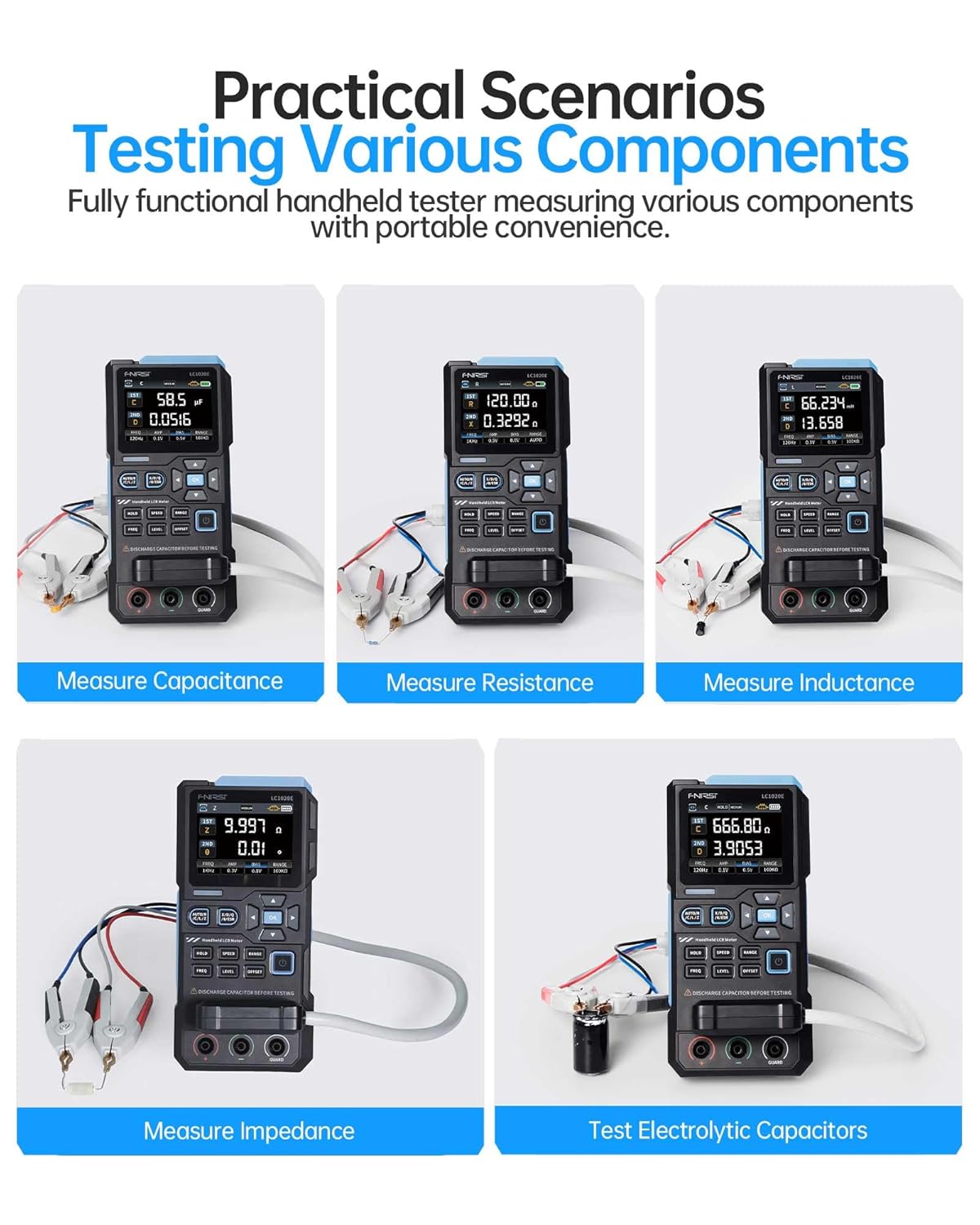
Image: A collage of five images showing the FNIRSI LC1020E LCR Meter measuring different components: capacitance, resistance, inductance, impedance, and electrolytic capacitors.
6. Smart Sorting & Comparison Mode
The smart sorting feature allows for efficient screening of components based on preset nominal values and tolerance limits. This mode calculates the relative error (%) and provides alerts via sound or LED if components fall outside the specified range.
6.1 Setting Nominal and Tolerance
- Navigate to the Sorting/Comparison mode in the menu.
- Set the desired nominal value for the component (e.g., 100nF for a capacitor).
- Define the tolerance percentage (0.1%дан 99.9%ке чейин).
6.2 Performing Sorting
Once settings are configured, test components. The device will indicate whether the component meets the criteria (Pass/Fail) and track success/fail counts.

Image: The FNIRSI LC1020E LCR Meter demonstrating its sorting and comparison mode, showing a component passing the test and another failing, with various components laid out.
7. Калибрлөө
For optimal accuracy, perform open/short calibration periodically or when changing test leads. This compensates for stray capacitance and inductance in the test setup.
7.1 Open Calibration
With no component connected to the test leads, initiate the open calibration process from the menu. This measures and compensates for stray capacitance.
7.2 Short Calibration
Short the test leads together (connect positive to negative) and initiate the short calibration. This measures and compensates for residual inductance and resistance in the leads.
8. FNIRSI LCR-ST1 Tweezer Tester
The FNIRSI LCR-ST1 is a portable LCR/ESR meter in a tweezer format, designed for precise measurement of surface-mount devices (SMD) and other small components. It supports resistance, capacitance, inductance, and diode measurements.

Image: The FNIRSI LCR-ST1 Smart Tweezer LCR/ESR Meter being used to test a component on a circuit board, highlighting its compact design and measurement capabilities.
8.1 LCR-ST1 Measurement Capabilities
- Сыноо жыштыктары: 100 Hz, 1 kHz, 10 kHz
- Test Voltage: 0.3 Vrms, 0.6 Vrms
- Параметрлер өлчөнөт: R, C, L, Diodes, D Value (Dissipation Factor), Q Value (Quality Factor), X Value (Reactance), Z Value (Total Impedance), ESR (Equivalent Series Resistance).

Image: The FNIRSI LCR-ST1 Smart Tweezer displaying its auto-recognition feature and various parameters like D, Z, Q, X, and ESR, while testing small components.
8.2 Precision Measurement
The LCR-ST1 offers high precision with minimum measurements down to 10mΩ, 1µH, and 1pF, with an accuracy range between 0.5% and 5%.

Image: A close-up of the FNIRSI LCR-ST1 Smart Tweezer display, showing a precision resistance measurement of 1.942 Ω and a dissipation factor (D) of 458.70.
9. Техникалык шарттар
| Өзгөчөлүк | Спецификация |
|---|---|
| Дисплейдин саны | 19,999 |
| Сыноо жыштыктары | 100Гц, 120Гц, 1кГц, 10кГц, 100кГц |
| Test Voltage Levels | 0.1В, 0.3В, 0.6В |
| Ички тентектик | 0.0V, 0.5V |
| Кубаттуулук диапазону | 1 пФ – 100 мФ |
| Каршылык диапазону | 10мΩ – 10МΩ |
| Индуктивдүүлүк диапазону | 1µH – 100H |
| Чыгуу импедансы | 100Ω |
| Өлчөө ылдамдыгы | Fast (4/s), Medium (2/s), Slow (1/s) |
| LCR-ST1 Test Frequencies | 100 Гц, 1 кГц, 10 кГц |
| LCR-ST1 Test Voltage | 0.3 Vrms, 0.6 Vrms |
| LCR-ST1 Resistance Range | 10 mΩ to 10 MΩ |
| LCR-ST1 Capacitance Range | 1 pF to 22 mF |
| LCR-ST1 Inductance Range | 1 µH to 10 H |
10. Кыйынчылыктарды
10.1 Туура эмес окуулар
- Сыноо өткөргүчтөрү туура туташтырылганын жана бузулбаганын текшериңиз.
- Perform open/short calibration.
- Check if the correct measurement mode and frequency are selected for the component.
- Ensure the component is fully discharged before testing.
10.2 Түзмөк күйбөй жатат
- Verify the battery is charged or the external power adapter is connected and functioning.
- Check for any physical damage to the device or power port.
10.3 Дисплей маселелери
- If the display is blank or flickering, try restarting the device.
- Түзмөктүн өтө жогорку температурага дуушар болбогонун текшериңиз.
11. Кепилдик жана колдоо
11.1 Кепилдик маалыматы
This product typically comes with a standard return policy, allowing for refunds or replacements within 30 days of purchase. Please refer to your purchase documentation for specific warranty terms and conditions.
11.2 Кардарларды колдоо
For technical assistance, troubleshooting, or warranty claims, please contact FNIRSI customer support or visit the official FNIRSI store online. You can find more information and contact details at the FNIRSI технология дүкөнү.