
H-TECH HT-1015
H-TECH HT-1015 Car Radio User Manual
Модел: HT-1015
Introduction
This manual provides detailed instructions for the installation, operation, and maintenance of your H-TECH HT-1015 Car Radio. This device features FM radio, Bluetooth connectivity, two USB-A ports (one for music playback, one for charging), and an auxiliary input. Please read this manual thoroughly before using the product to ensure proper function and safety.
Коопсуздук маалыматы
- Түзмөктү айдоодон алаксытпаңыз.
- Кыска туташуулардын же бузулуулардын алдын алуу үчүн бардык зымдар туура туташтырылганын текшериңиз.
- Аппаратты экстремалдык температурага, тике күн нуруна же нымдуулукка дуушар кылуудан алыс болуңуз.
- Агрегатты ажыратууга же өзгөртүүгө аракет кылбаңыз. Бардык тейлөөлөрдү квалификациялуу кызматкерлерге тапшырыңыз.
- Үндүн көлөмүн тышкы трафиктин үндөрүн угууга мүмкүндүк берген деңгээлде кармаңыз.
Пакеттин мазмуну
Пакетте бардык буюмдар бар экенин текшериңиз:
- 1x H-TECH HT-1015 Car Radio Unit
- 1x 16-Pin Wiring Harness
- 1x ISO Wiring Harness
- 1x Алыстан башкаруу
- 1x Колдонуучунун колдонмосу (бул документ)
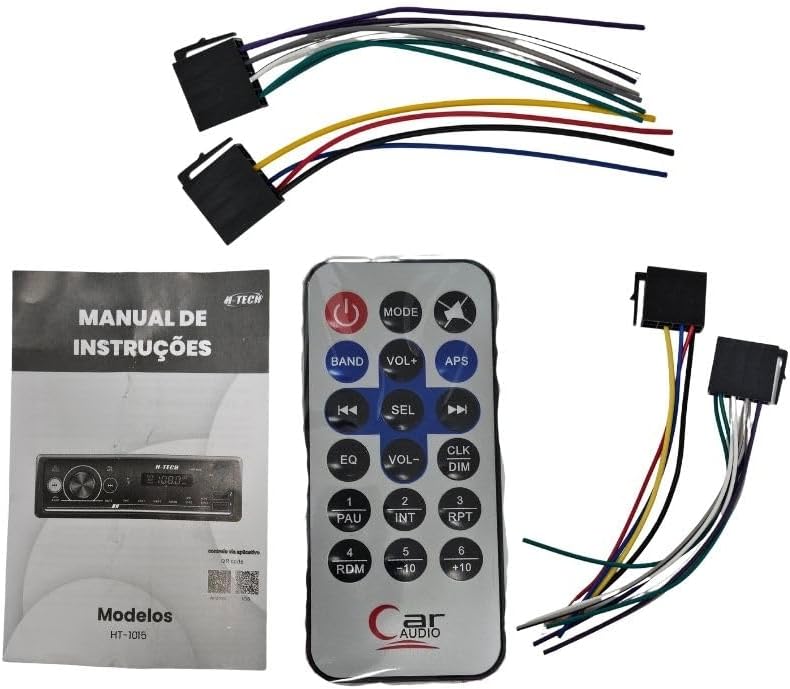
Image: Included components for the H-TECH HT-1015 car radio, showing the main unit, remote, and wiring harnesses.
Продукт бүттүview
Алдыңкы панелдин башкаруу элементтери

Сүрөт: алдыңкы view of the H-TECH HT-1015 car radio, displaying the main rotary knob, mode button, band button, track controls, APS button, mute button, numbered preset buttons, and two USB-A ports on the right side.
- MODE баскычы: Switches between FM, USB, AUX, and Bluetooth modes.
- Ротари баскычы: Adjusts volume. Press to select menu options.
- БАНД баскычы: Selects FM bands (FM1, FM2, FM3).
- APS Button: Automatic Preset Store (FM mode).
- Мурунку/Кийинки трек баскычтары: Радио жыштыктарын өткөрүп жиберет же тууралайт.
- MUTE баскычы: Аудио чыгарууну өчүрөт.
- Номерленген баскычтар (1-6): Radio station presets; also used for folder navigation (USB).
- USB-A Port (Music): For connecting USB drives to play audio files.
- USB-A Port (Charge 2.1A): Мобилдик түзмөктөрдү кубаттоо үчүн.
- AUX киргизүү: тышкы аудио түзмөктөр үчүн 3.5 мм уячасы.
- MIC: Built-in microphone for Bluetooth calls.
Арткы панелдик байланыштар

Сүрөт: Арткы view of the H-TECH HT-1015 car radio, showing the main 16-pin wiring harness connector, antenna input, and two RCA audio output jacks (red and white).
- 16-Pin Wiring Harness Connector: Connects to the included wiring harnesses for power, speakers, and other functions.
- Антенна киргизүү: For connecting the car's FM antenna.
- RCA аудио чыгыштары: Two outputs (Left/Right) for connecting to external ampаман калгандар.
Орнотуу жана орнотуу
Кесиптик орнотуу сунушталат. Орнотууну баштоодон мурун унаанын батареясы ажыратылганын текшериңиз.
Зымдар диаграммасы
Use the provided 16-pin and ISO wiring harnesses to connect the car radio to your vehicle's electrical system and speakers. Refer to the color codes below:
| Wire Color | Функция |
|---|---|
| Сары | Туруктуу кубаттуулук (12V+) |
| Кызыл | Accessory Power (ACC) |
| Кара | Жер |
| Көк | Антенна/Ampкөтөргүчтү алыстан күйгүзүү |
| Ак | Алдыңкы сол динамик (+) |
| Ак/Кара | Алдыңкы сол динамик (-) |
| Боз | Алдыңкы оң динамик (+) |
| Боз/Кара | Алдыңкы оң динамик (-) |
| Жашыл | Арткы сол динамик (+) |
| Жашыл/Кара | Арткы сол динамик (-) |
| Кызгылт көк | Арткы оң динамик (+) |
| Кызгылт көк/кара | Арткы оң динамик (-) |
Connect the antenna cable to the antenna input on the rear panel. If using external amplifiers, connect them to the RCA audio outputs.
Физикалык орнотуу
- Carefully remove the existing car radio from your vehicle's dashboard.
- Connect the wiring harnesses from the HT-1015 to your vehicle's wiring, matching the functions.
- Slide the HT-1015 into the dashboard opening until it clicks into place.
- Унаанын аккумуляторун кайра туташтырыңыз.
- Test the unit's functions before fully reassembling the dashboard.
Иштөө нускамалары
Күйгүзүү/өчүрүү жана Көлөмү
- басыңыз РЕЖИМ button (or power button if separate) to turn the unit on.
- басып, кармап туруңуз РЕЖИМ аппаратты өчүрүү үчүн баскыч.
- айлантыңыз Айлануучу баскыч үн деңгээлин жөндөө.
FM радиосунун иштеши
- басыңыз РЕЖИМ баскычын "FM" көрсөтүлгөнчө басыңыз.
- басыңыз БАНД FM1, FM2 жана FM3 диапазондорунун ортосунда которулуу үчүн баскычты басыңыз.
- басыңыз Мурунку/Кийинки трек баскычтары to manually tune frequencies.
- басып, кармап туруңуз Мурунку/Кийинки трек баскычтары автоматтык станция издөө үчүн.
- басыңыз APS Күчтүү станцияларды автоматтык түрдө сканерлөө жана алдын ала коюлган жөндөөлөргө сактоо баскычы.
- басыңыз Номерленген баскычтар (1-6) to select a stored preset station.
USB ойнотуу
- USB флэш-дискти салыңыз USB-A (Music) port. The unit will automatically switch to USB mode and begin playback.
- Болбосо, басыңыз РЕЖИМ USB режимин тандоо үчүн баскыч.
- колдонуу Мурунку/Кийинки трек баскычтары тректерди өткөрүп жиберүү.
- колдонуу Numbered Buttons (e.g., 5/-10, 6/+10) to navigate folders or skip multiple tracks.
Көмөкчү киргизүү
- Тышкы аудио аспапты (мисалы, смартфон, MP3 ойноткуч) туташтырыңыз AUX киргизүү 3.5 мм аудио кабелин колдонуу менен.
- басыңыз РЕЖИМ AUX режимин тандоо үчүн баскычты басыңыз.
- Туташкан тышкы түзмөктөн ойнотууну башкарыңыз.
Bluetooth операциясы
- басыңыз РЕЖИМ button to select Bluetooth mode. The display will show "BT" or "PAIRING".
- Мобилдик түзмөгүңүздө Bluetooth иштетип, жеткиликтүү түзмөктөрдү издеңиз.
- Select "HT-1015" from the list of devices to pair. A confirmation tone will sound upon successful pairing.
- Once paired, you can stream audio from your device to the car radio. Use the Мурунку/Кийинки трек баскычтары ойнотууну башкаруу.
- For phone calls, the built-in microphone will be used. Press the Айлануучу баскыч чалууларга жооп берүү / токтотуу.
USB заряддоо
- Мобилдик түзмөгүңүздү төмөнкүгө туташтырыңыз USB-A (Charge 2.1A) port using a compatible USB cable.
- The device will begin charging automatically. This port is designed for faster charging.
Алыстан башкаруу жана Колдонмо башкаруу
- The included remote control allows for convenient operation of various functions from a distance. Refer to the remote's button labels for specific actions.
- The unit also supports control via a mobile application. Scan the QR code provided on the product packaging or in the quick start guide to download the app for Android or iOS devices.
Техникалык тейлөө
- Тазалоо: Аппараттын бетин жумшак, кургак чүпүрөк менен сүртүңүз. Абразивдүү тазалоочу каражаттарды же эриткичтерди колдонбоңуз.
- USB порттору: USB портторун чаңдан жана таштандылардан таза кармаңыз.
- Жалпы кам көрүү: Аппаратты түшүрүүдөн же катуу соккулардан сактаныңыз.
Проблемаларды чечүү
| Көйгөй | Мүмкүн себеп | Чечим |
|---|---|---|
| Күч жок | Туура эмес зымдар; Сактагыч күйүп кеткен; Унаанын аккумулятору ажыратылган. | Check power and ground connections. Inspect the fuse. Ensure battery is connected. |
| Үн жок | Volume too low; Mute activated; Speaker wires disconnected; Incorrect input mode. | Increase volume. Deactivate mute. Check speaker connections. Select correct input mode (FM, USB, AUX, BT). |
| FM кабыл алуу начар | Антенна туташкан эмес; Сигнал алсыз аймак; Антенна бузулган. | Ensure antenna is securely connected. Try tuning to stronger stations. Consider a new antenna if damaged. |
| Bluetooth жупташкан жок | Түзмөктө Bluetooth иштетилген эмес; Түзмөк жупташтыруу режиминде эмес; Түзмөк өтө алыс. | Ensure Bluetooth is on and discoverable on your device. Select Bluetooth mode on the radio. Keep devices close. |
| USB ойнотулбай жатат | Колдоого алынбайт file format; USB drive corrupted; Unit not in USB mode. | аудиону камсыз кылуу files are in a supported format (e.g., MP3). Try a different USB drive. Select USB mode. |
Техникалык шарттар
| Өзгөчөлүк | Деталь |
|---|---|
| Модель номери | HT-1015 |
| Бренд | H-TECH |
| Байланыш технологиясы | Bluetooth |
| Өзгөчөлүктөр | FM Tuner, USB Music Playback, USB Charging (2.1A), Auxiliary Input, Bluetooth Audio Streaming & Calls |
| Шайкеш түзмөктөр | Smartphone, USB Flash Drives |
| Туташтыргыч түрү | RCA, 16-pin harness |
| Аудио чыгаруу режими | Стерео |
| Чыгуу күчү (RMS) | 4 х 25 Ватт |
| Каналдардын саны | 4 |
| Колдоого алынган Интернет кызматтары | Spotify (via connected smartphone) |
| Тышкы тест сертификациясы | ANATEL: 07926-24-16671 |
| Камтылган компоненттер | Car radio, 16-pin harness, ISO harness, remote control, manual |
Кепилдик жана колдоо
This H-TECH HT-1015 car radio comes with a 1 жылдык кепилдик from the manufacturer against defects in materials and workmanship. Please retain your proof of purchase for warranty claims.
For technical support or warranty inquiries, please contact your retailer or the H-TECH customer service department. Contact information may be available on the product packaging or the official H-TECH webсайт.
Ask a question about this manual
Ask about setup, troubleshooting, compatibility, parts, safety, or missing instructions. Manuals+ will review the question and use this page’s manual context to help answer it.