
1. Киришүү
This manual provides essential instructions for the installation, operation, and maintenance of your CINMOORE CM-BC22U Wireless Magnetic Home Security Camera. Please read this manual thoroughly before using the product to ensure proper function and safety. Keep this manual for future reference.
2. Коопсуздук маалыматы
- Камера кулап калбашы үчүн туруктуу жерге орнотулганын текшериңиз.
- Камераны өтө жогорку температурага, узак убакыт бою түз күн нуруна же коррозиялуу чөйрөлөргө дуушар кылбаңыз.
- Use only the specified charging cable and adapter to prevent damage or fire.
- Камераны балдардан жана үй жаныбарларынан алыс кармаңыз.
- Камераны өз алдынча бөлүүгө же оңдоого аракет кылбаңыз. Жардам алуу үчүн кардарларды колдоо бөлүмүнө кайрылыңыз.
- Ensure your Wi-Fi network is secure to protect your privacy.
3. Пакеттин мазмуну
Пакетиңизде бардык буюмдар бар экенин текшериңиз:
- CINMOORE CM-BC22U Wireless Magnetic Home Security Camera
- Магниттик орнотуу базасы
- Монтаждоо бурамдары жана дубал анкерлери
- USB заряддоо кабели
- Колдонуучунун Колдонмосу (бул документ)
4. Продукт бүтүп калдыview
The CINMOORE CM-BC22U is a 2.5K wireless magnetic home security camera designed for outdoor use, featuring AI person detection, 4MP color night vision, and two-way audio. It is battery-powered and IP66 waterproof.
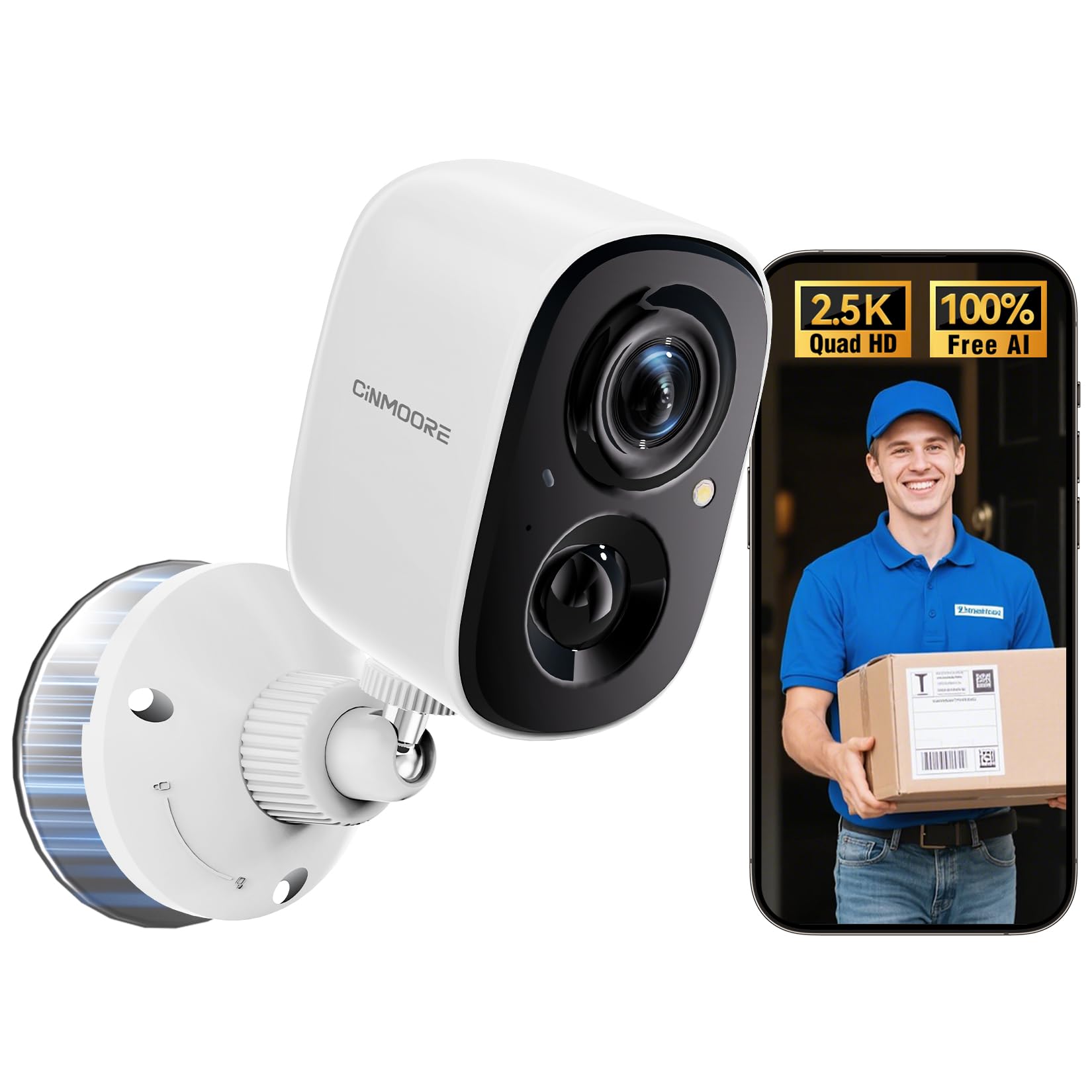
Image: CINMOORE CM-BC22U Wireless Magnetic Home Security Camera. This image shows the front and side view of the white camera unit with its magnetic base.

Image: Key features of CINMOORE CM-BC22U camera. This graphic highlights features such as 2.5K QHD resolution, sound & light siren, color night vision, built-in 5200mAh battery, wire-free installation, free person detection, and full duplex two-way audio.
5. Орнотуу
5.1 Камераны заряддоо
Before initial use, fully charge the camera using the provided USB cable and a 5V/1A or 5V/2A power adapter. The charging indicator light will show the charging status. A full charge typically takes several hours.
5.2 Колдонмону орнотуу
Download the official CINMOORE app from your smartphone's app store (iOS App Store or Google Play Store). Издөө "CINMOORE" and install the application.
5.3 Камераны жупташтыруу
- CINMOORE колдонмосун ачып, аккаунт түзүңүз же кириңиз.
- Жаңы түзмөк кошуу үчүн "+" сөлөкөтүн таптаңыз.
- Follow the on-screen instructions to select your camera model.
- Камераны күйгүзүңүз. Камера жупташтыруу режимине өтөт, бул күйүп-өчкөн LED жарыгы менен көрсөтүлөт.
- Смартфонуңузду 2.4 ГГц Wi-Fi тармагына туташтырыңыз. Камера 5 ГГц Wi-Fi'ды колдоого албайт.
- Телефонуңуздун экранында көрсөтүлгөн QR кодун камеранын линзасы менен сканерлеңиз. Телефонду камерадан болжол менен 15-20 см (6-8 дюйм) аралыкта кармаңыз.
- Once connected, the camera will confirm with an audible prompt, and the LED light will turn solid.
5.4 Камераны орнотуу
The camera offers flexible installation options due to its magnetic base and wire-free design.
- Магниттик орнотуу: Attach the camera directly to any metallic surface using its strong magnetic base. Ensure the surface is clean and provides a secure hold.
- Бурама орнотуу: For non-metallic surfaces or enhanced security, use the provided mounting screws and wall anchors.
- Оптималдуу жер үчүн ылайыктуу жерди тандаңыз viewing angle and Wi-Fi signal strength.
- Mark the positions for drilling holes using the mounting base as a template.
- Эгерде гипсокартонго же кышка орнотуп жатсаңыз, тешиктерди бургулап, дубалга анкерлерди орнотуңуз.
- Secure the magnetic mounting base to the wall with screws.
- Attach the camera to the magnetic base and adjust the angle as needed.

Image: Magnetic mounting of CINMOORE camera. This image illustrates how the camera attaches to its magnetic base, which is then secured to a wall.
6. Камераны иштетүү
6.1 Live View
Түз эфирдеги видео түрмөгүнө кирүү үчүн CINMOORE колдонмосун ачып, түзмөктөр тизмесинен камераңызды тандаңыз. Сиз төмөнкүлөрдү жасай аласыз view реалдуу убакыт footagИнтернет байланышы бар каалаган жерден.
6.2 Эки тараптуу аудио
Түз эфирде view, tap the microphone icon in the app to speak through the camera's built-in speaker. Tap the speaker icon to listen to audio from the camera's microphone. This feature allows for real-time communication.
6.3 Кыймылды аныктоо жана эскертүүлөр
The camera features free AI person detection to reduce false alarms. Configure detection settings in the app:
- Сезимталдуулук: Adjust the motion detection sensitivity to suit your environment.
- аныктоо зоналары: Камералардын ичиндеги белгилүү бир аймактарды коюңуз view кыймылды аныктоо үчүн.
- Эскертүүлөр: Enable push notifications to receive instant alerts on your smartphone when motion or a person is detected. The camera can also activate a built-in siren and spotlight upon detection.

Image: AI Person Detection feature. This image shows a person walking towards a door, with the camera detecting them and sending a notification to a smartphone, highlighting the AI person detection capability with spotlight, notification, and siren options.

Image: Smart AI Person Detection. This image shows a person walking a dog in front of a house, with a blue box highlighting the detected 'Person' by the camera, emphasizing the smart AI detection feature.
6.4 Жаздыруу жана ойнотуу
The camera supports both local storage via a microSD card (up to 256GB, not included) and optional cloud storage. Recorded events can be accessed and played back through the CINMOORE app.

Image: Secure Video Storage Options. This graphic illustrates the camera's support for both SD local storage (expandable up to 256GB) and AWS cloud storage (with a 30-day free trial), emphasizing encrypted storage.

Image: Secure Local & Cloud Storage. This image displays various scenarios captured by the camera, such as a car, packages, a person with a dog, and a person attempting to break in, all protected by a shield icon representing secure local and cloud storage.
6.5 Түнкү көрүнүш
The camera provides 4MP full-color night vision, ensuring clear and detailed footage even in low-light conditions. It automatically switches between day and night modes.

Image: Full-Color Night Vision. This split image compares normal night vision (monochrome) with full-color night vision, demonstrating the camera's ability to capture clear, colored images in darkness.

Image: IR Night Vision vs Color Night Vision. This split image compares traditional IR night vision (black and white) with the camera's color night vision, showing a car in a driveway with much greater detail and color in the latter.

Image: 2.5K QHD Resolution Comparison. This split image compares 2.5K QHD resolution with 2K FHD, showing a car in a driveway with significantly sharper detail in the 2.5K QHD view.

Image: 2K HD vs 2.5K QHD Image Quality. This split image compares the visual clarity between 2K HD and 2.5K QHD, showing a dog running on grass with noticeably finer detail and sharpness in the 2.5K QHD image.
7. Техникалык тейлөө
7.1 Батареяны башкаруу
- Recharge the camera when the battery level is low, as indicated by the app.
- Battery life varies based on usage frequency, recording duration, and environmental conditions.
- Батареянын иштөө мөөнөтүн узартуу үчүн аны дайыма толугу менен бошотуп туруудан алыс болуңуз.
7.2 Тазалоо
Wipe the camera lens and body with a soft, dry cloth. Do not use harsh chemicals or abrasive cleaners, as they may damage the camera's finish or lens coating.
7.3 Микропрограмма жаңыртуулары
Periodically check the CINMOORE app for available firmware updates. Keeping your camera's firmware updated ensures optimal performance, security, and access to new features. Follow the in-app instructions for updating.
8. Кыйынчылыктарды
| Маселе | Мүмкүн себеп | Чечим |
|---|---|---|
| Camera frequently goes offline | Weak Wi-Fi signal; Router issues; Battery low | Ensure camera is within Wi-Fi range. Restart your router. Fully charge the camera. If issues persist, consider a Wi-Fi extender. |
| Difficulty connecting to 2.4GHz Wi-Fi | Incorrect Wi-Fi password; Connecting to 5GHz network; Router settings | Verify Wi-Fi password. Ensure your phone is connected to a 2.4GHz network during setup. Check router settings to ensure 2.4GHz band is enabled. |
| Unreliable motion detection or image capturing | Туура эмес сезгичтик орнотуулары; Тоскоолдуктар view; Camera placement | Adjust motion detection sensitivity in the app. Ensure the camera's view is clear. Reposition the camera for optimal coverage of the desired area. |
| SD card not recording or recognized | SD card not inserted correctly; Corrupted SD card; SD card full | Ensure the SD card is inserted correctly. Format the SD card via the app. Replace the SD card if corrupted. Ensure the SD card is not removed while the camera is operating. |
| Эки тараптуу аудио иштебейт | Microphone/speaker muted in app; Low volume on phone; Network issues | Check app settings to ensure microphone and speaker are enabled. Adjust volume on your smartphone. Ensure a stable internet connection. |
9. Техникалык шарттар
| Өзгөчөлүк | Деталь |
|---|---|
| Модель аты | CM-BC22U |
| Видео тартуунун резолюциясы | 2.5K (1440P) Quad HD |
| Байланыш технологиясы | Зымсыз (2.4 ГГц Wi-Fi) |
| Power Source | Батарея менен иштейт (5200 мАч кайра заряддалуучу батарея) |
| Түнкү көрүнүш | Толук түстүү түнкү көрүнүш |
| Өзгөчөлүктөр | 2-Way Audio, Built-In Light, HD Resolution, Motion Sensor, AI Person Detection |
| Ички/тышкы колдонуу | Сыртта (IP66 суу өткөрбөйт) |
| Сактагыч параметрлери | MicroSD Card (up to 256GB, not included), Cloud Storage (optional) |
| Шайкеш түзмөктөр | Смартфон (Android, iOS) |
| Тоо түрү | Magnetic, Ceiling Mount, Tabletop Mount, Wall Mount |
| Элементтин өлчөмдөрү | 7.6 x 5.1 x 5.1 Сантиметр |
10. Кепилдик маалыматы
The CINMOORE CM-BC22U Wireless Magnetic Home Security Camera comes with a 2 жылдык өндүрүүчүнүн кепилдиги сатып алынган күндөн тартып. Бул кепилдик кадимки колдонуудагы материалдардын жана жасалгалоодогу кемчиликтерди камтыйт. Туура эмес колдонуудан, кырсыктардан, уруксатсыз өзгөртүүлөрдөн же табигый кырсыктардан улам келип чыккан зыянды камтыбайт. Кепилдик дооматтары үчүн сатып алганыңызды тастыктаган документти сактап коюңуз.
11. Колдоо
For technical assistance, troubleshooting, or warranty inquiries, please contact CINMOORE customer support:
- Электрондук почта: Refer to your product packaging or the CINMOORE official webакыркы байланыш электрондук почта сайты.
- Ыкчам байланыш телефону: A free hotline is available on weekdays for product issues. Refer to your product packaging or the CINMOORE official website for the hotline number.
- Онлайн ресурстар: Visit the CINMOORE official webКөп берилүүчү суроолор, жаңыртылган колдонмолор жана колдоо макалалары үчүн сайт.