
1. Коопсуздук боюнча маанилүү маалымат
The Twotrees TTS-10 Pro is a Class 4 laser product. Direct or scattered laser radiation can cause severe eye and skin damage. Always follow these safety guidelines:
- коргоочу көз айнек кийүү: Always wear the provided laser safety goggles when the machine is operating.
- Түздөн-түз таасир этүүдөн качыңыз: Never look directly into the laser beam or allow it to reflect off shiny surfaces into your eyes or skin.
- Вентиляция: Operate the engraver in a well-ventilated area to dissipate smoke and fumes produced during engraving and cutting.
- Өрт коопсуздугу: Keep a fire extinguisher nearby. Do not leave the machine unattended during operation, especially when cutting flammable materials.
- Материалдык шайкештик: Do not engrave or cut materials that produce toxic fumes or are highly reflective without proper precautions.
- Балдар жана үй жаныбарлары: Балдарды жана үй жаныбарларын операциядан алыс кармаңыз.
- Шашылыш токтотуу: Авариялык токтотуу жол-жобосу менен таанышып алыңыз.

Сүрөт 1.1: Laser safety warning signs indicating danger from direct or scattered radiation. Always observe these warnings during operation.
2. Продукт бүтүп калдыview
The Twotrees TTS-10 Pro is a high-precision laser engraving and cutting machine designed for various DIY and professional applications. It features a powerful 10000mW laser module with advanced compression spot technology, enabling efficient engraving and cutting on a wide range of materials.

Сүрөт 2.1: The Twotrees TTS-10 Pro Laser Engraver, showcasing its compact design and working area.
Негизги өзгөчөлүктөрү:
- High Power Laser: 10000mW (10W) output for effective engraving and cutting.
- Precision Spot: 0.069mm laser spot size for fine detail and clean cuts.
- Жогорку ылдамдык: Engraving speeds up to 30000mm/min.
- Материалдын ар тараптуулугу: Capable of working with wood, metal, acrylic, glass, stainless steel, and more.
- Advanced Mainboard: 32-bit dual-core MCU for faster processing and multiple control options (online, offline, mobile app, WEB).
- Аба жардам берүүчү сопло: Integrated metal air assist nozzle to improve cutting penetration and efficiency, and reduce smoke.
3. Пакеттин мазмуну
Пакетте бардык компоненттер бар экенин текшериңиз:
- Twotrees TTS-10 Pro Laser Engraver Frame
- 10000mW Laser Module
- Control Box
- Кубаттуу адаптер жана кабель
- USB кабели
- Коопсуздук көз айнек
- Risers (as specified)
- Air Assist Nozzle
- Tool Kit (screws, wrenches, etc.)
- Колдонуучунун Колдонмосу (бул документ)
4. Баштапкы орнотуу
4.1. Ассамблея
The TTS-10 Pro comes 90% pre-assembled. Follow the included quick-start guide for final assembly steps, which typically involve attaching the gantry to the base frame and connecting the laser module.
4.2. Кубат жана USB туташтыруу
- Кубат адаптерин башкаруу кутусуна, андан кийин розеткага туташтырыңыз.
- Connect the USB cable from the control box to your computer for initial setup and software communication.
4.3. Программалык камсыздоону орнотуу
The TTS-10 Pro is compatible with several popular laser control software applications:
- LaserGRBL (Windows): Free software for basic engraving tasks. Download from the official LaserGRBL webсайт.
- LightBurn (Windows, Mac): Paid, professional software offering advanced features for both engraving and cutting. A trial version is usually available. Download from the official LightBurn webсайт.
- MKSLaser (Android, iOS): Mobile application for convenient control via smartphone or tablet. Download from your device's app store.
Install your preferred software and ensure your computer or mobile device recognizes the engraver.
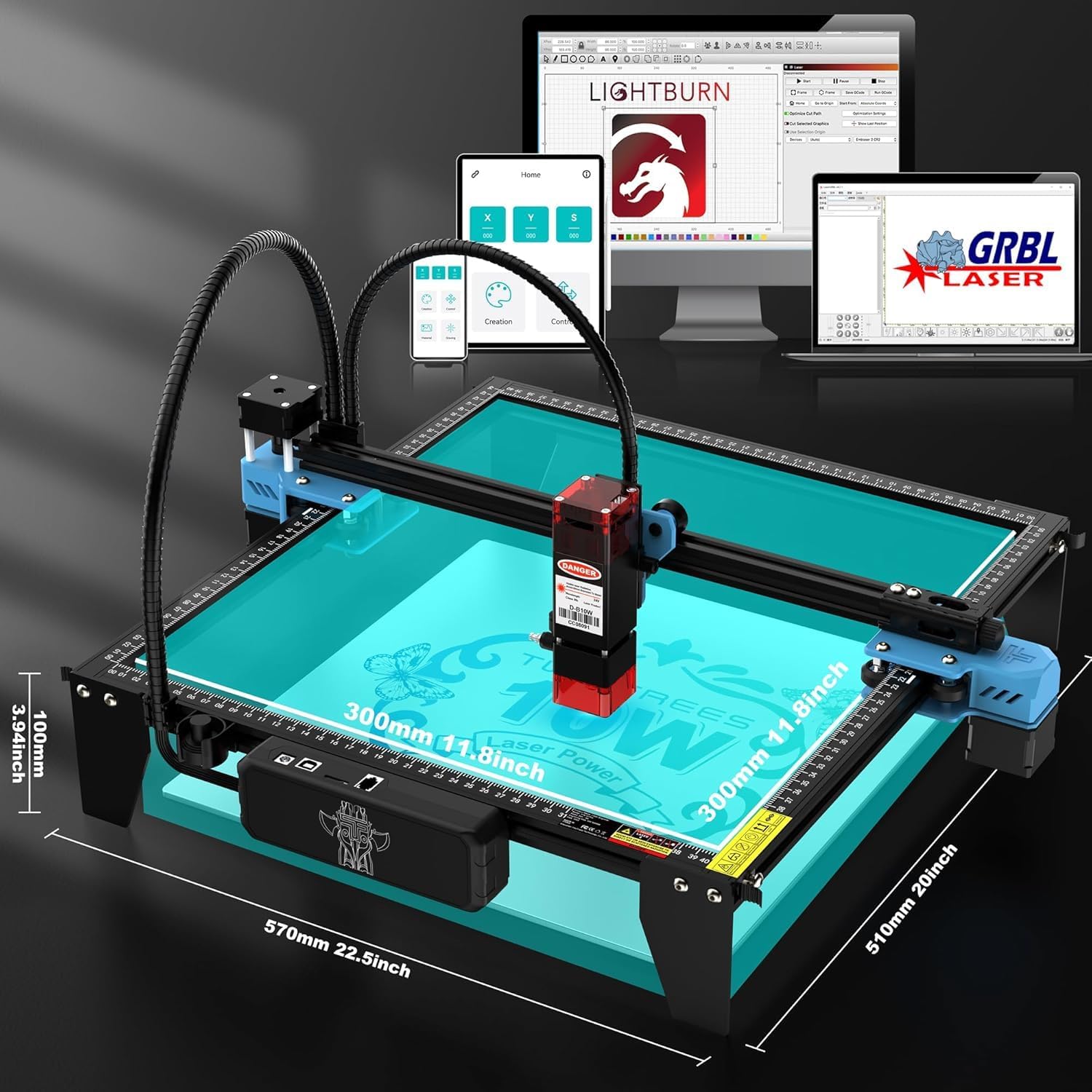
Сүрөт 4.1: The TTS-10 Pro connected to various devices, illustrating software compatibility and control options.
5. Иштөө нускамалары
5.1. Preparing Your Material
Place the material to be engraved or cut securely on the working surface. Ensure it is flat and properly aligned within the working area (300x300mm).
5.2. Лазерди фокустоо
Adjust the laser module's height to achieve the optimal focal point on the material surface. Refer to your software's instructions for specific focusing procedures. Proper focus is critical for achieving precise results.

Сүрөт 5.1: Diagram illustrating the LD+FAC+C-Lens compression spot technology, which creates a fine 0.069mm laser spot for high precision.
5.3. Программалык камсыздоонун иштеши
- Жүктөөнүн дизайны: Open your chosen software (e.g., LightBurn, LaserGRBL) and load your design file (e.g., SVG, DXF, JPG, PNG).
- Орнотууларды тууралоо: Configure laser power, speed, and passes according to your material and desired effect. Start with lower power and higher speed for testing.
- Frame Area: Use the software's framing function to preview the laser's path and ensure it fits within your material.
- Ишти баштоо: Initiate the engraving or cutting process. Monitor the machine closely.
5.4. Using the Air Assist Nozzle
The integrated air assist nozzle helps to blow away smoke and debris from the laser's path, improving cutting efficiency and reducing charring. Ensure it is properly connected and functioning for optimal results, especially during cutting operations.

Сүрөт 5.2: Illustration of the 10W laser power, demonstrating its capability to cut materials like pine board and acrylic with multiple passes.
6. Техникалык тейлөө
Regular maintenance ensures the longevity and optimal performance of your TTS-10 Pro laser engraver.
- Лазердик линзаны тазалоо: Лазердин иштешине таасир этиши мүмкүн болгон чаңды жана таштандыларды кетирүү үчүн лазердик линзаны мезгил-мезгили менен жумшак, түксүз чүпүрөк жана линза тазалоочу эритме менен тазалап туруңуз.
- Clean the Working Area: Remove any accumulated dust, debris, or material scraps from the working bed and surrounding areas.
- Check Belts and Rails: Inspect the timing belts for tension and wear. Ensure the guide rails are clean and free of obstructions for smooth movement.
- Программалык камсыздоонун жаңыртуулары: Check the official Twotrees website for any available firmware updates for your machine.
7. Кыйынчылыктарды
This section addresses common issues you might encounter with your TTS-10 Pro laser engraver.
| Көйгөй | Мүмкүн себеп | Чечим |
|---|---|---|
| Лазер иштебейт же алсыз чыгаруу | Loose cable, dirty lens, incorrect power setting, laser module failure. | Check all connections. Clean the laser lens. Verify power settings in software. Contact support if module is faulty. |
| Machine not connecting to computer/app | USB cable issue, driver not installed, incorrect COM port, software conflict. | Try a different USB port/cable. Install necessary drivers. Select correct COM port in software. Restart computer/app. |
| Engraving/cutting results are blurry or inaccurate | Improper focus, loose belts, material movement, incorrect speed/power. | Re-focus the laser. Check and tighten belts. Secure material. Adjust speed and power settings. |
| Machine makes grinding noises | Obstruction on rails, loose motor, damaged belt. | Inspect rails for debris. Check motor mounting screws. Examine belts for damage. |
8. Техникалык шарттар
Detailed specifications for the Twotrees TTS-10 Pro Laser Engraver:
| Өзгөчөлүк | Спецификация |
|---|---|
| Модел | TTS-10 Pro |
| Лазердик чыгаруу күчү | 10000мВт (10Вт) |
| Лазердик класс | Class Ⅳ |
| Лазердик Spot өлчөмү | 0.069мм |
| Гравюра ылдамдыгы | 30000 мм/мин чейин |
| Working Size | 300x300 мм (12x12 дюйм) |
| Продукциянын өлчөмдөрү | 20.1 x 7 x 7 дюйм (болжол менен 510 x 178 x 178 мм) |
| Элемент Салмагы | 7.92 фунт (болжол менен 3.6 кг) |
| Mainboard | 32-bit Dual-core MCU |
| Программалык камсыздоонун шайкештиги | LaserGRBL, LightBurn, MKSLaser (mobile app) |
| Киргизүү рейтинги | DC 12V, 4A |
9. Кепилдик жана колдоо
Twotrees products typically come with a manufacturer's warranty covering defects in materials and workmanship. For specific warranty terms and duration, please refer to the documentation included with your purchase or visit the official Twotrees webсайт.
For technical support, troubleshooting assistance, or spare parts, please contact Twotrees customer service through their official channels. When contacting support, provide your product model (TTS-10 Pro) and a detailed description of the issue.
Онлайн ресурстар:
- Official Twotrees Webсайт: www.twotrees3d.com (Сураныч, так колдоону текшериңиз URL on your product packaging or official webсайт)
- Software Support: Refer to the documentation or communities for LaserGRBL, LightBurn, and MKSLaser.