
HomeWizard HWE-KWH1
HomeWizard 1-Phase Wi-Fi kWh Meter (MID Certified) Instruction Manual
Model: HWE-KWH1
1. Киришүү
The HomeWizard 1-Phase Wi-Fi kWh Meter is designed to provide accurate, real-time energy consumption data for single-phase electrical installations. This MID-certified meter is suitable for official billing purposes and offers comprehensive monitoring capabilities via the HomeWizard app. It is ideal for tracking energy usage of large consumers such as electric vehicle charging stations, heat pumps, and solar installations.
2. Коопсуздук маалыматы
Эскертүү: Бул түзмөктү орнотуу жогорку вольт менен иштөөнү талап кылатtage electricity. Improper installation can lead to serious injury or death.
- Орнотуу жергиликтүү электр эрежелерине жана эрежелерине ылайык квалификациялуу электрик тарабынан аткарылышы керек.
- Ensure the main power supply is disconnected before attempting any installation or maintenance.
- Аппаратты ачпаңыз casinг. Ичинде колдонуучу тейлей турган бөлүктөр жок.
- Аппаратты суудан жана ашыкча нымдан алыс кармаңыз.
- Operate the device within its specified voltage and current ratings (100A, 230V).
3. Пакеттин мазмуну
Пакетте бардык буюмдар бар экенин текшериңиз:
- HomeWizard 1-Phase Wi-Fi kWh Meter (Model: HWE-KWH1)
- Quick Start Guide
4. Продукт бүтүп калдыview
The HomeWizard kWh Meter is a compact device designed for DIN rail mounting, providing precise energy measurement and Wi-Fi connectivity for smart home integration.

Figure 4.1: HomeWizard kWh Meter showing its compact dimensions (10.6 x 3.6 x 6.6 cm).

Figure 4.2: Key features of the HomeWizard kWh Meter, including backlit LCD, intuitive button control, impulse LED, DIN rail mounting, and security seal orifice.
Негизги өзгөчөлүктөрү:
- MID Certified: Ensures accuracy for official billing and leasing максаттары.
- Wi-Fi туташуусу: Real-time data access via the HomeWizard app.
- 1-Phase Measurement: Suitable for single-phase electrical systems.
- DIN темир жол орнотуу: Easy installation in standard electrical panels.
- Компакт дизайн: Fits into most electrical cabinets.
- Арткы жарыктуу LCD экран: Direct on-site display of measurements.
- Intuitive Button Control: Simple navigation.
- Impulse LED: Indicates current energy consumption.
- Security Seal Orifice: For protection against tampring.
5. Орнотуу жана орнотуу
The HomeWizard kWh Meter is designed for installation in your electrical panel. Due to the nature of electrical work, professional installation is highly recommended.
5.1. Орнотууга талаптар
- Technical knowledge of electrical installations is required.
- Standard 35mm DIN rail for mounting.
- 2.4 GHz Wi-Fi network for app connectivity.
5.2. Installation Steps (Professional Installation Recommended)
- Кубатты өчүрүү: Before starting, ensure the main power supply to your electrical panel is completely switched off.
- Mount the Meter: Securely attach the HomeWizard kWh Meter onto a 35mm DIN rail within your electrical panel.
- Wire the Meter: Connect the meter according to the wiring diagram provided in the quick start guide and local electrical standards. Ensure correct phase and neutral connections, and connect the load.
- Күчтү калыбына келтирүү: Once wiring is complete and verified, restore power to the electrical panel.
- Wi-Fi туташуусу: Follow the instructions in the Quick Start Guide to connect the meter to your 2.4 GHz Wi-Fi network.
- Колдонмо интеграциясы: Download the HomeWizard app from your device's app store and follow the in-app instructions to add and configure your new kWh meter.

Figure 5.1: The HomeWizard kWh Meter being installed on a DIN rail in an electrical cabinet. Professional installation is advised.
6. Иштөө нускамалары
The HomeWizard kWh Meter provides real-time energy data directly on its LCD screen and through the HomeWizard mobile application.
6.1. On-Device Display
- The backlit LCD screen displays current energy consumption (kWh) and other relevant metrics.
- Use the intuitive button control to cycle through different display modes and view historical data directly on the device.
- The impulse LED will flash to indicate active energy consumption.
6.2. HomeWizard App Integration
The HomeWizard app is the primary interface for monitoring and managing your energy data.
- Колдонмону жүктөп алыңыз: Издөө "HomeWizard" in your smartphone's app store (iOS or Android).
- Эсеп түзүү: If you don't have one, create a HomeWizard account and log in.
- Түзмөк кошуу: Follow the in-app instructions to add your kWh meter. Ensure your phone is connected to the same 2.4 GHz Wi-Fi network as the meter during setup.
- Monitor Consumption: View real-time and historical energy consumption data, including grid draw, grid feed-in, and consumption by specific appliances (if configured with other HomeWizard devices).
- Insights and Optimization: The app provides insights into your energy usage patterns, helping you identify large consumers and optimize your energy consumption.

Figure 6.1: The HomeWizard app interface showing real-time energy consumption data, including grid usage and solar production.

Figure 6.2: A smartphone displaying the HomeWizard app, illustrating its user-friendly interface for energy monitoring.
6.3. Тиркемелер
The HomeWizard kWh Meter is versatile and can be used to monitor various high-consumption devices and energy sources:
- Жылуулук насостору
- Electric Vehicle (EV) Charging Stations
- Кондиционерлер
- Solar Panels (for production monitoring)
- Электрдик суу жылыткычтар
- клуб Hobs
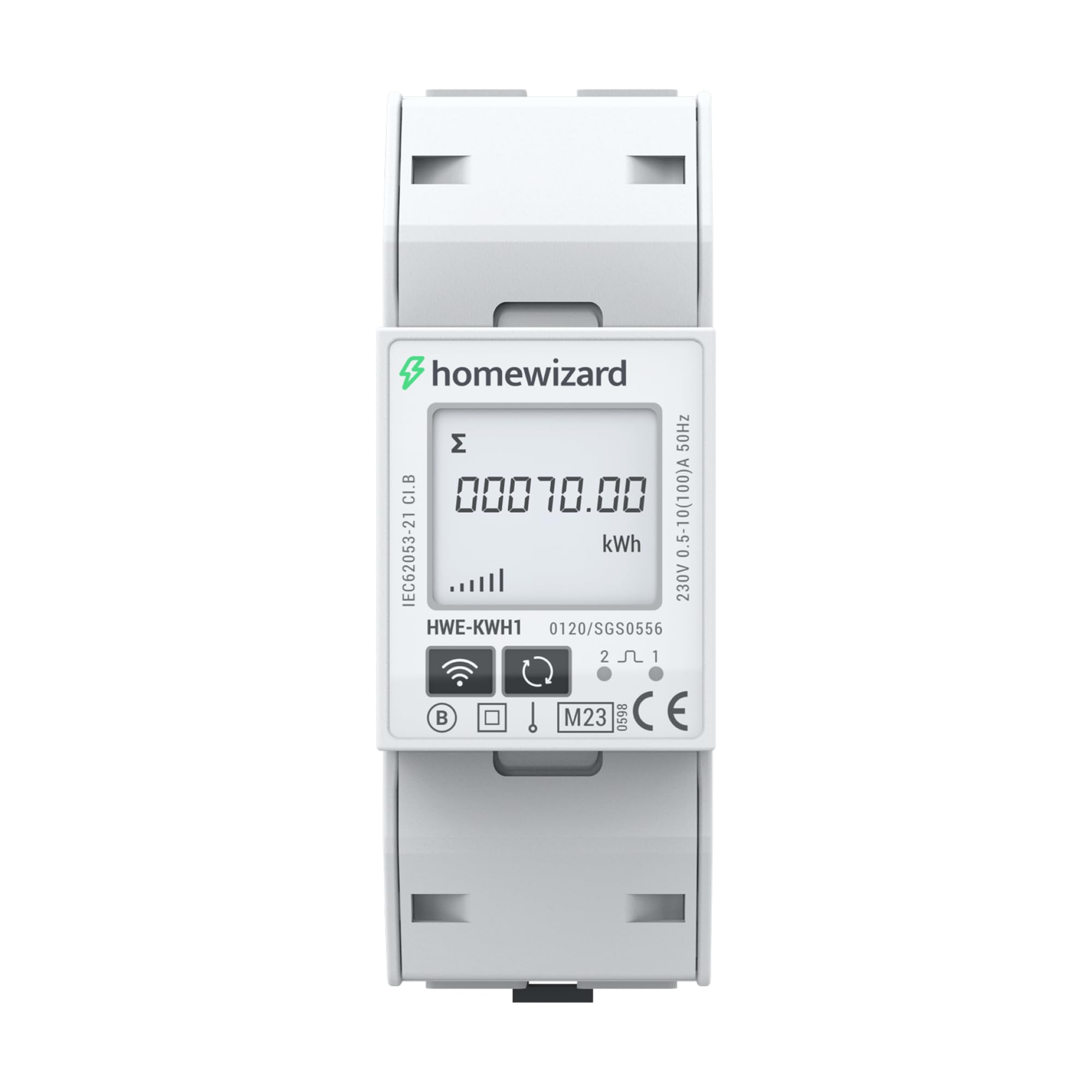
Figure 6.3: The HomeWizard kWh Meter monitoring an electric vehicle charging station and solar panel output.
7. Техникалык тейлөө
The HomeWizard kWh Meter is designed for maintenance-free operation.
- Тазалоо: Зарыл болсо, түзмөктүн сыртын кургак, жумшак чүпүрөк менен акырын сүртүңүз. Суюк тазалоочу каражаттарды же эриткичтерди колдонбоңуз.
- Программалык камсыздоонун жаңыртуулары: Ensure your device's firmware is up to date through the HomeWizard app to benefit from the latest features and improvements.
- Колдонуучунун тейлөөчү тетиктери жок: Do not attempt to open or repair the device. Refer to qualified personnel for any issues.
8. Кыйынчылыктарды
If you encounter issues with your HomeWizard kWh Meter, try the following steps:
- Кубат жок/Дисплей өчүк:
- Check the main power supply to the electrical panel.
- Ensure all wiring connections are secure (consult a qualified electrician).
- Wi-Fi туташуусу жок:
- Verify your Wi-Fi network is 2.4 GHz. The device does not support 5 GHz networks.
- Ensure the Wi-Fi signal strength is adequate at the meter's location.
- Wi-Fi роутериңизди өчүрүп күйгүзүңүз.
- Attempt to re-pair the device with the HomeWizard app.
- Туура эмес окуулар:
- Confirm that the meter is correctly wired according to the installation diagram.
- Ensure the meter is MID certified for accurate measurements.
- Колдонмо дайындарды көрсөтпөйт:
- Смартфонуңуздагы интернет байланышын текшериңиз.
- Ensure the HomeWizard app is updated to the latest version.
- Log out and log back into the HomeWizard app.
- If the issue persists, contact HomeWizard support.
9. Техникалык шарттар
| Бренд | HomeWizard |
| Модел | HWE-KWH1 |
| Продукциянын өлчөмдөрү (L x W x Y) | 10.6 x 3.6 x 6.6 см |
| Элемент Салмагы | 167 грамм |
| Түс | Боз |
| Материал | Пластик |
| Тtage | 230 вольт |
| Учурдагы рейтинг | 100 А |
| Энергияны керектөө | 2 Ватт |
| MID Certified | Ооба |
| Батареялар камтылган | Жок |
| Батареялар талап кылынат | Жок |
| Биринчи жеткиликтүү | 19-ноябрь, 2025-жыл |
10. Кепилдик жана колдоо
10.1. Кепилдик маалыматы
The HomeWizard kWh Meter comes with a 2-year availability for spare parts. For specific warranty terms and conditions, please refer to the documentation provided with your purchase or visit the official HomeWizard webсайт.
10.2. Программалык камсыздоону жаңыртуу
Software updates are provided to enhance functionality and security. Information regarding guaranteed software updates is not available in the provided data. Please check the HomeWizard app or webакыркы маалымат алуу үчүн сайт.
10.3. Кардарларды колдоо кызматы
For technical assistance, troubleshooting, or any other inquiries, please contact HomeWizard customer support.
- Өндүрүүчү: HomeWizard
- Сатуучу: HomeWizard BV (on Amazon.fr)
- Refer to the HomeWizard webбайланыш маалыматы жана колдоо булактары үчүн сайт.
Ask a question about this manual
Ask about setup, troubleshooting, compatibility, parts, safety, or missing instructions. Manuals+ will review the question and use this page’s manual context to help answer it.