
Introduction
Thank you for choosing the CALOETHNEY HX801S Bluetooth Neckband Headphones. This manual provides essential information for the proper setup, operation, and maintenance of your device. Please read it thoroughly before use to ensure optimal performance and longevity of your headphones.
The HX801S features a retractable neckband design, Bluetooth 5.1 connectivity, and a long-lasting battery. It is designed for comfort and convenience, offering stereo sound and vibration call reminders.
Коопсуздук маалыматы
- Наушниктерди экстремалдык температурага, нымдуулукка же коррозиялуу чөйрөгө тийгизбеңиз.
- Аппаратты түшүрүүдөн же катуу таасирлерден сактаныңыз.
- Do not attempt to disassemble or modify the headphones, as this may void the warranty and cause damage.
- Аппаратты балдардан жана үй жаныбарларынан алыс кармаңыз.
- Берилген заряддоо кабелин же тастыкталган эквивалентти гана колдонуңуз.
- Узак убакыт бою жогорку үн менен угуу угууга зыян келтириши мүмкүн. Үндү коопсуз деңгээлге тууралаңыз.
Пакеттин мазмуну
Сураныч, пакетте төмөнкү нерселерди текшериңиз:
- CALOETHNEY HX801S Bluetooth Neckband Headphones
- USB заряддоо кабели
- Наушниктер (ар кандай өлчөмдөгү)
- Колдонуучунун Колдонмосу (бул документ)
Продукт бүттүview
Familiarize yourself with the components and controls of your HX801S headphones.

Figure 1: Headphone Controls and Components
This image displays the CALOETHNEY HX801S neckband headphones with various parts labeled, including the Memory Flex Neck Band, LED Indicator, Power Button, MFB (Multi-Function Button for Play/Pause), Previous/Next Song buttons, Stretch Switch for earbuds, Volume Up/Down buttons, and the Charging Port (USB-C).

Сүрөт 2: Алдыңкы View of HX801S Headphones
А ачык view of the CALOETHNEY HX801S Bluetooth Neckband Headphones, showcasing their black and blue design and the in-ear earbuds.
Жайгашуу
1. Наушниктерди заряддоо
Before first use, fully charge your headphones. Connect the provided USB charging cable to the USB-C charging port on the headphones and to a power source (e.g., computer USB port or USB wall adapter). The LED indicator will show the charging status.
3-сүрөт: Кубаттоо порту жана батарея жөнүндө маалымат
This image highlights the USB-C charging port on the headphones and indicates a 200mAh battery capacity, with a full charge time of approximately 2 hours, providing 18-24 hours of music/talk time.
- Толук кубаттоо болжол менен 2 саатты талап кылат.
- The LED indicator will typically turn solid blue or off when fully charged.
- The headphones offer up to 22 hours of music time, 20 hours of talk time, and 550 hours of standby time on a single charge.
2. Күйгүзүү / Өчүрүү
- Күйгүзүү үчүн: Press and hold the Power Button (refer to Figure 1) for approximately 3 seconds until the LED indicator flashes blue and you hear a power-on prompt.
- Өчүрүү үчүн: Press and hold the Power Button for approximately 3 seconds until the LED indicator flashes red and you hear a power-off prompt.
3. Bluetooth Жупташтыруу
Гарнитураңызды Bluetooth иштетилген түзмөккө туташтыруу үчүн:
- Наушниктердин өчүрүлгөнүн текшериңиз.
- Press and hold the Power Button for approximately 5-7 seconds until the LED indicator flashes red and blue alternately. This indicates pairing mode.
- Түзмөгүңүздө (смартфон, планшет, ноутбук) Bluetooth иштетиңиз жана жеткиликтүү түзмөктөрдү издеңиз.
- Select "HX801S" from the list of found devices.
- Once connected, the LED indicator will flash blue slowly, and you will hear a connection confirmation.

4-сүрөт: Bluetooth жупташтыруу процесси
This image illustrates a smartphone's Bluetooth settings screen, showing the "HX801S" device available for connection, demonstrating the pairing step.
Кулакчындар 10 метрге (33 фут) чейин туруктуу туташуу үчүн Bluetooth 5.1 колдойт.
Иштөө нускамалары
1. Basic Music Controls
- Ойнотуу/тындыруу: Press the MFB (Multi-Function Button) once.
- Кийинки ыр: Press the "Next Song" button once.
- Мурунку ыр: Press the "Previous Song" button once.
- Көлөмү: Press the "Volume Up" button.
- Үнүн азайтуу: Press the "Volume Down" button.
2. Чалууларды башкаруу
- Чалууга жооп берүү/аяктоо: Press the MFB once during an incoming call or during an active call.
- Чакырууну четке кагуу: Кирүүчү чалуу учурунда MFBди болжол менен 2 секунд басып туруңуз.
- Акыркы номерди кайра терүү: Double-press the MFB when no call is active.

Figure 5: Incoming Call Vibration Reminder
This image shows a smartphone receiving an incoming call, with visual cues indicating the vibration reminder feature of the headphones, ensuring you don't miss important calls.
3. Connecting Two Bluetooth Devices Simultaneously
The HX801S headphones can connect to two Bluetooth devices at the same time, allowing you to seamlessly switch between them.
- Pair the headphones with the first device (Device A) as described in the "Bluetooth Pairing" section.
- Disable Bluetooth on Device A. The headphones will re-enter pairing mode.
- Pair the headphones with the second device (Device B).
- Enable Bluetooth on Device A. The headphones should automatically connect to both Device A and Device B.

Figure 6: Dual Device Connectivity
This image demonstrates the ability of the HX801S headphones to connect to two devices simultaneously, such as a laptop and a smartphone, allowing for easy switching between audio sources.
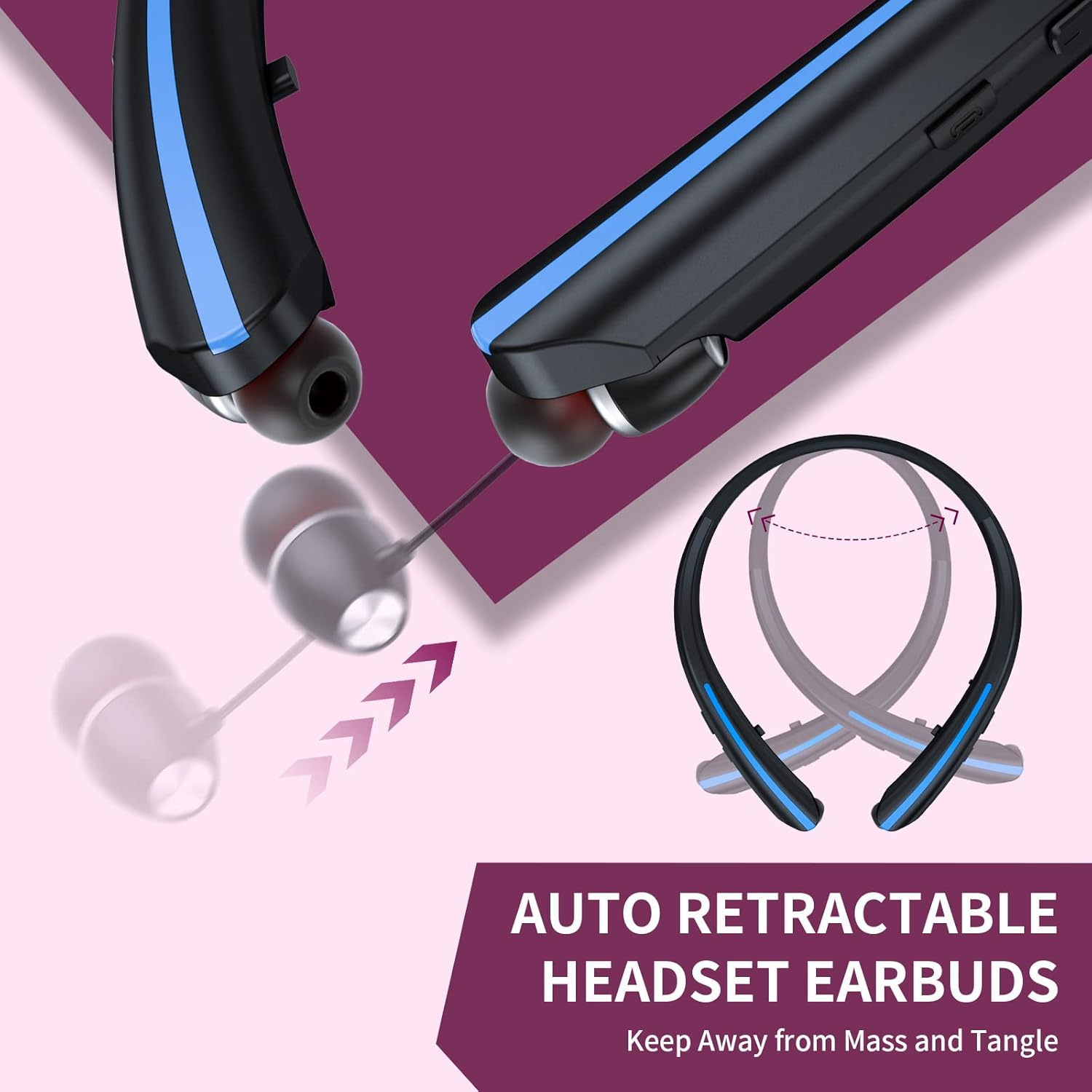
4. Retractable Earbuds
The earbuds feature a retractable mechanism for convenient storage and to prevent tangling. Gently pull the earbud cable to extend it. To retract, press the 'Stretch Switch' button (refer to Figure 1) and guide the cable back into the neckband. Avoid forcing the retraction or pulling the earbuds excessively to prevent damage.
Figure 7: Retractable Earbud Mechanism
This image illustrates the retractable design of the earbuds, showing how they can be extended and retracted into the neckband for tangle-free storage.
Техникалык тейлөө
1. Тазалоо
- Наушниктерди жумшак, кургак чүпүрөк менен сүртүңүз.
- Абразивдүү тазалагычтарды, спиртти же химиялык эриткичтерди колдонбоңуз.
- Regularly clean the eartips to remove earwax and debris for optimal sound quality and hygiene.
2. Сактоо
- Наушниктерди күн тийбеген, салкын, кургак жерде сактаңыз.
- When not in use, retract the earbuds to protect the cables.
3. Сууга туруктуулук
The HX801S headphones are designed with a waterproof rating, making them suitable for use during workouts or in light rain. However, they are not intended for submersion in water. Ensure the charging port cover is securely closed to maintain water resistance.

8-сүрөт: Сууга туруктуулук өзгөчөлүгү
This image visually represents the waterproof capability of the HX801S headphones, showing water splashing over the device, indicating its suitability for active use.
Проблемаларды чечүү
Эгерде сиз кулакчындарыңыз менен кандайдыр бир көйгөйлөргө туш болсоңуз, төмөнкү кеңири таралган көйгөйлөрдү жана чечимдерди караңыз:
| Көйгөй | Мүмкүн себеп | Чечим |
|---|---|---|
| Кулакчындар күйбөйт. | Батарея аз. | Кулакчындарды кеминде 2 саат кубаттаңыз. |
| Түзмөк менен жупташтыруу мүмкүн эмес. | Кулакчындар жупташтыруу режиминде эмес; түзмөктө Bluetooth өчүк; түзмөктөн өтө алыс. | Кулакчындар жупташтыруу режиминде экенин текшериңиз (кызыл/көк түстө күйүп-өчүп турат). Түзмөгүңүздө Bluetooth'ду күйгүзүңүз. Кулакчындарды түзмөккө жакыныраак жылдырыңыз (10 метрдин ичинде). |
| No sound or muffled sound. | Volume too low; headphones not connected; eartips blocked or improperly fitted. | Increase volume on headphones and device. Reconnect headphones. Clean eartips and ensure they are properly seated in your ears. Try different eartip sizes. |
| үзгүлтүктүү байланыш. | Аппараттан өтө алыс; кийлигишүү; аз батарея. | Move closer to the connected device. Avoid environments with strong Wi-Fi or other Bluetooth signals. Charge the headphones. |
| Кулакчындар жылмакай тартылып алынбайт. | Механизмдин бузулушу же тыгылып калышы. | Ensure no debris is blocking the retraction path. Do not force the retraction. If persistent, contact customer support. |
Техникалык шарттар
| Өзгөчөлүк | Спецификация |
|---|---|
| Модель номери | HX801S |
| Бренд | КАЛОТНИ |
| Байланыш технологиясы | Зымсыз (Bluetooth) |
| Bluetooth версиясы | 5.1 |
| Bluetooth диапазону | 10 метрге чейин (33 фут) |
| Батарея сыйымдуулугу | 200mAh |
| Батареяны заряддоо убактысы | Болжол менен 2 саат |
| Музыка ойнотуу убактысы | 22 саатка чейин |
| Talk Time | 20 саатка чейин |
| Күтүү убактысы | 550 саатка чейин |
| Кулак жайгаштыруу | Кулакта |
| Форма фактору | Моюн боосу |
| Noise Control | Активдүү ызы-чууну жокко чыгаруу |
| Сууга туруктуулук деңгээли | Суу өткөрбөйт |
| Шайкеш түзмөктөр | Cellphones, Desktops, Laptops, Tablets, Telephones |
Кепилдик жана колдоо
Кепилдик маалымат
The CALOETHNEY HX801S Bluetooth Neckband Headphones come with a 1-year warranty from the date of purchase. This warranty covers manufacturing defects. It does not cover damage caused by misuse, accidents, unauthorized modifications, or normal wear and tear.
Кардарларды колдоо
If you have any questions, require technical assistance, or need to claim warranty service, please contact CALOETHNEY customer support through the retailer where you purchased the product or refer to the contact information provided on the product packaging or the official CALOETHNEY webсайт.