
1. Киришүү
Thank you for choosing the AOPUTTRIVER AP-5000N Pinless Moisture Meter. This device is designed for non-destructive measurement of moisture content in various materials such as lumber, drywall, firewood, and masonry. Its advanced sensing technology provides accurate readings without damaging the surface of the material. This manual provides detailed instructions for proper setup, operation, and maintenance to ensure optimal performance and longevity of your device.

Image 1.1: The AP-5000N moisture meter is versatile, suitable for measuring moisture in walls, wood floors, raw wood, and other building materials.
2. Коопсуздук маалыматы
- Аппаратты колдонуудан мурун бардык нускамаларды кылдат окуп чыгыңыз.
- Do not attempt to disassemble or modify the meter. This may cause damage and void the warranty.
- Түзмөктү бузулуп калбашы үчүн, аны суудан жана нымдуулугу жогору чөйрөдөн алыс кармаңыз.
- Store the meter in a dry, cool place when not in use.
- Батареяларды жергиликтүү эрежелерге ылайык жок кылыңыз.
3. Пакеттин мазмуну
Пакетте бардык буюмдар бар экенин текшериңиз:
- AP-5000N Pinless Moisture Meter
- Иштетүү нускамалары боюнча колдонмо
- Type-C маалымат кабели
- Small Screwdriver (for battery compartment, if applicable)
- Сактоочу баштык

Image 3.1: Contents of the AP-5000N package, including the meter, storage pouch, Type-C cable, and screwdriver.
4. Продукт бүтүп калдыview
Familiarize yourself with the components and controls of your AP-5000N moisture meter:

Сүрөт 4.1: Алдыңкы view of the AP-5000N meter with key features labeled.
- LED көрсөткүч жарыгы: Displays Dry, Mid, or Wet status.
- Dry Indicator: Green light for low moisture.
- Flashlight Indicator: Indicates flashlight is active.
- Дубал режими: Setting for wall materials.
- Softwood Mode: Setting for softwood materials.
- Measurement Reading Display: Digital percentagэ окуу.
- Күйгүзүү / Өчүрүү баскычы: Аппаратты күйгүзүү же өчүрүү үчүн.
- Reading Hold Button: Дисплейдеги учурдагы окууну токтотот.
- MID Indicator: Yellow light for medium moisture.
- Wet Indicator: Red light for high moisture.
- Masonry Mode: Setting for masonry materials.
- Hardwood Mode: Setting for hardwood materials.
- Measurement Reading Analog Display: Bar graph for visual moisture level.
- Режим тандоо баскычы: Cycles through material modes.
- Flashlight On/Off Button: Орнотулган фонарьды иштетет.
5. Орнотуу
5.1. Батареяны орнотуу
The AP-5000N typically uses AAA batteries (not always included). Locate the battery compartment on the back of the device. Use the provided small screwdriver to open the compartment, insert the batteries according to the polarity indicators, and then securely close the compartment.
5.2. Баштапкы күйгүзүү
басыңыз Күйгүзүү/өчүрүү баскычы to turn on the device. The LCD display will illuminate, and the meter will perform a brief self-test before entering measurement mode.
6. Иштөө нускамалары
6.1. Күйгүзүү/өчүрүү
- Күйгүзүү үчүн: баскычын басыңыз Күйгүзүү/өчүрүү баскычы.
- Өчүрүү үчүн: басып, кармап туруңуз Күйгүзүү/өчүрүү баскычы for a few seconds, or the device will automatically power off after a period of inactivity to conserve battery life.
6.2. Режимди тандоо
The meter offers different modes for various materials to ensure accurate readings. To select a mode:
- басыңыз Режим тандоо баскычы кайра-кайра.
- The LCD display will show the name of the currently selected material (e.g., WALL, MASONRY, SOFTWOOD, HARDWOOD).
- Choose the mode that best matches the material you are testing.
6.3. Өлчөөлөрдү алуу
The AP-5000N uses non-destructive sensing technology, allowing measurements up to 20mm (0.75 inches) deep without damaging the surface.
- Ensure the correct material mode is selected.
- Gently press the sensing area on the back of the hygrometer flat against the surface of the material you wish to measure.
- The moisture reading will be displayed on the LCD screen.

Image 6.1: The meter can detect moisture up to 19mm (0.75 inches) deep into materials.
6.4. Окууларды түшүнүү
The meter provides moisture readings through a digital LCD display, a tri-color LED bar graph, and an audible alarm.
- LCD дисплей: Shows the exact moisture percentage.
- Tri-color LED Bar Graph:
- Green (DRY): Indicates low moisture levels.
- Yellow (MID): Indicates medium moisture levels.
- Red (WET): Indicates high moisture levels.
- Үн сигнализациясы: The meter will beep and the LED bar will turn red when the humidity exceeds the system's preset wet threshold for the selected material.
- кармап туруу функциясы: басыңыз Reading Hold Button to freeze the current reading on the display for easier recording. Press it again to release the hold.
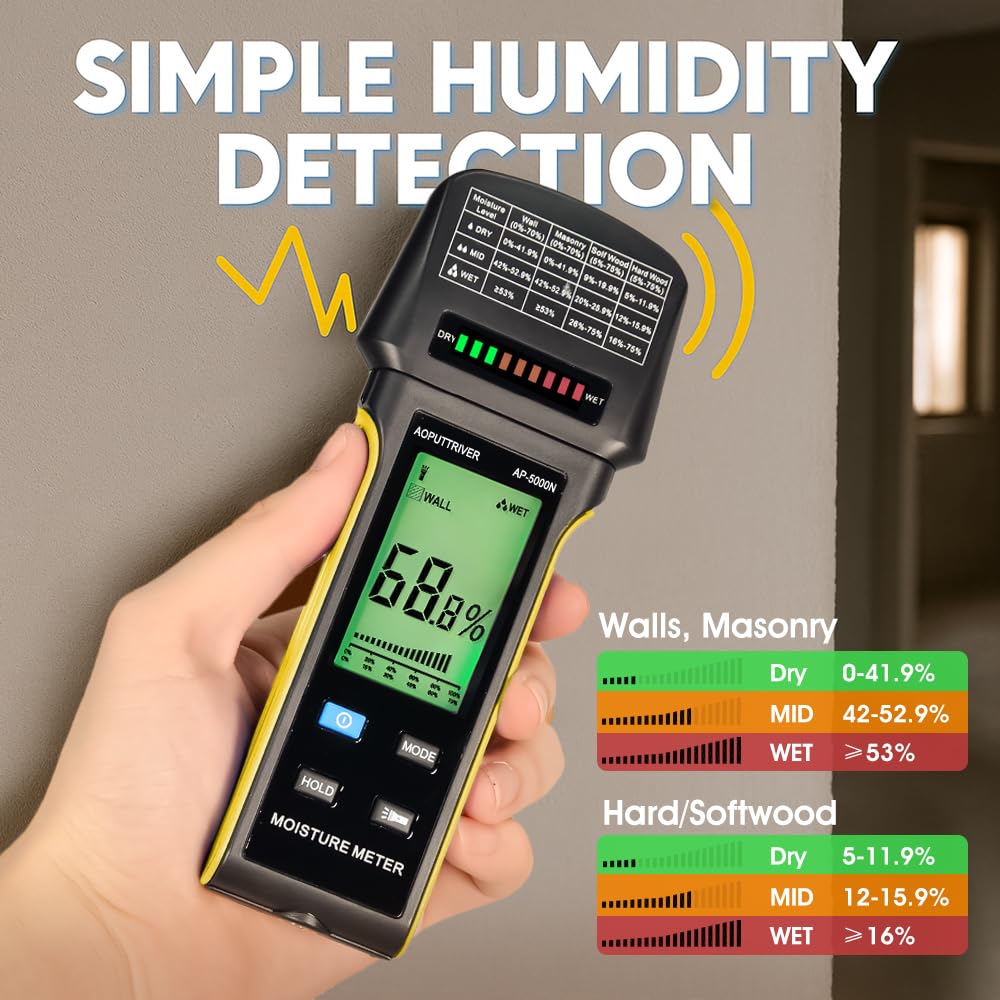
Image 6.2: The display shows digital readings and a color-coded bar graph for quick moisture assessment. Reference the table on the meter for specific ranges.
6.5. Кол чырак функциясы
The meter includes a built-in flashlight for use in dimly lit areas.
- To turn on the flashlight: Press the Фонарик күйгүзүү/өчүрүү баскычы.
- To turn off the flashlight: Press the Фонарик күйгүзүү/өчүрүү баскычы кайра.

Image 6.3: The integrated flashlight assists in reading the display and inspecting surfaces in low-light conditions.
7. Техникалык тейлөө
- Тазалоо: Аппаратты жумшак, кургак чүпүрөк менен сүртүңүз. Абразивдүү тазалагычтарды же эриткичтерди колдонбоңуз.
- Сактагыч: When not in use for extended periods, remove the batteries to prevent leakage. Store the meter in its protective pouch in a cool, dry place, away from direct sunlight and extreme temperatures.
8. Кыйынчылыктарды
- Түзмөк күйбөйт: Батареянын орнотулушун текшерип, батарейкалары түгөнүп калбагандыгын текшериңиз. Керек болсо алмаштырыңыз.
- Туура эмес окуулар: Ensure the correct material mode is selected. Make sure the sensing area is flat against the surface and free from dirt or obstructions.
- Дисплей күңүрт же бүлбүлдөп жатат: Батареялар аз болушу мүмкүн. Аларды алмаштырыңыз.
- No reading: Ensure the device is properly pressed against the material. The material might be too thin or outside the measurement range.
9. Техникалык шарттар
- Модел: AP-5000N
- Өлчөө принциби: Pinless, Non-Destructive Electromagnetic Sensing
- аныктоо тереңдиги: 20 мм (0.75 дюйм) чейин
- Дисплей: Large Backlit LCD with Tri-color LED Bar Graph
- Өлчөө режимдери: Wall, Masonry, Hardwood, Softwood
- Өзгөчөлүктөрү: Audible Alarm, Low Battery Alarm, Auto Power Off, Hold Function, Flashlight
- Кубат булагы: (Typically AAA batteries, user to confirm from device)
- Бренд: AOPUTTRIVER
10. Кепилдик жана колдоо
For any questions regarding your AOPUTTRIVER AP-5000N Pinless Moisture Meter, please refer to the contact information provided with your purchase or visit the official AOPUTTRIVER webколдоо үчүн сайтка кайрылыңыз. Кепилдик боюнча дооматтар үчүн сатып алганыңызды тастыктаган документти сактап коюңуз.