
Typhur WT01
Typhur Sync One Smart зымсыз эт термометринин колдонуучу колдонмосу (WT01 модели)
Модел: WT01
Introduction
The Typhur Sync One Smart Wireless Meat Thermometer provides precise temperature monitoring for various cooking methods, including BBQ, grilling, oven, and smoking. This device features a standalone base with an LCD display, unlimited WiFi and Bluetooth range, and enhanced signal stability. It is equipped with multiple sensors for accurate temperature readings and integrates with a dedicated mobile application for advanced control and monitoring.

Image: Typhur Sync One Smart Wireless Meat Thermometer, showing the probe, the base unit with its display, and a smartphone screen displaying the companion app.
Жайгашуу
1. Кутудан чыгаруу жана компоненттер
Upon unboxing your Typhur Sync One, ensure all components are present:
- Typhur Sync Device Base
- Meat Probe (1 unit)
- Заряддоо кабели
- User Manual
- Кепилдик картасы
- Калибрлөө сертификаты
For a visual guide on unboxing and component identification, refer to the 'Typhur Sync One Guide' video.
Video: 'How to Use Typhur Sync One Wireless Meat Thermometer' by Typhur Inc. This video provides a comprehensive overview of the product, including unboxing, setup, and usage instructions.
2. Powering On/Off the Device Base
To power on the Sync One device base, press and hold the central 'O' button for 2 seconds. To power off, press and hold the 'O' button for 3 seconds. The display will show 'Shutting Down..' before turning off.
Video: 'How to turn on/off the Sync base?' by Typhur Inc. This video demonstrates the process of powering the Sync One base unit on and off.
3. Колдонмону орнотуу жана жупташтыруу
Download the Typhur App from the App Store (iOS) or Google Play (Android). Register an account using your email and verify it. Once logged in, navigate to the 'Devices' section in the app menu bar and click '+Add Device'. Select 'Typhur Sync One' from the list and follow the on-screen prompts to pair your device. You may need to confirm pairing on the device base.
4. Wi-Fiга туташуу
After successful pairing, select your 2.4GHz Wi-Fi network within the app to establish an unlimited range connection. This allows you to monitor your cooking remotely.
Иштөө нускамалары
1. Correct Probe Insertion
Proper probe insertion is crucial for accurate temperature readings. Insert the probe into the center of the thickest portion of the meat, avoiding large areas of fat and bone. Ensure the safety notch on the probe is fully inserted into the meat and not beyond the ceramic handle position. This ensures the internal sensors are correctly positioned and the ambient sensor is exposed to the cooking environment.
Video: 'How to Correctly Insert the Probe?' by Typhur Inc. This video demonstrates the proper technique for inserting the meat probe to ensure accurate readings.

Image: A diagram illustrating the placement of the 5 internal sensors and 1 ambient sensor within the Typhur Sync One probe when inserted into meat, highlighting the precise temperature measurement points.
2. Кол режими
In Manual Mode, you set a specific target temperature. The device base will alert you once this temperature is reached. After the alert, remove the meat from the heat source and allow it to rest for a few minutes before serving.
3. Smart Mode
Smart Mode guides you through the entire cooking process. It sends notifications for timely removal of the meat from the heat source, accounting for carryover cooking, and alerts you when your food is perfectly ready after resting. You can select the type of meat and cut from the app's presets.
Video: 'Why to Remove Meat Before It Hits the Target Temp?' by Typhur Inc. This video explains the concept of carryover cooking and why it's important to remove meat from heat before it reaches the final target temperature.
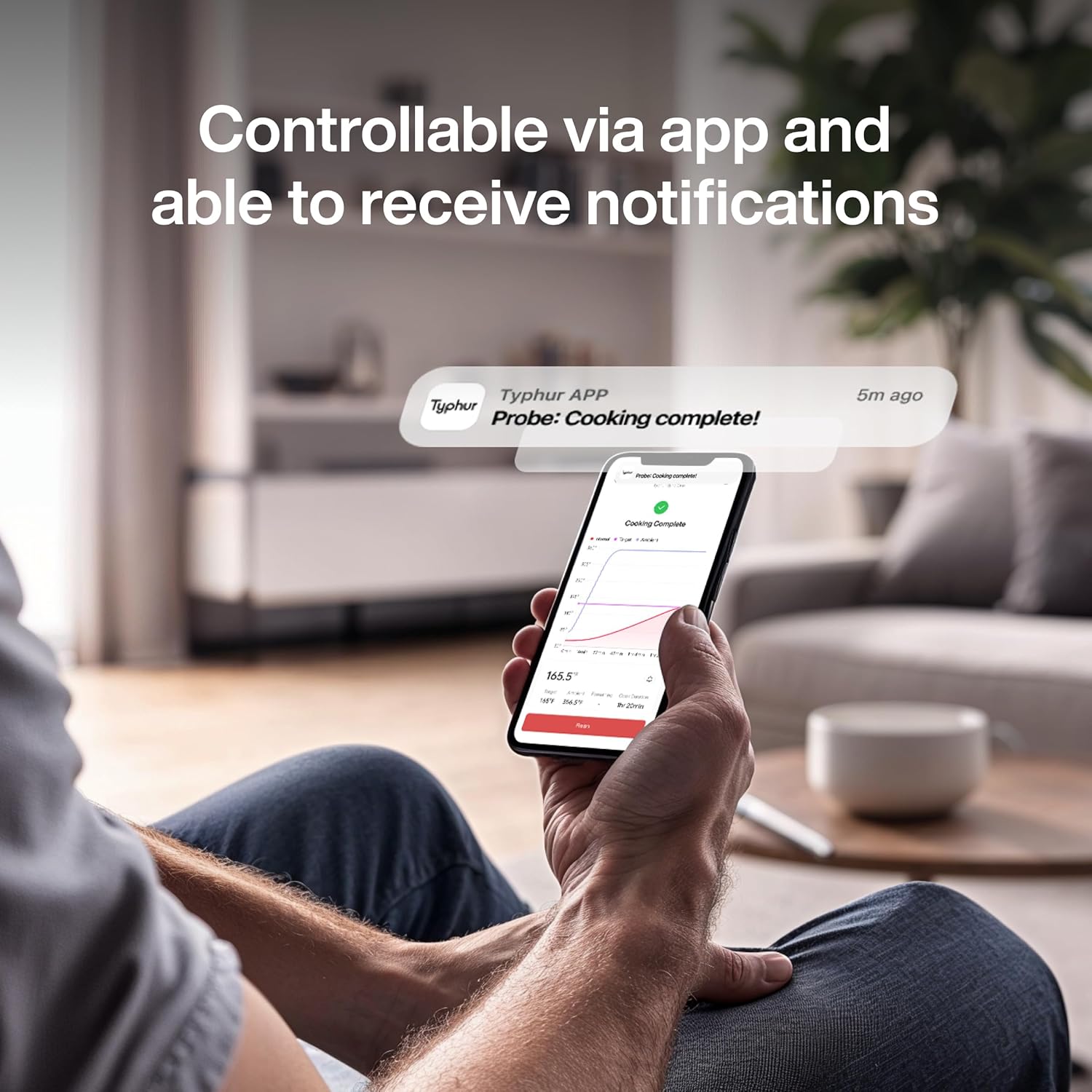
Image: A smartphone showing the Typhur app with a 'Cooking Complete!' notification, indicating the end of the cooking process, along with a graph of internal and ambient temperatures.
4. Changing Temperature Units
To switch between Celsius and Fahrenheit, connect the device base to your phone via the Typhur app. Open the app settings, find 'Measurement Units', and tap to switch between US (Fahrenheit) and Metric (Celsius).
Video: 'How to Change Temperature Units' by Typhur Inc. This video demonstrates how to switch between Celsius and Fahrenheit temperature units using the Typhur app.
Техникалык тейлөө
1. Зондду тазалоо
The Typhur Sync One probe is IPX8 waterproof and dishwasher-safe. It can also be hand-washed with dish soap and water. For stubborn residue, a steel wire ball can be used, though minor scratches may occur without affecting functionality. Always ensure the probe is clean and dry before storing or charging.
Video: 'How to Clean the Probes of Typhur Wireless Meat Thermometer?' by Typhur Inc. This video illustrates different methods for cleaning the meat probes, including hand washing and dishwasher use.
2. Заряддоо
The device base serves as a charging station for the probe. To charge the probe, simply insert it into the device base. The charging indicator on the probe will illuminate. To charge the device base, connect the provided charging cable to the charging port on the base.
Проблемаларды чечүү
1. Inconsistent Ambient Temperature Display
Differences in ambient temperature readings between probes can occur due to variations in heat radiation and convection zones within the cooking appliance. Ensure probes are correctly inserted into the thickest part of the meat, avoiding bone and fat. Allow at least 15 minutes for the ambient temperature to stabilize after placing the appliance in the oven or grill before taking readings.
Video: 'Why Don't All Probes Show the Same Ambient Temp?' by Typhur Inc. This video explains the reasons behind potential inconsistencies in ambient temperature readings between multiple probes and how to ensure accurate measurements.
2. Заряддоо маселелери
If the device base is not charging, ensure it is connected to a power source for at least 10 minutes. Turn the base on and check for a lightning symbol on the battery icon. If the base has power but is not charging, try replacing the charging cable and adapter. If the probe is not charging, ensure it is clean and fully inserted into the device base.
Video: 'How to fix Searching/Battery Life Issue?' by Typhur Inc. This video provides guidance on troubleshooting charging issues for the Sync One device.
Техникалык шарттар
| Бренд | Typhur |
| Модель аты | Sync One Wireless Meat Thermometer (WT01) |
| Өзгөчө өзгөчөлүк | App Companion, High Accuracy, Large Display, Waterproof, Wi-Fi Support |
| Байланыш технологиясы | Bluetooth 5.3, Wi-Fi |
| Дисплей түрү | LCD |
| Сырткы материал | Алюминий |
| Камтылган компоненттер | Typhur Sync Device Base x 1, Meat Probe x 1, Charging Cable x 1, User Manual x 1 |
| Power Source | Батарея менен иштейт (2 литий-иондук батарейкалар камтылган) |
| Жогорку температура рейтинги | 752 Degrees Fahrenheit (400°C) for short-term exposure |
| Төмөнкү температура рейтинги | 32 градус Фаренгейт (0°C) |
| Жооп убактысы | 0.5 секунд |
| Кайра колдонууга жарамдуу | Зарядкалуу |
| Суу өткөрбөйт рейтинги | IPX8 |
| Элемент Салмагы | 7.4 унция |
| UPC | 717325242847, 717325242991, 850074930020 |
Кепилдик
The Typhur Sync One Smart Wireless Meat Thermometer comes with a 3-year warranty, providing assurance for product quality and performance.
Колдоо
For any questions, technical assistance, or support inquiries, please contact Typhur customer service via email:
Электрондук почта: support@typhur.com
Тектеш документтер - WT01
 |
Typhur Sync Quad зымсыз эт термометри Колдонуучунун колдонмосу Typhur Sync Quad зымсыз эт термометри (WT08) үчүн комплекстүү колдонуучу колдонмосу, анын өзгөчөлүктөрү, иштеши, коопсуздук чаралары, туташуу, бышыруу режимдери жана көйгөйлөрдү аныктоо деталдары. |
 |
Typhur Sync кош зымсыз термометринин колдонуучу колдонмосу Typhur Sync кош зымсыз термометринин (WT03 модели) кеңири колдонуучу колдонмосунда анын функциялары, иштеши, мүнөздөмөлөрү, коопсуздук чаралары, бузулууларды оңдоо жана жөнгө салуу маалыматы камтылган. |
 |
Typhur Sync One Wireless Thermometer User Manual Comprehensive user manual for the Typhur Sync One Wireless Thermometer (Model WT01). Includes safety instructions, setup guide, cooking modes, troubleshooting, and specifications. |
 |
Typhur Sync Oven User Manual v1.2 Comprehensive user manual for the Typhur Sync Oven (Model CV03), detailing safety instructions, parts, control panel operation, cooking functions, wireless probe usage, app connectivity, cleaning and maintenance, technical specifications, troubleshooting, FAQs, and certifications. |
 |
Typhur Sync Gold Lite зымсыз термометр колдонуучу колдонмосу Typhur Sync Gold Lite зымсыз термометри (YS-WT10 модели) үчүн колдонуучу колдонмосу, маанилүү коопсуздук чараларын, түзмөктүн иштешин, спецификацияларды, бузулууларды аныктоону жана колдоо маалыматын камтыйт. |
 |
Typhur Sync Dual Pro Wireless Thermometer User Manual (WT14) Comprehensive user manual for the Typhur Sync Dual Pro wireless thermometer (Model WT14). Includes setup instructions, cooking modes, safety guidelines, troubleshooting, and regulatory information. |
Ask a question about this manual
Ask about setup, troubleshooting, compatibility, parts, safety, or missing instructions. Manuals+ will review the question and use this page’s manual context to help answer it.