1. Киришүү
This manual provides detailed instructions for the setup, operation, and maintenance of your SANSUI 15.6 Inch Portable Monitor. Please read this manual thoroughly before using the product to ensure proper functionality and to prevent damage.
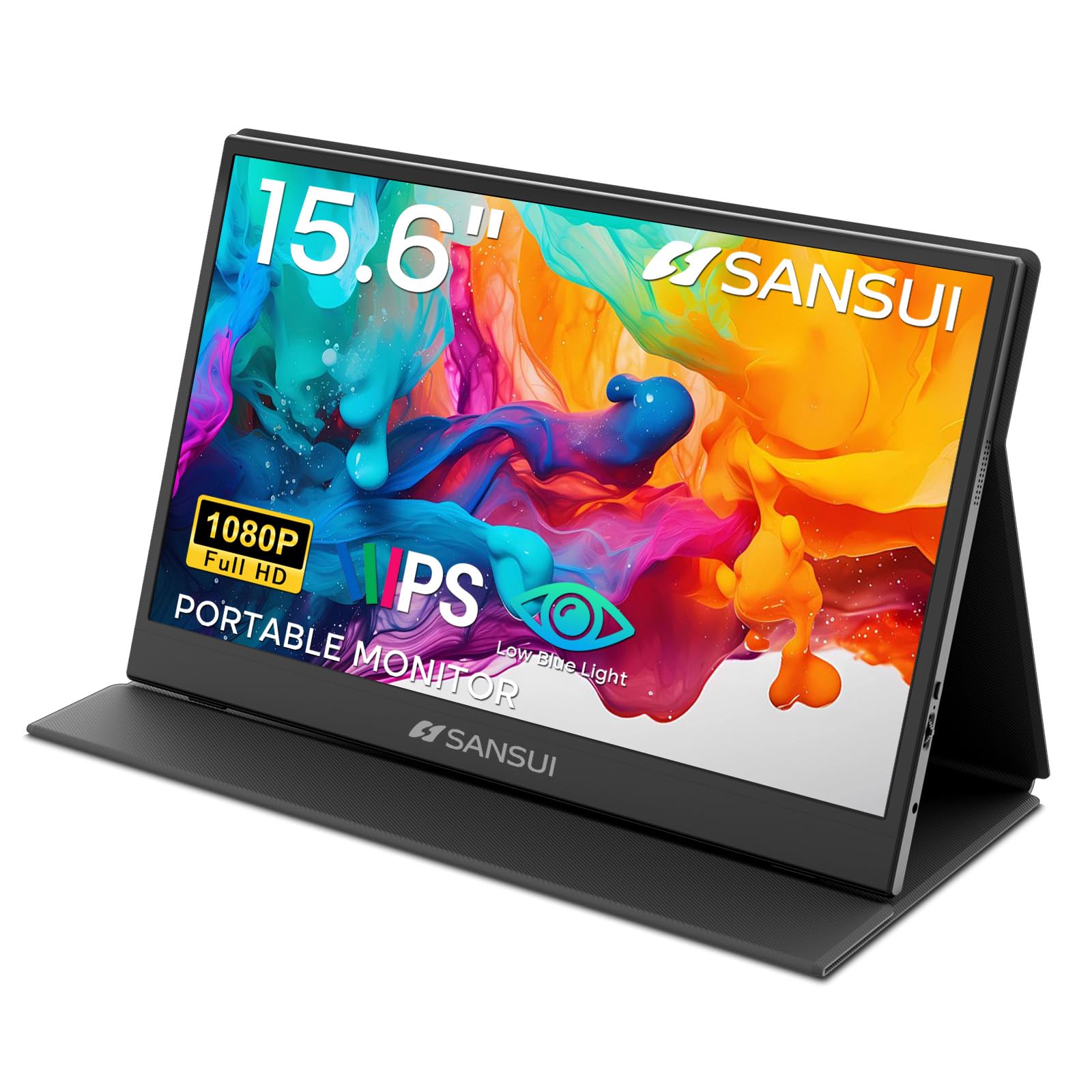
Image: The SANSUI 15.6 Inch Portable Monitor, showcasing анын саркеч дизайны жана жандуу дисплей.
2. Пакеттин мазмуну
Verify that all items listed below are included in your product package. If any items are missing or damaged, please contact SANSUI customer support.
- SANSUI 15.6 Inch Portable Monitor with PU Leather Cover
- HDMI to Mini HDMI Cable (1.2m)
- Type-C to Type-C Cable (30V5A, 1m)
- Quick Start Guide (QSG Card)
- Колдонуучунун Колдонмосу (бул документ)
- Кепилдик картасы

Image: All included accessories laid out next to the portable monitor.
Кутудан чыгуучу видео
Video: An unboxing demonstration of the SANSUI 15.6 Inch Portable Monitor, showing how to unpack the device and its accessories.
3. Продукциянын өзгөчөлүктөрү
- Дисплей: 15.6-inch IPS panel with FHD 1920x1080 resolution.
- Visual Quality: 1200:1 high contrast ratio and 250 nits brightness for clear images.
- Viewбурч: Туурасы 178 ° viewбурч.
- Көздүн жайлуулугу: Features low blue light and flicker-free technology to reduce eye strain.
- Дизайн: Ultra-thin (0.43 inches) and lightweight (2.1 lbs without cover) for portability.
- Коргоочу капкак: Includes a PU leather stand cover that offers 24°/37° tilt angles.
- Аудио: Built-in dual speakers and a 3.5mm audio jack.
- Байланыш: Two USB Type-C ports and one Mini HDMI port.

Image: Visual representation of the monitor's display specifications and features.

Image: Illustration of the monitor's eye-care features, including low blue light and flicker-free technology.
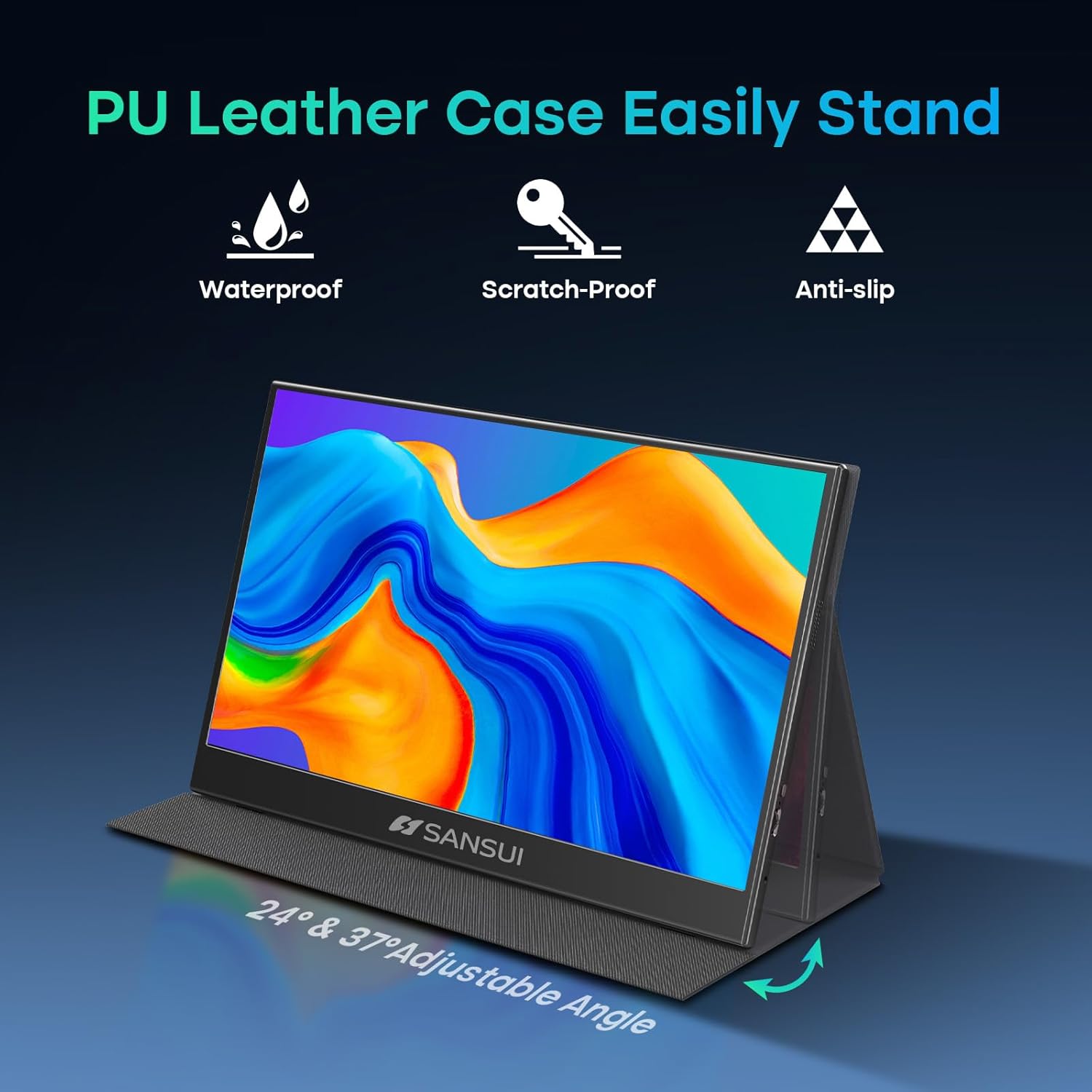
Image: The monitor's PU leather cover functioning as a stand, illustrating its adjustable angles and protective qualities.
4. Физикалык бүтүрүүview
Familiarize yourself with the ports and controls on your SANSUI portable monitor.
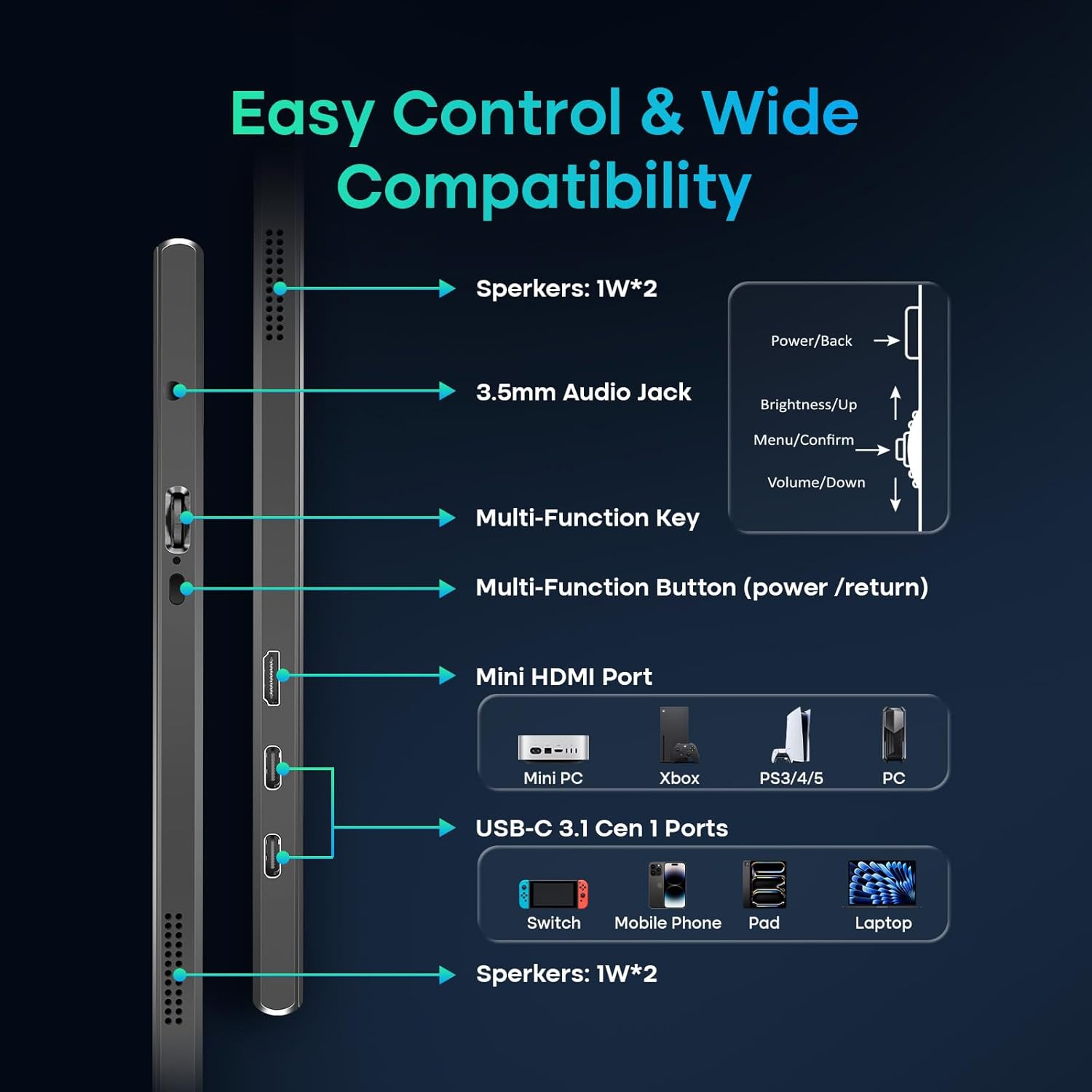
Image: A detailed diagram showing the location and function of all ports and control buttons on the monitor.
Порттор жана баскычтар:
- USB Type-C порттору (x2): For power, video, and data transmission (requires full-function USB-C port on host device).
- Mini HDMI Port (x1): For video input from devices like laptops, PCs, gaming consoles.
- 3.5 мм аудио уячасы: Тышкы кулакчындарды же динамиктерди туташтыруу үчүн.
- Multi-Function Key: Controls power, menu navigation, brightness, and volume.
- Камтылган динамиктер: Dual 1W speakers for audio output.
5. Орнотуу жана туташуу
The SANSUI portable monitor offers flexible connection options for various devices.
Энергияга талаптар:
- The monitor can be powered directly by a compatible full-function USB-C port on your device (e.g., laptop, phone).
- For independent power supply or when using the Mini HDMI connection, a dedicated PD adapter (45W or higher, not included) and a USB-C cable supporting 45W+ power transmission are required.
Туташуу ыкмалары:
- USB Type-C Connection (Single Cable Solution):
- Connect one end of the provided Type-C to Type-C cable to a full-function USB-C port on your device (which supports DisplayPort Alt Mode).
- Connect the other end to one of the USB Type-C ports on the monitor.
- This connection provides power, video, and data through a single cable. Ensure your device's USB-C port supports video output.
- HDMI Connection (Video Only):
- Connect one end of the provided HDMI to Mini HDMI cable to your device's HDMI port.
- Connect the Mini HDMI end to the Mini HDMI port on the monitor.
- When using HDMI, external power is required for the monitor via a USB Type-C port and a PD adapter (not included).
6. Мониторду иштетүү
Экрандагы дисплей (OSD) менюсу:
Use the Multi-Function Key to access and navigate the OSD menu for display settings, audio adjustments, and other configurations.
- Press the Multi-Function Key to open the OSD menu.
- Move the key up/down to navigate through menu options.
- Press the key to confirm a selection.
- Press the Multi-Function Button (power/return) to go back or exit the menu.
Көрсөтүү режимдери:
The monitor supports various display modes depending on your connected device and operating system settings.
- MirrorMode: Duplicates your primary screen's content.
- Кеңейтилген режим: Extends your desktop, allowing for multitasking across multiple screens.
- Экинчи экран режими: Жалгыз дисплей катары көчмө мониторду колдонот.

Сүрөт: Мисamples of the monitor used in Mirror, Extended, and Second Screen modes with various devices.
7. Техникалык тейлөө
- Экранды тазалоо: Бир аз жумшак, түксүз кездемени колдонуңуз dampсуу же экран тазалоочу менен бүттү. Катуу химиялык заттардан алыс болуңуз.
- Денени тазалоо: Жумшак, кургак чүпүрөк менен сүртүңүз.
- Сактагыч: When not in use, store the monitor in its protective PU leather cover to prevent scratches and damage.
- Экстремалдуу шарттарды болтурбоо: Мониторду өтө жогорку температурага, нымдуулукка же түз күн нуруна дуушар кылбаңыз.
8. Кыйынчылыктарды
Мониторуңузда көйгөйлөргө туш болсоңуз, төмөнкү жалпы көйгөйлөрдү жана чечимдерди караңыз:
- Сигнал жок / Кара экран:
- Бардык кабелдердин (USB-C, HDMI, кубат булагы) бекем туташтырылганын текшериңиз.
- Verify that your device's USB-C port supports video output (DisplayPort Alt Mode).
- If using HDMI, ensure the monitor is receiving adequate power from a separate USB-C power source.
- Try connecting to a different port on your device or a different device to isolate the issue.
- Тышкы монитор аныкталганын жана иштетилгенин текшерүү үчүн түзмөгүңүздүн дисплей жөндөөлөрүн текшериңиз.
- Кубат жок:
- Ensure the USB-C power cable is connected to a power source (either your device's full-function USB-C port or a 45W+ PD adapter).
- Башка USB-C кабелин же кубат адаптерин колдонуп көрүңүз.
- Image Flickering / Unstable Display:
- Ensure the cables are not damaged and are properly connected.
- Reduce the display resolution or refresh rate on your connected device.
- Ensure the monitor is receiving stable power.
- Динамиктерден аудио жок:
- Check the volume settings on both the monitor (via OSD menu) and your connected device.
- Ensure the correct audio output device is selected on your computer/device.
- If using HDMI, ensure your device is sending audio over HDMI.
9. Техникалык шарттар
| Модель номери | ES-P156T1F |
| Screen Size | 15.6 дюйм |
| Панел түрү | IPS |
| Резолюция | FHD 1920x1080 |
| Аспект катышы | 16:9 |
| Жарыктык | 250 nits (candela per square meter) |
| Контраст катышы | 1200:1 |
| Viewбурч | 178° |
| Screen Surface | Мт |
| Байланыш | 2x USB Type-C, 1x Mini HDMI, 1x 3.5mm Audio Jack |
| Баяндамачылар | Dual 1W Built-in Speakers |
| Product Dimensions (with cover) | 14.33 x 9.21 x 0.59 дюйм |
| Product Dimensions (without cover) | 14.2 x 9.1 x 0.43 дюйм |
| Item Weight (with cover) | 2.99 фунт |
| Item Weight (without cover) | 2.1 фунт (болжол менен) |
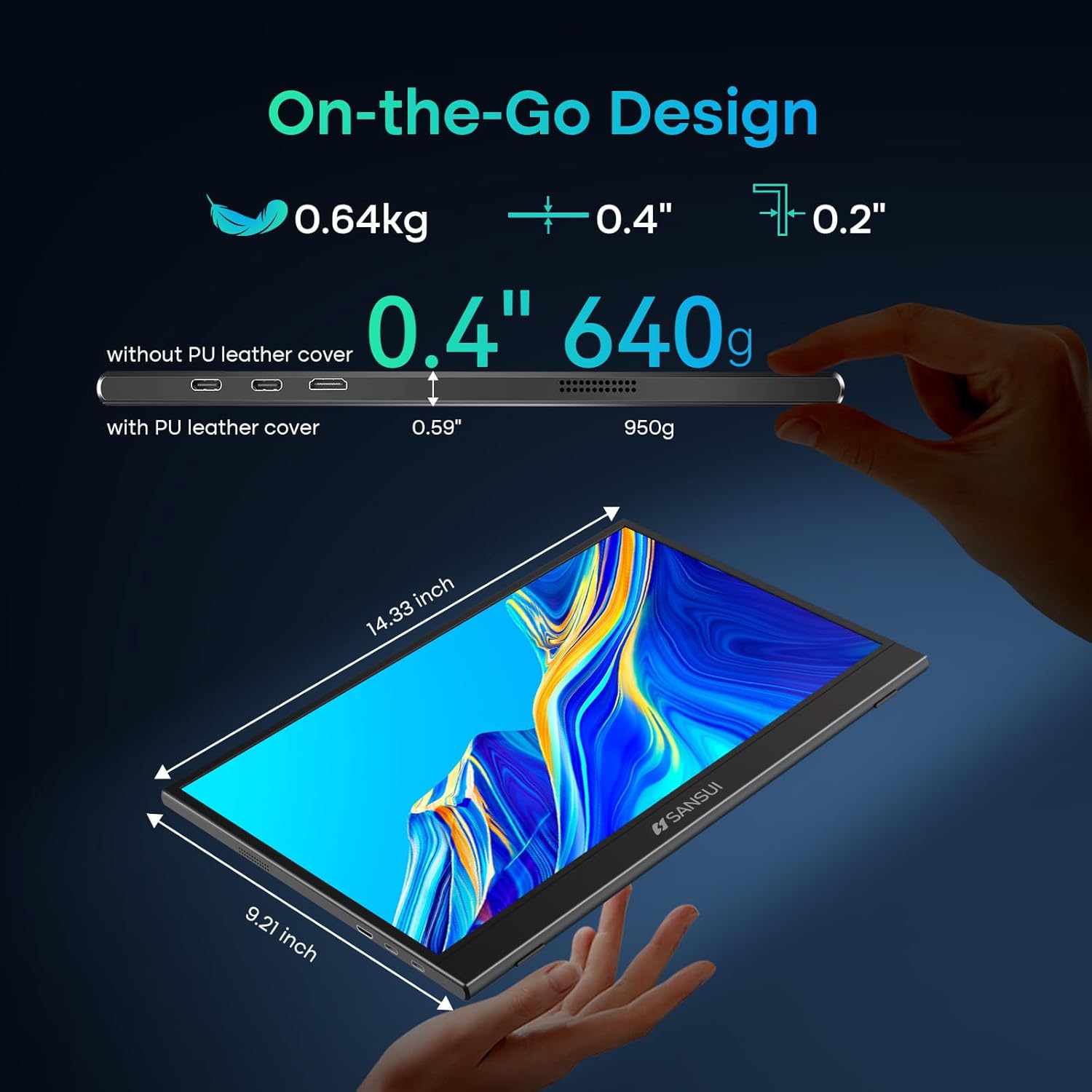
Image: Detailed dimensions and weight specifications of the portable monitor.
10. Кепилдик жана колдоо
Your SANSUI portable monitor comes with a manufacturer's warranty. Please refer to the included Warranty Card for specific terms and conditions, including warranty period and coverage details.
For technical support, troubleshooting assistance, or warranty claims, please contact SANSUI customer service. Contact information can typically be found on the Warranty Card, Quick Start Guide, or the official SANSUI webсайт.