
1. Киришүү
This manual provides detailed instructions for the ECHTPower EP05 Wireless PC Gaming Controller. This multi-platform controller features a TFT screen for on-the-fly adjustments, Hall-Effect joysticks for precision, dual Hall triggers, a 1000Hz polling rate, and customizable RGB lighting. It is compatible with Windows PC, Nintendo Switch, Android, and iOS devices.
Video: ECHTPower PC Controller with Intelligent Screen. This official video provides an overview контроллердин өзгөчөлүктөрү жана дизайны жөнүндө.
2. Негизги өзгөчөлүктөрү
- Smart TFT Screen Control: Adjust vibration, RGB lighting, turbo settings, trigger travel, and button mapping directly on the integrated screen without external software.
- Холл эффектиси бар джойстиктер: Designed to prevent joystick drift, providing stable and smooth control for various game genres.
- Dual Hall Triggers: Offers adjustable trigger travel (2mm for rapid fire, 6mm for precise control) for an optimized gaming experience.
- 1000Гц добуш берүү ылдамдыгы: Ensures ultra-fast input and responsiveness in 2.4GHz wireless or wired modes.
- Көп платформалык колдоо: Connects via Bluetooth, 2.4G wireless, or USB-C wired to Windows PC, Switch, Android, and iOS devices. (Note: Not compatible with Xbox or PlayStation.)
- Conductive Gel Buttons: Provides sharp feedback and durability, rated for 3 million presses.
3. Пакеттин мазмуну
Таңгактан чыгаргандан кийин, бардык буюмдар бар экенин текшериңиз:
- ECHTPower EP05 Wireless PC Gaming Controller
- USB-C заряддоо кабели
- 2.4G зымсыз кабыл алгыч (USB донгл)
- User Manual
4. Орнотуу жана туташуу
4.1 Контроллерди заряддоо
Before first use, fully charge the controller using the provided USB-C cable. Connect the USB-C end to the controller and the USB-A end to a power source (e.g., PC, USB wall adapter).
4.2 Күйгүзүү/өчүрүү
To power on the controller, press and hold the OFF/ON button located on the front of the controller until the RGB lights illuminate and the TFT screen activates. To power off, press and hold the same button until the lights turn off.
4.3 Түзмөктөргө туташуу
The controller supports three connection modes: Bluetooth, 2.4G Wireless, and Wired USB-C.
- Bluetooth Connection (for Switch, Android, iOS):
- Контроллердин өчүрүлгөнүн текшериңиз.
- Switch the rear mode selector to the appropriate platform (e.g., "SW" for Switch, "PHONE" for Android/iOS).
- Press and hold the pairing button (often indicated by a Bluetooth icon or a dedicated pairing button) until the RGB lights flash rapidly.
- On your device, go to Bluetooth settings and select "ECHTPower EP05" to pair.
- 2.4G Wireless Connection (for PC):
- Контроллердин өчүрүлгөнүн текшериңиз.
- Switch the rear mode selector to "PC" or "Receiver".
- 2.4G зымсыз кабыл алгычты компьютериңиздеги жеткиликтүү USB портуна сайыңыз.
- Power on the controller. It should automatically connect to the receiver. The TFT screen will indicate connection status.
- Wired USB-C Connection (for PC):
- Connect the USB-C cable to the controller and the USB-A end to your PC.
- Контроллер автоматтык түрдө зымдуу режимге өтөт жана компьютериңиз тарабынан таанылат.
Important: Always switch the rear mode selector to the correct platform before attempting to pair or connect.

Image: The ECHTPower EP05 controller shown with its 2.4G wireless dongle and USB-C cable, highlighting the various connection methods available.
5. Контроллерди иштетүү
5.1 Using the TFT Screen
The integrated TFT screen allows for direct customization of controller settings. Navigate the menu using the D-pad and action buttons (A, B, X, Y).

Сүрөт: деталдуу view of the controller's TFT screen, showing options for adjusting settings such as light brightness, vibration, and volume.
5.2 Adjusting RGB Lighting
Access the RGB lighting settings via the TFT screen. You can adjust brightness, choose from various lighting effects (e.g., marquee, flow, gradient), and select specific colors.

Image: The ECHTPower EP05 controller showcasing its adjustable RGB lights, with the TFT screen displaying lighting options.
5.3 Customizing Vibration
The controller offers four levels of adjustable vibration intensity. Use the TFT screen to select your preferred feedback level (0%, 30%, 60%, 100%).

Image: The controller displaying its four-level adjustable vibration settings on the TFT screen, ranging from 0% to 100%.
5.4 Dual Hall Triggers
The dual Hall triggers can be switched between two modes:
- Short-travel (2mm): Ideal for rapid-fire actions in shooter games.
- Long-travel (6mm): Provides precise control for racing games or other applications requiring nuanced input.

Image: An illustration of the ECHTPower EP05's dual Hall triggers, demonstrating the 2mm short-travel for quick shooting and 6mm long-travel for precise control in racing games.
5.5 Программалануучу артка баскычтары
The controller features mappable back buttons (M1, M2) for enhanced customization. These can be programmed via the TFT screen to replicate other button inputs or execute macros.
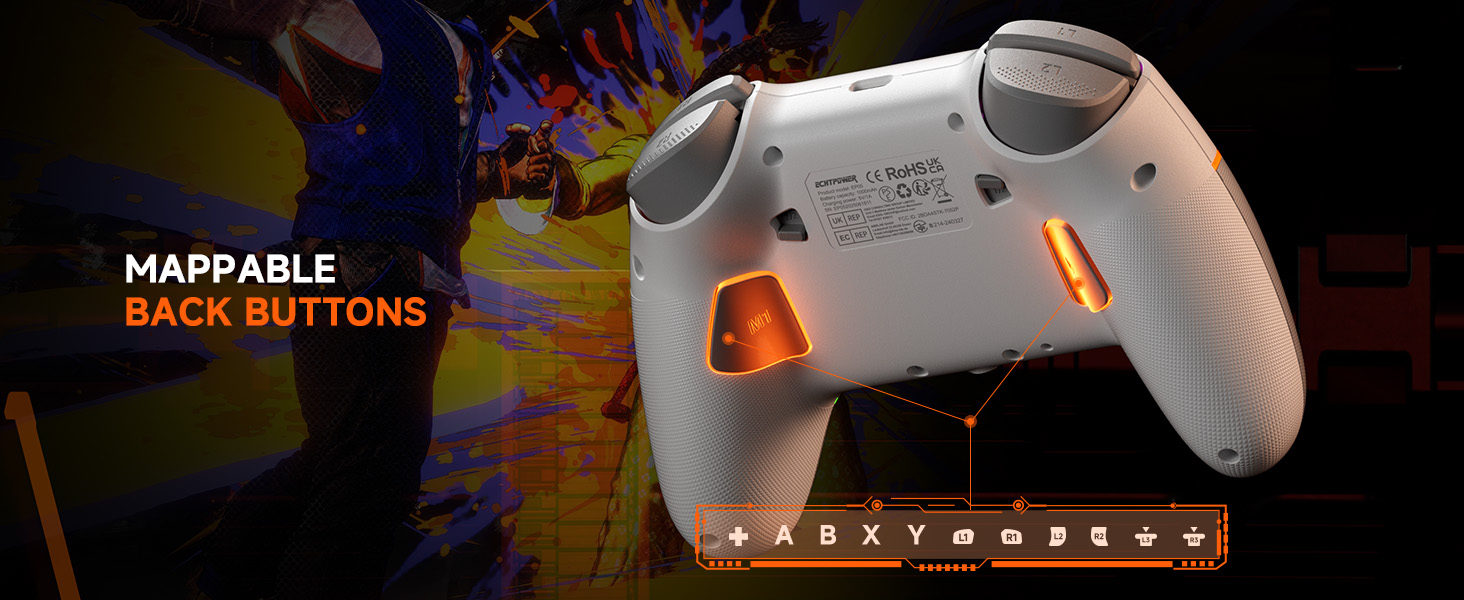
Image: The underside of the ECHTPower EP05 controller, highlighting the mappable back buttons (M1, M2) for custom assignments.
6. Техникалык тейлөө
- Тазалоо: Башкаргычты тазалоо үчүн жумшак, кургак чүпүрөктү колдонуңуз. Абразивдүү тазалоочу каражаттарды же эриткичтерди колдонбоңуз.
- Сактагыч: Контроллерди түз күн нурунан жана экстремалдык температурадан алыс салкын, кургак жерде сактаңыз.
- Батареяга кам көрүү: Батареянын иштөө мөөнөтүн оптималдаштыруу үчүн, контроллерди тез-тез толук зарядсыздандырбаңыз. Аны үзгүлтүксүз кубаттап туруңуз.
7. Кыйынчылыктарды
- Контроллер туташпай жатат:
- Контроллер заряддалганын текшериңиз.
- Verify the rear mode selector is set to the correct platform (PC, SW, PHONE).
- For 2.4G, ensure the receiver is properly inserted and the controller is in 2.4G mode.
- Bluetooth үчүн, түзмөгүңүздүн Bluetooth функциясы күйүк экенин жана контроллер жупташтыруу режиминде экенин текшериңиз.
- Контроллерди да, түзмөктү да өчүрүп-күйгүзүп көрүңүз.
- Джойстиктин дрейфи:
- The Hall-Effect joysticks are designed to prevent drift. If you experience issues, ensure the controller's firmware is up to date (check the manufacturer's webсайт).
- Perform a calibration if available through the controller's TFT screen settings.
- RGB жарыктары иштебейт:
- Check the RGB settings on the TFT screen to ensure they are enabled and configured correctly.
- Жарыктуулук деңгээлин тууралаңыз.
- Батарейканын кыска мөөнөтү:
- Колдонуудан мурун контроллердин толук заряддалганын текшериңиз.
- Reduce RGB lighting brightness or turn off lighting effects to conserve battery.
- Disable vibration if not needed.
8. Техникалык шарттар
| Өзгөчөлүк | Деталь |
|---|---|
| Модел | EP05 |
| Байланыш | Bluetooth, 2.4G зымсыз, USB-C зымдуу |
| Добуш берүү көрсөткүчү | 1000Hz (2.4G/Wired) |
| Джойстиктер | Hall-Effect (No Drift) |
| Триггерлер | Dual Hall-Effect (Adjustable 2mm/6mm) |
| Экран түрү | TFT |
| Батарея сыйымдуулугу | 1000mAh |
| Шайкеш платформалар | Windows компьютери, Nintendo Switch, Android, iOS |
| Түс | Ак |
9. Кепилдик жана колдоо
9.1 Кепилдик маалыматы
This ECHTPower EP05 controller comes with a 2 жылдык Чектелген Кепилдик. Please retain your proof of purchase for warranty claims. The warranty covers manufacturing defects and malfunctions under normal use. It does not cover damage caused by misuse, accidents, unauthorized modifications, or normal wear and tear.
9.2 Кардарларды колдоо
For technical support, warranty claims, or general inquiries, please contact ECHTPower customer service:
- Электрондук почта: service@echtpower.com
- Webсайт: www.echtpower.com
Please provide your product model (EP05) and a detailed description of your issue when contacting support.