
Introduction
Thank you for choosing the TONOR E7 Dynamic Podcast Microphone Kit. This comprehensive kit combines a professional dynamic microphone with an audio interface mixer, designed to provide an immersive audio experience for podcasting, recording, game streaming, and content creation. This manual provides detailed instructions for setup, operation, and maintenance to ensure optimal performance and longevity of your device.
Кутуда эмне бар
Сураныч, пакеттин мазмунун текшерип, бардык буюмдар бар экенин текшериңиз:
- 1 x Dynamic Microphone (MIC)
- 1 x XLR Cable
- 1 x Boom Arm Kit
- 1 x Audio Interface Mixer
- 2 x USB Type-A to Type-C Cables
- 1 x 3.5mm TRS Audio Cable
- 2 x User Manuals

Image: The complete TONOR E7 Dynamic Podcast Microphone Kit, including the microphone, mixer, and boom arm.
Орнотуу колдонмосу
Follow these steps to set up your TONOR E7 Dynamic Podcast Microphone Kit:
- Assemble the Boom Arm: Securely attach the desk mount clamp to your table. Insert the adjustable suspension scissor arm stand into the clamp and tighten it. Adjust the arm to your desired position.
- Микрофонду бекитүү: Mount the microphone onto the boom arm. Ensure it is firmly attached to prevent movement during use.
- Connect the Microphone to the Mixer: Use the provided XLR cable to connect the microphone to the XLR input on the audio interface mixer. For USB connectivity, connect the microphone directly to your computer using a USB-C to USB-A cable.
- Connect the Mixer to Your Computer: Use one of the USB Type-A to Type-C cables to connect the audio interface mixer to your computer (Mac OS, Windows, PS4/PS5).
- Connect Additional Audio Devices: Use the 3.5mm TRS audio cable to connect external audio devices to the LINE IN port. Connect headphones to the HEADPHONE or HEADSET output ports for monitoring.
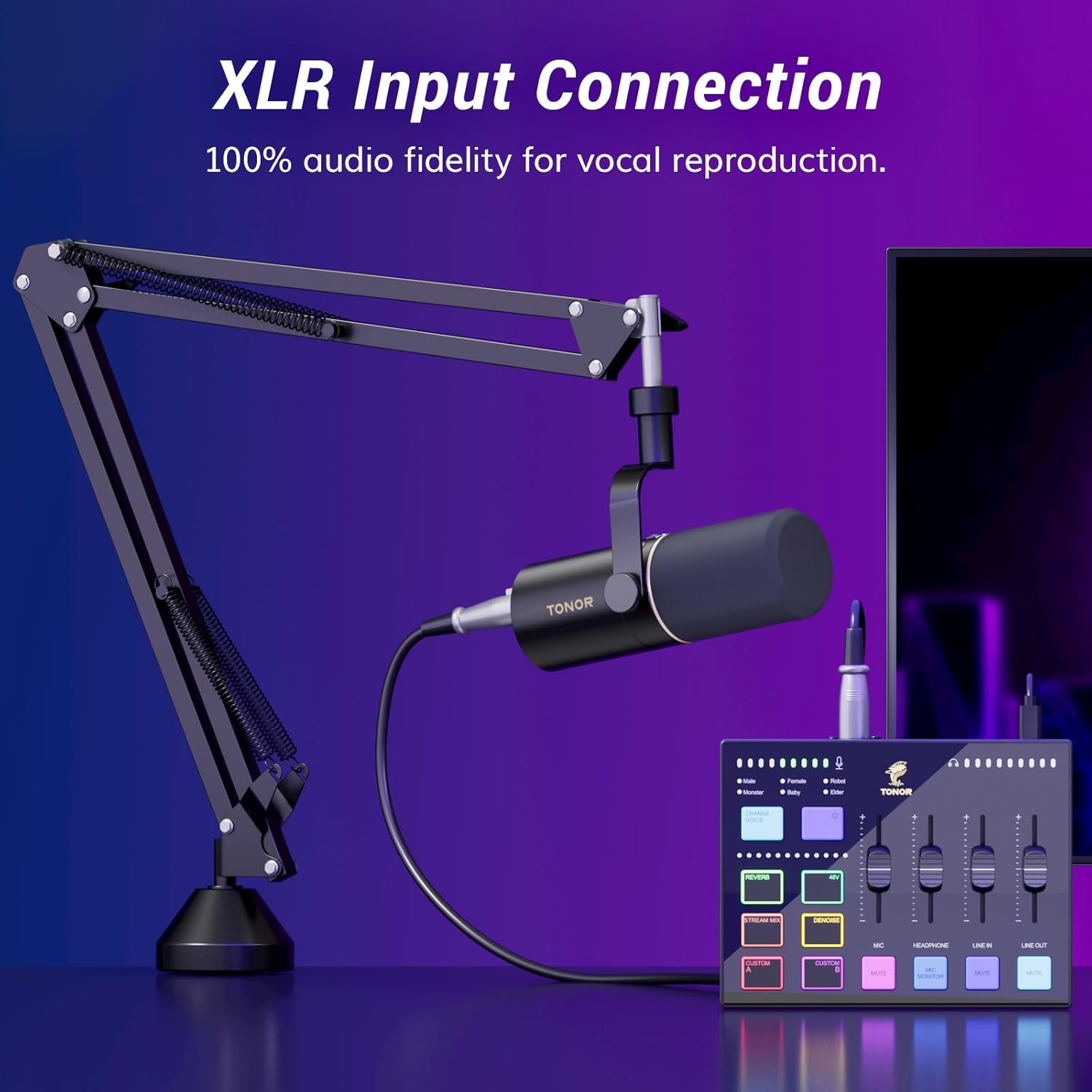
Image: Close-up of the TONOR E7 microphone showing the XLR input connection for high-fidelity audio.

Image: Diagram of the TONOR E7 audio mixer's input and output ports, highlighting wide compatibility with various devices like PCs, headphones, speakers, XLR mics, and instruments.
Video: An unboxing and setup guide for a TONOR microphone, demonstrating how to assemble the components and connect the microphone.
Иштөө нускамалары
The TONOR E7 audio interface mixer provides extensive control over your audio. Familiarize yourself with the following functions:
- Volume Sliders: Adjust the volume independently for microphone, line-in, headphone, and line-out channels using the smooth sliders.
- Үнсүз баскычы: Use the dedicated mute button for quick and convenient audio management.
- Real-time Mic Monitoring: Monitor your voice in real-time through connected headphones, ensuring clear feedback during live streams or recordings.
- RGB жарык эффекттери: Choose from 11 built-in customizable RGB lighting modes to match your streaming setup or personal preference.
- Ыңгайлаштырылган баскычтар: Utilize 2 pre-recorded customizable buttons for quick access to frequently used functions.
- Voice-Changing Modes: Experiment with 6 voice-changing modes for creative content.
- Реверберацияны жөндөө: Adjust the 12-level reverb to add depth and richness to your audio.
- AI ызы-чуусун азайтуу: Activate AI noise reduction for a cleaner, more professional sound by minimizing background noise.
- Music Mixing Streaming: Seamlessly mix music into your streams for enhanced content.
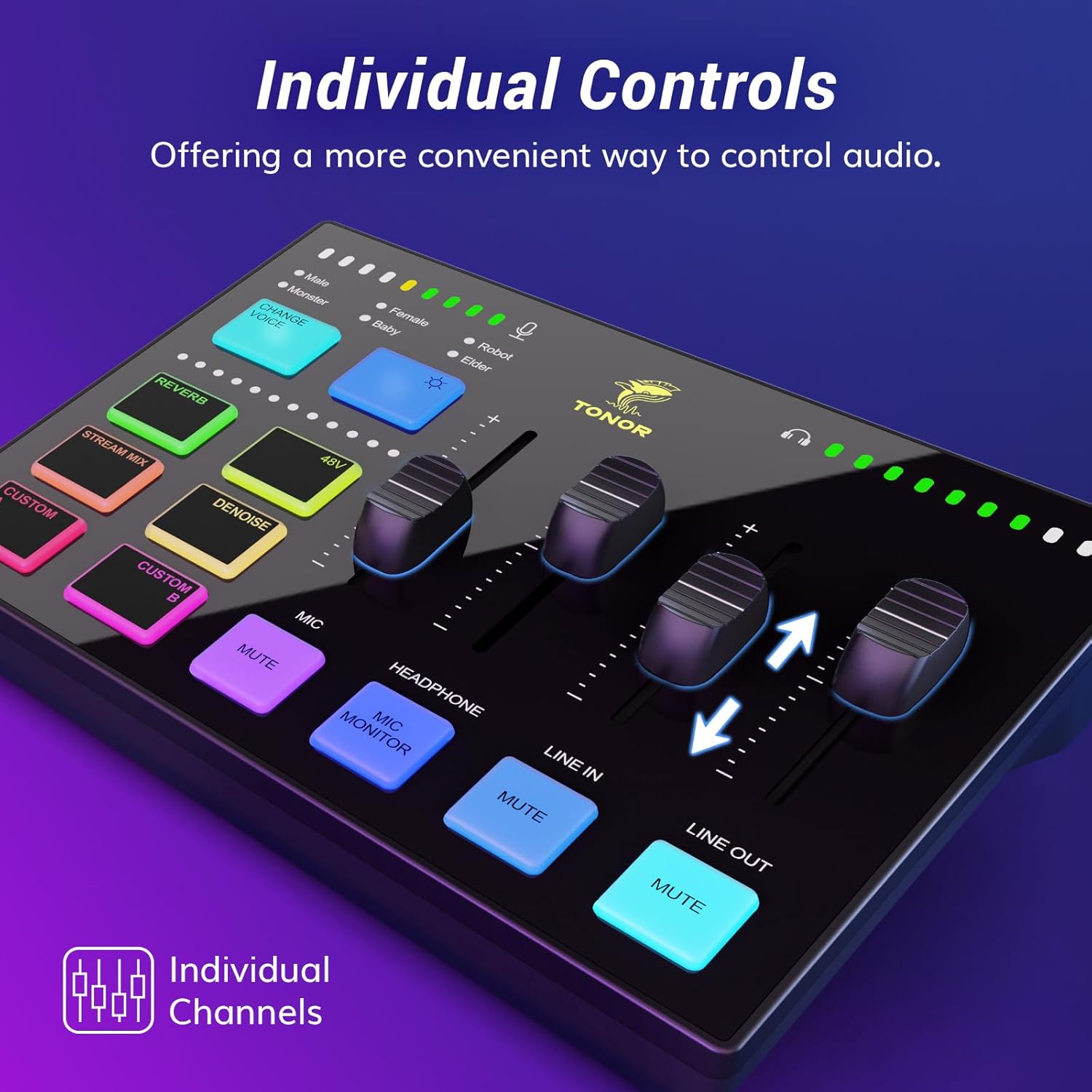
Сүрөт: деталдуу view of the TONOR E7 audio mixer with individual sliders for microphone, headphone, line-in, and line-out, along with mute buttons and other controls.

Сүрөт: бурчтуу view of the TONOR E7 audio mixer showcasinанын жандуу RGB жарык эффекттери.
Видео: Кайраview of the TONOR Dynamic Microphone, highlighting its USB/XLR plug-and-play functionality and sound quality.
Техникалык шарттар
| Өзгөчөлүк | Деталь |
|---|---|
| Бренд | ТОНОР |
| Модель аты | E7 |
| Байланыш технологиясы | Auxiliary, USB, XLR |
| Туташтыргыч түрү | USB туташуу |
| Өзгөчө өзгөчөлүк | Plug and play |
| Шайкеш түзмөктөр | Headphone, Microphone, Personal Computer, Speaker |
| Түс | Кара |
| Элемент Салмагы | 2320 грамм |
| Элементтин өлчөмдөрү (L x W x Y) | 16.69 x 8.5 x 6.06 дюйм |
| Каналдардын саны | 7 |
| Өндүрүүчү | ТОНОР |
Техникалык тейлөө
To ensure the longevity and optimal performance of your TONOR E7 Microphone Kit, please follow these maintenance guidelines:
- Тазалоо: Use a soft, dry cloth to clean the microphone and mixer surfaces. Avoid using harsh chemicals or abrasive materials that could damage the finish.
- Сактагыч: When not in use, store the microphone and mixer in a cool, dry place away from direct sunlight and extreme temperatures.
- Кабельге кам көрүү: Avoid bending or twisting cables excessively. Store cables neatly to prevent damage.
Проблемаларды чечүү
If you encounter any issues with your TONOR E7 Microphone Kit, please refer to the following common troubleshooting tips:
- Үн чыгышы жок:
- Ensure all cables (XLR, USB, 3.5mm) are securely connected.
- Check the volume sliders on the mixer and your computer's audio settings.
- Verify that the correct input device (TONOR E7) is selected in your computer's sound settings.
- Үн сапаты начар:
- Ensure the microphone is positioned correctly, speaking directly into the top of the microphone.
- Activate the AI noise reduction feature on the mixer.
- Башка электрондук шаймандардын кийлигишүүсүн текшериңиз.
- RGB жарыктары иштебейт:
- Ensure the mixer is powered on and connected correctly.
- Cycle through the RGB lighting modes to see if they respond.
Кепилдик жана колдоо
TONOR provides a TWO-YEAR warranty from the date of purchase for the E7 Dynamic Podcast Microphone Kit. This warranty covers manufacturing defects and ensures your product functions as intended.
For technical support, warranty claims, or any inquiries, please contact TONOR customer service. Refer to the contact information provided in the included user manuals or visit the official TONOR webсайт.


