
1. Продукт бүтүп калдыview
The BN-LINK WiFi Smart Plug (Model CP-J31WT) allows you to control your home appliances remotely, set schedules, and use voice commands for a smarter, more convenient lifestyle. This compact plug is designed for ease of use and integrates seamlessly with popular smart home platforms.

Image: BN-LINK WiFi Smart Plug overview with icons for WiFi, timer, app control, voice control, remote operation, and group control.
Негизги өзгөчөлүктөрү:
- Алыстан башкаруу: Turn appliances ON/OFF from anywhere using your smartphone.
- Үн менен башкаруу: Handsfree иштөө үчүн Alexa жана Google Home менен шайкеш келет.
- Таймер функциясы: Schedule appliances to turn ON/OFF automatically, saving energy and preventing overcharging.
- Компакт дизайн: Small size ensures it doesn't block adjacent outlets.
- Коопсуздук өзгөчөлүктөрү: Equipped with high-temperature flame-retardant material, overload protection, electric shock prevention, and anti-tracking design.

Image: Diagram highlighting the smart plug's features: LED indicator, ON/OFF button, WiFi connection, timer function, remote operation, and voice control.
2. Коопсуздук маалыматы
Сураныч, бул продуктуну колдонуудан мурун бардык коопсуздук нускамаларын окуп, түшүнүңүз. Бул нускамаларды аткарбоо электр шокуна, өрткө же олуттуу жаракатка алып келиши мүмкүн.
- Аппаратты ажыратпаңыз же өзгөртпөңүз.
- Нымдуу чөйрөдө же сууга жакын жерде колдонбоңуз.
- Сайгычтын розеткага толук сайылганын текшериңиз.
- 15A / 1500W максималдуу жүктөмдөн ашпаңыз.
- Балдар жетпеген жерде сактаңыз.
- Тазалоодон мурун түзмөктү розеткадан сууруп алыңыз.
- Бул продукт ички колдонуу үчүн гана иштелип чыккан.
Камтылган коопсуздук өзгөчөлүктөрү:
- High-Temperature Flame-Retardant Material: Reduces fire risk.
- Ашыкча жүктөн коргоо: Ашыкча токтун кесепетинен келтирилген зыяндын алдын алуу үчүн автоматтык түрдө электр кубатын өчүрөт.
- Electric Shock Prevention Design: Enhanced safety against accidental contact.
- Anti-Tracking Design: Prevents dust accumulation and potential short circuits.
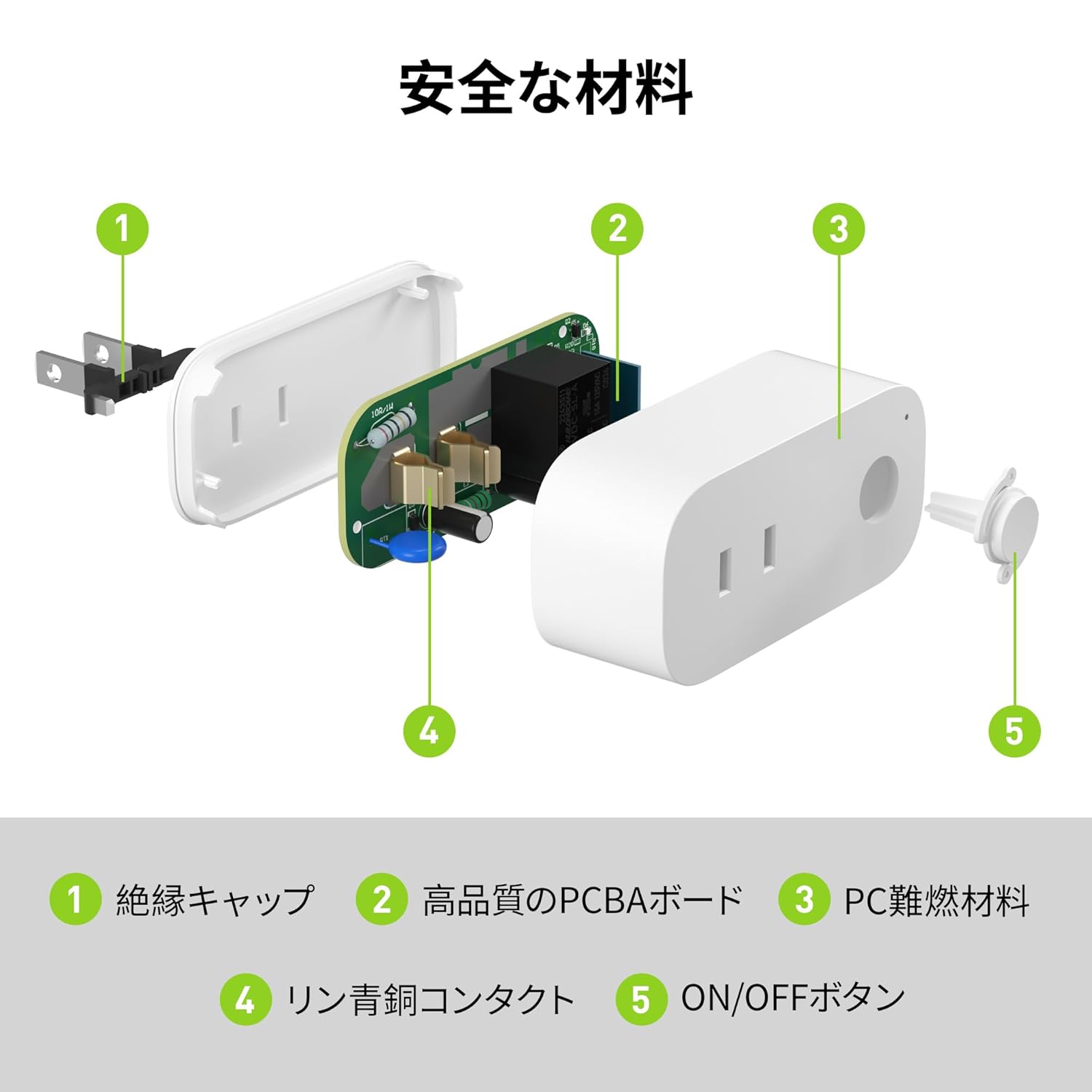
Image: Internal components of the smart plug, highlighting safety features such as the insulation cap, high-quality PCBA board, PC flame-retardant material, phosphor bronze contacts, and the ON/OFF button.
3. Орнотуу нускамалары
3.1. Баштапкы орнотуу
- Unpack the BN-LINK Smart Plug from its packaging.
- Plug the smart plug into a standard wall outlet.
- Observe the indicator light on the plug. It should start blinking. If it does not blink, press and hold the ON/OFF button for approximately 5 seconds until it starts blinking rapidly.
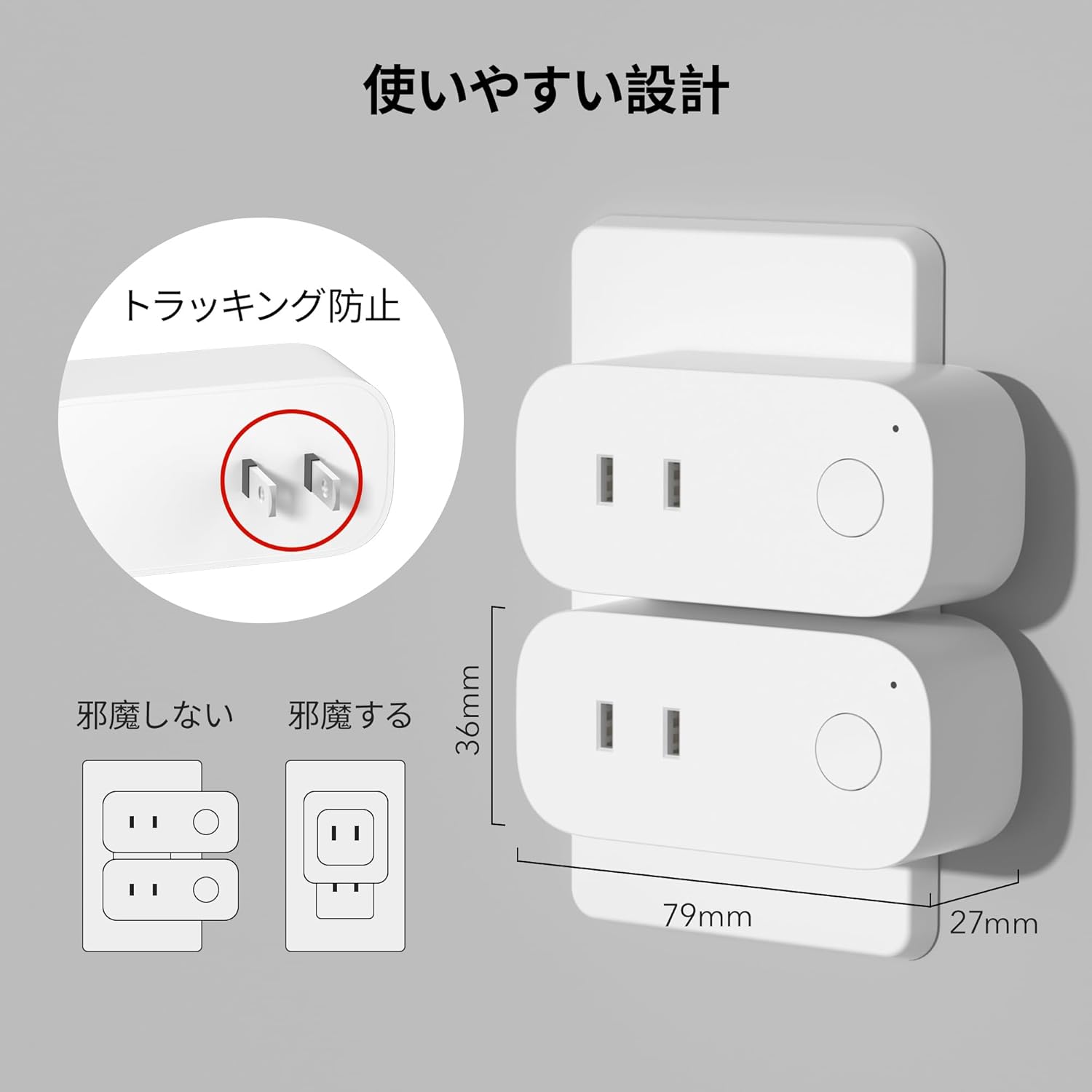
Image: The compact design of the smart plug, illustrating how it fits into an outlet without obstructing the adjacent one. Dimensions are also shown.
3.2. Колдонмону орнотуу жана Wi-Fi туташуусу
To utilize all smart features, you need to install the BN-LINK app and connect the plug to your 2.4GHz Wi-Fi network. This device only supports 2.4GHz Wi-Fi.
- Download the "BN-LINK" app from your smartphone's app store (Google Play Store for Android or Apple App Store for iOS).
- Колдонмону ачып, каттоо эсебин түзүңүз же сизде мурунтан эле бар болсо, кириңиз.
- Жупташтыруу процессин баштоо үчүн "+" сүрөтчөсүн же "Түзмөк кошууну" таптаңыз.
- Select "Smart Plug" from the device list.
- Follow the on-screen instructions to connect the smart plug to your 2.4GHz Wi-Fi network. Ensure your phone is also connected to the 2.4GHz network during setup.
- Once connected, you can rename your smart plug for easy identification (e.g., "Living Room Lamp"," "Кофе кайнаткыч").
Video: This video demonstrates the process of connecting the smart plug to the BN-LINK app and your Wi-Fi network, including resetting the device and confirming indicator light status.
Video: This video provides a step-by-step guide on setting up the ePlugBT and connecting it to Wi-Fi, which is similar to the BN-LINK Smart Plug setup process.
4. Иштөө нускамалары
4.1. Колдонмо аркылуу алыстан башкаруу
Once connected to Wi-Fi, you can control your appliances from anywhere with an internet connection.
- Open the BN-LINK app.
- Tap on the device name you wish to control.
- Use the ON/OFF toggle button within the app to switch your appliance on or off.

Image: Remote operation of the smart plug via the BN-LINK app on a smartphone. The image shows the app's ON/OFF control for a device connected to the smart plug, with a WiFi router in the background.

Image: A user controlling a smart plug remotely with their smartphone in a modern kitchen environment.
4.2. Үн менен башкаруу
Integrate your smart plug with Amazon Alexa or Google Home for convenient voice commands.
- Ensure your smart plug is successfully connected to the BN-LINK app and your Wi-Fi network.
- Alexa же Google Home колдонмосун ачыңыз.
- Follow the app's instructions to add a new device or skill, searching for "BN-LINK" or "Smart Plug."
- Байланышкандан кийин, сиз төмөнкү сыяктуу үн буйруктарын колдоно аласыз:
- "Alexa, [түзмөктүн аталышын] күйгүзүңүз."
- "Эй, Google, [түзмөктүн аталышын] өчүр."

Image: A user in a living room controlling a lamp connected to a smart plug using voice commands with an Alexa device. The image also indicates Google Home compatibility.

Image: A smart plug connected to an outlet, being controlled by a Google Home device. A person is shown in bed, illustrating hands-free operation.
4.3. Timer Function and Scheduling
Set custom schedules to automate your appliances and manage energy consumption.
- In the BN-LINK app, select your smart plug.
- "Таймер" же "График" бөлүмүнө өтүңүз.
- Set specific ON/OFF times for your appliances. You can create daily, weekly, or one-time schedules.
- Use the countdown timer for temporary automation, such as turning off a charger after a set period to prevent overcharging.

Image: The BN-LINK app displaying timer and scheduling features. Examples show a coffee maker turning on at 7:15 AM and a lamp turning off at 10:00 PM, demonstrating automated control.

Image: A smart plug connected to a microwave, with the app interface showing a timer set to turn the device ON at 7:00.
5. Техникалык тейлөө
To ensure optimal performance and longevity of your BN-LINK Smart Plug, follow these maintenance guidelines:
- Тазалоо: Disconnect the smart plug from the power outlet before cleaning. Use a dry, soft cloth to wipe the surface. Do not use liquid cleaners or sprays.
- Сактагыч: If not in use for an extended period, unplug the device and store it in a cool, dry place away from direct sunlight and moisture.
- Текшерүү: Periodically check the plug and outlet for any signs of damage, wear, or overheating. If any issues are found, discontinue use and contact customer support.
6. Кыйынчылыктарды
If you encounter issues with your BN-LINK Smart Plug, refer to the following common problems and solutions:
| Көйгөй | Мүмкүн себеп | Чечим |
|---|---|---|
| Түзмөк Wi-Fi'га туташа албайт. | Туура эмес Wi-Fi сырсөзү, 5 ГГц Wi-Fi тармагы, сигнал начар же түзмөк жупташтыруу режиминде эмес. |
|
| Пульт иштебей жатат. | No internet connection on phone or smart plug, or app issue. |
|
| Үн менен башкаруу жооп бербей жатат. | Incorrect device name, smart assistant not linked, or internet connection issue. |
|
| Plug is unresponsive. | Күч алtage, device malfunction, or firmware issue. |
|
7. Техникалык шарттар
| Өзгөчөлүк | Деталь |
|---|---|
| Бренд | BN-LINK |
| Модель номери | CP-J31WT |
| Элемент Салмагы | 70 г |
| Пакеттин өлчөмдөрү | 8.2 x 4.7 x 4.3 см |
| Өлчөмү | 1 Пакет |
| Которуу түрү | 1-жол |
| Камтылган компоненттер | Smart Plug body, Instruction Manual |
| Batteries Used | Жок |
| Иштөө режими | КҮЙГҮЗҮҮ ӨЧҮРҮҮ |
| Учурдагы рейтинг | 15 Amps |
| Operating Voltage | 100 вольт |
| Туташтыргыч түрү | Плагин |
| Материал | Пластик |
| Circuit Type | 1-жол |
8. Кепилдик жана колдоо
BN-LINK products are designed for quality and reliability. For warranty information and customer support, please refer to the contact details provided in the product packaging or visit the official BN-LINK webсайт.
For further assistance, you may also contact the seller directly through the Amazon platform.
Онлайн ресурстар:
- Official BN-LINK Webсайт: www.bn-link.com (Эскертүү: Бул толтургуч URL, replace with actual if available)
- Amazon продукт бети: Amazon.co.jp Product Page