
1. Киришүү
This manual provides detailed instructions for the safe and efficient operation of your Jesverty SPS-10010H Variable DC Power Supply. This device is designed to provide a stable and adjustable DC power output, suitable for various applications including electronic laboratories, DIY projects, battery charging, and auto repair shops. Please read this manual thoroughly before use and retain it for future reference.
2. Коопсуздук нускамалары
- Ар дайым кубат булагын жерге туташтырылган розеткага туташтырыңыз.
- Аппаратты нымдуу жерде иштетпеңиз же damp шарттар.
- Ашыкча ысып кетүүнүн алдын алуу үчүн туура желдетүүнү камсыз кылыңыз.
- в ачпагылаasing; ичинде колдонуучу тейлей турган тетиктер жок. Бардык тейлөө иштерин квалификациялуу адистерге тапшырыңыз.
- Киргизилген томду текшериңизtage matches your local power supply before connecting.
- Before connecting or disconnecting loads, ensure the output is turned off.
- Чыгуу терминалдарын кыска туташуудан сактаңыз.
3. Продукт бүтүп калдыview
The Jesverty SPS-10010H is a high-precision variable DC power supply featuring a 4-digit LED display for accurate voltage and current readings. It includes an encoder knob for precise adjustments, an output ON/OFF switch, and built-in Over-Voltage Protection (OVP) and Over-Current Protection (OCP) for enhanced safety.
Алдыңкы жана арткы панелдин өзгөчөлүктөрү
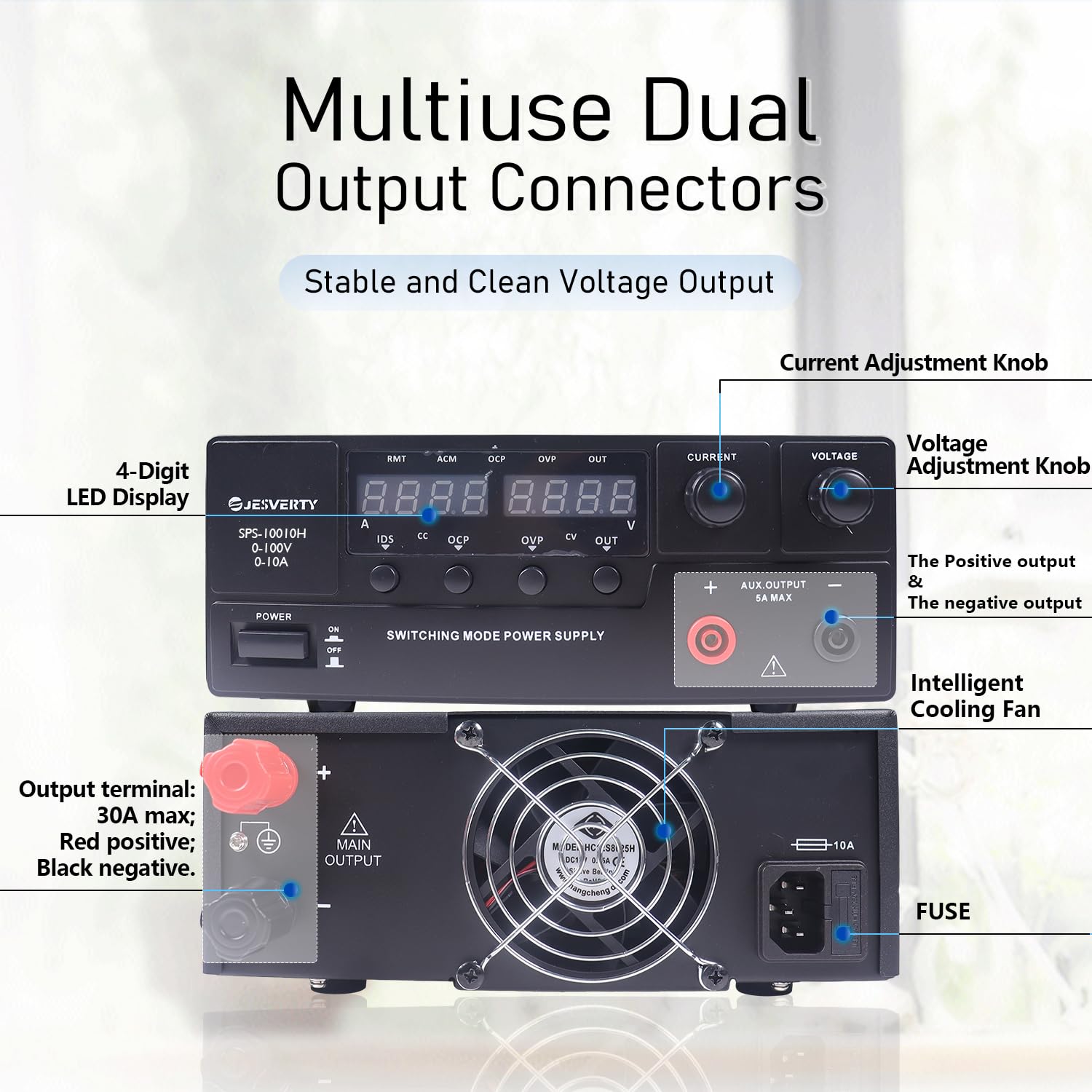
Сүрөттүн сүрөттөлүшү: This image displays the front and rear panels of the Jesverty SPS-10010H power supply. The front panel features a 4-digit LED display, current and voltage adjustment knobs, an output ON/OFF switch, and an auxiliary output terminal. The rear panel shows the main output terminals (red for positive, black for negative), an intelligent cooling fan, and the AC power input with a fuse holder.
- 4 орундуу LED дисплей: Provides precise readings of voltage жана ток.
- Токту жөндөө баскычы: Used to set the desired output current.
- Тtage Жөндөө баскычы: Used to set the desired output voltage.
- Чыгарууну күйгүзүү/өчүрүү которгучу: Controls the power output to the terminals.
- Auxiliary Output Terminal: Provides a fixed 5A maximum output.
- Main Output Terminals: Red for positive, black for negative.
- Акылдуу муздатуу желдеткичи: Automatically adjusts speed based on temperature to maintain optimal performance.
- OVP (Ашыкча томtage Protection) & OCP (Over-Current Protection): Safety features to protect the device and connected load.
4. Орнотуу
- Пакеттен чыгаруу: Carefully remove the power supply from its packaging. Inspect for any signs of damage.
- Жайгашкан жери: Place the unit on a stable, level surface with adequate ventilation around all sides. Do not block the cooling fan vents.
- Кубат туташуу: Connect the provided power cord to the AC input on the rear panel and then to a grounded wall outlet.
- Баштапкы күйгүзүү: Flip the main power switch on the front panel to the 'ON' position. The LED display should illuminate.
- Чыгуу туташуу: Connect your load to the main output terminals using appropriate test leads. Ensure correct polarity (red to positive, black to negative). For auxiliary output, use the dedicated terminal.
5. Иштөө нускамалары
5.1 Adjusting Voltage жана Current

Сүрөттүн сүрөттөлүшү: This image illustrates the interaction with the digital display for setting voltage and current. It shows how to press a button to select the digit to adjust and then rotate the encoder knob to change the value, allowing for precise control over the output parameters.
- Күйгүзүү: Turn on the power supply. Ensure the output is initially OFF.
- Set Voltage: айлантыңыз Тtage Жөнгө салуу баскычы каалаган чыгаруу көлөмүн орнотуу үчүнtage. Pressing the knob allows you to select individual digits for fine-tuning.
- Set Current Limit: айлантыңыз Учурдагы жөндөө баскычы to set the desired current limit. This acts as a maximum current the supply will deliver. Pressing the knob allows for digit selection.
- Чыгарууну иштетүү: Бир жолу томtage and current limits are set, press the Output ON/OFF Switch to enable the power output. The display will show the actual output voltage жана ток.
- Чыгарууну өчүрүү: To stop the output, press the Output ON/OFF Switch кайра.
5.2 Over-Voltagэлектрондук коргоо (OVP) жана ашыкча ток коргоо (OCP)

Сүрөттүн сүрөттөлүшү: This image highlights the Over-Current Protection (OCP) alarm feature. It shows the power supply's display and indicates that the OCP button can be used to detect and respond to short-circuits or over-current conditions, triggering an alarm and stopping the output to protect the connected device.
The power supply is equipped with OVP and OCP functions to protect both the device and the connected load from damage due to excessive voltage or current. If an OVP or OCP event occurs, the power supply will automatically cut off the output and trigger an alarm. To reset, address the cause of the over-condition, then cycle the output switch off and on.
5.3 Батареяны заряддоо функциясы

Сүрөттүн сүрөттөлүшү: This image demonstrates the battery charging function of the Jesverty SPS-10010H power supply. It shows the power supply connected to a lead-acid battery, with icons indicating compatibility with Ni-MH, Lithium, LiFePO4, and Lead-Acid batteries. A crucial note advises setting the current and voltage correctly before charging.
The SPS-10010H can be used for charging various battery types, including Ni-MH, Lithium, LiFePO4, and Lead-Acid batteries. Маанилүү: Ар дайым туура заряддоо көлөмүн коюңузtage and current limit according to the battery manufacturer's specifications before connecting the battery and enabling the output. Incorrect settings can damage the battery or the power supply.
6. Техникалык тейлөө
- Тазалоо: Тазалоодон мурун электр кубатын электр тармагынан ажыратыңыз. Сыртын сүртүү үчүн жумшак, кургак чүпүрөктү колдонуңуз. Абразивдүү тазалоочу каражаттарды же эриткичтерди колдонбоңуз.
- Вентиляция: Periodically check that the ventilation openings are free from dust and debris. Use compressed air to clear if necessary.
- Сактагыч: Узак мөөнөткө колдонулбаганда, кубат менен камсыздоону салкын, кургак жерде, тике күн нурунан жана өтө температурадан алыс сактаңыз.
- Сактагычты алмаштыруу: If the unit fails to power on, check the fuse located in the AC input socket on the rear panel. Replace with a fuse of the same type and rating (e.g., 10A).
7. Кыйынчылыктарды
| Көйгөй | Мүмкүн себеп | Чечим |
|---|---|---|
| Күйгүзүлгөндө кубат жок | Power cord not connected, wall outlet faulty, fuse blown. | Check power cord connection, test wall outlet, replace fuse if necessary. |
| Чыгаруунун көлөмү жокtage/Current | Output switch is OFF, OVP/OCP triggered, faulty connection to load. | Turn output switch ON, check for OVP/OCP condition and reset, verify load connections. |
| Чыгуу томtagэлектрондук/ток туруксуз | Loose connections, faulty load, internal issue. | Check all connections, test with a different load, contact support if problem persists. |
| Бирдик ашыкча ысып жатат | Бөгөттөлгөн желдетүү, ашыкча жүк. | Ensure vents are clear, reduce load or operating time. |
8. Техникалык шарттар

Сүрөттүн сүрөттөлүшү: This image provides a visual representation of the Jesverty SPS-10010H power supply, highlighting its approximate dimensions (290mm / 11.41in length, 210mm / 8.26in width, 80mm / 3.15in height) and weight (approximately 3.0kg / 6.4lb). It also lists key features such as overload protection, metal body, cooling fan, and HD screen display.
| Өзгөчөлүк | Спецификация |
|---|---|
| Модель номери | SPS-10010H |
| Киргизүү көлөмүtage | 100 вольт (AC) |
| Output Voltage Диапазон | 0-100В DC |
| Чыгуу токунун диапазону | 0-10А DC |
| Максималдуу кубаттуулук чыгаруу | 1000 Ватт |
| Дисплей | 4 цифралуу LED |
| Коргоо өзгөчөлүктөрү | OVP (Ашыкча томtage Protection), OCP (Over-Current Protection), FCC compliant |
| Форма фактору | Стол |
| Материал | Plastic (external casing), Metal (internal components) |
| Муздатуу | Интеллектуалдык муздаткыч желдеткич |
| Өлчөмдөрү (L x W x Y) | Болжол менен 290 x 210 x 80 мм (11.41 x 8.26 x 3.15 дюйм) |
| Салмагы | Болжол менен 3.0 кг (6.4 фунт) |
| UPC | 680306176823 |
| Келип чыккан өлкө | Кытай |
9. Кепилдик жана колдоо
For warranty information and technical support, please refer to the documentation provided with your purchase or contact the Jesverty customer service directly. Keep your purchase receipt as proof of purchase for any warranty claims.
10. Тиркемелер

Сүрөттүн сүрөттөлүшү: This image displays four common application scenarios for the Jesverty SPS-10010H power supply: DIY electronics projects, battery charging, use in electronic laboratories, and applications in auto repair shops. This illustrates the versatility of the device.
The Jesverty SPS-10010H Variable DC Power Supply is suitable for a wide range of applications, including but not limited to:
- DIY electronics projects and hobbyists
- Battery charging for various battery types
- Educational and research electronic laboratories
- Testing and repair in auto repair shops
- General purpose power supply for testing and development