
Introduction
Thank you for choosing the MACAP MI40 Luxe On-Demand Espresso Grinder. This manual provides essential information for the safe and efficient operation, maintenance, and care of your new grinder. Please read all instructions carefully before use and retain this manual for future reference.

The MACAP MI40 Luxe On-Demand Espresso Grinder, featuring a sleek black finish and integrated touchscreen display.
Коопсуздук маалыматы
Өрт, электр шок жана жаракат алуу коркунучун азайтуу үчүн электр шаймандарын колдонууда ар дайым негизги коопсуздук чараларын сактаңыз.
- Жаргылчак иштетүүдөн мурун бардык нускамаларды окуп чыгыңыз.
- Do not immerse the grinder, cord, or plug in water or other liquids.
- Колдонбогондо, тетиктерди чогултууда же демонтаждоодон мурун жана тазалоодон мурун розеткадан сууруп алыңыз.
- кыймылдуу бөлүктөргө тийбегиле.
- Эч кандай шайманды зымы же сайы бузулган, же шайман иштебей калгандан кийин же кандайдыр бир түрдө бузулгандан кийин иштетпеңиз. Жардам алуу үчүн кардарларды колдоо бөлүмүнө кайрылыңыз.
- Өндүрүүчү тарабынан сунушталбаган же сатылбаган тиркемелерди колдонуу өрткө, электр шокуна же жаракатка алып келиши мүмкүн.
- Сыртта колдонбоңуз.
- Шнурды столдун же столдун четине илинип салбаңыз же ысык беттерге тийбеңиз.
- Ensure the hopper lid is securely in place before operating.
- Only grind whole roasted coffee beans. Do not grind other substances such as nuts, spices, or instant coffee.
Жайгашуу
1. таңгактан чыгаруу
- Бардык компоненттерди таңгактан кылдаттык менен алып салыңыз.
- Inspect the grinder for any signs of damage. If damaged, do not operate and contact your retailer.
- Бардык коргоочу пленкаларды жана таңгактоочу материалдарды алып салыңыз.
2. Компонентти идентификациялоо
Familiarize yourself with the main parts of your MI40 Luxe grinder:
- Хоппер: Бүтүндөй кофе дандарын кармайт.
- Бункердин капкагы: Covers the hopper.
- Майдалоону жөндөө баскычы: Located below the hopper, used to set grind fineness.
- Сенсордук дисплей: For programming and selecting dosing options.
- Dosing Spout: Where ground coffee is dispensed.
- Portafilter кармоочу: Supports the portafilter during grinding.
- Кубат которгучу: Located on the side of the grinder.
3. Баштапкы жыйын
- Install the Hopper: Place the hopper onto the grinder body, ensuring it seats correctly. Rotate it slightly until it locks into position.
- Install the Hopper Lid: Place the lid securely on top of the hopper.
4. Жайгаштыруу
Майдалагычты туруктуу, тегиз жана кургак бетке коюңуз. Түзмөктүн айланасында жетиштүү желдетүү бар экенин текшериңиз.
5. Power Connection
Электр шнурын жерге туташтырылган электр розеткасына сайыңыз. Voltage matches the specifications listed on the grinder's rating label.
Иштөө нускамалары
1. Filling the Hopper
Lift the hopper lid and pour whole roasted coffee beans into the hopper. Do not overfill. Replace the lid securely.
2. Grind Adjustment (Nice Grind Control Dial)
The MI40 Luxe features a stepless grind adjustment dial for precise control. To adjust the grind fineness:
- Turn the grinder ON using the power switch.
- Rotate the grind adjustment dial. Turning it clockwise results in a finer grind, and counter-clockwise results in a coarser grind.
- For espresso, start with a fine setting and adjust incrementally based on extraction time and taste. It is recommended to adjust the grind while the burrs are running to prevent jamming.

Деталдаштырылган view of the Nice Grind Control Dial for precise grind fineness adjustment.
3. Touchscreen Dosing
The touchscreen allows for programmable dosing for single and double shots.
- Күйгүзүү: Ensure the grinder is powered on. The touchscreen will illuminate.
- Select Dose: On the main screen, you will see icons for single and double shot doses. Tap the desired dose icon.
- Adjust Dose Time (if needed): To program the dose time, press and hold the desired dose icon until it enters programming mode. Use the '+' and '-' buttons on the screen to adjust the grinding time in seconds. Tap the icon again to save.
- Place Portafilter: Position your portafilter securely in the portafilter holder beneath the dosing spout.
- Майдалоону баштоо: Tap the selected dose icon once to start grinding. The grinder will automatically stop after the programmed time.
- Manual Grinding: Some models may offer a manual grind option, typically by pressing a dedicated button or holding a dose icon briefly. Refer to the on-screen prompts.
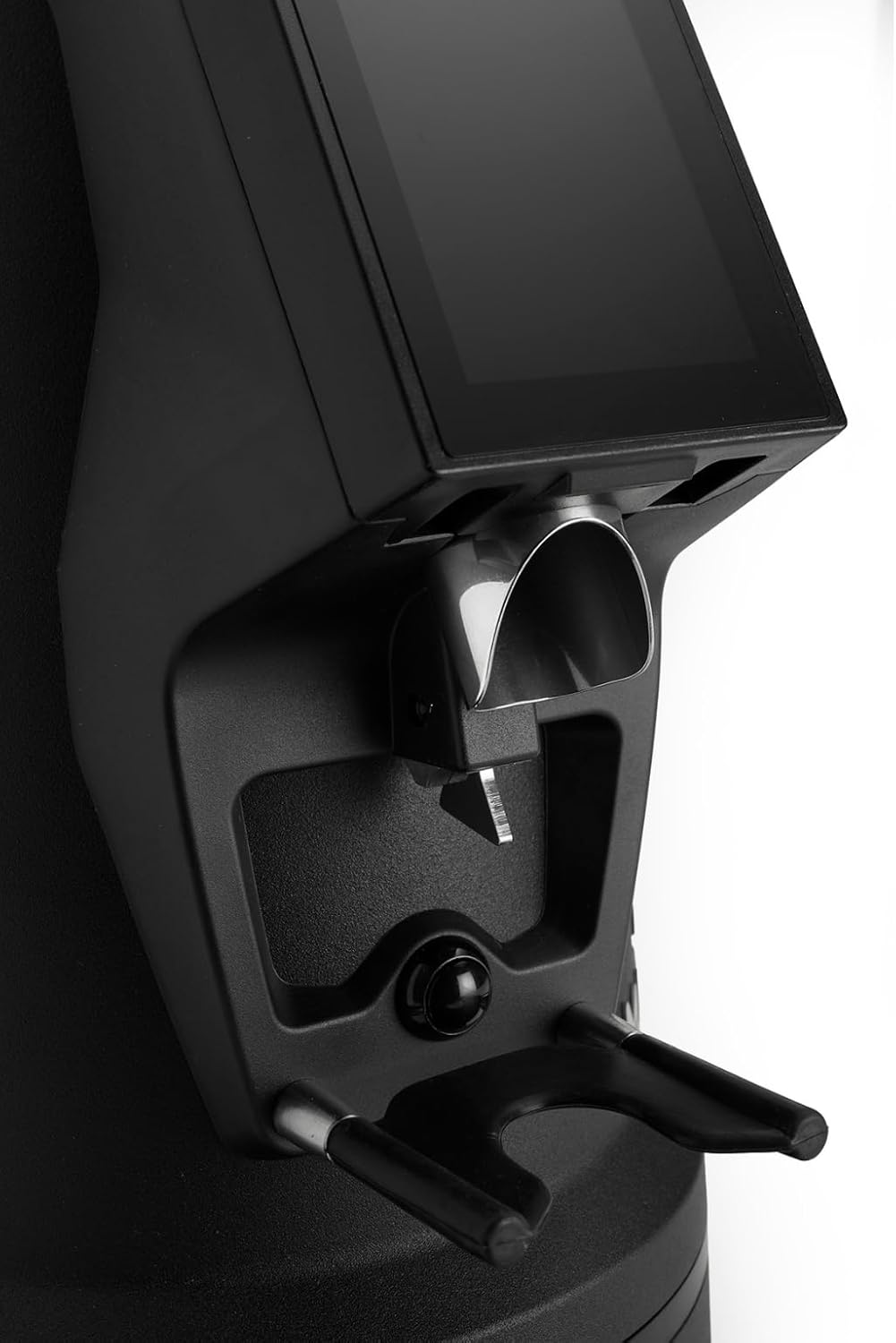
The dosing spout and portafilter holder, designed for efficient and clean coffee dispensing.
Техникалык тейлөө
Regular cleaning and maintenance ensure optimal performance and longevity of your grinder.
1. Күнүмдүк тазалоо
- Хоппер: Калган буурчактарды бошотуп, идиштин ичин кургак чүпүрөк менен сүртүңүз.
- Dosing Spout: Use a brush or vacuum cleaner to remove any residual coffee grounds from the dosing spout and portafilter holder area.
- Сырткы: Жаргылчактын сыртын жарнама менен сүртүңүзamp кездеме. Абразивдүү тазалагычтарды колдонбоңуз же аппаратты сууга салбаңыз.
2. Burrs Cleaning (Weekly/Bi-weekly)
To maintain grind consistency, the burrs should be cleaned regularly.
- Unplug the Grinder: Always disconnect the power before cleaning the burrs.
- Хопперди алып салуу: Empty the hopper and remove it from the grinder body.
- Access Burrs: Depending on the model, you may need to unscrew the top burr carrier. Refer to the specific instructions for your MI40 Luxe model.
- Таза бурчтар: Use a stiff brush or a vacuum cleaner to remove all coffee grounds from both the stationary and rotating burrs. Do not use water.
- Кайра чогултуу: Carefully reassemble the burr carrier and hopper, ensuring all parts are securely in place.
3. Жалпы кам көрүү
- Жаргылчакты салкын, кургак жерде сактаңыз.
- Avoid exposing the grinder to direct sunlight or extreme temperatures.
Проблемаларды чечүү
Жаргылчакыңыз менен көйгөйлөргө туш болсоңуз, төмөнкү жалпы көйгөйлөрдү жана чечимдерди караңыз:
| Көйгөй | Мүмкүн себеп | Чечим |
|---|---|---|
| Жаргылчак күйгүзбөйт | No power, power switch off, or safety interlock not engaged. | Check power cord connection, ensure power switch is ON, verify hopper is correctly seated. |
| No coffee grinding / Grinder jams | Beans not feeding, burrs clogged, or grind setting too fine. | Ensure hopper has beans. Unplug, remove hopper, clean burrs. Adjust to a coarser setting. |
| Туруксуз майдалоо | Бурчтар булганган же эскирген. | Clean burrs thoroughly. If problem persists, burrs may need replacement. |
| Жаргылчак ызы-чуу | Foreign object in burrs or loose components. | Unplug and inspect burrs for foreign objects. Ensure all parts are securely fastened. |
If the problem persists after attempting these solutions, please contact MACAP customer support or your retailer.
Техникалык шарттар
| Өзгөчөлүк | Деталь |
|---|---|
| Модел | MI40 Luxe |
| Бренд | Macap |
| Burr түрү | Flat Burrs |
| Burr Size | 65 мм |
| Майдалоону тууралоо | Stepless (Nice Grind Control Dial) |
| Дозалоо | Touchscreen Programmable On-Demand |
| Бункердин сыйымдуулугу | 2.6 фунт (болжол менен 1.2 кг) |
| Материал | Дат баспаган болот |
| Элемент Салмагы | 19.6 фунт (болжол менен 8.9 кг) |
| Өлчөмдөрү (L x W x Y) | 12" x 7.6" x 22" (болжол менен 30.5см x 19.3см x 55.9см) |
| Мотор | High-Torque |
Кепилдик жана колдоо
Your MACAP MI40 Luxe Grinder is covered by a manufacturer's warranty. For specific warranty terms and conditions, please refer to the warranty card included with your product or visit the official Macap website. For technical support, spare parts, or service inquiries, please contact your authorized Macap dealer or the customer support team.
Байланыш маалыматы:
- Refer to your purchase documentation for retailer contact details.
- Visit the official Macap website for global support information.