
Introduction
The NUROUM OpenEar Pro 2 Headphones are designed for enhanced comfort and clear communication in various environments. Featuring an open-ear design, Environmental Noise Cancellation (ENC) with a DSP chip, and multi-point Bluetooth 5.3 connectivity, these headphones are optimized for professional use, offering up to 15 hours of battery life.
Кутуда эмне бар

Пакетке төмөнкүлөр кирет:
- 1x OpenEar Pro 2 Headphones
- 1x Adapter (USB-C to USB-A)
- 1x USB Cable (USB-A to USB-C)
- 1x Ташуу кутусу
- User Manual
This image displays all items included in the NUROUM OpenEar Pro 2 Headphones package, neatly arranged. You can see the headphones, a USB-C charging cable, a USB-C to USB-A adapter, a grey carrying case, and the user manual.
Продукт бүттүview

The NUROUM OpenEar Pro 2 features a lightweight, flexible design with an adjustable boom microphone. The open-ear style allows for situational awareness while providing clear audio. Controls are integrated for ease of use.

Equipped with a HiFi 4 DSP processor, the OpenEar Pro 2 utilizes advanced algorithms for Environmental Noise Cancellation (ENC), ensuring your voice is clear during calls by reducing 99.9% of ambient noise.

User-friendly controls are integrated directly on the headset. This includes a power ON/OFF and multi-function button (MFB), volume up/down buttons, and a dedicated mute button on the microphone boom for quick access during calls.
Орнотуу жана туташуу
The OpenEar Pro 2 offers versatile connectivity options for seamless integration into your workflow.
Bluetooth Жупташтыруу
- Наушниктердин өчүрүлгөнүн текшериңиз.
- Press and hold the Multi-function Button (MFB) for 3 seconds until the indicator light flashes blue and red, indicating pairing mode.
- On your device (smartphone, tablet, computer), enable Bluetooth and search for 'NUROUM OpenEar Pro 2'.
- Select the device to connect. A voice prompt will confirm successful pairing.
Dongle Connection (for PC/Mac)
For a more stable and low-latency connection with your computer, use the provided USB dongle.
- USB жабдыгын компьютериңиздеги жеткиликтүү USB портуна сайыңыз.
- Power on your OpenEar Pro 2 headphones. They will automatically connect to the dongle.
- Ensure the headphones are selected as the audio input and output device in your computer's sound settings.

The headphones come with both a USB-C dongle and a USB-C to USB-A adapter, ensuring broad compatibility with different computer ports for stable connections.
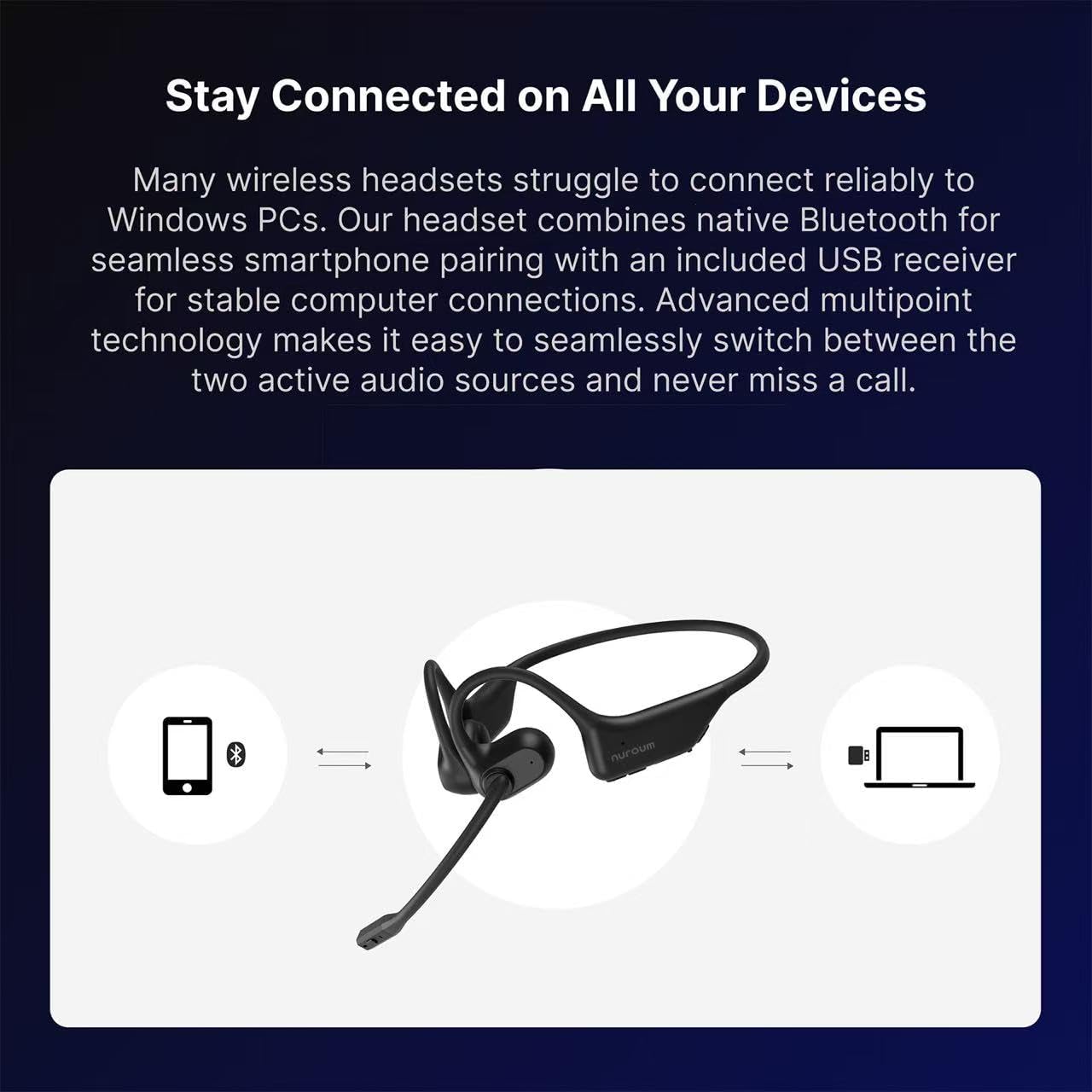
The multi-point connectivity feature allows the headphones to be connected to two devices simultaneously, such as a PC and a smartphone. This enables seamless switching between online meetings and phone calls without re-pairing.
Official Product Video: Connectivity Options
This video demonstrates the various connectivity options for the OpenEar Pro 2 headphones, including Bluetooth and the use of the USB dongle for stable connections with different devices.
Иштөө нускамалары
Негизги башкаруу элементтери
- Күйгүзүү/өчүрүү: Көп функциялуу баскычты (КФБ) 3 секунд басып, кармап туруңуз.
- Үндү көзөмөлдөө: Use the dedicated volume +/- buttons.
- Микрофондун үнүн басуу/ачуу: Press the mute button located on the microphone boom.
- Чалууга жооп берүү/аяктоо: MFB басыңыз.
- Чакырууну четке кагуу: MFBди 1 секунд басып туруңуз.
- Музыканы ойнотуу/тындыруу: MFB басыңыз.
- Кийинки / Мурунку трек: Press volume +/- for 1 second.
- Үн Жардамчысын жандыруу: Keep pressing MFB for 1 second.
- Жупташтыруу таржымалын тазалоо: Keep pressing volume+ and volume- at the same time for 5 seconds.
Official Product Video: Simple to Use
This video highlights the simple and intuitive controls of the OpenEar Pro 2 headphones, demonstrating how to manage calls, music, and other functions with ease.
Негизги өзгөчөлүктөрү
Ultimate Comfort

Crafted with soft silicone materials, the OpenEar Pro 2 weighs only 1.12 ounces (31g), providing unparalleled comfort for extended wear. The open-ear design sits delicately in front of each ear, preventing ear fatigue and allowing for natural airflow.
Official Product Video: Comfort is Our Priority
This video emphasizes the superior comfort of the Nuroum OpenEar Pro 2, showcasing its lightweight and ergonomic design for all-day wear without discomfort.
Экологиялык ызы -чууну жокко чыгаруу (ENC)

The integrated ENC technology, powered by a HiFi 4 DSP processor, significantly reduces ambient noise by up to 99.9%. This ensures your voice remains crystal clear during calls, even in noisy environments. The adjustable boom mic can be positioned closer to your mouth for optimal voice pickup.
Official Product Video: Noise Cancelling Test
This short video demonstrates the effectiveness of the noise-cancelling microphone in the OpenEar Pro 2 headphones, showing how it filters out background sounds during calls.
Батареянын узак иштөө мөөнөтү

Enjoy up to 15 hours of continuous music playback or 12 hours of continuous call time on a single charge. The headphones feature 2-hour quick charging via the included Type-C cable, minimizing downtime. (Note: Headphones automatically power off during charging. Please restart after full charge.)
Техникалык шарттар
| Өзгөчөлүк | Деталь |
|---|---|
| Бренд | NUROUM |
| Модель номери | US-OpenEar Pro 2-CD-5 |
| Кулак жайгаштыруу | Ачык кулак |
| Байланыш технологиясы | Зымсыз (Bluetooth 5.4) |
| Bluetooth диапазону | 10 метр |
| Noise Control | Adaptive Noise Cancellation (ENC) |
| Батареянын орточо иштөө мөөнөтү | 15 саат |
| Батареяны заряддоо убактысы | 2 саат |
| Элемент Салмагы | 1.12 унция |
| Сууга туруктуулук деңгээли | Сууга чыдамдуу |
| Шайкеш түзмөктөр | Уюлдук телефондор, стол үстүндөгү компьютерлер, ноутбуктар |
| Кошумча функциялар | Echo Cancellation, Fast Charging, Lightweight, Multipoint Pairing, Volume Control |

The NUROUM OpenEar Pro 2 headphones offer broad compatibility with most operating systems, including iOS, Android, Windows, Mac, and Linux. They are also compatible with popular communication platforms like Zoom, Microsoft Teams, Skype, and more.
Техникалык тейлөө
Тазалоо
To maintain optimal performance and hygiene, regularly clean your headphones. Use a soft, dry cloth to wipe the surfaces. For stubborn dirt, a slightly damp cloth with mild soap can be used, ensuring no moisture enters the speaker or microphone openings.
Суу каршылык
The OpenEar Pro 2 headphones are water resistant. This means they can withstand splashes and light rain, making them suitable for various environments. However, they are not designed for submersion in water. Avoid exposing them to heavy rain, showering, or swimming.
Сактагыч
When not in use, store the headphones in the provided carrying case to protect them from dust, scratches, and physical damage. Avoid storing them in extreme temperatures or high humidity.
Проблемаларды чечүү
Күч жок
- Кулакчындар толук заряддалганын текшериңиз. Аларды USB-C кабели аркылуу кубат булагына туташтырыңыз.
- If charging, remember the headphones automatically power off. Restart them after charging is complete.
Bluetooth аркылуу жупташтырылбай жатат
- Кулакчындар жупташтыруу режиминде экенин текшериңиз (индикатор көк жана кызыл түстө күйүп-өчүп турат).
- Make sure Bluetooth is enabled on your device and it is within 10 meters of the headphones.
- Clear the pairing history on the headphones (press volume+ and volume- for 5 seconds) and try pairing again.
- Наушникти да, түзмөгүңүздү да өчүрүп күйгүзүңүз.
Poor Audio Quality or Disconnections
- Кулакчындар менен түзмөгүңүздүн ортосунда эч кандай тоскоолдуктар жок экенин текшериңиз.
- If using with a computer, try connecting via the USB dongle for a more stable connection.
- Башка зымсыз аппараттардын кийлигишүүсүн текшериңиз.
- Ensure the headphones are fully charged. Low battery can affect connection stability.
Микрофон маселелери
- Ensure the microphone is not muted. Press the mute button on the boom mic.
- Check that the headphones are selected as the input device in your communication software (e.g., Zoom, Microsoft Teams).
- Adjust the position of the boom microphone closer to your mouth for optimal voice pickup.
Кепилдик жана колдоо
The NUROUM OpenEar Pro 2 Headphones come with a 1 жылдык кепилдик from the manufacturer, Auditoryworks. This warranty covers defects in materials and workmanship under normal use.
For further assistance, product registration, or to explore other NUROUM products, please visit the official NUROUM Store: