
1. Киришүү
Thank you for choosing the ELECROW 5-inch IPS Touch Screen Monitor. This compact display offers a high-definition visual experience with responsive touch functionality, designed for a wide range of applications including single-board computers and mini PCs. This manual provides essential information for the proper installation, operation, and care of your device.

The ELECROW 5-inch IPS Touch Screen Monitor, a versatile display solution.
Негизги өзгөчөлүктөр төмөнкүлөрдү камтыйт:
- HD Display Experience: 5-inch IPS capacitive touchscreen with a 1024 x 600 resolution, 178° viewing angle, and support for up to 1080P signal input.
- Responsive Touch: Supports 5-point multi-touch on Windows and single-touch on Raspberry Pi/Jetson Nano.
- Оңой Plug-and-Play: No additional drivers required for most compatible systems.
- Кесиптик функциялары: Features a headphone jack for audio output and a built-in OSD menu for display adjustments.
2. Кутуда эмне бар
Төмөндө тизмеленген нерселердин баары пакетиңизге камтылганын текшериңиз:
- 1x 5-inch Touch Screen Monitor
- 1x HD Cable (1m)
- 1x USB-A to USB-C Cable (1m)
- 1x Micro-HD Adapter (for Raspberry Pi 4B & 5)
- 4x Hexagonal Copper Standoff Kit (M2.5)
- 2x Pro Stand
- 1x Screwdriver
- 1x Колдонуучунун колдонмосу (Ыкчам баштоо колдонмосу)
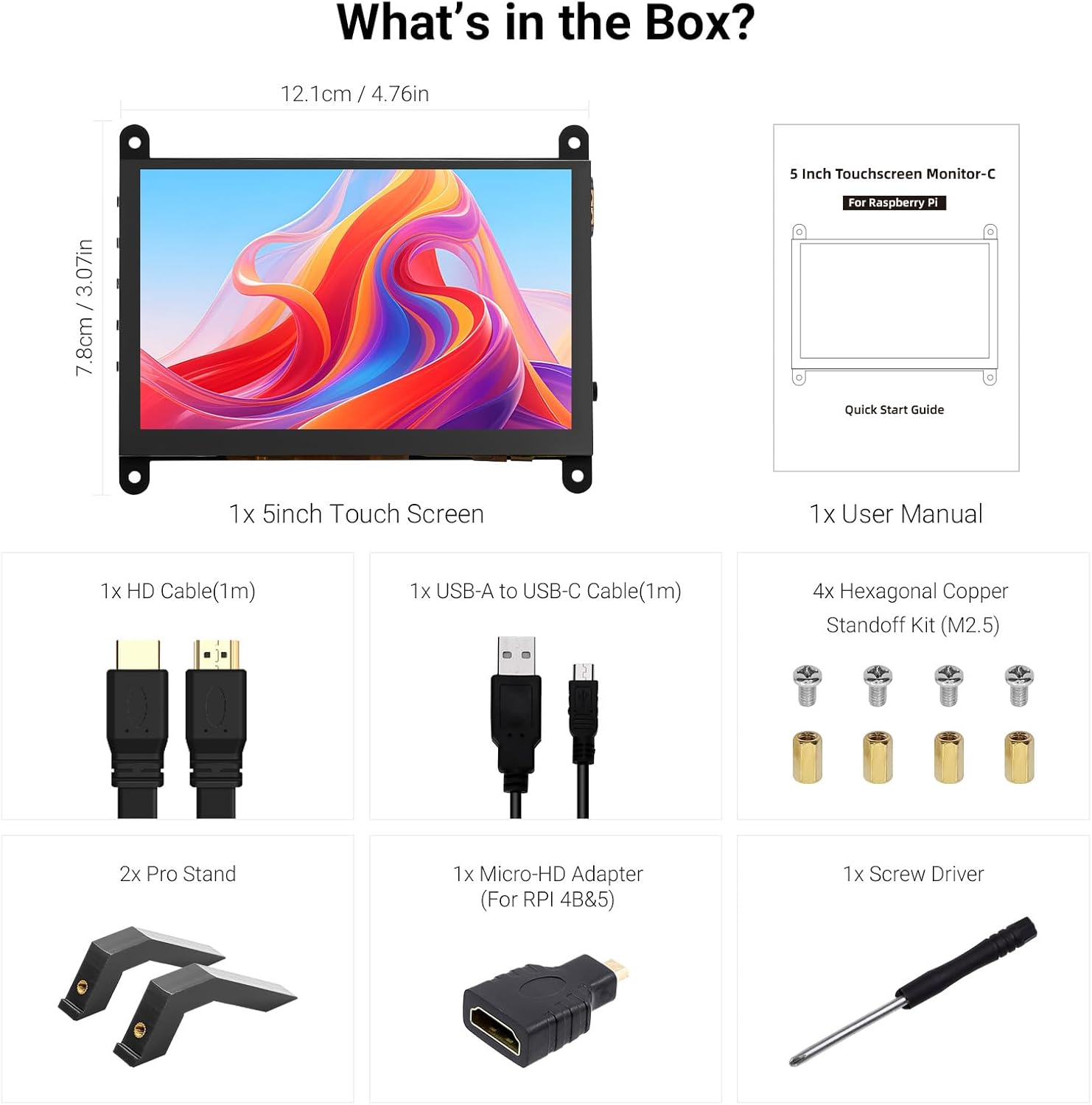
Бардык компоненттер продукт пакетине киргизилген.
3. Продукт бүтүп калдыview
Familiarize yourself with the ports and buttons on your ELECROW 5-inch Touch Screen Monitor:

Деталдаштырылган view монитордун портторунун жана башкаруу баскычтарынын.
- HD Input Port: Видео сигнал киргизүү үчүн.
- USB-C порту: For power supply and touch signal transmission.
- 3.5 мм гарнитура уячасы: Аудио чыгаруу үчүн.
- Меню баскычы: Экрандагы дисплей (OSD) менюсуна кирет.
- Left/Up Button: Navigates left or up in the OSD menu.
- Right/Down Button: Navigates right or down in the OSD menu.
- Кайтаруу баскычы: Exits a menu or returns to the previous option.
- Кубат баскычы: Дисплейин күйгүзөт же өчүрөт.
- 20P-FPC-0.5mm Display Port: For flexible cable expansion in embedded systems.
4. Орнотуу нускамалары
Follow these steps to connect your ELECROW 5-inch Touch Screen Monitor to a compatible device:
4.1 Connecting to Raspberry Pi
- Connect HD Cable: Use the provided HD cable to connect the monitor's HD Input Port to the HDMI port on your Raspberry Pi. If using Raspberry Pi 4B or 5, use the included Micro-HD adapter.
- USB кабелин туташтыруу: Connect the USB-C port on the monitor to a USB-A port on your Raspberry Pi using the provided USB-A to USB-C cable. This supplies power to the monitor and enables touch functionality.
- Күйгүзүү: Power up your Raspberry Pi. The display should automatically detect the signal and power on.
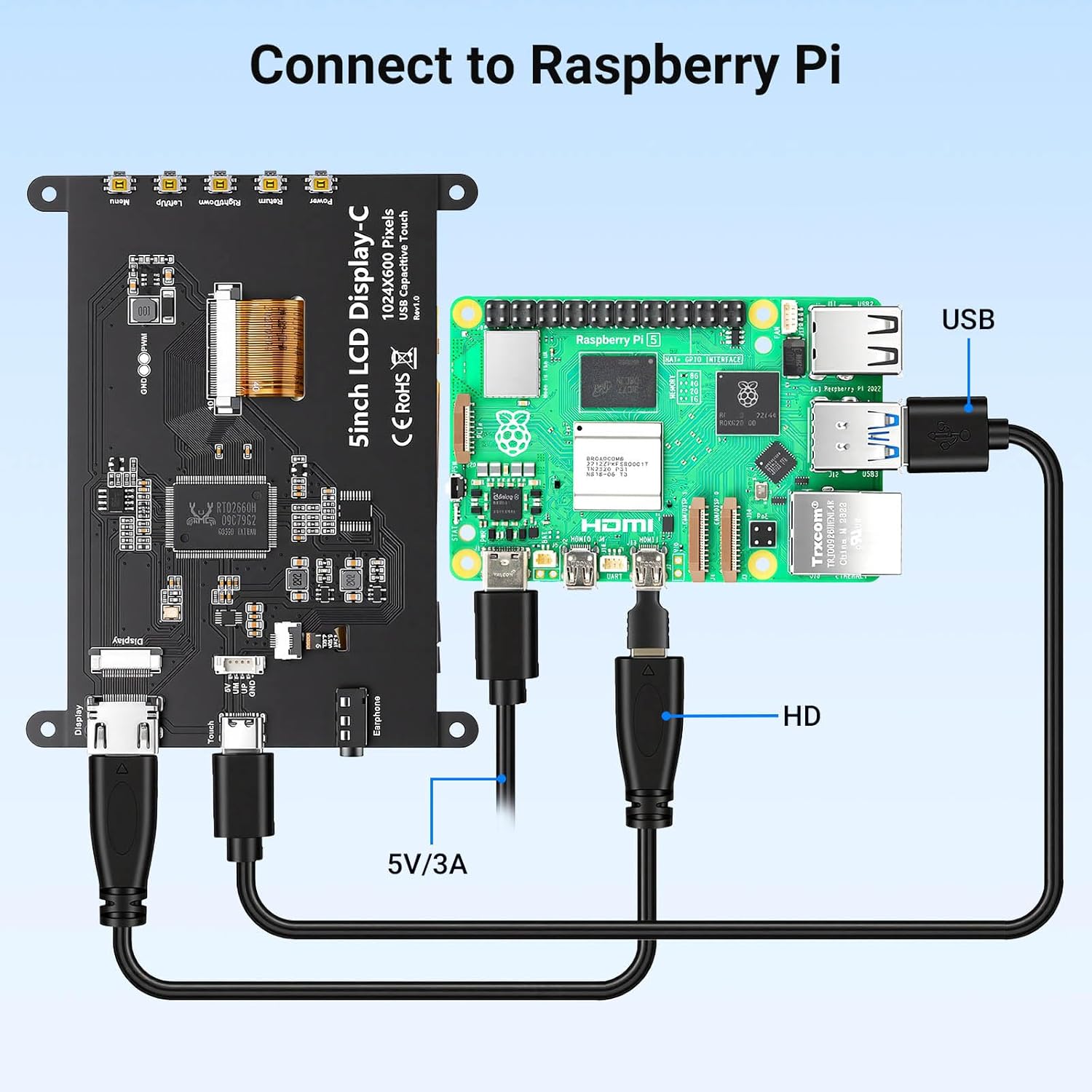
Connection diagram for Raspberry Pi.
4.2 Connecting to Windows PC/Laptop
- Connect HD Cable: Use the provided HD cable to connect the monitor's HD Input Port to the HDMI port on your PC/laptop.
- USB кабелин туташтыруу: Connect the USB-C port on the monitor to a USB-A port on your PC/laptop using the provided USB-A to USB-C cable. This provides power and enables touch functionality.
- Күйгүзүү: Power on your PC/laptop. The display should be recognized automatically. No additional drivers are typically required for Windows 7/8/10/11.
5. Иштөө нускамалары
5.1 Негизги операция
- Күйгүзүү/өчүрүү: Press the Power Button (8) to turn the display on or off.
- Тийүү функциясы: The monitor features a capacitive touchscreen. On Windows systems, it supports 5-point multi-touch. On Raspberry Pi (Raspbian, Ubuntu, Kali, Retropie) and Jetson Nano, it supports single-touch operation.

Responsive touch experience for various devices.
5.2 Экрандык менюнун навигациясы
The On-Screen Display (OSD) menu allows you to adjust various display settings:
- басыңыз Menu Button (4) OSD менюсун ачуу үчүн.
- колдонуу Left/Up Button (5) жана Right/Down Button (6) меню параметрлери боюнча чабыттоо.
- басыңыз Menu Button (4) параметрди тандоо же орнотууну ырастоо үчүн кайра.
- басыңыз Кайтуу баскычы (7) to exit the current menu or return to the previous level.
Common adjustable settings include Brightness, Contrast, and other display parameters.
5.3 Аудио чыгаруу
Кулакчындарды же тышкы динамиктерди туташтырыңыз 3.5mm Headphone Jack (3) for audio output from the connected device.
6. Шайкештик
The ELECROW 5-inch Touch Screen Monitor offers broad compatibility with various operating systems and hardware platforms:
- Операциялык системалар: Raspbian, Ubuntu, Kali, Retropie, Windows 7/8/10/11, Windows 10 IoT.
- Шайкеш түзмөктөр: Raspberry Pi 5, Raspberry Pi 4, Raspberry Pi 3 B+, BB Black, Banana Pi, Jetson Nano, PS4, Xbox.

Broad compatibility with popular operating systems and devices.
7. Техникалык шарттар
| Өзгөчөлүк | Деталь |
|---|---|
| Бренд | ЭЛЕКРО |
| Модель номери | DLH04950B |
| Screen Size | 5 дюйм |
| Резолюция | 1024 x 600 пиксел |
| Дисплей түрү | IPS |
| Viewбурч | 178 градус |
| Жарыктык | 410 кд/м² |
| Жаңыртуу ылдамдыгы | 60 Гц |
| Жооп убактысы | 2 Миллисекунд |
| Байланыш | HDMI, USB түрү C |
| Тtage | 5 вольт |
| Өлчөмдөрү (W x Y) | 12.1 см x 7.8 см (4.76 дюйм x 3.07 дюйм) |
| Кошумча функциялар | Portable, Touchscreen, Headphone Jack, OSD Menu |

Visual representation of key display specifications.
8. Техникалык тейлөө
Proper care and maintenance will ensure the longevity and optimal performance of your monitor:
- Экранды тазалоо: Бир аз жумшак, түксүз кездемени колдонуңуз dampened with water or a screen-cleaning solution. Avoid harsh chemicals, abrasive materials, or excessive moisture.
- Жалпы тазалоо: Wipe the exterior of the monitor with a dry, soft cloth.
- Сактагыч: Узак мөөнөткө колдонулбаганда, мониторду күн нурунан жана экстремалдык температурадан алыс, салкын, кургак жерде сактаңыз.
- Колдонуу: Avoid dropping the monitor or subjecting it to strong impacts. Do not apply excessive pressure to the screen.
- Вентиляция: Ensure the monitor has adequate ventilation to prevent overheating. Do not block any vents.
9. Кыйынчылыктарды
If you encounter issues with your ELECROW 5-inch Touch Screen Monitor, refer to the following common problems and solutions:
9.1 Дисплей жок / Кара экран
- Байланыштарды текшерүү: Ensure the HD cable is securely connected to both the monitor and the source device.
- Электр камсыздоо: Verify that the USB-C cable is properly connected and providing sufficient power (5V). Try a different USB port or power adapter if available.
- Булак түзмөк: Confirm that your source device (e.g., Raspberry Pi, PC) is powered on and outputting a video signal.
- Резолюция орнотуулары: Ensure the output resolution of your source device is compatible with the monitor (1024x600 or a resolution that can be scaled).
9.2 Touch Function Not Working
- USB туташуу: The USB-C cable is essential for touch functionality. Ensure it is connected to both the monitor and the source device.
- Операциялык системаны колдоо: Verify that your operating system supports touch input and that necessary drivers (if any, though usually plug-and-play) are installed. For Raspberry Pi, ensure the OS is configured for touch.
- Кайра калибрлөө: Some operating systems may require touch screen calibration. Refer to your OS documentation for instructions.
9.3 Image Quality Issues (Flickering, Distorted Colors)
- Кабелдин бүтүндүгү: Try a different HD cable to rule out a faulty cable.
- Булак сигналы: Test the monitor with a different source device to determine if the issue is with the monitor or the source.
- OSD Орнотуулары: Adjust brightness, contrast, and other color settings via the OSD menu.
10. Кепилдик жана колдоо
10.1 Кепилдик маалыматы
This ELECROW 5-inch Touch Screen Monitor comes with a 1 жылдык Өндүрүүчүнүн Кепилдиги. This warranty covers defects in materials and workmanship under normal use. It does not cover damage caused by misuse, accident, modification, or unauthorized repair.
10.2 Техникалык колдоо
For technical assistance, troubleshooting beyond this manual, or warranty claims, please contact ELECROW customer support through their official website or the platform where you purchased the product. Please have your model number (DLH04950B) and purchase details ready when contacting support.