
Introduction
The LIGHTSPEED Zulu 4 ANR Aviation Headset is designed to provide pilots with enhanced comfort, clear communication, and reliable performance. This manual outlines the features, setup, operation, and maintenance procedures to ensure optimal use of your headset.

Image: The LIGHTSPEED Zulu 4 ANR Aviation Headset, featuring its over-ear design and microphone.
Негизги өзгөчөлүктөр төмөнкүлөрдү камтыйт:
- Эки Bluetooth байланышы: Allows simultaneous connection to two devices for cell phone communication, stereo music streaming, and aviation app alerts.
- Low-Profile Комфорт: Weighing approximately 14.9 ounces, the headset features a stainless-steel headband designed for comfortable weight distribution and reduced side pressure.
- FrameFit™ Ear Seals: Tapered foam ear seals are engineered to provide a better seal around eyewear frames, enhancing comfort and clarity.
- Clear Communications: Enhanced upstream audio reduces up to 90% of background noise from outgoing transmissions via Bluetooth. The Dual Aperture Disc microphone offers superior noise cancellation, and user-adjustable mic gain balances voices in multi-headset environments.
- Узактыгы: Constructed with stainless steel and magnesium, and cables built around a Kevlar core, the Zulu 4 is designed for demanding aviation environments.
Кутуда эмне бар
Upon unboxing your LIGHTSPEED Zulu 4 headset, verify that all components are present:
- LIGHTSPEED Zulu 4 ANR Aviation Headset
- Headset Cable (Panel Power 6-Pin Plug)
- Кулак жаздыкчалары (алдын ала орнотулган)
- Баш боо (алдын ала орнотулган)
- Коргоочу кап

Image: The protective carrying case included with the Lightspeed Zulu 4 headset.
Жайгашуу
Before using your Zulu 4 headset, ensure it is properly connected and configured.
Connecting to Aircraft Power (Panel Power 6-Pin Plug)
- Locate the 6-pin Lemo connector on your aircraft's audio panel.
- Align the headset's 6-pin plug with the aircraft's receptacle.
- Gently push the plug into the receptacle until it clicks securely into place. This connection provides power to the headset and integrates it with the aircraft's intercom system.
Bluetooth Жупташтыруу
The Zulu 4 features dual Bluetooth connectivity, allowing two devices to be paired simultaneously.
- Гарнитураңыз күйгүзүлгөнүн текшериңиз.
- Мобилдик түзмөгүңүздө (мисалы, смартфондо, планшетте) Bluetooth'ду иштетиңиз.
- On the headset's control module, press and hold the Bluetooth button until the indicator light flashes, indicating pairing mode.
- On your device, select "Zulu4_XXXX" (where XXXX is a unique identifier) from the list of available Bluetooth devices.
- Once connected, the indicator light on the control module will change to a steady blue.
- Repeat the process for a second device if desired.

Image: The Lightspeed Zulu 4 headset showing the microphone boom extended and earcups.
Иштөө нускамалары
Гарнитураны тагынуу
Place the headset on your head so that the ear seals fully enclose your ears. Adjust the headband for a comfortable, secure fit. The FrameFit™ ear seals are designed to accommodate eyeglasses or sunglasses without compromising the acoustic seal.

Сүрөт: алдыңкы view of the Lightspeed Zulu 4 headset, highlighting the earcups and adjustable headband.
Микрофонду жөндөө
Position the Dual Aperture Disc microphone approximately 1/4 inch from your lips. The flexible boom allows for precise placement to optimize voice clarity and noise cancellation. Use the user-adjustable mic gain on the control module to balance your voice in a multi-headset environment.
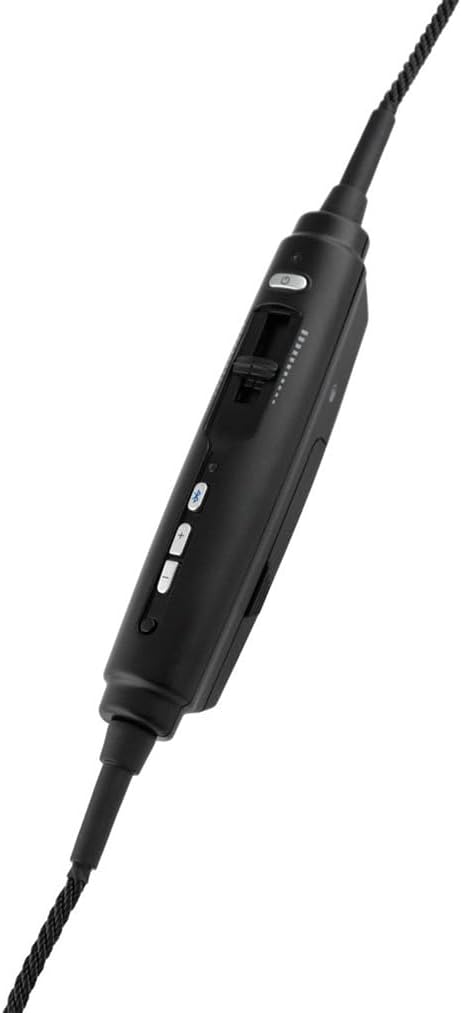
Image: The in-line control module of the Lightspeed Zulu 4 headset, featuring buttons for volume, Bluetooth, and a mic gain slider.
Активдүү ызы-чууну азайтуу (ANR)
The Active Noise Reduction (ANR) system automatically engages when the headset receives power from the aircraft's 6-pin Lemo connector, providing a quieter listening environment.
Bluetooth Аудиосун колдонуу
Once paired, you can stream audio from your connected devices. The headset prioritizes intercom and radio communications, automatically muting or lowering Bluetooth audio during critical transmissions.
Техникалык тейлөө
Proper maintenance ensures the longevity and performance of your Zulu 4 headset.
- Тазалоо: жумшак колдонуу, damp cloth to clean the exterior surfaces. Avoid harsh chemicals or abrasive materials.
- Кулак мөөрлөрү: Periodically inspect ear seals for wear and tear. Replace them if they become cracked or lose their cushioning to maintain optimal comfort and ANR performance.
- Кабельге кам көрүү: Avoid sharp bends or excessive pulling on the cables. Store the headset in its protective case when not in use to prevent damage to the cables and connectors.
- Сактагыч: Гарнитураны салкын, кургак жерде, күн нуру түз тийбеген жана өтө жогорку температурадан алыс сактаңыз.
Проблемаларды чечүү
If you encounter issues with your Zulu 4 headset, consider the following common solutions:
- Аудио жок/Үзгүлтүктүү аудио:
- Ensure the 6-pin Lemo plug is fully seated in the aircraft's receptacle.
- Check the volume controls on the headset and the aircraft's audio panel.
- Verify the aircraft's intercom system is functioning correctly.
- Bluetooth туташуу маселелери:
- Ensure Bluetooth is enabled on your device and the headset is in pairing mode.
- Түзмөктү жупташып, кайра жупташып көрүңүз.
- Башка түзмөктөр Bluetooth байланышына тоскоол болбой турганын текшериңиз.
- Poor Microphone Clarity:
- Adjust the microphone position to be 1/4 inch from your lips.
- Check the mic gain setting on the control module.
- Ensure the microphone windscreen is clean and properly installed.
For further assistance, please refer to the official LIGHTSPEED Aviation webсайтка же кардарларды тейлөөгө кайрылыңыз.
Техникалык шарттар
| Бренд | ЖАРЫК ЫЛДАМДЫГЫ |
| Модель аты | Zulu 4 - Panel Power |
| Модель номери | 40615 |
| Түс | Кара |
| Кулак жайгаштыруу | Кулак үстүндө |
| Форма фактору | Кулак үстүндө |
| Импеданс | 295 Ом |
| Байланыш технологиясы | Bluetooth |
| Наушник уясы | LEMO 6-pin |
| Noise Control | Активдүү ызы-чууну жокко чыгаруу |
| Frequency Response | 20 Гц - 20 000 Гц |
| Аудио драйвер түрү | Планардык магниттик айдоочу |
| Коргоочу материал | Көбүк, дат баспас болоттон жасалган |
| Элемент Салмагы | 14.9 унция |
| Шайкеш түзмөктөр | iPad, iPhone |
| Кошумча функциялар | Dual Aperture Disc Microphone, Dual Bluetooth, FrameFit Ear Seals, Front Row Center Stereo Cross-feed Technology, Noise Cancellation |
Продукт бүттүview Video
Видео: расмий продукт бүттүview of the LIGHTSPEED Zulu 4 ANR Aviation Headset, demonstrating its features and benefits.
Кепилдик жана колдоо
The LIGHTSPEED Zulu 4 ANR Aviation Headset is backed by a 7 жылдык Чектелген Кепилдик covering materials and workmanship. For detailed warranty information, technical support, or service requests, please visit the official LIGHTSPEED Aviation webсайтына же алардын ыйгарым укуктуу тейлөө борборлоруна кайрылыңыз.
Official LIGHTSPEED Aviation Webсайт: lightspeedaviation.com