
Introduction
The New Bee GT40 is a versatile and accurate clip-on instrument tuner designed for a wide range of stringed instruments including guitar, bass, ukulele, violin, and cello. Featuring a bright color display, 360° rotatable clip, and a rechargeable battery, this tuner provides fast and precise tuning for musicians of all levels. This manual will guide you through the setup, operation, maintenance, and troubleshooting of your New Bee GT40 tuner.
Кутуда эмне бар
Сураныч, пакеттин мазмунун текшерип, бардык буюмдар бар экенин текшериңиз:
- New Bee GT40 Guitar Tuner
- USB-C заряддоо кабели
- Колдонуучунун Колдонмосу (бул документ)

Продукт өзгөчөлүктөрү
- Fast & Accurate Tuning: Equipped with an advanced digital processor and high-sensitivity piezo sensor for quick and precise tuning across various instruments.
- Bright Color Display: High-resolution color screen ensures clear visibility in diverse lighting conditions, from dark stagачык сырткы чөйрөлөргө.
- Кайра заряддалуучу батарея: Provides approximately 6 hours of continuous tuning on a single charge. Includes a USB-C charging cable for convenient recharging.
- 360° Айлануучу Клип: The tuner features a 360° swivel and 135° tilt, allowing for optimal viewing angles on any headstock, whether left or right-handed. The padded clamp protects your instrument's finish.
- Компакттуу жана көчмө: Its ultra-compact design allows it to fit easily in a guitar bag or pocket, making it ideal for on-the-go use.
- Multi-Instrument Support: Supports Chromatic, Guitar, Bass, Ukulele, and Violin tuning modes.


Жайгашуу
1. Charging the Tuner
Before first use, fully charge the tuner. Connect the supplied USB-C cable to the tuner's charging port and plug the other end into any standard USB power source (e.g., computer, USB wall adapter). The battery indicator on the screen will show charging status. A full charge provides approximately 6 hours of working time.

2. Тюнерди бекитүү
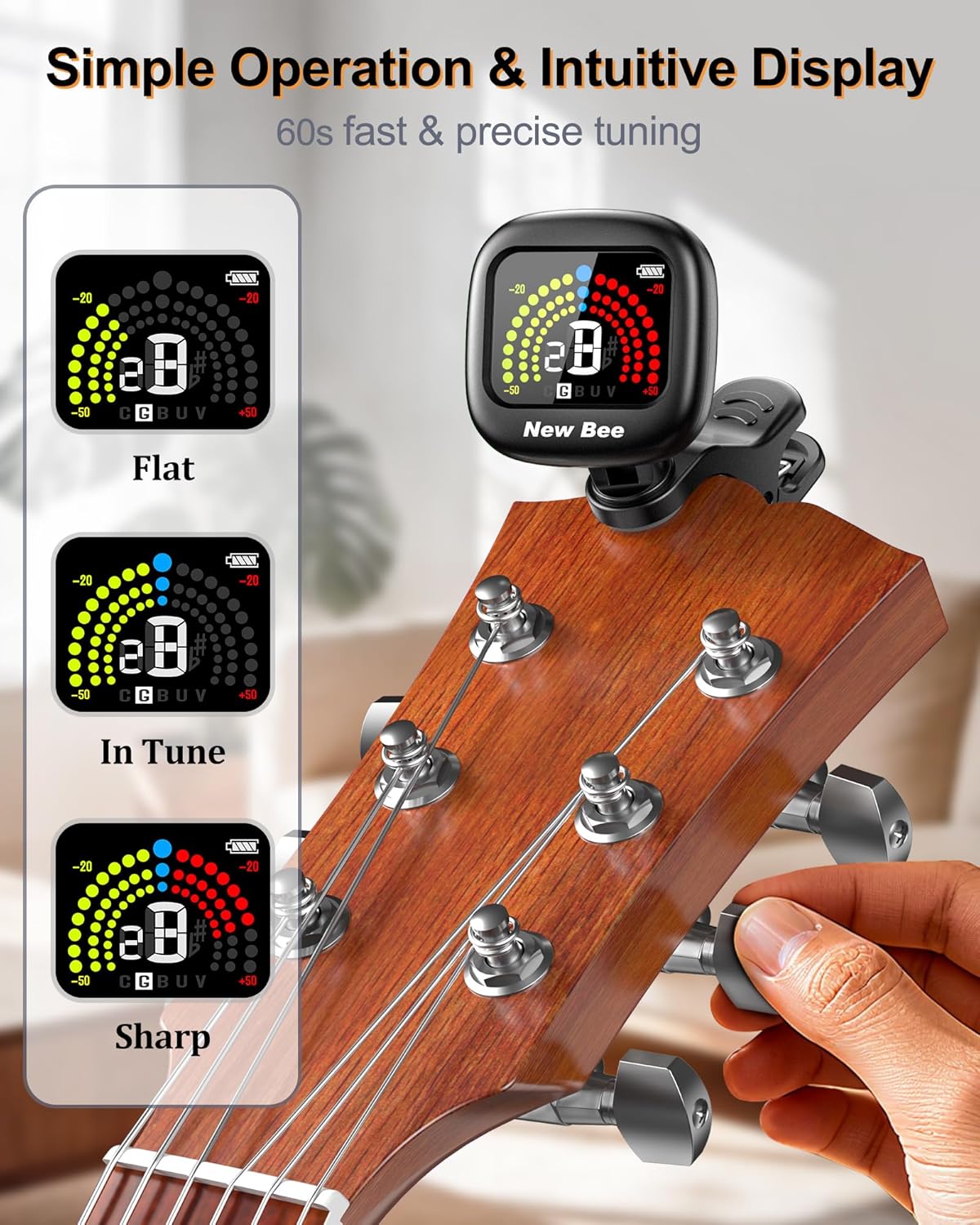
Clip the tuner onto the headstock of your instrument. The padded clamp ensures a secure grip without damaging the instrument's finish. Adjust the tuner's angle using its 360° rotational and 135° tilt capabilities for optimal viewing.

Иштөө нускамалары
1. Күйгүзүү/өчүрүү
Press and hold the power button (usually located on the side) for a few seconds to turn the tuner on or off. The display will light up when powered on. The tuner will automatically switch off after 5 minutes of no signal input to conserve battery life.
2. Түздөө режимин тандоо
Briefly press the power button to cycle through the available tuning modes: Chromatic (C), Guitar (G), Bass (B), Ukulele (U), and Violin (V). Select the mode appropriate for your instrument.

3. Аспабыңызды жөндөө
Once the tuner is attached and the correct mode is selected, pluck a single string on your instrument. The tuner will detect the vibration and display the note name and pitch accuracy on the screen.
- Батир: If the note is flat, the left side of the display will illuminate (typically yellow/green), and the needle will be to the left of the center. Tighten the string until the display indicates it is in tune.
- Курч: If the note is sharp, the right side of the display will illuminate (typically red), and the needle will be to the right of the center. Loosen the string until the display indicates it is in tune.
- Үндө: When the note is in tune, the center of the display will illuminate (typically blue/green), and the needle will be centered.

Техникалык тейлөө
To ensure the longevity and optimal performance of your New Bee GT40 tuner, follow these maintenance guidelines:
- Тазалоо: Wipe the tuner with a soft, dry cloth. Avoid using abrasive cleaners, solvents, or harsh chemicals, as these can damage the display or casing.
- Сактагыч: Store the tuner in a cool, dry place away from direct sunlight and extreme temperatures. When not in use for extended periods, ensure it is fully charged before storage and periodically recharge it to maintain battery health.
- Колдонуу: Handle the tuner with care. Avoid dropping it or subjecting it to strong impacts, which can affect its internal components and accuracy.
Проблемаларды чечүү
If you encounter issues with your New Bee GT40 tuner, refer to the following common problems and solutions:
| Көйгөй | Мүмкүн себеп | Чечим |
|---|---|---|
| Тюнер күйбөй жатат. | Батарея аз же заряды жок. | Charge the tuner using the provided USB-C cable. Ensure the charging cable and power source are functional. |
| Inaccurate or inconsistent tuning. | Incorrect tuning mode selected; external noise interference; loose connection to instrument. | Verify the correct tuning mode (C, G, B, U, V) is selected. Ensure you are in a quiet environment. Re-clip the tuner securely to the instrument's headstock. |
| Дисплей күңүрт же жооп бербей жатат. | Low battery; tuner malfunction. | Charge the tuner. If the issue persists after charging, contact customer support. |
| Tuner automatically turns off too quickly. | Энергияны үнөмдөө функциясы иштетилди. | The tuner is designed to turn off after 5 minutes of no signal input to save battery. This is normal operation. |
Техникалык шарттар
| Өзгөчөлүк | Спецификация |
|---|---|
| Модель номери | GT40 |
| Тюнинг режимдери | Хроматикалык, гитара, басс, укулеле, скрипка |
| аныктоо ыкмасы | Vibration (Piezo Sensor) |
| Электр камсыздоо | Кайра заряддалуучу литий полимердик батарейка |
| Батарея сыйымдуулугу | 90mAh |
| Жумуш убактысы | Болжол менен. Заряддоого 6 саат |
| Заряддоо порту | USB-C |
| Дисплей | Түстүү LCD |
| Айлануу | 360° Swivel, 135° Tilt |
| Өлчөмдөр | 1.85 x 1.96 x 1.22 дюйм (47 x 49.8 x 31 мм) |
| Салмагы | 1.76 унция (50 г) |
| Материал | Пластик |
Кепилдик жана колдоо
New Bee products are designed for reliability and performance. For any questions, technical assistance, or warranty claims, please refer to the contact information provided with your purchase or visit the official New Bee webсайт. Кепилдик кызматтарды сатып алуунун далили катары сатып алуу квитанциясын сактаңыз.