
Продукт бүттүview
The wegear WL500 is a rechargeable silent wireless mouse designed for comfortable and efficient use across various devices. It features quiet click buttons, adjustable DPI settings, and a stable 2.4GHz wireless connection.

Image: The wegear WL500 mouse, emphasizing its silent click feature with a graphic of a sleeping baby and sound wave icon.
Орнотуу нускамалары
Follow these steps to set up your wegear WL500 wireless mouse:
- Locate the Nano USB-A receiver. It is stored in a compartment on the back of the mouse.
- Plug the USB-A receiver into an available USB port on your computer (laptop, PC, Mac).
- Чычкандын ылдый жагында жайгашкан ON/OFF которгучу аркылуу чычканды күйгүзүңүз.
- The mouse should connect automatically. No drivers are required for installation.

Image: The wegear WL500 mouse wirelessly connected to a laptop, demonstrating the 2.4G plug-and-play setup.
Video: A demonstration of unboxing the wegear wireless mouse and plugging in the USB receiver for initial setup.
Иштөө нускамалары
Унчукпай чыкылдатуу баскычтары
The left, right, and scroll wheel buttons are designed for quiet operation, minimizing noise in shared environments. The side buttons are not silent.
Жөнгө салынуучу DPI жөндөөлөрү
The mouse offers three adjustable DPI (Dots Per Inch) levels for precision control:
- 800 DPI
- 1200 DPI (демейки)
- 1600 DPI
To switch between DPI settings, press the DPI button located on the bottom of the mouse. The indicator light will flash to confirm the current setting (1 flash for 800 DPI, 2 flashes for 1200 DPI, 3 flashes for 1600 DPI).
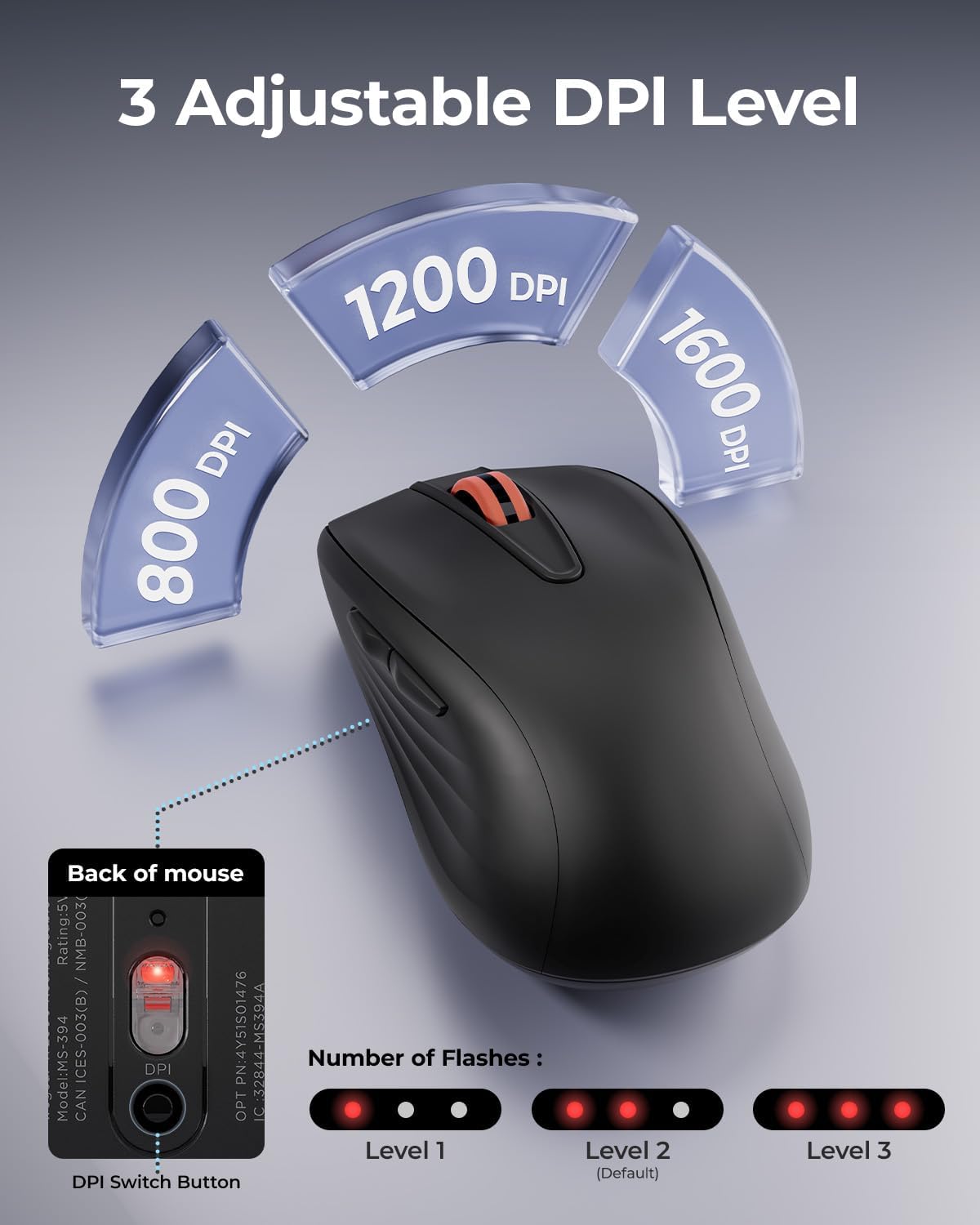
Image: Illustration of the DPI switch button on the mouse's underside and how LED flashes indicate the selected DPI level.
6-Button Functionality
The mouse includes six buttons for enhanced productivity:
- Сол чыкылдатуу
- Оң чыкылдатуу
- Жылдыруу дөңгөлөгү (Чыкылдатуучу)
- Алга баскычы (каптал)
- Артка баскычы (каптал)
- DPI Switch Button (Bottom)
The forward and backward buttons are useful for navigating web pages. Note: Forward/backward buttons may not be recognized on Mac operating systems.
Шайкештик
The wegear WL500 mouse is compatible with:
- Windows 7/8/10/11
- macOS 13.0 жана андан жогору
- iPadOS 13.3 and above
- Android 7.0 жана андан жогору
It is suitable for desktops, laptops, PCs, MacBooks, and iPads (some iPads may require a USB-A to USB-C converter).

Image: A user operating the wegear WL500 mouse, with operating system logos indicating broad compatibility.
Техникалык тейлөө
Чычканды заряддоо
The wegear WL500 mouse features a built-in 380mAh lithium battery. To charge:
- Connect the provided USB-C charging cable to the charging port on the front of the mouse.
- Кабелдин экинчи учун USB кубат булагына туташтырыңыз (мисалы, компьютер, дубал адаптер).
- A full charge takes approximately 1.5-2 hours and provides up to 45 hours of continuous use.

Image: The wegear WL500 mouse connected for USB-C charging, with details on charging time and battery life.
Тазалоо
To maintain optimal performance, periodically clean the mouse with a soft, dry cloth. Avoid using harsh chemicals or abrasive materials.
Проблемаларды чечүү
- Чычкан жооп бербей жатат: Ensure the mouse is turned on and the USB receiver is securely plugged into your computer. Try plugging the receiver into a different USB port.
- Кечигип же үзгүлтүктүү байланыш: Ensure the mouse is within the 33ft (10m) operating range of the receiver. Avoid placing the receiver near strong interference sources like other wireless devices or large metal objects.
- DPI жөндөөсү өзгөрбөйт: Press the DPI button firmly on the bottom of the mouse. Observe the LED flashes to confirm the change.
- Mac'та алдыга/артка баскычтары иштебей жатат: These buttons may not be recognized by macOS. This is a known compatibility limitation.
- Заряддоо маселелери: Ensure the USB-C cable is properly connected to both the mouse and the power source. Try a different USB-C cable or power adapter.
Техникалык шарттар
| Өзгөчөлүк | Деталь |
|---|---|
| Бренд | wegear |
| Модель аты | WL500 Mouse |
| Байланыш технологиясы | 2.4 ГГц USB зымсыз |
| Кыймылды аныктоо технологиясы | Оптикалык |
| DPI деңгээли | 800, 1200, 1600 |
| Button Quantity | 6 (Left, Right, Scroll Wheel, Forward, Backward, DPI Switch) |
| Өзгөчөлүктөр | Ergonomic Design, Portable, Rechargeable, Silent Click |
| Батарея | Камтылган 380mAh литий батареясы |
| Батареянын иштөө мөөнөтү | 45 саатка чейин (үзгүлтүксүз колдонуу) |
| Заряддоо порту | USB-C |
| Операциялык системанын шайкештиги | Windows 7/8/10/11, macOS 13.0+, iPadOS 13.3+, Android 7.0+ |
| Баскыч басуу сыноосу | 3 миллион жолу |
Кепилдик жана колдоо
The wegear WL500 Rechargeable Silent Wireless Mouse comes with a 1 жылдык кепилдик өндүрүүчүдөн.
For technical support, warranty claims, or further assistance, please contact wegear customer service through their official webпродукт сатылып алынган сайт же сатуучу.