1. Киришүү
This manual provides instructions for the Generic AKT-G1713 RGB Wired Semi-Mechanical Gaming Keyboard and Optical Mouse Kit. This kit is designed for gaming, study, and daily use, offering quick response, precision, and a modern design for an enhanced experience on your PC or notebook.
Негизги өзгөчөлүктөрү:
- Complete Gaming Kit: Includes a semi-mechanical ABNT2 keyboard and a wired USB 2.0 optical mouse.
- Жандуу RGB жарыктандыруу: Keyboard features colorful rainbow LED backlighting for a modern look and improved visibility in low-light conditions.
- Semi-Mechanical Keyboard: QWERTY ABNT2 layout with membrane keys providing a soft, ergonomic touch for comfortable extended use.
- Optical Mouse with LED: Optical detection technology with blue LED illumination, ergonomic design, and wired connection for precise, lag-free response.
- Зымдуу туташуу: Reliable and stable USB 2.0 connection, compatible with personal computers running Windows 11 and other operating systems.
2. Орнотуу нускамалары
Follow these steps to set up your Generic AKT-G1713 Gaming Kit:
- Комплектти таңгактан чыгаруу: Клавиатураны жана чычканды таңгагынан этияттык менен алып чыгыңыз.
- Баскычтопту туташтыруу: Locate an available USB port on your computer. Plug the USB cable from the keyboard into the USB port.
- Чычканды туташтыруу: Locate another available USB port on your computer. Plug the USB cable from the mouse into the USB port.
- Системаны таануу: Your computer should automatically detect and install the necessary drivers (Plug and Play). This may take a few moments.
- Функционалдуулугун текшерүү: Once installed, the keyboard and mouse LEDs should illuminate. Test both devices to ensure they are working correctly.

Image: The Generic AKT-G1713 gaming keyboard and mouse kit, showing both devices connected via USB cables.
3. Иштөө нускамалары
3.1 Клавиатуранын иштеши
The keyboard features a standard ABNT2 layout with semi-mechanical membrane keys designed for comfortable and responsive typing and gaming.
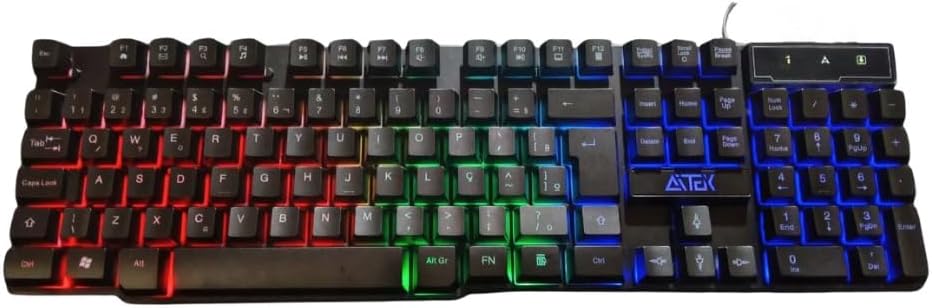
Сүрөт: Жогорку view of the AKT-G1713 keyboard, highlighting the ABNT2 layout and multi-color LED backlighting.
RGB жарыктандыруу: The keyboard features a rainbow LED backlight. This lighting is typically static or cycles automatically. There are no specific controls mentioned for changing patterns or colors. The lighting enhances the aesthetic and visibility in dim environments.

Сүрөт: бурчтуу view of the AKT-G1713 keyboard, showcasing the vibrant RGB backlighting across the keys.

Сүрөт: Side profile of the AKT-G1713 keyboard, illustrating the ergonomic key height and design.
3.2 Чычкан менен иштөө
The optical mouse provides high precision for gaming and navigation. Its ergonomic design ensures comfort during extended use.

Сүрөт: Жогорку view of the AKT-G1713 gaming mouse, featuring its ergonomic shape and blue LED illumination.
Баскычтар: The mouse typically includes left-click, right-click, scroll wheel, and potentially side buttons for enhanced functionality in games or applications. These buttons are responsive for quick actions.
LED жарыктандыруу: The mouse features blue LED lighting, which is usually static and integrated into the design.
4. Техникалык тейлөө
Proper maintenance ensures the longevity and optimal performance of your gaming kit.
- Тазалоо: Use a soft, dry cloth to wipe down the keyboard and mouse regularly. For stubborn dirt, slightly dampчүпүрөктү суу же жумшак тазалоо эритмеси менен жууп салыңыз. Ашыкча нымдуулуктан сактаныңыз.
- Төкмө каршылык: The keyboard is designed with some resistance to water spills. In case of a spill, immediately disconnect the keyboard from your computer, wipe off any liquid, and allow it to dry completely before reconnecting.

Image: The AKT-G1713 keyboard on a desk, demonstrating its water-resistant design with a spilled drink nearby.
- Кабельге кам көрүү: Avoid bending or twisting the USB cables excessively to prevent internal damage.
- Сактагыч: When not in use for extended periods, store the kit in a clean, dry place away from direct sunlight and extreme temperatures.
5. Кыйынчылыктарды
If you encounter issues with your gaming kit, refer to the following common solutions:
- Баскычтоп/чычкан жооп бербейт:
- Эки USB кабели тең компьютериңиздин USB портторуна бекем сайылганын текшериңиз.
- Түзмөктөрдү ар кандай USB портторуна сайып көрүңүз.
- Компьютериңизди өчүрүп күйгүзүңүз.
- Test the devices on another computer to determine if the issue is with the kit or your computer.
- LED жарыктары иштебейт:
- Verify the devices are properly connected and recognized by the system.
- Some keyboards have a dedicated key (e.g., Scroll Lock or a function key combination) to toggle backlighting. Check your keyboard for such a key.
- Чычкан курсору секирет же туура эмес:
- Ensure the mouse sensor is clean and free of dust or debris.
- Чычканды таза, бирдей бетке же чычкан аянтчасына колдонуңуз.
6. Техникалык шарттар
| Өзгөчөлүк | Деталь |
|---|---|
| Бренд | Жалпы |
| Модел | AKT-G1713 |
| Өндүрүүчү | Кытай |
| Байланыш технологиясы | Зымдуу USB 2.0 |
| Шайкеш түзмөктөр | Personal Computer, Game Console, Laptop, Smartphone, Tablet |
| Өзгөчөлүктөр | Ergonomic Design, RGB Lighting (Keyboard), Blue LED Lighting (Mouse) |
| Баскычтоптун түрү | Semi-Mechanical (Membrane) |
| Баскычтоптун жайгашуусу | ABNT2 (QWERTY) |
| Mouse Detection Technology | Оптикалык |
| Түс | Кара |
| Продукт Салмагы | 630 г |
| Пакеттин өлчөмдөрү | 45 x 12 x 5 см |
7. Кепилдик жана колдоо
Кепилдик: This product comes with a 1-month seller warranty from the date of purchase. Please retain your proof of purchase for any warranty claims.
Колдоо: For technical assistance, troubleshooting beyond this manual, or warranty inquiries, please contact your retailer or the point of purchase. Provide your product model (AKT-G1713) and a detailed description of the issue.


