
1. Киришүү
Thank you for choosing the UGREEN 11-inch Keyboard Case. This product is designed to enhance your iPad experience by providing a comfortable typing solution and versatile viewing angles, transforming your tablet into a portable workstation. This manual provides essential information for setup, operation, maintenance, and troubleshooting to ensure optimal performance.
2. Шайкештик
Бул клавиатура корпусу төмөнкү iPad моделдерине шайкеш келет:
- iPad Air 11-inch (M4/M3/M2, 2026/2025/2024)
- iPad Pro 11 дюймдук (4/3/2/1-муундагы)
- iPad Air 5th Generation (2022)
- iPad Air 4th Generation (2020)
Compatible Model Numbers: A3459, A2902, A3266, A1980, A2228, A2759, A2377, A2316, A2588.
Эскертүү: Бул иш жок iPad Pro 11 дюймдук (M4) 2024 менен шайкеш келет.

Figure 2.1: Detailed compatibility chart for UGREEN 11-inch Keyboard Case.
3. Пакеттин мазмуну
Пакетиңизде бардык буюмдар бар экенин текшериңиз:
- UGREEN 11-inch Keyboard Case
- USB-C заряддоо кабели (3 фут)
- User Manual
4. Продукт бүтүп калдыview
The UGREEN Keyboard Case features a robust design with several key functionalities:
- Precision Magnetic Back Plate: Ensures a secure and stable attachment for your iPad.
- 125° жөнгө салынуучу Viewбурч: Allows for flexible positioning for typing, browsing, or viewing.
- Scissor-Switch баскычтары: Provides a smooth, quiet, and consistent typing experience.
- 3-деңгээлдүү жөнгө салынуучу арткы жарык: Offers illumination for comfortable use in various lighting conditions.
- Responsive Touchpad: Enables precise cursor control and supports multi-gesture navigation.
- Dual Orientation Viewing: Supports both portrait and landscape modes.
- 650 мАч Батарея: Provides extended usage and standby times.

Figure 4.1: Powerful magnetic hold for stable iPad attachment.

Figure 4.2: Quick-set magnetic stand with 125° adjustable viewбурч.

Figure 4.3: Scissor-switch keyboard design and 3-level adjustable backlighting.

Figure 4.4: Responsive touchpad with multi-gesture support.
5. Орнотуу нускамалары
5.1 iPad тиркеңиз
- Align your compatible iPad with the magnetic back plate of the case.
- The iPad will securely snap into place due to the strong magnetic connection.
5.2 Powering On the Keyboard
- Locate the power switch on the right side of the keyboard.
- Slide the switch to the 'ON' position. The indicator light will briefly illuminate.
5.3 Bluetooth жупташтыруу
- Баскычтоп күйгүзүлгөнүн текшериңиз.
- iPad'иңизден төмөнкүгө өтүңүз Орнотуулар > Bluetooth.
- Bluetooth'ту күйгүзүңүз. iPad'ыңыз жакын жердеги түзмөктөрдү издейт.
- Select "UGREEN Keyboard" (or similar name) from the list of available devices.
- Жупташтыруу процессин аяктоо үчүн экрандагы көрсөтмөлөрдү аткарыңыз.
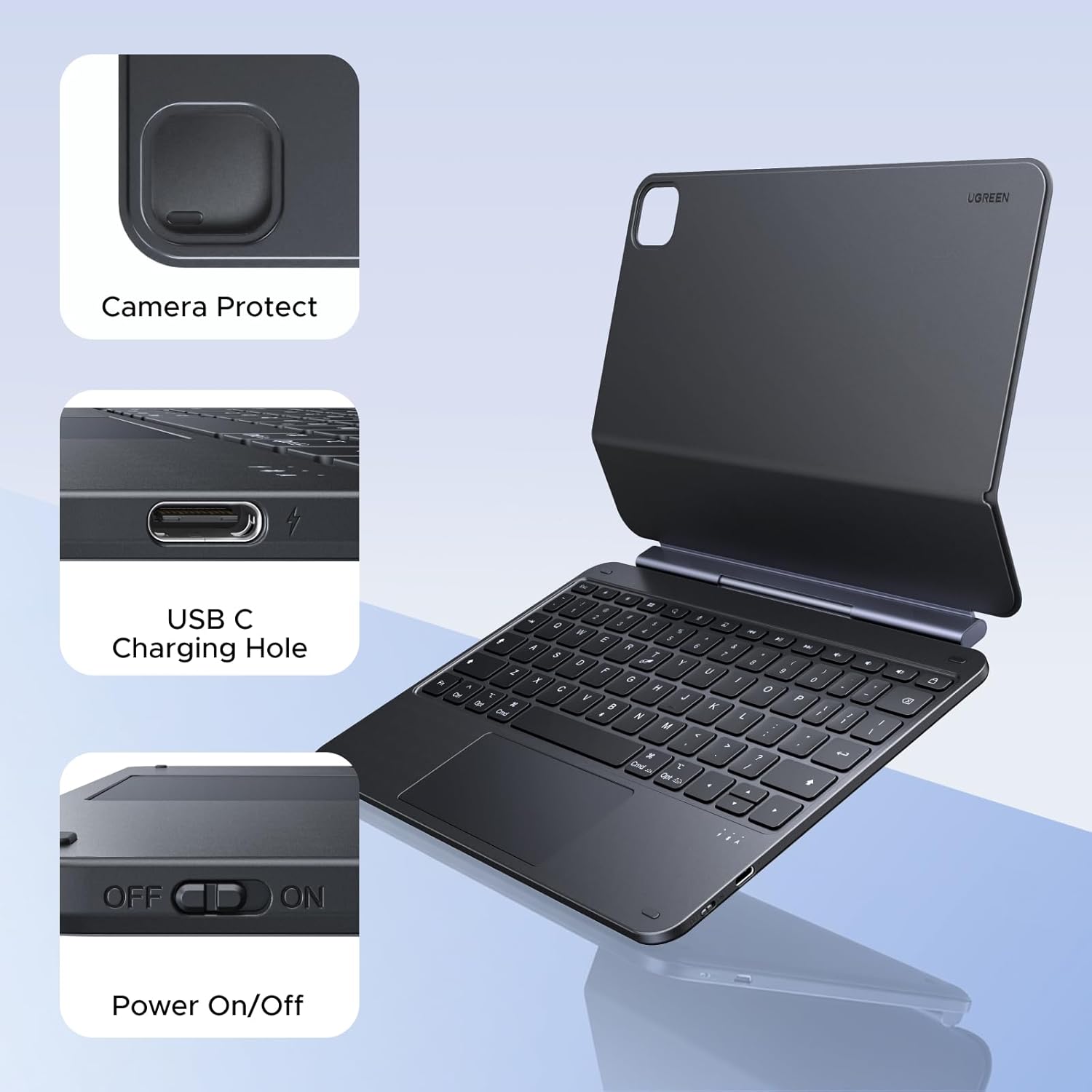
Figure 5.1: Location of the power switch and USB-C charging port.
6. Иштөө нускамалары
6.1 Тууралоо Viewбурч
The magnetic stand allows for a 125° adjustable viewing angle. Gently tilt your iPad to achieve your desired position for typing, drawing, or media consumption.
6.2 Сенсордук панелди колдонуу
The integrated touchpad supports various multi-touch gestures for intuitive navigation:
- Бир манжа менен басуу: Чыкылдатуу/Тандоо
- Эки манжа менен сыдыруу: Өйдө/төмөн же солго/оңго сыдырыңыз
- Чоңойтуу үчүн кысыңыз: Чоңойтуу/кичирейтүү
- Үч манжа менен өйдө сүрүү: Колдонмо алмаштыргычты ачыңыз
- Үч манжа менен ылдый сүрүү: Башкы экранга кайтуу
- Үч манжа менен солго/оңго сүрүү: Ачык колдонмолордун ортосунда которуштуруу
6.3 Арткы жарыкты жөндөө
басыңыз light icon key (usually next to the function keys) to cycle through the 3 levels of backlight brightness or to turn it off.
6.4 Dual Orientation Viewing
The case supports both portrait and landscape orientations. Simply rotate your iPad while it is magnetically attached to switch modes. This allows for flexible viewing during video calls, streaming, or browsing without compromising stability.

Figure 6.1: Versatile usage modes including typing, viewing, sketching, and reading.
7. Баскычтопту заряддоо
The keyboard is equipped with a 650mAh battery for extended use.
- Батареянын иштөө мөөнөтү: Up to 6 months standby time, or 5 months of regular use with the backlight off.
- Заряддоо убактысы: Толук кубаттоо үчүн болжол менен 2 саат.
- Заряддоо ыкмасы: Use the included USB-C cable to connect the keyboard's USB-C port to a power source.

Figure 7.1: Battery performance overview.
8. Техникалык тейлөө
To ensure the longevity and optimal performance of your UGREEN Keyboard Case, follow these maintenance guidelines:
- Тазалоо: жумшак колдонуу, damp cloth to wipe the exterior of the case. Avoid harsh chemicals or abrasive materials. For the keyboard keys, use a soft brush or compressed air to remove dust and debris.
- Сактагыч: When not in use, store the keyboard case in a clean, dry environment away from extreme temperatures and direct sunlight.
- Колдонуу: Avoid dropping the case or subjecting it to strong impacts, which could damage internal components or the magnetic mechanism.
9. Кыйынчылыктарды
If you encounter issues with your UGREEN Keyboard Case, refer to the following common problems and solutions:
9.1 Keyboard Not Pairing or Connecting
- Күчтү текшерүү: Клавиатуранын кубат которгучу "ON" абалында экенин текшериңиз.
- Батарея деңгээли: Verify that the keyboard has sufficient battery charge. Charge it if necessary.
- Bluetooth on iPad: Confirm that Bluetooth is enabled on your iPad (Орнотуулар > Bluetooth).
- Түзмөктү кайра жупташтыруу: If the keyboard was previously paired, try forgetting the device on your iPad's Bluetooth settings and then re-pairing it.
- Түзмөктөрдү кайра иштетүү: iPad жана клавиатураны өчүрүп күйгүзүңүз.
9.2 Inconsistent Touchpad Response
- Сенсордук панелди тазалоо: Сенсордук панелдин бети таза жана кир же нымдуулуктан таза экенин текшериңиз.
- Орнотулган программаны жаңыртуу: Check the UGREEN website for any available firmware updates for the keyboard.
- iPad жөндөөлөрү: Review your iPad's touchpad settings under Орнотуулар > Генерал > Trackpad & Mouse.
9.3 iPad Feels Top-Heavy or Unstable
- Беттик туруктуулугу: Ensure the keyboard case is placed on a flat, stable surface.
- Бурчту тууралоо: тууралаңыз viewing angle to a more balanced position. Extreme angles may reduce stability.
- Магниттик байланыш: Confirm the iPad is fully and securely attached to the magnetic back plate.
10. Техникалык шарттар
| Өзгөчөлүк | Деталь |
|---|---|
| Бренд | UGREEN |
| Модель номери | i711 |
| Шайкеш түзмөктөр | Tablet (Specific iPad models listed in Compatibility section) |
| Байланыш технологиясы | Bluetooth |
| Keyboard Description | Flexible, Scissor-switch |
| Баскычтоптун жайгашуусу | QWERTY |
| Материал | Plastic, Steel (Keyboard Plate) |
| Power Source | Батарея менен иштейт (650mAh литий батареясы) |
| Өзгөчөлүктөр | Magnetic Case, Adjustable Backlight, Touchpad |
11. Кепилдик жана колдоо
11.1 Кепилдик маалыматы
Бул UGREEN продуктусу төмөнкүлөр менен камтылган 2 жылдык Өндүрүүчүнүн Кепилдиги сатып алынган күндөн тартып. Бул кепилдик нормалдуу колдонуудагы материалдардагы жана жасалгадагы кемчиликтерди камтыйт.
Кепилдик төмөнкүлөрдү камтыбайт:
- Кырсыктан, кыянаттыктан, туура эмес пайдалануудан, суу ташкынынан, өрттөн, жер титирөөдөн же башка тышкы себептерден келип чыккан зыян.
- Damage caused by operating the product outside the permitted or intended uses described by UGREEN.
- Damage caused by service performed by anyone who is not a representative of UGREEN.
11.2 Кардарларды колдоо
For technical support, warranty claims, or general inquiries, please contact UGREEN customer service through the following channels:
- Webсайт: Расмий UGREENге барыңыз webколдоо булактары жана байланыш маалыматы үчүн сайт.
- Электрондук почта: Refer to your product packaging or the UGREEN webтиешелүү колдоо электрондук почта дарегин алуу үчүн сайтка кириңиз.
- Онлайн сатуучу: If purchased from an online retailer, you may also contact their customer service for assistance.
Please have your product model number (i711) and proof of purchase ready when contacting support.