
1. Киришүү
The Wyze Smart Scale X is an advanced digital bathroom scale designed to provide a comprehensive overview of your body composition. It measures various metrics beyond just weight, helping you track your health and fitness journey effectively. This manual will guide you through the setup, operation, and maintenance of your Wyze Smart Scale X.

Image: A user interacting with the Wyze Smart Scale X and its companion app, showing body composition trends over time.
2. Кутуда эмне бар
- Wyze Smart Scale X (1)
- 1.5V AAA Batteries (4)
- Ыкчам баштоо колдонмосу (1)
3. Орнотуу
- Батареяны орнотуу: Open the battery compartment on the underside of the scale and insert the four AAA batteries, ensuring correct polarity.
- Wyze колдонмосун жүктөп алыңыз: Издөө "Wyze" in your smartphone's app store (Apple App Store or Google Play Store) and download the official Wyze app.
- Create/Log In to Wyze Account: Open the app and either create a new account or log in with your existing Wyze credentials.
- Түзмөк кошуу: In the Wyze app, tap the "+" icon to add a new device. Select "Lifestyle" then "Wyze Scale Series" and choose "Wyze Scale X".
- Жупташтыруу: Follow the on-screen instructions in the app to pair your scale via Bluetooth. Ensure your phone's Bluetooth is enabled and keep it near the scale during pairing.
- Жеке маалымат: Enter your personal details (year of birth, height, gender) in the app. This information is crucial for accurate body composition measurements.
- Initial Measurement: Step onto the scale barefoot on a hard, flat surface to activate it and perform your first measurement.

Image: A user preparing to place the Wyze Smart Scale X on the floor for setup.
4. Иштөө нускамалары
Өлчөө алуу
- Таразаны катуу, жалпак бетке кой. Килемдерден же текши эмес полдон качыңыз.
- Бутуңуздун таза жана кургак экенине ынаныңыз.
- Step onto the scale barefoot, centering your feet on the ITO electrode areas.
- Stand still until your weight is displayed on the scale's LED screen.
- Keep the Wyze app open and near the scale for automatic data synchronization via Bluetooth.
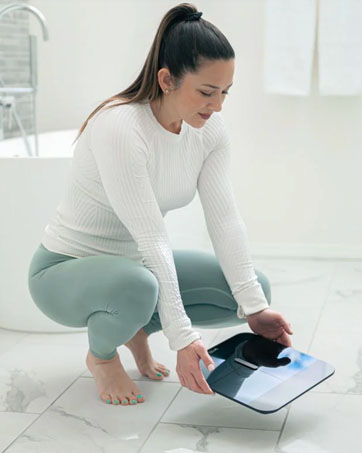
Image: A close-up of bare feet positioned on the Wyze Smart Scale X for a measurement.
Метрикаңызды түшүнүү
The Wyze Smart Scale X measures 13 essential body composition metrics:
- Салмагы
- Дене майынын пайызыtage
- Дене массасынын индекси (BMI)
- Muscle Mass
- Bone Mass
- Дене Суу пайызыtage
- Арык дене массасы
- Protein Level
- Visceral Fat
- Базалдык метаболизм ылдамдыгы (BMR)
- Метаболизм доору
- Heart Rate (measured via Wyze App)

Image: The Wyze Smart Scale X showing its display and a visual representation of the 13 essential body metrics it tracks.
5. Атайын режимдер
The Wyze Smart Scale X offers specialized modes for various users and situations:
- Ымыркай режими: Allows you to weigh an infant by first weighing yourself, then stepping on the scale while holding the baby. The scale calculates the baby's weight by subtracting your weight.
- Үй жаныбарлары режими: Similar to Baby Mode, this allows you to weigh your pet.
- Luggage Mode: For weighing luggage or other items.
- Кош бойлуулук режими: Provides weight tracking for pregnant users.
- Атлет режими: Recommended for individuals who work out more than 10 hours a week, as it adjusts body composition algorithms for athletic body types.
For added safety, you can turn off all electrical currents used to measure body composition in these modes, ensuring only weight is measured.

Image: A father weighing his children using a special mode on the Wyze Smart Scale X, demonstrating its versatility for family use.
6. App Integration & Data Tracking
The Wyze Smart Scale X seamlessly integrates with the Wyze app and popular third-party health applications:
- Wyze App: All your body composition data is stored and displayed in the Wyze app, allowing you to view trends over time, set goals, and track your progress.
- Үчүнчү тараптын колдонмолору: Sync your data with Apple Health, Health Connect, and Fitbit to consolidate your health information in one place.
The scale supports up to 8 users, automatically recognizing each individual and syncing their data to their respective profileколдонмодо s.

Image: The Wyze Smart Scale X highlighting its compatibility with popular health apps like Fitbit, Apple Health, and Health Connect.
Video: An official introduction to the Wyze Scale X, showcasing its design, features, and app integration.
7. Жүрөктүн кагышын өлчөө
The Wyze app provides a convenient way to measure your heart rate directly through your smartphone's camera, without needing the scale:
- Open the Wyze app and navigate to the Heart Rate measurement section.
- Grant camera access to the app when prompted.
- Gently place your finger on the main camera lens (not the flash) and hold it still.
- Use your other hand to cup the back of your phone so the light reflects towards the finger covering the camera lens.
- Hold still until the measurement is complete (typically less than a minute). The app will display and record your heart rate.
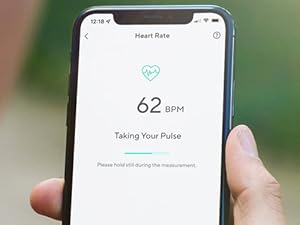
Image: A smartphone screen showing the Wyze app's heart rate measurement feature in progress.
8. Техникалык тейлөө
- Тазалоо: The scale features a durable tempered glass surface, making it easy to clean. Use a soft, damp бетти сүртүү үчүн чүпүрөк колдонуңуз. Абразивдүү тазалоочу каражаттарды же катуу химиялык заттарды колдонбоңуз.
- Сактагыч: Store the scale in a dry place away from direct sunlight and extreme temperatures. Its thin design allows for easy storage, such as in a drawer.
- Батареяны алмаштыруу: When the battery indicator appears on the display or in the app, replace all four AAA batteries with new ones.

Image: A user demonstrating how the slim design of the Wyze Smart Scale X allows for convenient storage in a drawer.
9. Кыйынчылыктарды
- Туура эмес окуулар: Ensure the scale is placed on a hard, flat surface. Stand still with bare feet centered on the electrodes. Body composition data can be affected by surface levelness, standing posture, and foot contact.
- Масштаб күйбөйт: Батареялардын туура орнотулганын жана түгөнбөгөнүн текшериңиз. Зарыл болсо, батареяларды алмаштырыңыз.
- Колдонмо синхрондобой жатат: Verify that Bluetooth is enabled on your smartphone and the Wyze app has permission to access Bluetooth. Keep your phone close to the scale during measurements.
- Body Composition Data Not Displaying: Ensure you are standing barefoot on the scale. The ITO electrodes require direct skin contact to measure body composition.
10. Техникалык шарттар
| Бренд | WYZE |
| Модел | WSCALX |
| Түс | Кара |
| Салмак сыйымдуулугу максималдуу | 400 фунт |
| Окуу тактыгы | +/- 0.2 фунт |
| Дисплей түрү | Digital LED |
| Материалдын түрү | ITO coated glass |
| Элемент Салмагы | 4 фунт |
| Power Source | 4 x 1.5V AAA Батареялар (кошулган) |
| Байланыш | Bluetooth |

Сүрөт: деталдуу view of the Wyze Smart Scale X highlighting its tempered glass surface and ITO electrode coating for accurate measurements.
11. Кепилдик жана колдоо
The Wyze Smart Scale X comes with a 1 жылдык Өндүрүүчүнүн Кепилдиги. For technical support, warranty claims, or additional information, please visit the official Wyze support webсайтка же кардарларды тейлөөгө кайрылыңыз.
Өндүрүүчү: Wyze Labs, Inc.
12. Коопсуздук боюнча маанилүү маалымат
The Wyze Smart Scale X uses Bio-electrical Impedance Analysis (BIA) technology. While generally safe, please note the following:
- Body composition data is for long-term trend tracking and should not be used for single medical comparisons or diagnoses. Consult a healthcare professional for medical advice.
- Measure barefoot on a hard, flat surface for the best consistency and accuracy of body composition data.
- Results may be affected by surface levelness, standing posture, and foot contact.
- If you have a pacemaker or other internal medical device, consult your doctor before using the scale, as the electrical currents used for BIA may interfere with these devices.
- Keep the scale dry to prevent electrical hazards.