
Introduction
The Xvive AT-2 Pro is a compact, multi-functional audio testing device designed for audio professionals and enthusiasts. It integrates five essential tools: a signal generator, an XLR cable tester, a 48V phantom power checker, an XLR input meter, and a headphone/built-in speaker monitor. This manual provides instructions for the proper use and maintenance of your AT-2 Pro to ensure optimal performance and longevity.

Image: The Xvive AT-2 Pro highlighting its five core functions.
Коопсуздук маалыматы
- Аппаратты сууга же ашыкча нымдуулукка дуушар кылбаңыз.
- Ашыкча температурадан сактаныңыз.
- Агрегатты ажыратууга же өзгөртүүгө аракет кылбаңыз. Бардык тейлөөлөрдү квалификациялуу кызматкерлерге тапшырыңыз.
- Use only the specified USB-C cable for charging.
- Балдар жетпеген жерде сактаңыз.
Пакеттин мазмуну
Пакетиңизде бардык буюмдар бар экенин текшериңиз:
- Xvive AT-2 Pro Audio Tester Unit
- USB-C заряддоо кабели
- Jack адаптер
- Коргоочу баштык

Image: Contents of the Xvive AT-2 Pro package.
Продукт бүттүview: Башкаруу каражаттары жана Функциялар
Familiarize yourself with the various inputs, outputs, and controls on your AT-2 Pro.
Сүрөт: деталдуу view of the AT-2 Pro's control panel.
- XLR Input/Output: Standard 3-pin XLR connectors for cable testing, signal generation, and input metering.
- 1/4" Jack Input/Output: For connecting to various audio equipment.
- 1/8" Headphone Output: Аудиону көзөмөлдөө үчүн.
- Үн баскычы: Adjusts headphone and built-in speaker volume.
- Signal Generator Buttons: Select 1kHz Tone or Pink Noise.
- Output Pad Switches: Adjust output level (-10dB, -20dB, -40dB).
- XLR Cable Test Button: Initiates XLR cable pin-by-pin test.
- Phantom Power Check LEDs: Indicate 48V phantom power status.
- Input Level Meter LEDs: Display signal presence (SG) and peak levels (PK).
- USB-C порту: Ички батареяны заряддоо үчүн.
Орнотуу жана заряддоо
Баштапкы заряддоо
Before first use, fully charge the AT-2 Pro using the provided USB-C cable. Connect the cable to the USB-C port on the device and to a standard USB power adapter (not included). The charging indicator will show progress and turn off when fully charged (approximately 1.5 hours).
Күйгүзүү/өчүрүү
Press and hold the power button to turn the device on or off. The display will illuminate upon activation.
Иштөө режимдери
1. Signal Generator (1kHz Tone & Pink Noise)
The signal generator provides a clean test signal for various audio equipment.
- Connect the AT-2 Pro to the input of the device you wish to test (e.g., mixer, DI box, active speaker) using an XLR or 1/4" cable.
- басыңыз 1кГц тон or Pink Noise button to select the desired signal.
- Adjust the output level using the -10/-20/-40 dB pad switches to match the input sensitivity of the connected equipment.
- Monitor the signal through the connected equipment or via the AT-2 Pro's headphone output/built-in speaker.

Image: Signal Generator function in use.


2. XLR Cable Tester (Pin-by-Pin)
Test XLR cables for continuity and correct wiring.
- Connect both ends of the XLR cable to the AT-2 Pro's XLR input and output ports.
- басыңыз XLR Cable Test button. The device will automatically cycle through pins 1, 2, and 3, indicating their status.
- Alternatively, you can manually select pins to test by repeatedly pressing the button.
- Green LEDs indicate a good connection for each pin. Red LEDs or no illumination indicate a fault.

Image: XLR Cable Tester in action, showing pin status.
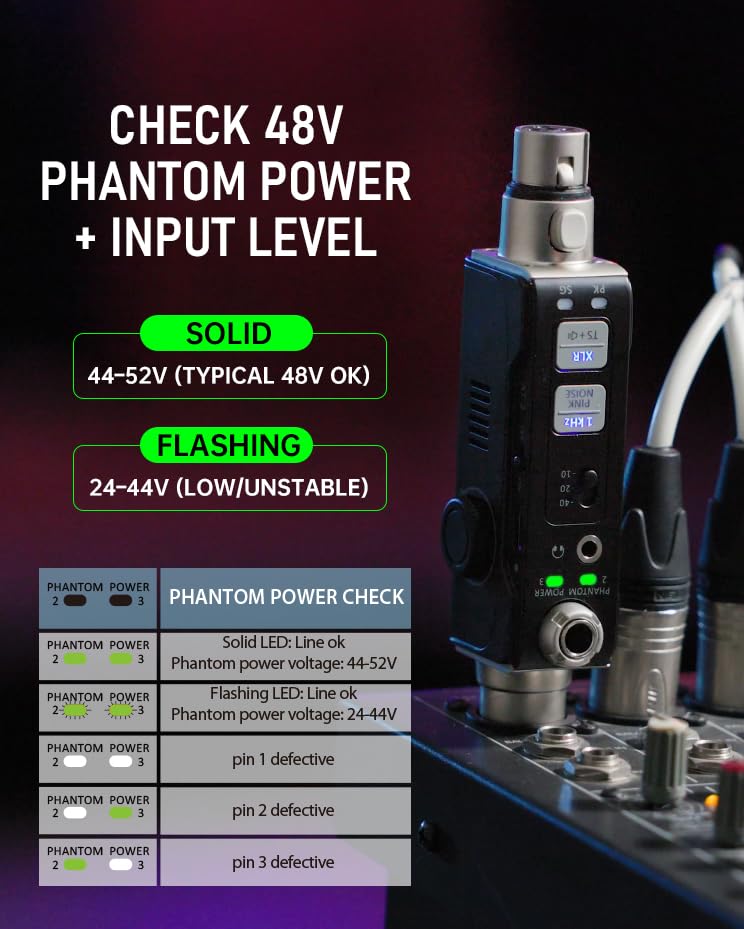
3. 48V Phantom Power Check + XLR Input Metering
Verify phantom power supply and monitor input signal levels.
- Connect the AT-2 Pro to an XLR input that is expected to provide phantom power.
- The Phantom Power Check LEDs will indicate the voltage: a solid light for 44-52V (typical 48V OK) and a flashing light for 24-44V (low/unstable).
- The XLR Input Meter LEDs (SG for Signal, PK for Peak) will illuminate to show signal presence and warn of very hot levels.

Image: Phantom Power Check and Input Level Meter.
4. Headphone/Built-in Speaker Monitoring
Listen to incoming audio signals directly from the device.
- Connect headphones to the 1/8" headphone output jack or use the built-in speaker.
- Adjust the volume using the dedicated volume knob.
- This feature allows for quick verification of audio signals at any point in your signal chain.

Image: Headphone Monitoring feature.
Проблемаларды чечүү
Common issues and solutions for the Xvive AT-2 Pro.
| Көйгөй | Мүмкүн себеп | Чечим |
|---|---|---|
| Күч жок | Аз батарея; түзмөк өчүк | Charge the unit; press and hold power button to turn on. |
| No signal from generator | Incorrect output pad setting; incorrect cable connection | Adjust output pad; ensure cables are securely connected. |
| XLR cable test fails | Faulty cable; improper connection | Ensure cable is fully inserted; replace cable if necessary. |
| No phantom power detected | Source not providing 48V; faulty source | Verify phantom power is enabled on the source; test with another source. |
| No audio from headphone/speaker | Volume too low; no input signal | Increase volume; ensure an audio signal is present at the input. |
Техникалык шарттар
- Модел: AT-2 PRO
- Функциялары: Signal Generator (1kHz Tone, Pink Noise), XLR Cable Tester, 48V Phantom Power Checker, XLR Input Meter, Headphone/Built-in Speaker Monitor
- Output Pad Levels: -10дБ, -20дБ, -40дБ
- Phantom Power Detection: Solid LED (44-52V), Flashing LED (24-44V)
- Батарея: Rechargeable Nonstandard Battery (included)
- Заряддоо: USB-C, approx. 1.5 hours for full charge
- Өлчөмдөрү: 8.19 x 4.29 x 2.6 дюйм (болжол менен)
- Салмагы: 5.3 унция (болжол менен)
Расмий продукт Video
Видео: Аткаминерview of the Xvive AT-2 Pro Audio Tester, demonstrating its 5-in-1 signal generator, XLR cable tester, and other features.
Кепилдик жана колдоо
The Xvive AT-2 Pro Audio Tester comes with a limited manufacturer's warranty. For detailed warranty information, technical support, or service inquiries, please refer to the official Xvive webсайтка же түздөн-түз кардарларды колдоо менен байланышыңыз. Сатып алуу квитанциясын кепилдик дооматтары үчүн сатып алуунун далили катары сактаңыз.
Кошумча жардам алуу үчүн, сураныч, баш багыңыз Xvive Store on Amazon.