
Introduction
This manual provides detailed instructions for the FTVOGUE 4G LTE USB Internet Module with GPS. This device is designed to provide universal 4G LTE connectivity and integrated GPS functionality for various applications, including IoT devices, PCs, and embedded systems. It features low power consumption and a plug-and-play design for ease of use.
Продукт бүттүview
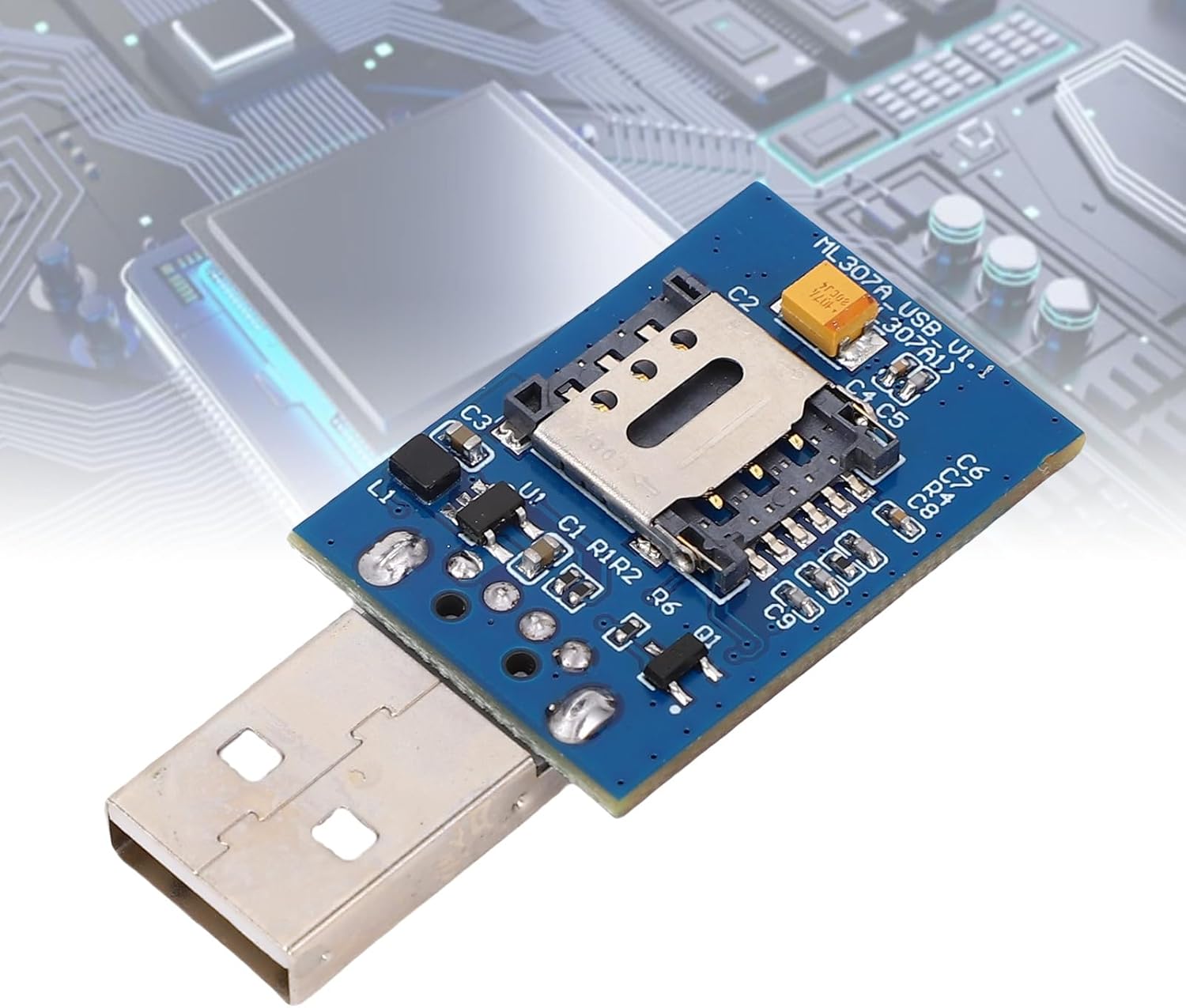
Сүрөт: алдыңкы view of the FTVOGUE 4G LTE USB Internet Module, showing the USB connector and the main circuit board.

Сүрөт: Арткы view of the FTVOGUE 4G LTE USB Internet Module, highlighting the antenna connectors for 4G and GPS.
Өзгөчөлүктөрү
- Universal 4G LTE Connectivity: Supports multiple carrier networks for reliable high-speed internet access.
- "Пайдаланып иштетүү" дизайны: Easy setup with Windows 10, requiring no driver installation for immediate connectivity.
- Low Power USB 2.0: Efficient power consumption and stable data transfer rates for continuous operation.
- Integrated GPS Functionality: Built-in GPS for accurate location tracking, suitable for logistics and asset monitoring.
- Versatile IoT Applications: Compatible with IoT devices and development projects using simple AT commands.
Пакеттин мазмуну
Пакетке төмөнкүлөр кирет:
- 1 x FTVOGUE 4G Full Netcom Module
Note: 4G antennae, GPS antennae, and SIM card are not included and must be acquired separately.
Орнотуу нускамалары
Follow these steps to set up your FTVOGUE 4G LTE USB Internet Module:
- SIM картаны салыңыз: Locate the SIM card slot on the module. Carefully insert your 4G All Netcom SIM card into the slot until it clicks into place. Ensure the SIM card is correctly oriented.

Сүрөт: деталдуу view of the SIM card slot on the module, ready for SIM card insertion.
- Антенналарды тиркөө: Connect the 4G antennae and GPS antennae to their respective connectors on the module. These are typically labeled RF1 (4G) and RF2 (GPS).
Image: The module's rear side, indicating the connection points for the 4G and GPS antennas.
- Connect to Computer/Device: Plug the USB connector of the module into an available USB port on your computer or IoT device. For Windows 10, the module is plug-and-play and should be recognized automatically.
Image: The module's front side, showing the USB connector ready for insertion into a host device.
Иштөө нускамалары
Once the module is connected and recognized by your system, you can begin using its 4G and GPS functionalities.
- Тармакка туташуу: To establish a 4G network connection, you will typically use a test tool or terminal software to send AT commands to the module. Refer to the module's specific AT command set documentation for detailed commands.

Image: The module with text overlay indicating "Use Instructions: Plug in the 4G antennae, GPS antennae, SIM card, and plug the USB into your computer. Open the test tool, click send AT command to network and use GPS."
- GPS функциясы: For GPS data acquisition, similar to network connectivity, you will use AT commands through a test tool. Specific commands are required to activate GPS and retrieve location data. Consult the module's technical documentation for the relevant GPS AT commands.
- Программалык камсыздоону интеграциялоо: For IoT devices and embedded systems, integrate the module's functionality into your application using appropriate drivers and libraries that communicate via the USB interface and AT commands.
Техникалык тейлөө
To ensure the longevity and optimal performance of your FTVOGUE 4G LTE USB Internet Module, follow these maintenance guidelines:
- Тазалыкты сактоо: Regularly clean the module with a soft, dry cloth. Avoid using liquid cleaners or solvents.
- Экстремалдуу шарттарды болтурбоо: Модулду өтө жогорку температурага, нымдуулукка же түз күн нуруна дуушар кылбаңыз.
- Коопсуз байланыштар: Ensure all antenna and USB connections are secure to prevent signal loss or damage.
- Этияттык менен мамиле кылуу: Avoid dropping or subjecting the module to physical shock.
Проблемаларды чечүү
If you encounter issues with your FTVOGUE 4G LTE USB Internet Module, consider the following troubleshooting steps:
| Көйгөй | Мүмкүн себеп | Чечим |
|---|---|---|
| Тармак туташуусу жок |
|
|
| GPS сигналы жок |
|
|
| Module Not Recognized by PC |
|
|
Техникалык шарттар
| Атрибут | Деталь |
|---|---|
| Бренд | FTVOGUE |
| Модель аты | FTVOGUEpf6clt0koa |
| Модель номери | FTVOGUEpf6clt0koa |
| Элемент түрү | 4G Full Netcom Module |
| Материал | PCB |
| SIM карта уячасы | 4G All Netcom SIM Card (SIM card not included) |
| Камтылган компоненттер | No (referring to additional accessories beyond the module itself) |
| Камтылган медиа | Жок |
| Өндүрүүчү | FTVOGUE |
| ASIN | B0GCXL57QC |
Кепилдик маалымат
This FTVOGUE 4G LTE USB Internet Module is covered by a manufacturer's warranty for 90 days from the date of purchase. Please retain your proof of purchase for warranty claims. The warranty covers defects in materials and workmanship under normal use. It does not cover damage caused by misuse, accident, unauthorized modification, or external causes.
Колдоо
For further assistance, technical support, or inquiries regarding your FTVOGUE 4G LTE USB Internet Module, please refer to the following resources:
- Онлайн колдоо: Visit the official FTVOGUE store on Amazon for product information and support resources: FTVOGUE Amazon Store
- Сатуучу менен байланышуу: For specific product issues or warranty claims, you may contact the seller directly through your Amazon order history.