
toocki Wi-Fi 6 USB Adapter
Toocki Wi-Fi 6 USB Adapter Instruction Manual
Model: Wi-Fi 6 USB Adapter
Introduction
This manual provides detailed instructions for the installation, operation, and maintenance of your Toocki Wi-Fi 6 USB Adapter. This device is designed to provide high-speed wireless internet connectivity and Bluetooth 5.4 functionality to your desktop or laptop computer. Please read this manual thoroughly before using the product to ensure proper setup and optimal performance.
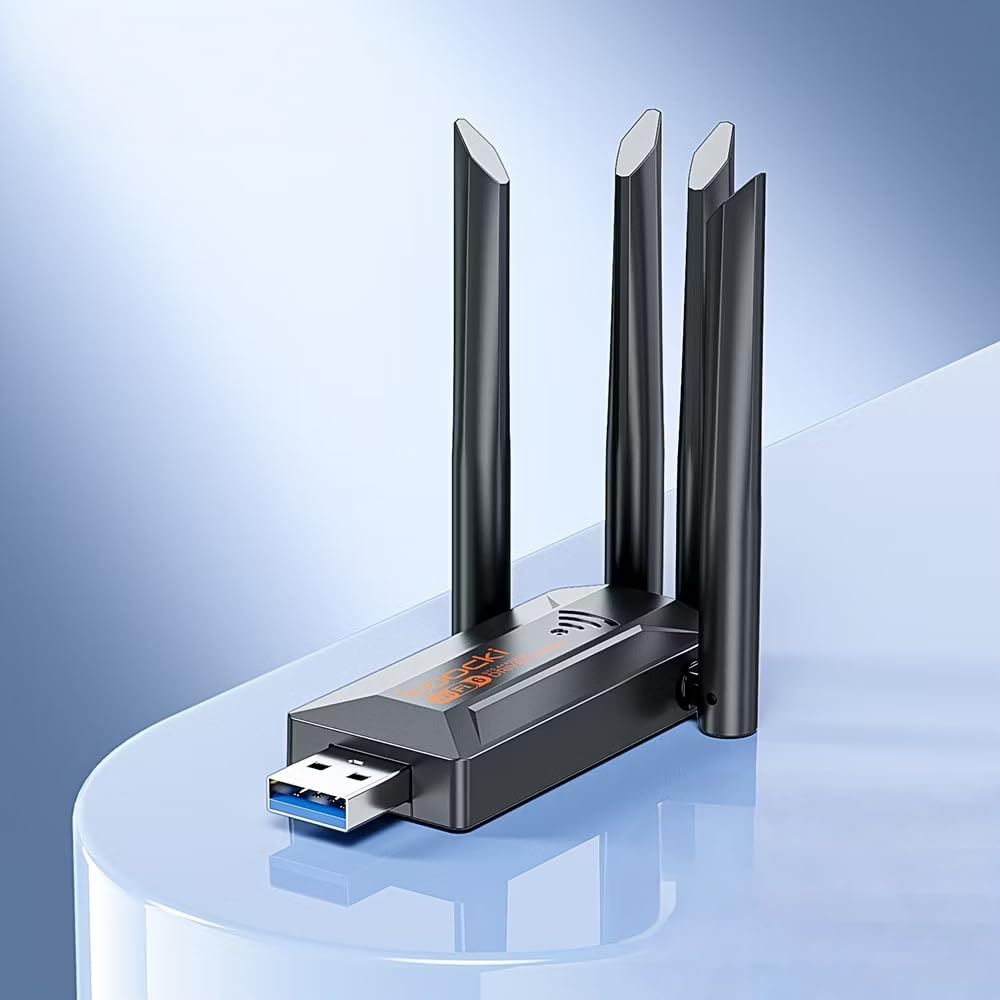
Image: The Toocki Wi-Fi 6 USB Adapter, showcasinанын компакттуу дизайны жана төрт жөнгө салынуучу антеннасы.
Коопсуздук маалыматы
- Түзмөктү суудан, оттон, жогорку нымдуулуктан же ысык чөйрөдөн алыс кармаңыз.
- Аппаратты ажыратууга, оңдоого же өзгөртүүгө аракет кылбаңыз.
- Түзмөктү күн нурунун түз тийген жерине же жылуулук булактарына тийгизбеңиз.
- Use only with compatible USB ports (USB 3.0 recommended for optimal performance).
- Балдар жетпеген жерде сактаңыз.
Пакеттин мазмуну
Пакетиңизде бардык буюмдар бар экенин текшериңиз:
- Toocki Wi-Fi 6 USB Adapter (1 unit)
- Колдонуучунун Колдонмосу (бул документ)
Note: The product is designed for driver-free installation on Windows 10/11. No separate driver CD is included.
Продукт бүттүview
The Toocki Wi-Fi 6 USB Adapter integrates advanced Wi-Fi 6 technology and Bluetooth 5.4 into a compact USB device. It features four high-gain external antennas for improved signal reception and transmission.

Сүрөт: Ички view highlighting the Wi-Fi 6 smart algorithm chip, indicating enhanced signal stability and wider coverage.
Негизги өзгөчөлүктөрү:
- Wi-Fi 6 (802.11ax) колдоосу: Provides stronger signal stability and wider coverage.
- Кош тилкелүү туташуу: Supports both 2.4GHz and 5GHz frequencies for flexible network options and speeds up to 900Mbps.
- Bluetooth 5.4: Enables stable, multi-device connections for peripherals like mice, keyboards, and headphones.
- Four High-Gain Antennas: Enhances signal strength and extends wireless range.
- USB 3.0 интерфейси: Ensures rapid data transfer speeds.
- Драйверсиз орнотуу: Plug-and-play compatibility for Windows 10/11.
- Кош функционалдык: Acts as a Wi-Fi receiver and an AP/Hotspot.
Орнотуу нускамалары
1. Адаптерди туташтырыңыз
- Компьютериңиз күйгүзүлгөнүн текшериңиз.
- Locate an available USB 3.0 port on your desktop or laptop. For optimal performance, use a USB 3.0 port (typically blue inside).
- Carefully insert the Toocki Wi-Fi 6 USB Adapter into the USB port.
- The operating system (Windows 10/11) should automatically detect and install the necessary drivers. A notification may appear indicating successful installation.
2. Adjust Antennas
The adapter features four adjustable antennas. For best signal reception and transmission, position the antennas vertically or at an angle that provides the strongest signal in your environment. Experiment with different orientations to find the optimal setup.

Image: The Toocki Wi-Fi 6 USB Adapter with its four antennas fully extended, ready for use.
Иштөө нускамалары
1. Connecting to Wi-Fi (Receiver Mode)
- After successful driver installation, click on the Wi-Fi icon in your computer's system tray (usually bottom-right corner for Windows).
- Жеткиликтүү зымсыз тармактардын тизмеси пайда болот.
- Select your desired Wi-Fi network (either 2.4GHz or 5GHz band, if both are available).
- Суралган болсо, тармактын коопсуздук ачкычын (сырсөз) киргизиңиз.
- Click "Connect". Your computer should now be connected to the internet wirelessly.

Image: Illustration of the adapter functioning as a Wi-Fi receiver, enabling a desktop PC to connect to a wireless network without cables.
2. Using as an AP/Hotspot (Transmission Mode)
The adapter can also create a Wi-Fi hotspot, allowing other devices (phones, tablets) to connect to your computer's internet connection.
- Ensure your computer is connected to the internet via an Ethernet cable or another Wi-Fi adapter.
- On Windows 10/11, go to Settings > Network & Internet > Mobile hotspot.
- Toggle the "Share my Internet connection with other devices" switch to On.
- You can customize the network name (SSID) and password under "Edit".
- Other devices can now search for and connect to this hotspot.

Image: Illustration demonstrating the adapter's Wi-Fi transmission function, creating a hotspot from a connected PC to share internet with mobile devices.
3. Bluetooth 5.4 туташуу
The integrated Bluetooth 5.4 allows for stable connections with multiple Bluetooth-enabled devices.
- On Windows 10/11, go to Орнотуулар > Түзмөктөр > Bluetooth жана башка түзмөктөр.
- Bluetooth күйгүзүлгөнүн текшериңиз On.
- "Bluetooth же башка түзмөк кошуу" баскычын чыкылдатып, "Bluetooth" тандаңыз.
- Bluetooth түзмөгүңүздү (мисалы, кулакчындар, чычкан, клавиатура) жупташтыруу режимине коюңуз.
- Жупташтырууну аяктоо үчүн тизмеден түзмөгүңүздү тандап, экрандагы көрсөтмөлөрдү аткарыңыз.

Image: The Toocki Wi-Fi 6 USB Adapter connected to a laptop, symbolizing its Bluetooth 5.4 capability for multiple device connections.
Техникалык тейлөө
- Адаптерди жумшак, кургак чүпүрөк менен сүртүп, таза кармаңыз.
- Суюк тазалоочу каражаттарды же эриткичтерди колдонуудан алыс болуңуз.
- Ensure the adapter is not obstructed to allow for proper heat dissipation.
- Узак мөөнөткө колдонулбаганда, адаптерди USB портунан коопсуз алып салуу сунушталат.
Проблемаларды чечүү
Wi-Fi туташуусу жок:
- USB портун текшерүү: Ensure the adapter is firmly inserted into a working USB port. Try a different USB port, preferably a USB 3.0 port.
- Драйверди орнотуу: For Windows 10/11, the driver should install automatically. Verify in Device Manager (search "Device Manager" in Windows) under "Network adapters" that the Toocki adapter is listed and has no error symbols. If not, try restarting your computer.
- Антеннанын абалы: Оптималдуу сигнал кабыл алуу үчүн антенналарды тууралаңыз.
- Маршрутизатор орнотуулары: Ensure your Wi-Fi router is powered on and broadcasting a signal. Check if other devices can connect to the same network.
- Network Profile: Forget the network and try reconnecting.
Жай Wi-Fi ылдамдыгы:
- USB 3.0 порт: Ensure the adapter is connected to a USB 3.0 port for maximum speed. USB 2.0 ports will limit performance.
- Сигнал күчү: Check your Wi-Fi signal strength. A weak signal can lead to slower speeds. Move closer to the router or adjust antennas.
- Тармактын тыгыны: Too many devices on the same network or channel can cause slowdowns. Try switching to the 5GHz band if available and less congested.
- Интерференция: Other electronic devices (microwaves, cordless phones) can interfere with Wi-Fi signals.
Bluetooth иштебей жатат:
- Bluetooth күйүк: Verify Bluetooth is enabled in Windows Settings.
- Түзмөктү жупташтыруу: Ensure your Bluetooth device is in pairing mode and within range.
- Интерференция: Reduce distance between devices and remove any obstructions.
- Кайра баштоо: Try restarting your computer and re-pairing the device.
Техникалык шарттар

Image: Visual representation emphasizing the 900Mbps dual-band Wi-Fi 6 features for faster, more stable connections.
| Өзгөчөлүк | Деталь |
|---|---|
| Бренд | Toocki |
| Модел | Wi-Fi 6 USB адаптери |
| Аппараттык интерфейс | USB 3.0 |
| Зымсыз стандарт | Wi-Fi 6 (IEEE 802.11ax), IEEE 802.11ac, IEEE 802.11n, IEEE 802.11g, IEEE 802.11b, IEEE 802.11a |
| Маалыматтарды өткөрүү ылдамдыгы | Секундасына 900 Мегабитке чейин |
| Жыштык тилкелери | 2.4 ГГц, 5 ГГц |
| Bluetooth версиясы | Bluetooth 5.4 |
| Антенналар | 4 жогорку күчөткүчтүү тышкы антенналар |
| Шайкеш түзмөктөр | Иш такта, ноутбук |
| Операциялык системаны колдоо | Windows 10/11 (Driver-Free) |
| Продукциянын өлчөмдөрү | 30L x 20W x 60H Millimeters (approx. 3 x 2 x 6 cm) |
| Элемент Салмагы | 30 грамм |
| Түс | Кара |
Кепилдик маалымат
This Toocki Wi-Fi 6 USB Adapter comes with a 6 айлык кепилдик from the date of purchase. This warranty covers manufacturing defects and malfunctions under normal use. It does not cover damage caused by misuse, accidents, unauthorized modifications, or external factors. Please retain your proof of purchase for warranty claims.
Кардарларды колдоо
If you encounter any issues or have questions regarding your Toocki Wi-Fi 6 USB Adapter that are not addressed in this manual, please contact your retailer or the manufacturer's customer support.
For support inquiries, please refer to the contact information provided with your purchase documentation or visit the official Toocki webсайт.
Ask a question about this manual
Ask about setup, troubleshooting, compatibility, parts, safety, or missing instructions. Manuals+ will review the question and use this page’s manual context to help answer it.