
1. Киришүү
This manual provides detailed instructions for the installation, operation, and maintenance of your Vonets VAR1200-L High Performance Dual Band WiFi Repeater. The VAR1200-L is designed to extend your existing wireless network coverage, providing a stable and high-speed internet connection for various applications, including 4K video streaming and long-distance data transmission.
2. Продукциянын өзгөчөлүктөрү
- High-Performance Repeater: Engineered for optimal connectivity, delivering a robust wireless signal for seamless 4K video streaming and long-distance transmission in both 2.4G and 5G frequency bands.
- Эки тилкелүү шайкештик: Effectively reduces interference and maximizes bandwidth, ideal for high-speed internet applications and ensuring reliable connections for multiple devices.
- POE Power Support: Equipped with Power over Ethernet (POE) capability, allowing for flexible installation without the need for additional power outlets, simplifying setup and enhancing convenience.
- Компакттуу жана орнотууга оңой: Designed to be both compact and powerful, this repeater can be effortlessly mounted or placed in various locations, ensuring a clutter-free environment while boosting network coverage.
3. Пакеттин мазмуну
Upon unpacking your Vonets VAR1200-L Repeater, please verify that all items are present and in good condition. The standard package typically includes:
- Vonets VAR1200-L Repeater Unit
- Power Adapter (if POE injector not used)
- Ethernet кабели
- Ыкчам орнотуу колдонмосу
- Internal Chip (as specified in product components)
Note: Specific contents may vary. If any items are missing or damaged, please contact customer support.
4. Продукт бүтүп калдыview
The Vonets VAR1200-L Repeater features a compact design with essential ports and indicators for easy setup and monitoring. Familiarize yourself with the device's physical components before proceeding with installation.
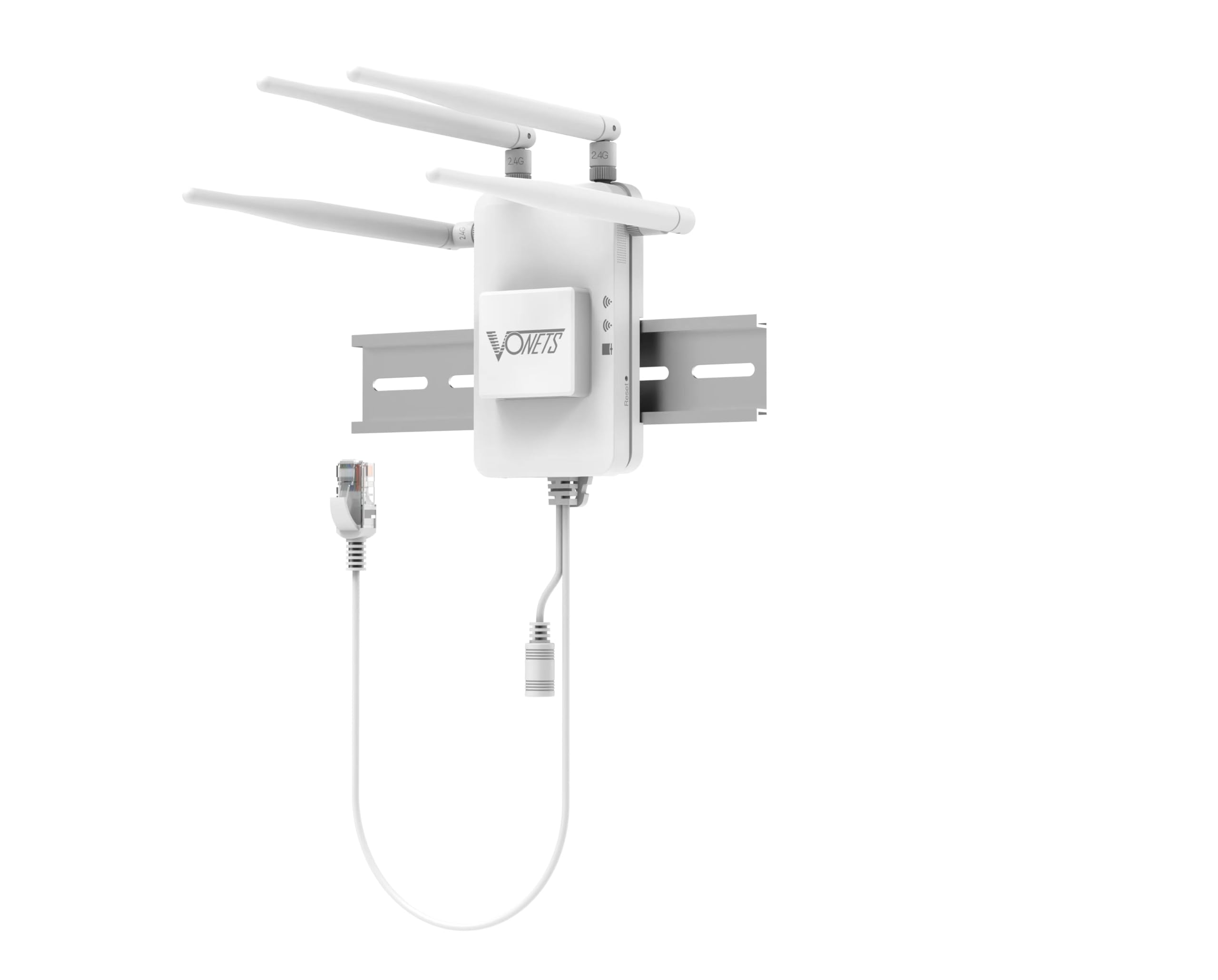
1-сүрөт: Фронт view of the Vonets VAR1200-L Repeater. This image displays the compact design of the repeater, likely showing LED indicators for power, WiFi signal strength, and network activity, along with the Vonets brand logo.
Типтүү компоненттерге төмөнкүлөр кирет:
- LED көрсөткүчтөрү: For Power, WLAN (2.4G/5G), LAN, and WPS status.
- Ethernet порттору: For connecting to your router or wired devices.
- WPS баскычы: For quick and secure setup.
- Калыбына келтирүү баскычы: Заводдук демейки жөндөөлөрдү калыбына келтирүү үчүн.
- Кубат киргизүү: For connecting the power adapter or POE injector.
5. Орнотуу нускамалары
Follow these steps to set up your Vonets VAR1200-L Repeater:
- Күйгүзүү: Connect the repeater to a power outlet using the provided power adapter, or connect it via an Ethernet cable to a POE-enabled switch/injector. Wait for the power LED to stabilize.
- Жайгашкан жери: Position the repeater between your main router and the area where you need improved WiFi coverage. Ensure it receives a good signal from your main router.
- Connection Method (Choose One):
- WPS Setup (Recommended for quick setup):
- Негизги роутериңиздеги WPS баскычын басыңыз.
- Within two minutes, press the WPS button on the VAR1200-L Repeater.
- Wait for the repeater's WLAN LED to indicate a successful connection (usually solid green or blue).
- Web Браузерди орнотуу:
- Connect your computer or mobile device to the repeater's default WiFi network (e.g., "Vonets_VAR1200-L"). No password is required initially.
- ачуу а web браузер жана демейки IP дарегин киргизиңиз (адатта 192.168.1.253 or vonets.com). Refer to the quick installation guide for the exact address.
- Log in with the default username and password (typically "admin" for both).
- Follow the on-screen wizard to select your main WiFi network, enter its password, and configure the repeater's network name (SSID) and password.
- Save settings and restart the repeater if prompted.
- WPS Setup (Recommended for quick setup):
- Байланышты текшерүү: Once set up, check the repeater's signal strength LEDs. Connect your devices to the repeater's extended WiFi network.
6. Иштөө нускамалары
After successful setup, the Vonets VAR1200-L Repeater operates automatically to extend your wireless network. Here are some operational considerations:
- Тармак кеңейтүүсү: The repeater will broadcast an extended WiFi network, typically with a modified SSID (e.g., "YourNetwork_EXT" or the name you configured). Connect your wireless devices to this network for improved coverage.
- Эки тилкелүү операция: The VAR1200-L supports both 2.4GHz and 5GHz bands. Devices will automatically connect to the optimal band, or you can manually select the preferred band if separate SSIDs are configured.
- Зымдуу туташуу: Use the Ethernet ports on the repeater to connect wired devices (e.g., smart TVs, gaming consoles, PCs) to your network, providing a stable wired connection in areas with weak WiFi.
- Мониторинг абалы: Observe the LED indicators on the repeater to monitor its operational status. A stable WLAN LED indicates a good connection to the main router.
7. Техникалык тейлөө
Proper maintenance ensures the longevity and optimal performance of your Vonets VAR1200-L Repeater:
- Тазалыкты сактоо: Түзмөктү жумшак, кургак чүпүрөк менен үзгүлтүксүз сүртүп туруңуз. Суюк тазалоочу каражаттарды же аэрозольдорду колдонуудан алыс болуңуз.
- Вентиляция: Ensure the repeater is placed in a well-ventilated area, away from direct sunlight, heat sources, and obstructions that could block airflow.
- Программалык камсыздоонун жаңыртуулары: Periodically check the Vonets official webмикропрограммаларды жаңыртуу үчүн сайт. Микропрограмманы жаңыртуу ишти жакшыртууга, жаңы функцияларды кошууга жана мүчүлүштүктөрдү оңдоого жардам берет.
- Экстремалдуу шарттарды болтурбоо: Аппаратты экстремалдык температурага, нымдуулукка же коррозиялык чөйрөгө тийгизбеңиз.
- Power Cycle: If the device experiences issues, try power cycling it by unplugging it from the power source for 10 seconds and then plugging it back in.
8. Кыйынчылыктарды
If you encounter issues with your Vonets VAR1200-L Repeater, refer to the following common problems and solutions:
- Кубат жок:
- Ensure the power adapter is securely connected to the repeater and a working power outlet.
- If using POE, verify the POE injector/switch is powered on and the Ethernet cable is correctly connected.
- Cannot Connect to Repeater's WiFi:
- Verify the repeater is powered on and its WiFi LEDs are active.
- Ensure you are selecting the correct extended network name (SSID) and entering the correct password.
- Try restarting the repeater and your device.
- No Internet Access Through Repeater:
- Негизги роутериңиздин интернетке кирүү мүмкүнчүлүгү бар-жогун текшериңиз.
- Ensure the repeater is successfully connected to your main router (WLAN LED should be stable).
- Reposition the repeater closer to your main router to improve signal strength.
- Try reconfiguring the repeater using the web браузерди орнотуу ыкмасы.
- Жай ылдамдык:
- Move the repeater closer to your main router.
- Ensure there are no major obstructions (thick walls, metal objects) between the repeater and your main router or your devices.
- Reduce the number of devices connected to the repeater.
- Башка электрондук шаймандардын кийлигишүүсүн текшериңиз.
- Repeater Keeps Disconnecting:
- Ensure the repeater is within the optimal range of your main router.
- Check for firmware updates for both the repeater and your main router.
- Репитердеги заводдук жөндөөлөрдү калыбына келтирип, кайра конфигурациялаңыз.
- Заводдун баштапкы абалга келтирүү: If all else fails, use a paperclip to press and hold the Reset button on the repeater for about 5-10 seconds until the LEDs flash. This will restore the device to its factory default settings, and you will need to reconfigure it.
9. Техникалык шарттар
| Өзгөчөлүк | Деталь |
|---|---|
| Бренд | Vonets |
| Модел | VAR1200-L |
| Зымсыз стандарттар | IEEE 802.11ac/a/b/g/n |
| Жыштык тилкелери | 2.4 ГГц жана 5 ГГц |
| Маалымат ылдамдыгы | Up to 1200Mbps (combined) |
| Электр камсыздоо | DC Power Adapter or Power over Ethernet (POE) |
| Камтылган компоненттер | Чип |
| Өндүрүүчү | Shenzhen Houtian Network Communication Technology Co.,Ltd |
| UPC | 767552409254 |
| ASIN | B0GD4SQ7J |
| GTIN | 767552409254 |
10. Кепилдик жана колдоо
Your Vonets VAR1200-L Repeater comes with a 1 жылдык кепилдик сатып алынган күндөн тартып өндүрүш кемчиликтерин жабуу. Кепилдик дооматтары үчүн сатып алганыңыздын далилин сактап коюңуз.
For technical assistance, troubleshooting, or warranty inquiries, Vonets offers dedicated customer support. You can typically find support contact information on the official Vonets webсайтында же продуктунун таңгагында.
Note: The warranty does not cover damage caused by misuse, accidents, unauthorized modifications, or natural disasters.