
1. Киришүү
Thank you for choosing the Hikity Android 15 Car Stereo. This manual provides detailed instructions for the installation, operation, and maintenance of your new car stereo system. Please read this manual thoroughly before use to ensure proper functionality and to maximize your user experience. This unit is specifically designed for Hyundai i20 models manufactured between 2008 and 2012.
2. Коопсуздук маалыматы
- Аппаратты ар дайым жоопкерчиликтүү жана жергиликтүү жол мыйзамдарына ылайык иштетиңиз. Айдоолорду алаксытуу кырсыкка алып келиши мүмкүн.
- Do not attempt to install or service the unit yourself if you are not qualified. Improper installation can cause damage to the vehicle's electrical system or the unit itself.
- Кыска туташуулардын алдын алуу үчүн бардык зымдарды туташтыруу бекем жана тийиштүү түрдө изоляциялангандыгын текшериңиз.
- Агрегатты суудан жана ашыкча нымдан алыс кармаңыз.
- Аппаратты экстремалдык температурага тийгизүүдөн сактаңыз.
3. Пакеттин мазмуну
Төмөндө тизмеленген нерселердин баары пакетиңизге камтылганын текшериңиз:

Image: Components included in the Hikity car stereo package, such as power cable, installation tool, RCA cable, rear camera input cable, accessories, USB cable, GPS antenna, microphone, and AHD rear camera.
- Унаа стерео блогу
- Электр кабели
- Орнотуу куралы
- RCA кабели
- Арткы камера киргизүү кабели
- Accessories (various mounting brackets/screws)
- USB Cable (Dual USB)
- GPS антеннасы
- Микрофон
- AHD арткы камера
4. Продукт бүтүп калдыview
The Hikity Android 15 Car Stereo features a 9-inch In-Cell touchscreen display and is powered by a quad-core processor with 4GB RAM and 64GB ROM, ensuring smooth operation and multitasking capabilities. It supports 1080P video decoding for clear media playback.

Image: Internal components showing the Cortex-A35 CPU, Mali G31 GPU, 4GB RAM, and 64GB ROM, highlighting the system's processing power.
The In-Cell touchscreen technology provides a thinner, lighter display with over 95% transparency and a faster touch response. The 1280x720 resolution offers a clear and bright visual experience.

Image: Visual representation of the In-Cell touchscreen, emphasizing its clarity, sensitivity, and light transmittance for outdoor visibility.
5. Орнотуу
This car stereo is designed for direct fitment in Hyundai i20 models from 2008 to 2012. Before proceeding with installation, ensure your vehicle's dashboard configuration matches the compatible design. Professional installation is recommended.

Image: A visual guide demonstrating the correct fitment of the Hikity car stereo into a Hyundai i20 dashboard (A:Fit) and an incompatible dashboard (B:Not Fit), highlighting the importance of checking dashboard configuration.
Орнотуу кадамдары (Жалпы колдонмо):
- Электр зымдарынын кыска төшөлүшүнө жол бербөө үчүн унаанын аккумуляторун ажыратыңыз.
- Учурдагы унаа стереосун жана аспаптар тактасын кылдаттык менен алып салыңыз.
- Connect the provided wiring harness to the vehicle's wiring. Ensure all connections are secure.
- Connect the GPS antenna, USB cables, microphone, and rear camera input cable as needed.
- Mount the new Hikity car stereo into the dashboard opening.
- Башкаруу панелинин жасалгасын кайра орнотуңуз.
- Унаанын аккумуляторун кайра туташтырып, түзмөктү сынап көрүңүз.
6. Орнотуу
Баштапкы күйгүзүү:
After installation, turn on your vehicle's ignition. The car stereo should power on automatically. Follow the on-screen prompts for initial setup.
Негизги Орнотуулар:
- Тил: Navigate to Settings > System > Languages & input to select your preferred language.
- Дата жана убакыт: Туура күндү жана убакытты коюңуз, же GPS/тармак аркылуу автоматтык мезгилдештирүүнү иштетиңиз.
- Wi-Fi туташуусу: Go to Settings > Network & internet > Wi-Fi to connect to a Wi-Fi hotspot for internet access and updates.
7. Иштөө нускамалары
7.1 Wireless CarPlay & Android Auto
The unit supports wireless CarPlay for iOS devices and wireless Android Auto for Android devices. This allows for seamless integration of your smartphone's navigation, music, and communication features.

Image: Displays of Wireless CarPlay and Android Auto interfaces, showing common applications like Maps, Spotify, and WhatsApp, indicating wireless connectivity via Bluetooth.
Туташуу кадамдары:
- Смартфонуңузда жана унааңызда Bluetooth иштетилгенин текшериңиз.
- On the car stereo, go to the CarPlay/Android Auto application.
- Издөө телефонуңуздагы жана жупташтыруучу түзүлүшүңүздөгү унаа стереосунун Bluetooth аталышы.
- Жупташтыруу кодун эки түзмөктө тең ырастаңыз.
- Туташкандан кийин, CarPlay же Android Auto автоматтык түрдө ишке кирет.
7.2 GPS багыттоо & WiFi
The system includes integrated GPS for navigation, supporting both online and offline maps. Real-time traffic information is available when connected to the internet.

Image: The car stereo screen displaying a YouTube video, indicating 5G WiFi connectivity, alongside examples of online and offline GPS navigation maps.
Using Navigation:
- Tap the 'Navigation' icon on the home screen.
- Enter your destination. The system will provide voice-guided directions.
- For online maps and real-time traffic, ensure the unit is connected to a Wi-Fi hotspot (e.g., from your smartphone).
7.3 Мультимедиа ойнотуу
Аудио жана видеону ойнотуу files from USB drives or streaming services when connected to the internet.
7.4 Split Screen & Picture-in-Picture
The unit supports split-screen functionality, allowing two applications to run simultaneously, and Picture-in-Picture mode for continuous video playback while using other functions.
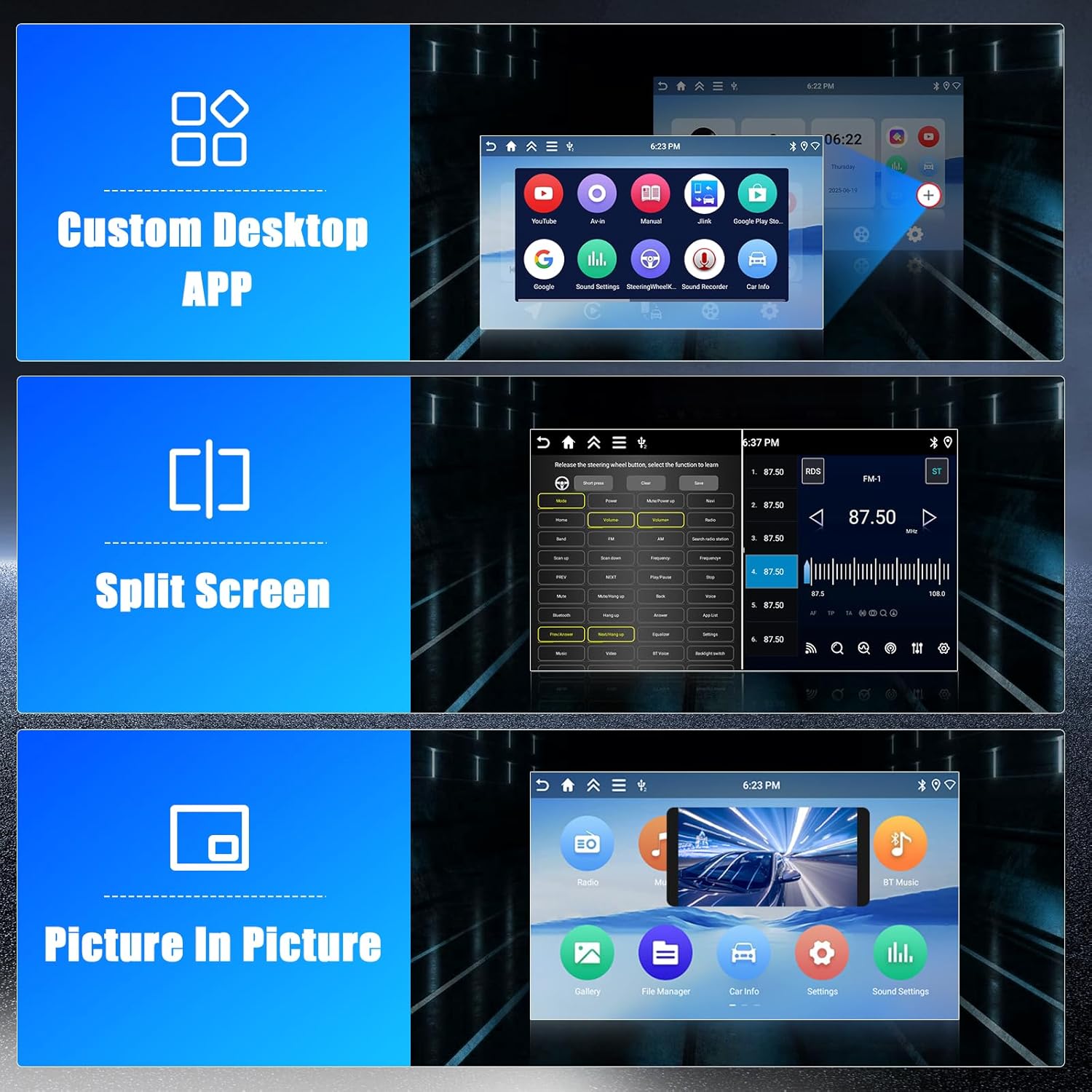
Сүрөт: Мисamples of the Custom Desktop APP interface, a split-screen view showing two applications side-by-side, and a Picture-in-Picture display with a video overlay.
Using Split Screen:
- Биринчи тиркемени ачыңыз.
- Бөлүнгөн экран режимине өтүү үчүн "Акыркы колдонмолор" баскычын басып туруңуз же ылдый жактан өйдө серпиңиз (Android версиясына жараша).
- Көрсөтүү үчүн экинчи тиркемени тандаңыз.
Bluetooth 7.5
Телефонуңузду Bluetooth аркылуу туташтырып, үнсүз чалуу жана аудио агымы.
Bluetooth түзмөгүн жупташтыруу:
- Телефонуңузда жана унаа стереосунда Bluetooth'ду иштетиңиз.
- On the car stereo, go to the Bluetooth settings.
- Издөө жеткиликтүү түзмөктөрдү тандап, телефонуңузду тандаңыз.
- Жупташтыруу кодун ырастаңыз.
7.6 Арткы камера
The included AHD rear camera provides a clear view when reversing. The display automatically switches to the camera feed when the vehicle is put into reverse gear.
8. Техникалык тейлөө
- Тазалоо: Экранды жана аппаратты тазалоо үчүн жумшак, кургак чүпүрөктү колдонуңуз. Абразивдүү тазалагычтардан же эриткичтерден качыңыз.
- Программалык камсыздоо жаңыртуулары: Оптималдуу иштешин жана жаңы функцияларга жетүүнү камсыз кылуу үчүн Wi-Fi тармагына туташканда тутум орнотуулары аркылуу программалык камсыздоо жаңыртууларын мезгил-мезгили менен текшерип туруңуз.
- Кабелдик байланыштар: Бардык кабелдердин бекем туташып турганын текшериңиз.
9. Кыйынчылыктарды
Жалпы маселелер жана чечимдер:
- Кубат жок: Check the vehicle's fuse box and the unit's power connections. Ensure the ignition is on.
- Үн жок: Динамиктердин туташууларын текшериңиз. Үн деңгээлин жана үнсүз кылуу жөндөөлөрүн текшериңиз. Туура аудио булагынын тандалганын текшериңиз.
- GPS сигналын жоготуу: GPS антеннасынын туура орнотулганын жана ачык экенин текшериңиз view асмандын. Унааны ачык жерге жылдырыңыз.
- Bluetooth/CarPlay/Android Auto Connection Issues: Ensure Bluetooth is enabled on both devices. Try unpairing and re-pairing the device. Restart both the phone and the car stereo.
- Сенсордук экран жооп бербейт: Бирдикти өчүрүп күйгүзүп көрүңүз. Эгер маселе чечилбесе, баштапкы абалга кайтаруу зарыл болушу мүмкүн (эскертүү: бул колдонуучунун бардык маалыматтарын өчүрөт).
- Бирдик тоңду: Press the reset button (if available, usually a small pinhole) or disconnect the power for a few minutes.
If you encounter issues not covered here, please refer to the warranty and support section for further assistance.
10. Техникалык шарттар
| Өзгөчөлүк | Спецификация |
|---|---|
| Модель номери | Hikity-A7904A4291H6MI2EU26 |
| Операция системасы | Android 15 |
| RAM | 4 ГБ |
| ROM | 64 ГБ |
| Screen Size | 9 дюйм |
| Экран түрү | In-Cell Touchscreen |
| Screen Resolution | 1280x720 |
| Процессор | Quad-Core (Cortex-A35 CPU, Mali G31 GPU) |
| Байланыш | Wireless CarPlay, Wireless Android Auto, Bluetooth, GPS, WiFi (5G), Dual USB |
| Аудио чыгаруу режими | Стерео |
| Power Output | 45 Ватт |
| Элемент Салмагы | 1.98 килограмм |
| Шайкеш түзмөктөр | Смартфон |
| Туташтыргыч түрү | RCA |
11. Кепилдик жана колдоо
Кепилдик маалыматы:
This Hikity car stereo comes with a 2 жылдык кепилдик сатып алынган күндөн тартып. Кепилдик дооматтары үчүн сатып алганыңыздын далилин сактап коюңуз.
Кардарларды колдоо:
For technical assistance, troubleshooting beyond this manual, or warranty inquiries, please contact Hikity customer support through the retailer where the product was purchased or visit the official Hikity webбайланыш маалыматы үчүн сайт.