
1. Киришүү
This manual provides essential information for the installation, operation, and maintenance of your BAFANG DPC18/DPC010 E-Bike Display. Please read this manual thoroughly before using the product to ensure correct usage and optimal performance. This display is designed to enhance your electric biking experience by providing clear data and convenient controls.
2. Шайкештик
The BAFANG DPC18/DPC010 display is specifically designed for use with Bafang BBS01B, BBS02B, BBS-HD, M620, M600, M510, and M420 mid-drive motors. It operates using the UART protocol with a 5-pin female round connector. It is туура келбейт with CAN protocol systems or other brands' motors, nor with Bafang hub motors or other Bafang mid-drive motors that do not use the specified UART protocol.

Сүрөттүн сүрөттөлүшү: This image illustrates the specific compatibility requirements for the BAFANG DPC18/DPC010 display. It clearly shows the correct UART protocol 5-pin female round connector and contrasts it with an incompatible CAN protocol 5-pin male triangular connector. The image also visually confirms compatibility with Bafang BBS Series Motors while indicating incompatibility with other motor types, including other brands' motors, Bafang hub motors, and certain other Bafang mid-drive motors.
3. Орнотуу жана орнотуу
Proper installation is crucial for the display's functionality and your safety. Ensure your e-bike's power is off before beginning installation.
- Монтаждоо: Securely attach the display to your handlebar using the provided bracket. Position it for optimal visibility and easy access to controls.
- Кабелдерди туташтыруу: Connect the display cable to the corresponding UART protocol connector on your Bafang mid-drive motor system. Ensure the connection is firm and secure.
- Кабелдик башкаруу: Route all cables neatly and secure them with zip ties to prevent interference with moving parts and to protect them from damage.
Video Description: This video provides a visual guide for the installation of a BAFANG C961 display, which shares similar installation principles with the DPC18/DPC010. It demonstrates how to mount the display on the handlebar and connect the necessary cables to the e-bike system.
4. Иштөө нускамалары
4.1 Күйгүзүү/өчүрүү
- To power on the display, press and hold the power button on the control pad.
- Өчүрүү үчүн кубат баскычын кайра басып, кармап туруңуз.
4.2 Changing Pedal Assist System (PAS) Levels
The display allows you to adjust the level of motor assistance. The system supports 0-9 or 0-6 pedal assist levels, depending on your motor configuration.
- Use the '+' and '-' buttons on the control pad to increase or decrease the PAS level.
- Level 0 typically indicates no motor assistance.

Сүрөттүн сүрөттөлүшү: This image displays the 'Display Setting' menu on the BAFANG DPC18/DPC010 screen. It shows various configurable options including Unit (Imperial), Brightness (100%), Auto Off (5Min), and prominently features 'MAX PAS' set to 9, indicating the maximum pedal assist level.
4.3 Display Settings and Information
The display provides various riding data and customizable settings:
- Ылдамдыгы: Current, average, and maximum speed.
- Аралык: Сапардын аралыгы жана жалпы одометр.
- Батарея деңгээли: Real-time battery charge indicator.
- Автоматтык арткы жарык: The display automatically adjusts brightness based on ambient light conditions for optimal visibility day or night.
- Adaptive Voltage: Compatible with 36V, 43V, and 48V battery systems.

Сүрөттүн сүрөттөлүшү: This image demonstrates the automatic backlight function of the BAFANG DPC18/DPC010 display. It is split into two halves, one depicting a bright daytime scene with the display clearly visible, and the other a darker nighttime scene where the display's backlight has adjusted for improved readability.
Сүрөттүн сүрөттөлүшү: This image visually represents the adaptive voltage capability of the BAFANG DPC18/DPC010 display. It shows the display alongside three progressively larger bars labeled 36V, 43V, and 48V, each with a lightning bolt icon, indicating its compatibility with these different battery voltages.
4.4 USB кубаттоо порту
The display includes a built-in USB charging port (5V/0.5A output) for convenient charging of your smartphone or other small electronic devices while riding.

Сүрөттүн сүрөттөлүшү: This close-up image focuses on the underside of the BAFANG DPC18/DPC010 display, clearly highlighting the integrated USB charging port. An arrow points to the USB symbol, indicating its function.
Video Description: This short video introduces various features of the C961 display, which shares many functionalities with the DPC18/DPC010. It briefly showcases aspects like automatic backlight, metric/imperial unit selection, and error code display.
5. Features Overview
- HD Color Display: 3.5-inch screen for clear and easy-to-read data.
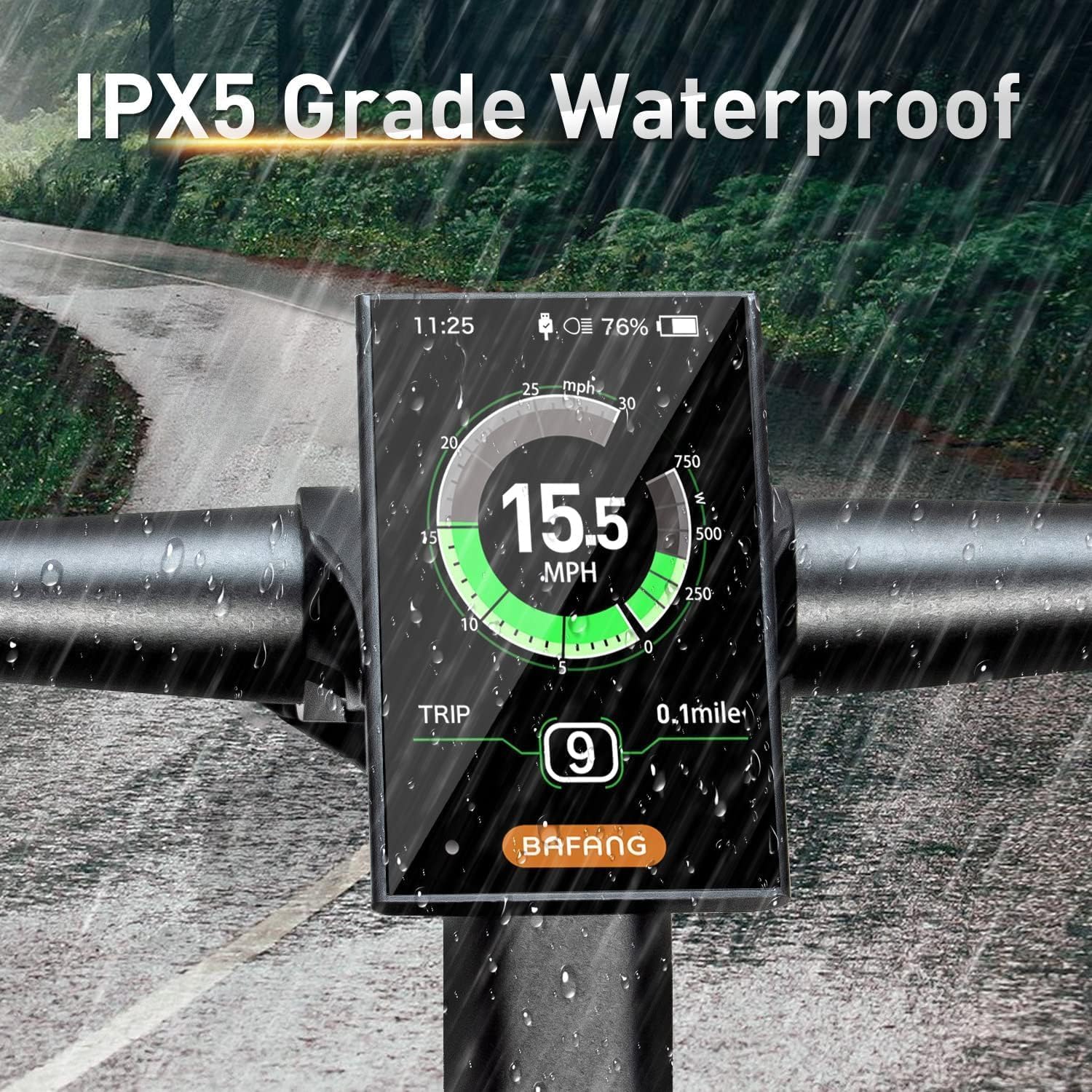
- IPX5 сууга туруктуулугу: Designed to withstand moderate rain and splashes, allowing for riding in various weather conditions.
- Ergonomic Keypad: User-friendly control pad for intuitive operation.
- Walking Assist: Provides low-speed assistance for pushing the bike.
- Error Code Diagnosis: Displays error codes to help identify system issues.

Сүрөттүн сүрөттөлүшү: This image shows the BAFANG DPC18/DPC010 display mounted on an e-bike handlebar during rainfall. Raindrops are visible on the screen and surrounding areas, demonstrating the display's IPX5 water resistance in wet conditions.

Сүрөттүн сүрөттөлүшү: This close-up image shows a hand pressing buttons on the ergonomically designed keypad of the BAFANG DPC18/DPC010 display, highlighting its ease of use and accessibility during operation.
6. Техникалык шарттар
| Өзгөчөлүк | Спецификация |
|---|---|
| Бренд | БАФАНГ |
| Модель номерлери | DPC18, DPC010 |
| Screen Size | 3.5 дюйм |
| Дисплей түрү | LCD |
| Display Resolution | 320 x 240 |
| Байланыш технологиясы | ANT, Bluetooth (Note: Actual connectivity may vary by specific model variant) |
| Сенсор түрү | Каденция сенсору |
| Батареянын курамы | Lithium-manganese dioxide |
| Эл аралык коргоо рейтинги | IPX5 |
| Монтаж түрү | Рул монтажы |
| Human-Machine Interface Input | Buttons |
| USB чыгышы | 5V/0.5A (for phone charging) |
7. Кыйынчылыктарды
If you encounter issues with your BAFANG DPC18/DPC010 display, consider the following common solutions:
- Дисплей күйбөйт:
- Check all cable connections, especially the main power cable from the motor to the display, to ensure they are securely fastened.
- Verify that your e-bike battery is charged and properly connected to the motor system.
- Inaccurate Speed/Distance Readings:
- Ensure the wheel size setting in the display menu matches your actual wheel size.
- Check the speed sensor and magnet for proper alignment and secure attachment.
- Көрсөтүлгөн ката коддору:
- Refer to your Bafang motor manual for a list of specific error codes and their meanings.
- Common error codes often relate to motor, controller, or battery communication issues.
- USB заряддоо иштебей жатат:
- Дисплейдин күйгүзүлгөнүн текшериңиз.
- Check the USB cable and the device being charged for proper connection and functionality.
If problems persist, contact BAFANG customer support or a qualified e-bike technician.
8. Техникалык тейлөө
To ensure the longevity and optimal performance of your BAFANG DPC18/DPC010 display, follow these maintenance guidelines:
- Тазалоо: Regularly wipe the display screen and body with a soft, damp кездеме. Экранга же экранга зыян келтириши мүмкүн болгон абразивдүү тазалоочу каражаттарды же эриткичтерди колдонуудан алыс болуңуз.asing.
- Коргоо: While the display is IPX5 water-resistant, avoid submerging it in water or exposing it to high-pressure water jets.
- Кабелдик текшерүү: Periodically check all cables and connectors for signs of wear, damage, or loose connections. Ensure they are securely fastened and properly routed.
- Сактагыч: When not in use for extended periods, store your e-bike and display in a dry, temperate environment, away from direct sunlight and extreme temperatures.
9. Кепилдик жана колдоо
For warranty information, technical support, or service inquiries, please refer to the documentation provided with your BAFANG product or visit the official BAFANG webсайт. Сатып алуу квитанциясын кепилдик дооматтары үчүн сатып алуунун далили катары сактаңыз.