
Introduction
This manual provides instructions for the Audster Portable Rechargeable Bluetooth Speaker Alarm Clock (Model AUD-S410). This device combines a Bluetooth speaker, FM radio, alarm clock, and multi-color LED night light into a single portable unit. Please read this manual thoroughly before use to ensure proper operation and to maximize your experience.
Продукт бүттүview & Компоненттери
Familiarize yourself with the device's layout and controls.
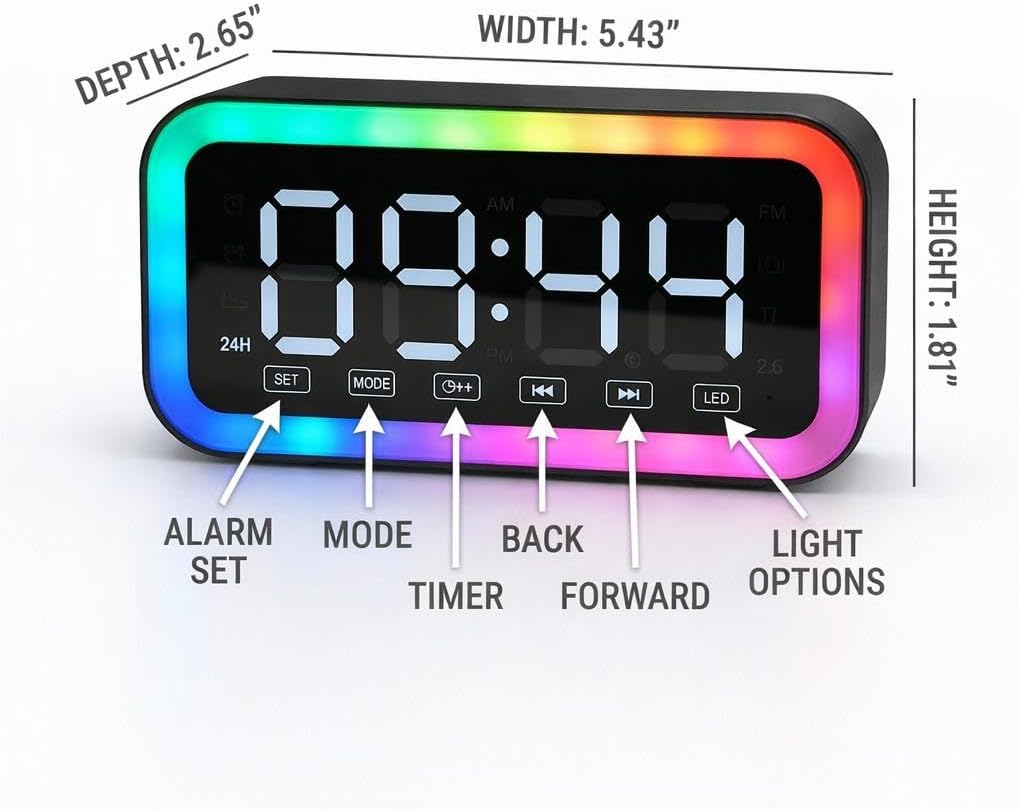
Image: Front Panel Controls. This image displays the front of the Audster AUD-S410, highlighting the digital display and control buttons. Labels indicate 'ALARM SET', 'MODE', 'TIMER', 'BACK', 'FORWARD', and 'LIGHT OPTIONS'. Dimensions are also shown: Width 5.43 inches, Height 1.81 inches, Depth 2.65 inches.

Image: Rear Panel Ports. This image shows the rear of the Audster AUD-S410, detailing the AUX Input, TF Card slot, and DC 5V Type-C charging port. Metric dimensions are also provided: 138 mm width, 69 mm height, 46 mm depth.
Негизги өзгөчөлүктөрү:
- Санариптик дисплей: Large, easy-to-read LED display for time and settings.
- Башкаруу баскычтары: Dedicated buttons for setting alarms, changing modes, adjusting time, and controlling LED lights.
- Bluetooth 5.0: Зымсыз аудио агымы үчүн.
- FM радиосу: Integrated tuner for local radio stations.
- Көп түстүү LED жарыктары: Ыңгайлаштырылуучу жарык эффекттери.
- Кайра заряддалуучу батарея: For portable use.
- Байланыш: AUX Input, TF Card slot, USB Type-C charging port.
Жайгашуу
1. Аппаратты заряддоо
Before initial use, fully charge the device. Connect the provided USB Type-C cable to the DC 5V charging port on the back of the unit and plug the other end into a compatible USB power adapter (not included).
- Заряддоо индикатору заряддоо учурунда күйөт.
- The indicator will turn off or change color once fully charged.
2. Күйгүзүү/өчүрүү
Press and hold the Power button (often integrated with the Mode button) to turn the device ON or OFF.
3. Убакытты белгилөө
In time display mode:
- Убакытты орнотуу режимине өтүү үчүн "SET" баскычын басыңыз. Саат цифралары жарк этет.
- Use the 'BACK' or 'FORWARD' buttons to adjust the hour.
- Мүнөт жөндөөсүнө өтүү үчүн "SET" баскычын кайра басыңыз. Мүнөт сандары күйөт.
- Use the 'BACK' or 'FORWARD' buttons to adjust the minutes.
- Press 'SET' a third time to confirm and exit time setting.
- To switch between 12-hour and 24-hour format, press the '12H/24H' button (if available, or cycle through with 'SET' button).
Иштөө нускамалары
1. Bluetooth динамик режими
- Аппаратты күйгүзүңүз.
- Press the 'MODE' button until 'BT' (Bluetooth) appears on the display. The device will enter pairing mode, indicated by a flashing Bluetooth icon or sound.
- Мобилдик түзмөгүңүздө Bluetooth иштетип, жеткиликтүү түзмөктөрдү издеңиз.
- Select 'AUD-S410' from the list. Once connected, a confirmation sound will play, and the Bluetooth icon will stop flashing.
- You can now play audio from your connected device. Use the 'BACK' and 'FORWARD' buttons on the speaker to skip tracks, and the volume controls on your mobile device to adjust volume.
2. FM радио режими
- Аппаратты күйгүзүңүз.
- Дисплейде 'FM' пайда болмоюнча 'MODE' баскычын басыңыз.
- To auto-scan and save stations: Press and hold the 'MODE' button (or a dedicated scan button if available). The device will scan for and save all available FM stations.
- To manually tune or switch stations: Use the 'BACK' or 'FORWARD' buttons to navigate through saved stations or fine-tune the frequency.
3. Ойготкуч саат функциясы
The device supports setting multiple alarms.
- Press the 'ALARM SET' button (often labeled with an alarm icon). The alarm time will flash.
- Use the 'BACK' or 'FORWARD' buttons to adjust the alarm hour.
- Press 'ALARM SET' again to move to minute setting.
- Use the 'BACK' or 'FORWARD' buttons to adjust the alarm minutes.
- Press 'ALARM SET' again to select the alarm sound (if applicable) or to enable/disable the alarm.
- Press 'ALARM SET' a final time to confirm and exit.
- To snooze: When the alarm sounds, press any button (except power) to activate snooze. The alarm will sound again after a few minutes.
- To turn off the alarm: Press and hold the 'ALARM SET' button when the alarm is sounding, or turn off the alarm in the settings.
4. LED жарык режимдери
Customize the ambiance with the integrated multi-color LED lights.
- Press the 'LED' or 'LIGHT OPTIONS' button to cycle through different light modes and colors.
- Continue pressing to find your desired light effect or to turn the lights off.

Image: Device with LED Lights. This image shows the Audster AUD-S410 displaying the time '08:00' with its vibrant multi-color LED lights illuminated around the display, creating a colorful glow.
Техникалык тейлөө
- Тазалоо: Аппаратты тазалоо үчүн жумшак, кургак чүпүрөктү колдонуңуз. Абразивдүү тазалагычтарды же эриткичтерди колдонбоңуз.
- Сактагыч: Аппаратты түз күн нурунан жана экстремалдык температурадан алыс салкын, кургак жерде сактаңыз.
- Батареяга кам көрүү: Батареянын иштөө мөөнөтүн узартуу үчүн, бат-баттан батарейканы толук зарядсыздандырбаңыз. Аппаратты узак убакыт бою колдонбосо дагы, үзгүлтүксүз заряддаңыз.
Проблемаларды чечүү
| Көйгөй | Мүмкүн себеп | Чечим |
|---|---|---|
| Түзмөк күйбөйт. | Батарея түгөнүп калды. | Connect the device to a power source using the USB Type-C cable and allow it to charge. |
| Bluetooth жупташуусу болбой жатат. | Device is not in pairing mode; Bluetooth is off on mobile device; device is too far from mobile device. | Ensure the speaker is in Bluetooth mode and discoverable. Check Bluetooth settings on your mobile device. Move the devices closer together. |
| Динамиктен үн жок. | Volume is too low; device is not connected; incorrect mode selected. | Increase volume on both the speaker and the connected device. Verify Bluetooth connection or correct mode (FM, AUX, TF). |
| FM радиосун кабыл алуу начар. | Алсыз сигнал; тоскоолдук. | Reposition the device to improve signal reception. Avoid placing near other electronic devices that may cause interference. |
| Time resets to 12:00 or does not hold correct time. | Internal battery for timekeeping is low or faulty; power interruption. | Ensure the main battery is charged. If the issue persists after charging, the internal timekeeping mechanism may require service. |
| Ойготкуч угулбайт. | Alarm is not set or is disabled; volume is too low. | Verify alarm settings and ensure it is enabled. Check the alarm volume. |
Техникалык шарттар
- Бренд: Audster
- Модель номери: AUD-S410
- Түсү: Кара
- Дисплей түрү: Digital LED
- Байланыш технологиясы: Bluetooth 5.0
- Өзгөчөлүктөр: Bluetooth Speaker, Alarm Clock, Multi-Color LED Lights, FM Radio, Rechargeable, Portable
- Кубат булагы: Батарея менен иштейт (кайра заряддалуучу)
- Product Dimensions (W x H): 5.43" x 1.81" (138 мм x 69 мм)
- Элемент Салмагы: Болжол менен 1 фунт
- Материал: Пластик
- UPC: 738676659856
Кепилдик маалымат
The manufacturer's warranty description for this product states: Жок.
Кардарларды колдоо
For further assistance or inquiries, please visit the official Audster store: