
1. Коопсуздук маалыматы
Always prioritize safety when operating the ANYCUBIC Photon P1 Resin 3D Printer. Resin materials can be toxic and may cause skin irritation or respiratory issues. Follow these guidelines:
- Коргоочу шаймандарды кийүү: Always wear appropriate personal protective equipment (PPE), including nitrile gloves and safety glasses, when handling resin or printed models.
- Адекваттуу желдетүүнү камсыз кылуу: Operate the printer in a well-ventilated area to minimize exposure to resin fumes. Avoid operating in enclosed spaces without proper air circulation.
- Тери менен байланышуудан качуу: Prevent direct skin contact with liquid resin. In case of contact, wash thoroughly with soap and water.
- Туура жок кылуу: Dispose of uncured resin and resin-contaminated materials according to local regulations. Do not pour liquid resin down drains.
- Балдар жана үй жаныбарлары жетпеген жерде сактаңыз: The printer and resin should be stored in a secure location inaccessible to children and pets.
2. Продукт бүтүп калдыview
The ANYCUBIC Photon P1 is a high-precision resin 3D printer designed for detailed and reliable printing. It features advanced technologies to enhance stability, print success rates, and user experience.
- Ultimate Stability Ball Screw: Employs stable ball screws and precision guide rails for smoother lifting and lowering, minimizing motion vibration.
- 14K Precision & LighTurbo COB 4.0: Delivers high resolution (13312 x 5120 px) with uniform light distribution for consistent and accurate prints.
- Wave Release Technology: Generates micro-airflow during plate lifting, reducing release force by 60% for easier model detachment and higher success rates.
- Smart Leveling 3.0: Factory-calibrated with automatic self-checks and real-time pressure feedback, eliminating the need for manual bed leveling.
- AI Monitoring: Features an AI-powered inspection system for build plate installation, bottom layer separation, resin level, and residue detection.
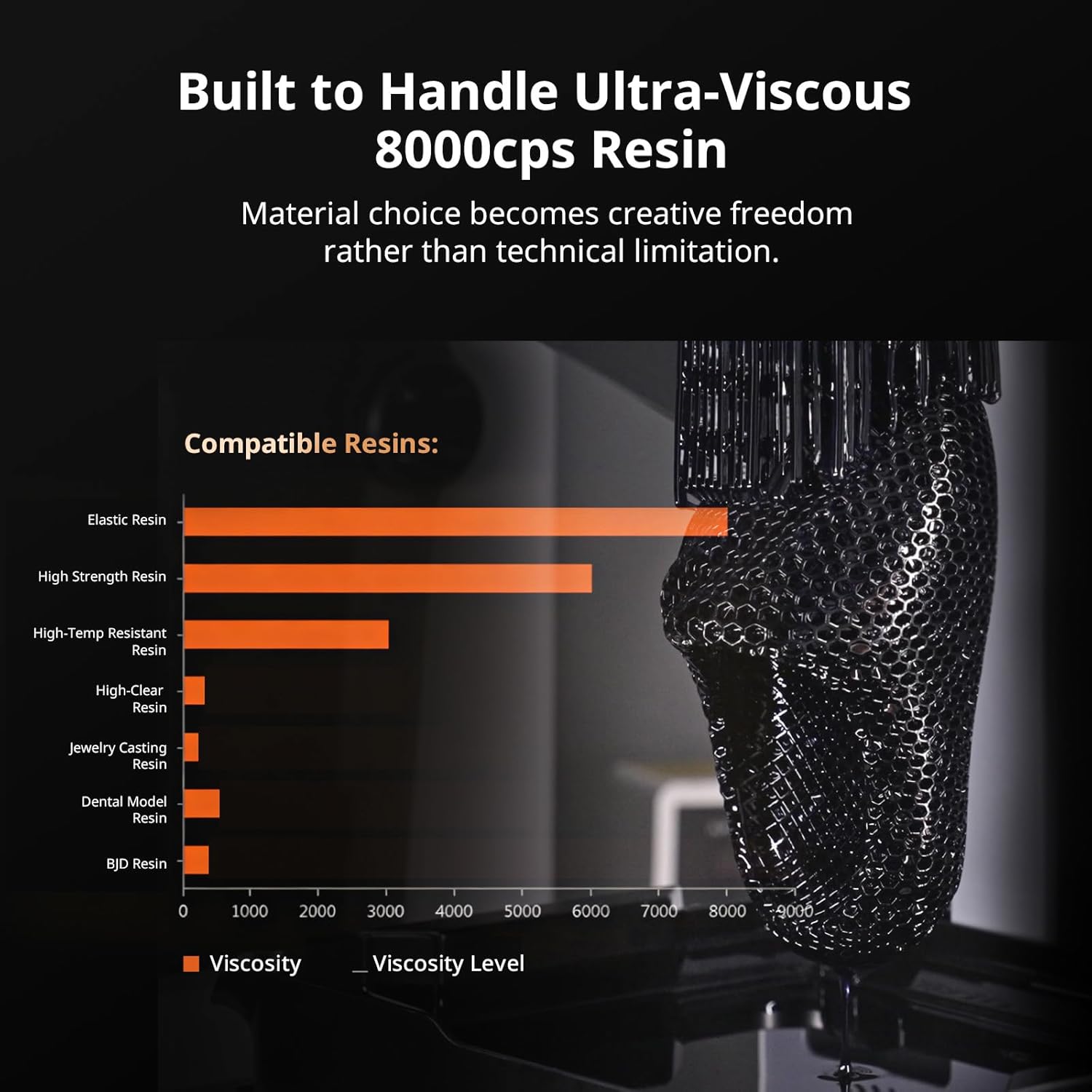
- 8000cps Resin Compatible: Capable of handling ultra-high viscosity resins, expanding material compatibility for advanced projects.
- Чоң курулуш көлөмү: Offers a generous build volume of 8.78 x 4.96 x 9.05 inches (6.5L).
3. Кутуда эмне бар
Your ANYCUBIC Photon P1 package includes the following items:
- 3D принтер
4. Орнотуу колдонмосу
4.1 Кутудан чыгаруу жана алгачкы текшерүү
Принтерди таңгагынан этияттык менен чыгарыңыз. Ташуу учурунда бардык компоненттерде бузулуу белгилери бар-жогун текшериңиз. Принтерден бардык коргоочу пленкаларды жана таңгактоочу материалдарды алып салыңыз.
Видео: Unboxing of the ANYCUBIC Photon P1. This video demonstrates the careful unboxing process, including the removal of protective packaging and internal components.
4.2 Build Plate Installation
Attach the build plate to the Z-axis assembly. Ensure it is securely fastened according to the on-screen instructions or user manual diagrams.

Сүрөт: Close-up of the ANYCUBIC Photon P1 build plate being installed onto the Z-axis. The textured surface of the build plate is visible.
4.3 Чайырлуу кВт орнотуу
Place the resin vat onto the printer's platform. Ensure it is correctly seated and secured to prevent resin leaks during operation.
Сүрөт: А деталдуу view of the resin vat installed on the ANYCUBIC Photon P1, showing the Wave Release Film and the overall structure of the vat.
4.4 Leveling the Build Plate
The Photon P1 features Smart Leveling 3.0, which is factory-calibrated. However, it is recommended to perform an initial leveling check. Follow the on-screen prompts to ensure proper calibration.

Сүрөт: The intelligent leveling system 3.0 of the ANYCUBIC Photon P1 in action, showing the build plate being automatically adjusted over a leveling paper.
4.5 Connecting to Power and Network
Connect the power cable to the printer and a suitable power outlet. Install the Wi-Fi antenna for network connectivity and remote operation.
Видео: This segment of the unboxing video demonstrates connecting the Wi-Fi antenna and performing the initial leveling process for the Photon P1.
5. Иштөө нускамалары
5.1 Preparing Your Model with Slicing Software
Use the ANYCUBIC Photon Workshop 4.0 slicing software to prepare your 3D models. This software allows you to adjust print settings, add supports, and slice your model into layers for printing.

Сүрөт: Screenshot of the Photon Workshop 4.0 software interface, showing a 3D model being prepared for slicing with support structures.
5.2 Loading Resin
Carefully pour resin into the resin vat, ensuring it does not exceed the maximum fill line. The Photon P1 is compatible with resins up to 8000cps viscosity.

Сүрөт: A chart illustrating the compatibility of the ANYCUBIC Photon P1 with various resin types, highlighting its ability to handle resins up to 8000cps viscosity.
5.3 Басып чыгарууну баштоо
Transfer your sliced model file to the printer via USB or network. Select the file on the printer's touchscreen and initiate the print. The AI monitoring system will perform checks before and during the print.
Видео: Кыска видеошоуasing the ANYCUBIC Photon P1 in operation, highlighting its precision and the quality of printed details.

Сүрөт: Diagram illustrating the AI-powered inspection system of the ANYCUBIC Photon P1, showing checks for build plate installation, bottom layer separation, resin level, and residue detection.
6. Техникалык тейлөө
6.1 Cleaning the Build Plate and Resin Vat
After each print, carefully remove the build plate and clean any residual resin. Clean the resin vat periodically to ensure optimal print quality and longevity of the FEP film. Use isopropyl alcohol (IPA) for cleaning.
6.2 Көмүртек чыпкасы
The Photon P1 includes a carbon filter to help reduce resin fumes. Replace the carbon filter periodically as recommended in the full user manual to maintain effective air purification.

Сүрөт: An illustration highlighting the quiet printing operation of the ANYCUBIC Photon P1, indicating noise levels below 45dB, suitable for home or office environments.
7. Кыйынчылыктарды
If you encounter issues with your Photon P1, refer to the following common problems and solutions:
- Print Failure/Poor Adhesion: Ensure the build plate is properly leveled. Check exposure settings in your slicing software. Verify the resin vat's FEP film is clean and undamaged.
- Чайырдын ашып кетиши: Do not overfill the resin vat. The maximum fill line should be observed, especially considering the displacement from the build plate.
- AI Monitoring Alerts: Address any alerts from the AI inspection system regarding build plate installation, bottom layer separation, resin levels, or residue.
8. Техникалык шарттар
| Өзгөчөлүк | Деталь |
|---|---|
| Продукциянын өлчөмдөрү | 16.93 x 24.41 x 16.54 дюйм |
| Элемент Салмагы | 38 фунт |
| Бренд | ANYCUBIC |
| Материал | Алюминий |
| Түс | ак |
| Шайкеш түзмөктөр | Ноутбук, персоналдык компьютер, смартфон |
9. Кепилдик жана колдоо
The ANYCUBIC Photon P1 Resin 3D Printer comes with a manufacturer's warranty. For detailed warranty information, technical support, or service inquiries, please refer to the official ANYCUBIC webсайтка же түздөн-түз кардарларды тейлөөгө кайрылыңыз. Кепилдик дооматтар үчүн сатып алуу дүмүрчөгүңүздү сактаңыз.