
J-TREK JX03
J-TREK JX03 Motorcycle Intercom Instruction Manual
Model: JX03 | Brand: J-TREK
Introduction
Thank you for choosing the J-TREK JX03 Motorcycle Intercom. This device is designed to enhance your riding experience with advanced communication and audio features. Please read this manual thoroughly before use to ensure proper installation, operation, and maintenance. Keep this manual for future reference.
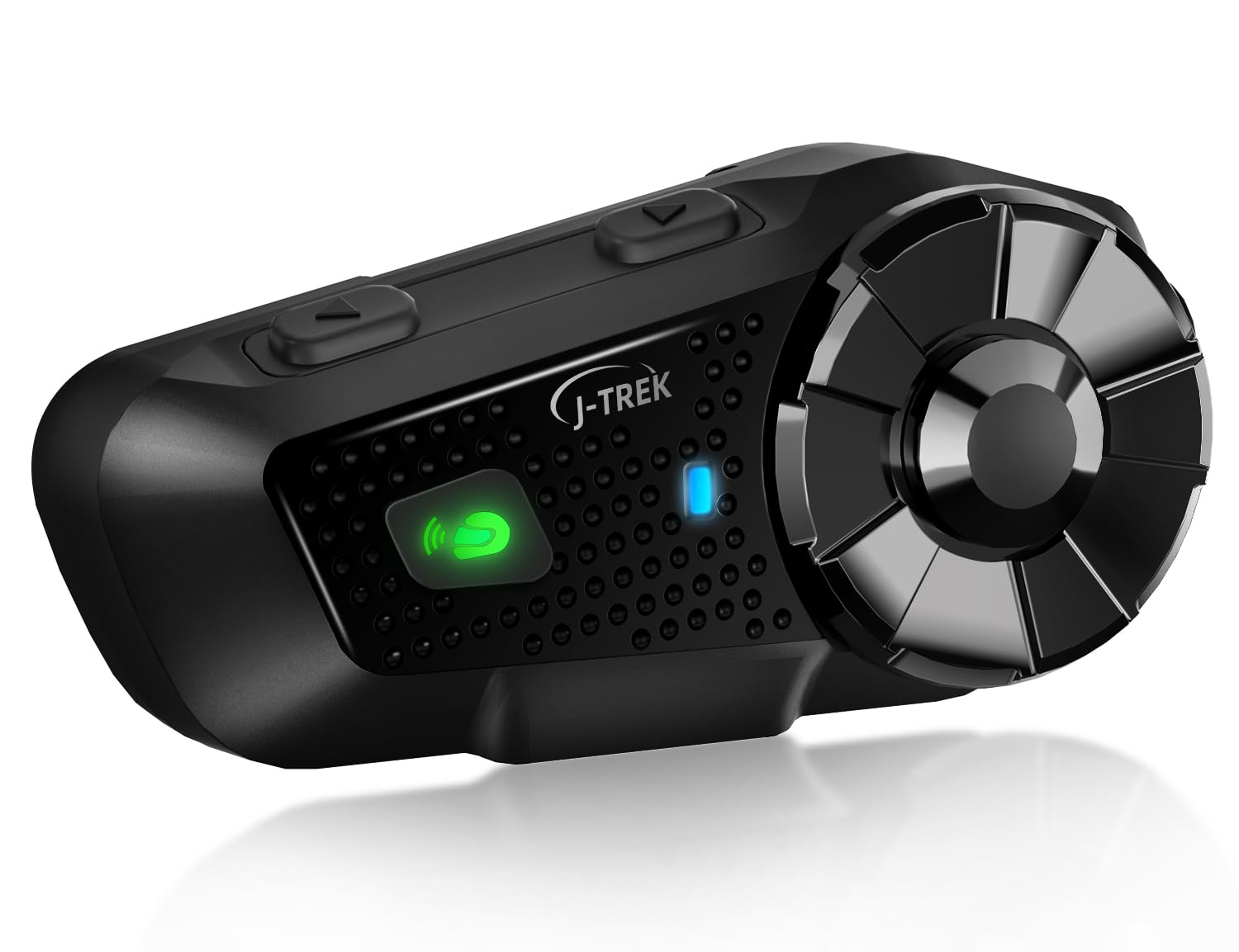
Image: J-TREK JX03 Motorcycle Intercom main unit.
Негизги өзгөчөлүктөрү
- Qualcomm Dual Bluetooth 5.2 Chip: Equipped with two independent chips for simultaneous media audio (music/navigation) and communication audio (intercom calls). The system automatically adjusts audio priority for seamless multitasking.
- JMC1.0 Mesh Network Technology: Proprietary mesh technology supports up to 8 riders over a 1500m range. Features intelligent interference countermeasures, host-free network reconstruction, and superior obstacle avoidance for stable team communication.
- High-Quality Speakers Optimized for Riding: 40mm large speakers, developed through extensive wind tunnel acoustic testing, deliver enhanced bass and clear sound even amidst engine noise. Effective wind noise suppression ensures call clarity up to 80km/h.
- Large Knob & Anti-slip Buttons: Designed for reliable operation even with thick motorcycle gloves, allowing quick and precise volume adjustment and function switching.
- Voice Command & Japanese Voice Guide: Supports voice commands for Siri or Google Assistant for hands-free operation. Features natural Japanese voice guidance for system notifications (e.g., battery level, connection status).
- Көп түзмөк шайкештиги: Connects with other J-TREK models and is compatible with certain intercoms or Bluetooth devices from other brands (e.g., Cardo, Sena) to expand communication range.
Пакеттин мазмуну
Төмөндө тизмеленген нерселердин баары пакетиңизге камтылганын текшериңиз:

Image: All components included in the J-TREK JX03 intercom package.
- Main Unit (x1)
- Jet Helmet Microphone (x1)
- Full-Face Microphone (x1)
- Монтаждоо кронштейни (x1)
- USB Type-C заряддоо кабели (x1)
- Speaker (x1 pair)
- Audio Conversion Cable (x1)
- Mounting Adhesive Tape (Red) (x1)
- Jet Helmet Microphone Fixing Tape (x1)
- Speaker Position Adjustment Pads (x2)
- Clip-Type Adhesive Tape (White) (x3)
- Instruction Manual (x1)
- Ыкчам баштоо боюнча колдонмо (x1)
- Mount Clip (x1)
- Full-Face Microphone Adhesive Tape (x1)
Жайгашуу
1. Аппаратты заряддоо
Before first use, fully charge the JX03. Connect the USB Type-C charging cable to the charging port on the unit and to a USB power source. The LED indicator will show charging status. A full charge takes approximately 1.5 hours.
2. Installing on Helmet
Choose between the clip-type mount or adhesive tape mount based on your helmet type and preference. Ensure the unit is securely attached and does not obstruct your vision or helmet functionality.
- Спикердин жайгашуусу: Position the speakers inside the helmet's ear pockets, ensuring they are aligned with your ears for optimal sound. Use the provided adjustment pads if needed.
- Микрофонду орнотуу: Select the appropriate microphone (jet helmet or full-face) and attach it to the inside of the helmet, ensuring it is close to your mouth for clear voice pickup. Secure the cable neatly within the helmet lining.
3. Алгачкы жупташтыруу (Bluetooth)
Смартфонуңуз же башка Bluetooth түзмөктөрүңүз менен жупташтыруу үчүн:
- Ensure the JX03 is off.
- Жупташтыруу режимин көрсөткөн LED индикатору кызыл жана көк түстө күйүп-өчкөнгө чейин Кубат баскычын басып туруңуз.
- On your smartphone, enable Bluetooth and search for "J-TREK JX03".
- Select the device to connect. A voice prompt will confirm successful pairing.
Иштөө нускамалары
1. Күйгүзүү/өчүрүү
- Күйгүзүү: Press and hold the Power button for 3 seconds. A voice prompt will confirm power on.
- Өчүрүү: Press and hold the Power button for 5 seconds. A voice prompt will confirm power off.
2. Үндү башкаруу
Rotate the large knob clockwise to increase volume and counter-clockwise to decrease volume.
3. Intercom Communication (Mesh & Bluetooth)

Image: Multiple riders connected via JMC1.0 Mesh Communication.
- Тор домофон: To initiate mesh communication, briefly press the Mesh button. The system will automatically search for and connect to other JX03 units within range (up to 8 riders, 1500m).
- Bluetooth Домофон: For one-on-one Bluetooth intercom with another compatible device, follow the pairing instructions for that specific device.
4. Music Playback & FM Radio

Image: Music sharing and FM radio functionality between two riders.
- Музыка ойнотуу: Once paired with your smartphone, music will play automatically. Use the multi-function button to play/pause.
- Кийинки / Мурунку трек: Briefly press the forward/backward buttons to skip tracks.
- FM радиосу: Press the FM button to activate the FM radio. Briefly press again to scan for stations.
- Музыка бөлүшүү: The JX03 supports sharing music with another paired JX03 unit. Refer to the quick start guide for specific button combinations.
5. Voice Assistant & Phone Calls
- Үн Жардамчысын жандыруу: Briefly press the Voice Assistant button to activate Siri or Google Assistant on your paired smartphone.
- Чалууга жооп берүү/аяктоо: Briefly press the multi-function button to answer an incoming call or end an ongoing call.
- Чакырууну четке кагуу: Press and hold the multi-function button for 2 seconds to reject an incoming call.
Техникалык тейлөө

Image: JX03 Intercom with IP65 full protection, shown in rainy conditions.
- Тазалоо: Аппаратты жумшак менен сүртүңүз, гamp кездеме. Катуу химиялык заттарды же абразивдүү тазалагычтарды колдонбоңуз.
- Суу каршылык: The JX03 is IP65 rated, meaning it is protected against dust and low-pressure water jets. While it can withstand rain, avoid submerging the device in water. Ensure the USB port cover is securely closed.
- Сактагыч: Түзмөктү колдонбогон учурда салкын, кургак жерде сактаңыз. Ашыкча температурадан алыс болуңуз.
- Батареяга кам көрүү: Батареянын иштөө мөөнөтүн узартуу үчүн, бат-баттан батарейканы толук зарядсыздандырбаңыз. Аппаратты узак убакыт бою колдонбосо дагы, үзгүлтүксүз заряддаңыз.
Проблемаларды чечүү
| Көйгөй | Мүмкүн себеп | Чечим |
|---|---|---|
| Түзмөк күйбөйт. | Батарея аз. | Аппаратты жок эле дегенде 30 мүнөткө кубаттаңыз. |
| Смартфон менен жупташтыруу мүмкүн эмес. | Түзмөк жупташтыруу режиминде эмес; телефондо Bluetooth өчүк. | Ensure JX03 is in pairing mode (flashing red/blue LED). Enable Bluetooth on your phone. |
| Домофондун туташуусу туруксуз. | Out of range; environmental interference. | Move closer to other riders. Avoid areas with strong radio interference. Mesh technology will attempt to re-establish connection automatically. |
| Динамиктерден үн жок. | Volume too low; speakers disconnected; incorrect audio source. | Increase volume. Check speaker connections. Ensure correct audio source is selected (e.g., music, intercom). |
| Микрофон үндү кабыл албай жатат. | Microphone not positioned correctly; microphone disconnected. | Adjust microphone closer to your mouth. Check microphone connection to the unit. |
Техникалык шарттар

Image: Battery performance details for the JX03 Intercom.
| Өзгөчөлүк | Деталь |
|---|---|
| Модел | JX03 |
| Bluetooth версиясы | 5.2 (Dual Chip) |
| Домофон түрү | Mesh (JMC1.0) & Bluetooth |
| Max Mesh Riders | 8 |
| Макс байланыш диапазону | 1500m (Mesh) |
| Динамик өлчөмү | 40мм |
| Батарея сыйымдуулугу | 1000mAh |
| Talk Time | 28 саатка чейин |
| Музыка убактысы | 30 саатка чейин |
| Күтүү убактысы | 350 саатка чейин |
| Заряддоо убактысы | Болжол менен 1.5 саат |
| Заряддоо порту | USB Type-C |
| Суу каршылык | IP65 |
| Келип чыккан өлкө | Кытай |
Кепилдик жана колдоо
The J-TREK JX03 Motorcycle Intercom comes with a 1 жылдык кепилдик сатып алынган күндөн тартып. Бул кепилдик өндүрүштүк кемчиликтерди жана нормалдуу колдонуудагы бузулууларды камтыйт. Бул туура эмес пайдалануудан, кырсыктардан, уруксатсыз өзгөртүүлөрдөн же табигый кырсыктардан келтирилген зыянды камтыбайт.
For technical support, warranty claims, or any questions regarding your JX03 intercom, please contact J-TREK customer service through the retailer where you purchased the product or visit the official J-TREK webбайланыш маалыматы үчүн сайт.
Ask a question about this manual
Ask about setup, troubleshooting, compatibility, parts, safety, or missing instructions. Manuals+ will review the question and use this page’s manual context to help answer it.