
1. Киришүү
Thank you for choosing the Gvyugke Captain 780 Wireless Gaming Headset. This headset is designed to provide a high-quality audio experience for gaming across multiple platforms. Please read this manual carefully to ensure proper setup, operation, and maintenance of your device.
2. Кутуда эмне бар
- 1 x Gvyugke Captain 780 Wireless Gaming Headset
- 1 x 2.4 ГГц USB донгл
- 1 х USB-C кубаттоо кабели
- 1 x 3.5 мм аудио кабель
- 1 x User Manual
3. Продукт бүтүп калдыview
The Gvyugke Captain 780 headset offers versatile connectivity and immersive audio for an enhanced gaming experience. Key features include:
- 4-ин-1 туташуусу: Supports 2.4GHz wireless (USB dongle), Bluetooth 5.3, and wired (3.5mm audio jack) connections.
- 7.1 Айлана үн: Equipped with 50mm dynamic drivers for precise audio positioning.
- Ызы-чууну жокко чыгаруучу микрофон: A rotating microphone ensures clear communication by reducing background noise.
- Батареянын узак иштөө мөөнөтү: A 1200mAh battery provides up to 70 hours of playtime, with a quick charge feature offering 2 hours of use after 5 minutes of charging.
- Ыңгайлуу дизайн: Features protein leather ear pads with memory foam, an adjustable headband, and rotating earcups for extended comfort.
- Бүктөлүүчү Дизайн: Compact and easy to store, ideal for portability.
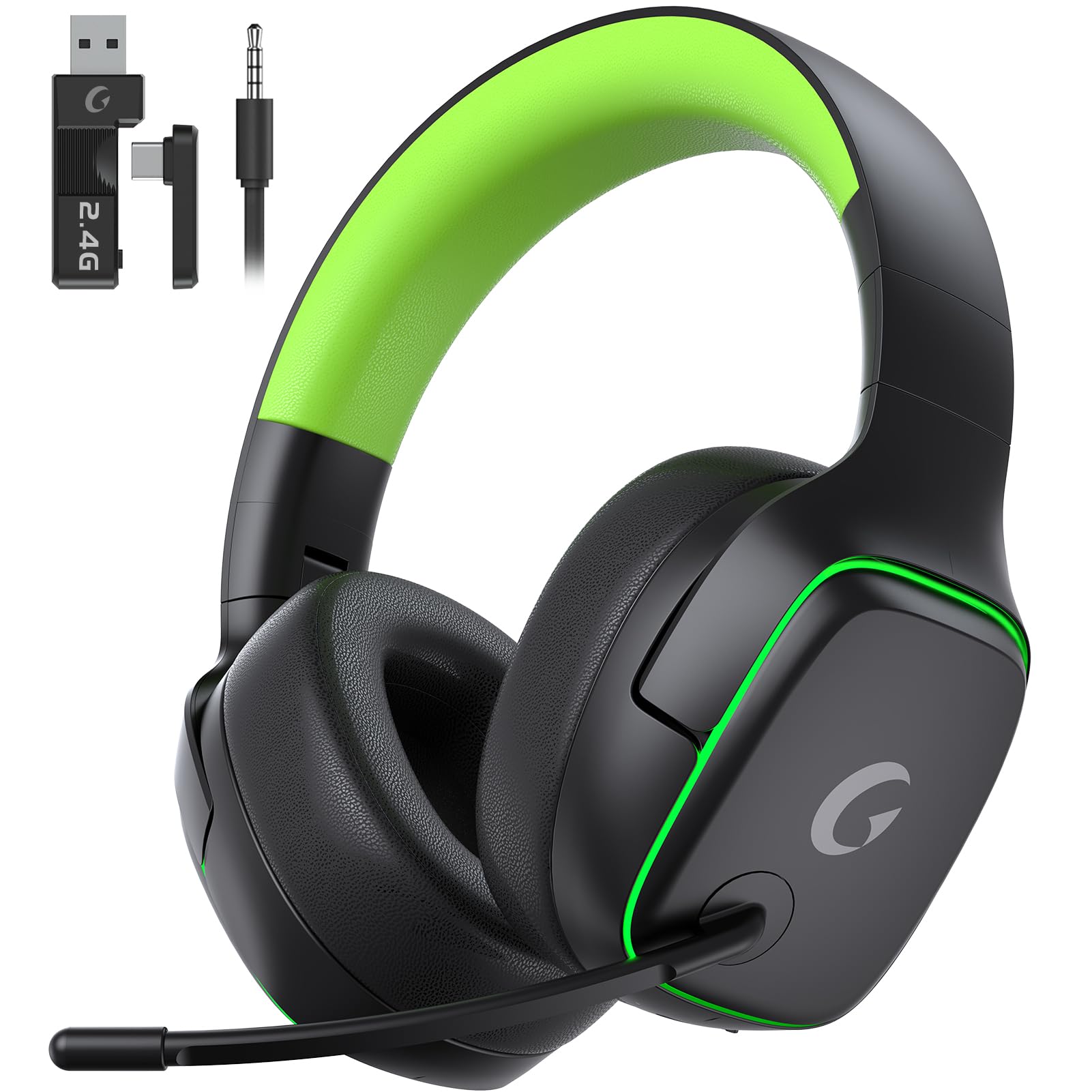
Image: Gvyugke Captain 780 Wireless Gaming Headset in blackgreen color.
Башкаруу каражаттары жана порттор

Image: Diagram showing the headset's controls and ports, including power, volume, mode switch, and charging port.
- Power Status индикатору
- Кубат/Үнсүз баскычы
- Көлөм Колеса
- BT/2.4G Mode Switch Button
- C түрүндөгү кубаттоо порт
- Заряддоо абалынын көрсөткүчү
4. Орнотуу
4.1 Гарнитураны заряддоо
Before first use, fully charge the headset. Connect the supplied USB-C charging cable to the headset's Type-C charging port and the other end to a USB power source (e.g., computer, wall adapter). The charging status indicator will show the charging progress.
4.2 2.4GHz Wireless Connection (for PC, PS5, PS4, Switch)
- Plug the 2.4GHz USB dongle into an available USB port on your device (PC, PS5, PS4, or Switch dock).
- Кубат баскычын басып, кармап туруу менен гарнитураны күйгүзүңүз.
- Switch the mode button on the headset to 2.4G mode.
- The headset should automatically connect to the dongle. The power status indicator will show a stable light when connected.

Image: The 2.4GHz USB dongle, used for wireless connection to compatible devices.
4.3 Bluetooth Connection (for PC, Switch, Mobile Devices)
- Кубат баскычын басып, кармап туруу менен гарнитураны күйгүзүңүз.
- Switch the mode button on the headset to Bluetooth mode. The power status indicator will blink, indicating pairing mode.
- On your device (PC, Switch, phone, tablet), go to Bluetooth settings and select "Gvyugke Captain 780" to pair.
- The power status indicator will show a stable light when connected.
4.4 Wired Connection (for PS5, PS4, Xbox, PC, Switch)
- Connect the 3.5mm audio cable to the headset's 3.5mm jack.
- Connect the other end of the 3.5mm audio cable to your device's audio output (e.g., controller, PC audio jack).
- The headset will operate in wired mode. Note: The microphone may not be usable on some platforms (e.g., Switch) in wired mode due to platform limitations.

Image: Visual representation of the headset's four connection modes: 2.4GHz Type-C, 2.4GHz USB, Bluetooth, and Wired.
5. Иштөө нускамалары
5.1 Күйгүзүү/өчүрүү
Гарнитураны күйгүзүү же өчүрүү үчүн Кубат баскычын 3 секунд басып туруңуз.
5.2 Үндү тууралоо
Use the Volume Wheel on the headset to increase or decrease the audio volume.
5.3 Микрофонду колдонуу
The microphone is rotatable. To mute or unmute the microphone, use the dedicated Power/Mute button. A red indicator light on the microphone will show when it is muted.

Сүрөт: Жакын план view of the headset's noise-canceling microphone, highlighting its design.
5.4 Туташуу режимдерин которуу
Use the BT/2.4G Mode Switch Button to toggle between 2.4GHz wireless mode and Bluetooth mode. For wired mode, simply connect the 3.5mm audio cable.
6. Техникалык тейлөө
6.1 Тазалоо
Wipe the headset, especially the ear cushions, with a soft, dry cloth. Do not use harsh chemicals or abrasive materials. Ensure no liquid enters the ports.
6.2 Сактоо
When not in use, store the headset in a cool, dry place. The foldable design allows for compact storage. Avoid exposing the headset to extreme temperatures or direct sunlight.

Image: A person wearing the headset around their neck, illustrating the neck-wear folding design for comfort during breaks.
6.3 Батареяга кам көрүү
Батареянын иштөө мөөнөтүн узартуу үчүн, гарнитуранын тез-тез толук зарядын жоготпоңуз. Гарнитураны үзгүлтүксүз колдонбосоңуз да, аны үзгүлтүксүз кубаттап туруңуз.
7. Кыйынчылыктарды
7.1 Үн жок / Үндүн деңгээли төмөн
- Гарнитура күйгүзүлгөнүн жана толук заряддалганын текшериңиз.
- Гарнитурадагы үн дөңгөлөгүн жана түзмөгүңүздүн үн жөндөөлөрүн текшериңиз.
- Verify the correct connection mode (2.4GHz, Bluetooth, or Wired) is selected and properly established.
- For 2.4GHz, ensure the USB dongle is securely plugged in and recognized by your device.
7.2 Микрофон иштебейт
- Ensure the microphone is not muted (check the mute button and indicator light).
- Гарнитура микрофону тандалганын текшерүү үчүн түзмөгүңүздүн аудио киргизүү жөндөөлөрүн текшериңиз.
- For wired connection, confirm your device supports microphone input via the 3.5mm jack.
7.3 Байланыш маселелери
- If using 2.4GHz, try unplugging and re-plugging the USB dongle.
- Bluetooth үчүн, гарнитураны түзмөгүңүз менен жупташтырбай, кайра жупташтырып көрүңүз.
- Ensure the headset is within the effective range of your device (10 meters for Bluetooth).
- Гарнитураны да, туташкан түзмөгүңүздү да өчүрүп-күйгүзүңүз.
8. Техникалык шарттар
| Өзгөчөлүк | Спецификация |
|---|---|
| Бренд | Gvyugke |
| Модель аты | Капитан 780 |
| Байланыш технологиясы | 2.4 ГГц зымсыз, Bluetooth 5.3, 3.5 мм зымдуу |
| Кулак жайгаштыруу | Кулак үстүндө |
| Аудио драйверинин өлчөмү | 50 миллиметр |
| Импеданс | 30 Ом |
| Frequency Response | 20 KHz |
| Аудио кечигүү | 20 Миллисекунд |
| Батарея сыйымдуулугу | 1200mAh |
| Батареянын орточо иштөө мөөнөтү | 70 саат |
| Батареяны заряддоо убактысы | 2 саат |
| Bluetooth версиясы | 5.3 |
| Bluetooth диапазону | 10 метр |
| Noise Control | Пассивдүү ызы-чууну жокко чыгаруу |
| Материал | Пластик |
| Түс | Blackgreen |
9. Кепилдик жана колдоо
9.1 Кепилдик маалыматы
The Gvyugke Captain 780 Wireless Gaming Headset comes with a 2 жылдык Өндүрүүчүнүн Кепилдиги. Бул кепилдик нормалдуу колдонуудагы материалдардагы жана жасалгадагы кемчиликтерди камтыйт. Кепилдик дооматтары үчүн сатып алганыңыздын далилин сактап коюңуз.
9.2 Кардарларды колдоо
For technical assistance, troubleshooting, or warranty inquiries, please contact Gvyugke customer support through their official website or the retailer where you purchased the product. Refer to the product packaging for specific contact details.